
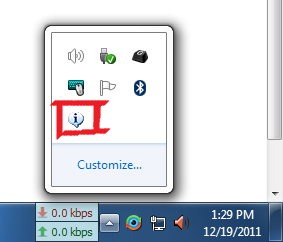
How to get rid of balloon icon?

Cyborg31

New member
Member
Local time
8:14 AM
Messages
52
o9cg8.png


I'm pretty sure it's related to the bluetooth icon. It pops up on login saying something about the bluetooth radio can't be used by other devices (something like that although the bluetooth does work) and then it just stays there. Hovering over it shows nothing and right/left click on it does nothing.

I have clicked on "Customize" and selected "Hide icons and notifications" but nothing.
 

My Computer My Computer

At a glance

Windows 7 Pro x64Q6600 3.2 Ghz4 GB DDR2GTX 275
OS
Windows 7 Pro x64
CPU
Q6600 3.2 Ghz
Memory
4 GB DDR2
Graphics Card(s)
GTX 275
Monitor(s) Displays
SyncMaster 2443
Screen Resolution
1920x1200
Hard Drives
500 GB 7200 RPM Seagate Barracuda
2 TB WD Green
2 TB WD Green
Internet Speed
50 Mbps down/3 Mbps up
I think "Hide icons and notifications" option just hides icons behind that arrow if you expand it you will see everything.
You need to find out what software displays it. a windows icon or some software drivers etc.. and then you can start troubleshooting.
 

My Computer My Computer

At a glance

Windows 7 pro 64bit. (SP1)Intel core I5 24008GB DDR3 KingstonGigabyte GF GTX650OC
Computer type
PC/Desktop
Computer Manufacturer/Model Number
Self Built PC
OS
Windows 7 pro 64bit. (SP1)
CPU
Intel core I5 2400
Motherboard
Gigabyte H61
Memory
8GB DDR3 Kingston
Graphics Card(s)
Gigabyte GF GTX650OC
Sound Card
Realtek HD audio
Monitor(s) Displays
LCD 20"
Screen Resolution
1600x900
Hard Drives
INTEL SSD 320 80GB +Seagate 7200.12 1TBx3
PSU
Coolermaster RX450W
Case
Coolermaster atx case
Cooling
stock cooler
Keyboard
logitech
Mouse
logitech
Internet Speed
FTTD 100mbps

My Computer My Computer

At a glance

Win 7 Pro 64-bitIntel i5 2.4 Ghz8GB DDR3Intel HD 3000
Computer type
Laptop
Computer Manufacturer/Model Number
Sony Vaio VPCEB47GM Laptop
OS
Win 7 Pro 64-bit
CPU
Intel i5 2.4 Ghz
Memory
8GB DDR3
Graphics Card(s)
Intel HD 3000
Sound Card
IDT High Definition
Monitor(s) Displays
15.6 WGXA Anti-Glare LED
Screen Resolution
1280x800
Hard Drives
640Gb 7200rpm
Antivirus
MSE
Browser
Opera (primary) with IE9 backup
Did you click OK to confirm the changed setting?
 

My Computer My Computer

At a glance

Windows 7 Ultimate SP1 64-BitIntel Core i7 870 @ 2.93GHz8Gb Dual-Channel DDR3 @ 664MHznVidia GeForce GTX 460 1024MB dedicated RAM
Computer Manufacturer/Model Number
HP Pavilion Elite 495UK
OS
Windows 7 Ultimate SP1 64-Bit
CPU
Intel Core i7 870 @ 2.93GHz
Motherboard
MSI 2A9C (CPU1)
Memory
8Gb Dual-Channel DDR3 @ 664MHz
Graphics Card(s)
nVidia GeForce GTX 460 1024MB dedicated RAM
Sound Card
Realtek HD Audio
Monitor(s) Displays
HP2310i
Screen Resolution
1920 x 1080
Hard Drives
1x1954GB Hitachi HDS22020ALA 330 (RAID), 1x1954GB Hitachi External for backup and storage
PSU
460W
Case
HP Elite
Cooling
Air cooled
Keyboard
Logitech K750 solar-powered keyboard
Mouse
Logitech Wireless M180 mouse
Internet Speed
2Mb
Other Info
Pure Avanti Flow Internet Radio with iPod Dock, 64Gb iPod, HP USB Speakers, Sony MDR-V500 Headphones, Sony Vaio F-Series Laptop
You can try: right click an empty place on the Taskbar/Properties, under Notification area, Customize check the box for Always show all icons. If the info ballon then still appears, hover over it and you may get a popup which give a clue for what program it is for.
It may also show in the Customize window. After un-checking the box go to the icon and select Always hide.
 

My Computer My Computer

At a glance

Windows 7 Ultimate X64 SP1Intel i5-2550K, Differing ~4.4-4.8GHz No buil...16GB G.Skill Sniper 1866MHz @ 2133MHz 2x8GBASUS GTX650TIB-DC2OC-2GD5, (650TI Boost)
Computer type
PC/Desktop
Computer Manufacturer/Model Number
Home Built Desktop By DataTech
OS
Windows 7 Ultimate X64 SP1
CPU
Intel i5-2550K, Differing ~4.4-4.8GHz No built in GPU
Motherboard
ASUS P8Z68-V PRO/GEN3
Memory
16GB G.Skill Sniper 1866MHz @ 2133MHz 2x8GB
Graphics Card(s)
ASUS GTX650TIB-DC2OC-2GD5, (650TI Boost)
Sound Card
Onboard Realtek 5-1
Monitor(s) Displays
Samsung P2570HD
Screen Resolution
1920x1080
Hard Drives
Samsung 840 Pro 256GB SSD for OS, 500GB Seagate Constellation (Enterprise drive) for Data
PSU
Corsair HX650W
Case
Inwin Dragon Rider
Cooling
Hyper 212 EVO w/two Noctua fans, push-pull, @1300 RPM
Keyboard
E-Z Eyes, bright yellow keys with large characters
Mouse
steelseries SENSEI Laser Pro Gaming
Internet Speed
48-51Mbs Mbs down, 11 Mbs up Xfinity Cable
Antivirus
Norton Internet Security 2013
Browser
IE 10, Opera, Pale Moon if needed
Other Info
4 case fans, LG BluRay-RE, ASUS DVD-RW, Mr. Fusion power supply, 1.21 gigawatts.
Ok I somehow managed to get rid of it. Restarted again and it disappeared. I don't get the notification anymore when i login.
 

My Computer My Computer

At a glance

Windows 7 Pro x64Q6600 3.2 Ghz4 GB DDR2GTX 275
OS
Windows 7 Pro x64
CPU
Q6600 3.2 Ghz
Memory
4 GB DDR2
Graphics Card(s)
GTX 275
Monitor(s) Displays
SyncMaster 2443
Screen Resolution
1920x1200
Hard Drives
500 GB 7200 RPM Seagate Barracuda
2 TB WD Green
2 TB WD Green
Internet Speed
50 Mbps down/3 Mbps up
Back
Top