Solved How to get rid of "Get Windows 10" popup for good?

The Win 10 upgrade pop-up only shows up immediately after logging into IE11. Can't do anything else until Xing out of the pop-up. The pop-up has never shown up at any other time. I did discover and download GWX control panel. It indicates that GWX app is not on my computer and therefore my computer shouldn't be bothered by the Win 10 upgrade pop-up. Not so. It may be that the GWX control app doesn't work because of the uninstall of the several updates prior to downloading the GWX app. Now wondering if it would be advantageous to restore the computer to a date prior to performing the uninstalls of the KB updates in order to get back GWX folders, etc.

Previously indicated that a search of the Win 7 C drive shows a number of GWX files on the computer, some in what are described as MUM files and some as Security Catalog files. I asked if these could be deleted but have not received a reply.

Help would be appreciated.
 

My Computer My Computer

At a glance

Windows 7 Pro Sp1 64-Bit 7601 MultiprocessIntel Core i5 760 @ 2.80GHzTotal 4.00 GB Usable 3.99 GBAMD Radeon HD5670 Memory 1024 MB
Computer type
PC/Desktop
Computer Manufacturer/Model Number
Powerspec
OS
Windows 7 Pro Sp1 64-Bit 7601 Multiprocess
CPU
Intel Core i5 760 @ 2.80GHz
Motherboard
Intel Corp DP55WB
Memory
Total 4.00 GB Usable 3.99 GB
Graphics Card(s)
AMD Radeon HD5670 Memory 1024 MB
Sound Card
(1) AMD Hi Def Auduio Device (2) Realtek Hi Def Audio
Monitor(s) Displays
Acer
Screen Resolution
1920x1080
Hard Drives
(1) Hitachi HDS721010CLA332 (2) WDC WD1002FAEX-00Z3A SCSI (3) Generic Compact Flash USB Device (4) Generic MS/MS-PRO USB Device
Keyboard
Inland
Mouse
Inland
Antivirus
Norton Internet Security
Browser
IE 11
Appears that it might be your home page is holding the pop-up.
Art.
 

My Computer My Computer

At a glance

Win7 sp1 Pro 64bit / XP sp2 Pro (games only)Intel Core 2 Duo E8400 @ 3.00GHz8.00 GB Dual-Channel DDR2 @ 400MHz (5-5-5-18)1024MB GeForce GTX 560
Computer type
PC/Desktop
Computer Manufacturer/Model Number
Home built
OS
Win7 sp1 Pro 64bit / XP sp2 Pro (games only)
CPU
Intel Core 2 Duo E8400 @ 3.00GHz
Motherboard
Intel Corporation DP35DP (CPU1)
Memory
8.00 GB Dual-Channel DDR2 @ 400MHz (5-5-5-18)
Graphics Card(s)
1024MB GeForce GTX 560
Sound Card
NVIDIA High Definition Audio
Monitor(s) Displays
SyncMaster (2048x1152@60Hz)
Hard Drives
240GB Sandisc Extreme Pro SSD
244GB Seagate ST3250410AS
488GB Seagate ST500DM002-1BD142
931GB Western Digital WDC WD1003FZEX
PSU
Corsair 720
Case
ATX
Keyboard
HID Keyboard Device Logitech
Mouse
HID-compliant mouse Microsoft
Other Info
TSSTcorp CDDVDW SH-S223L

HL-DT-ST BD-RE BH12LS35
What does it mean "homepage is holding the pop-up"? Is there a corrective recommendation?
 

My Computer My Computer

At a glance

Windows 7 Pro Sp1 64-Bit 7601 MultiprocessIntel Core i5 760 @ 2.80GHzTotal 4.00 GB Usable 3.99 GBAMD Radeon HD5670 Memory 1024 MB
Computer type
PC/Desktop
Computer Manufacturer/Model Number
Powerspec
OS
Windows 7 Pro Sp1 64-Bit 7601 Multiprocess
CPU
Intel Core i5 760 @ 2.80GHz
Motherboard
Intel Corp DP55WB
Memory
Total 4.00 GB Usable 3.99 GB
Graphics Card(s)
AMD Radeon HD5670 Memory 1024 MB
Sound Card
(1) AMD Hi Def Auduio Device (2) Realtek Hi Def Audio
Monitor(s) Displays
Acer
Screen Resolution
1920x1080
Hard Drives
(1) Hitachi HDS721010CLA332 (2) WDC WD1002FAEX-00Z3A SCSI (3) Generic Compact Flash USB Device (4) Generic MS/MS-PRO USB Device
Keyboard
Inland
Mouse
Inland
Antivirus
Norton Internet Security
Browser
IE 11
ie11 and msn if your home page will show the win-10 upgrade.

The first time I opened ie11 after upgrading it did me too and my home page is https://google.com :p
MSN.com will drive you nuts pretty quick.
 

My Computer My Computer

At a glance

Win-7-Pro64bit 7-H-Prem-64biti7-5930K 2nd i9-9940x both water blocked VRM'...Trident-z 3200C14 2nd Trident-z 3600C16EVGA 1080ti ftw3 2nd Titan Xp both water blocked
Computer type
PC/Desktop
Computer Manufacturer/Model Number
Custom assembled by me :}
OS
Win-7-Pro64bit 7-H-Prem-64bit
CPU
i7-5930K 2nd i9-9940x both water blocked VRM's too
Motherboard
ASUS SABERTOOTH X99 2nd ASUS x299 Apex
Memory
Trident-z 3200C14 2nd Trident-z 3600C16
Graphics Card(s)
EVGA 1080ti ftw3 2nd Titan Xp both water blocked
Sound Card
Built-in Realtek
Monitor(s) Displays
1-AOC G2460PG 24"G-Sync 144Hz/ 2nd 1-ASUS VG248QE 24" 144Hz
Screen Resolution
1920 x 1080 144Hz
Hard Drives
2-Samsung M.2 Evo & Evo Plus
2-Samsung 850 EVO 500GB SSD's/ 3-2.5 W.D. Black 1tb-&3-1tb/3-3.5 WD Black 1tb hdd's
PSU
EVGA SuperNOVA 1000-P2 2nd 1200-P2
Case
2-Corsair Obsidian Series 450D Black ATX Mid Tower
Cooling
Custom water loops
Keyboard
Logitech G710+/ 2nd Logitech G910
Mouse
2-RedDragon M901 Perdition 16400 dpi Gaming mouse = wired
Internet Speed
Comcast Ping 19ms 89.31mbps download speed 6.12mbps upload
Antivirus
Malwarebytes Pro/ Superantispyware Pro
Browser
FireFox & Pale moon
Other Info
2nd ASUS X299 Apex/Intel i9-9940x with Custom water loop/7H-Prem-x64/Corsair 450D case/Ram Trident-z 3600C16 4x8gb / Samsung970Evo plus 500gb SSD/Dual ssd EZ swap evo/PSU EVGA SuperNova 1200w-P2 80+Platinum/GPU Titan Xp /8-ML-140 on push-pull on 2-280GTX rads
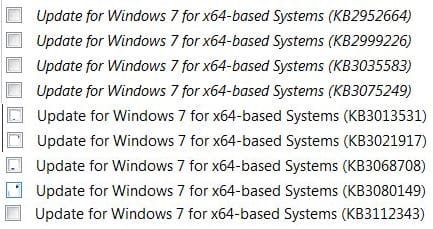
in addition to the list of KB updates that i posted above, I have done the following:
- open IE11, help menu, about internet explorer, uncheck Install New Versions Automatically
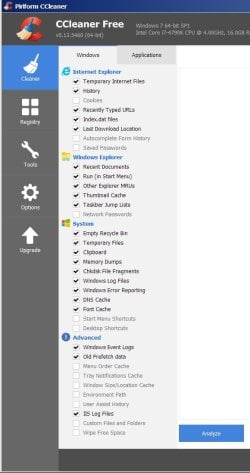
- since doing those uninstalls on my home computer, I have run piriform CCleaner and have done the [disk] cleaner along with registry cleaner. See attached pic for settings i used for Cleaner. Be sure to save your website usernames and passwords beforehand.
- also have windows updates set to "check manually"


I did not make mental note, but I believe initially after doing all the KB uninstalls I may have gotten a windows 10 pop up when launching IE11, didn't think anything of it. If i did i closed it and forgot about it.
But I did do CCleaner since.
When I open IE11 on my computer...
i never do i use firefox :)
my IE11 home page is set to google.com and set to go there upon launching IE11,
and when it does (checking it now as i am typing this post) I do not get any windows 10 pop ups.
 

Attachments

  • cc.jpg
    cc.jpg
    51.9 KB · Views: 1

My Computer My Computer

At a glance

Windows 7 x64, ultimate/pro/home, SLES x86 & ...intel & amdyesgtx970
Computer type
PC/Desktop
Computer Manufacturer/Model Number
homebuilt & dell & sgi
OS
Windows 7 x64, ultimate/pro/home, SLES x86 & ia64
CPU
intel & amd
Motherboard
yes
Memory
yes
Graphics Card(s)
gtx970
Sound Card
same as memory
Monitor(s) Displays
benq 27"
Screen Resolution
2560*1440
Hard Drives
many
Finally got rid of the Win 10 upgrade pop-up. Not certain which action finally got rid of it. Here's what was done. Reviewed the KB list provided by ADDRAM and uninstalled whatever KB update that wasn't previously uninstalled. Performed an update to determine if any of the previously KBs uninstalled reappeared. None did. Searched for and found a GWX folder on the C drive. Previously had made the key change to this folder that was supposed to keep the pop-up from launching. This time the folder was deleted. The next operation was to restore IE11. After having performed all the above, the Win 10 upgrade pop-up has been eliminated. Thanks to all that weighed in on the problem.

These software companies, such as Microsoft, Google, Facebook and Apple seem to be hypocritical. On the one hand they claim to want to protect their customers from government intervention, in their effort to track down terrorists, but seem to have no problem with downloading and installing software the user may not want or need. The explanations that accompany Microsoft updates are generally vague and unhelpful in determining whether they should be downloaded and installed. I have learned an important lesson and will now be very careful to determine why any Microsoft update should be downloaded and installed.
 

My Computer My Computer

At a glance

Windows 7 Pro Sp1 64-Bit 7601 MultiprocessIntel Core i5 760 @ 2.80GHzTotal 4.00 GB Usable 3.99 GBAMD Radeon HD5670 Memory 1024 MB
Computer type
PC/Desktop
Computer Manufacturer/Model Number
Powerspec
OS
Windows 7 Pro Sp1 64-Bit 7601 Multiprocess
CPU
Intel Core i5 760 @ 2.80GHz
Motherboard
Intel Corp DP55WB
Memory
Total 4.00 GB Usable 3.99 GB
Graphics Card(s)
AMD Radeon HD5670 Memory 1024 MB
Sound Card
(1) AMD Hi Def Auduio Device (2) Realtek Hi Def Audio
Monitor(s) Displays
Acer
Screen Resolution
1920x1080
Hard Drives
(1) Hitachi HDS721010CLA332 (2) WDC WD1002FAEX-00Z3A SCSI (3) Generic Compact Flash USB Device (4) Generic MS/MS-PRO USB Device
Keyboard
Inland
Mouse
Inland
Antivirus
Norton Internet Security
Browser
IE 11
They say a registry cleaner is not needed in windows 7,
from what you just said, i would argue that a registry cleaner like CCleaner is more important now than ever.

someone here on sevenforums should maintain a sticky of one master list of kb updates to avoid for win7, with description.
 

My Computer My Computer

At a glance

Windows 7 x64, ultimate/pro/home, SLES x86 & ...intel & amdyesgtx970
Computer type
PC/Desktop
Computer Manufacturer/Model Number
homebuilt & dell & sgi
OS
Windows 7 x64, ultimate/pro/home, SLES x86 & ia64
CPU
intel & amd
Motherboard
yes
Memory
yes
Graphics Card(s)
gtx970
Sound Card
same as memory
Monitor(s) Displays
benq 27"
Screen Resolution
2560*1440
Hard Drives
many

My Computer My Computer

At a glance

Win-7-Pro64bit 7-H-Prem-64biti7-5930K 2nd i9-9940x both water blocked VRM'...Trident-z 3200C14 2nd Trident-z 3600C16EVGA 1080ti ftw3 2nd Titan Xp both water blocked
Computer type
PC/Desktop
Computer Manufacturer/Model Number
Custom assembled by me :}
OS
Win-7-Pro64bit 7-H-Prem-64bit
CPU
i7-5930K 2nd i9-9940x both water blocked VRM's too
Motherboard
ASUS SABERTOOTH X99 2nd ASUS x299 Apex
Memory
Trident-z 3200C14 2nd Trident-z 3600C16
Graphics Card(s)
EVGA 1080ti ftw3 2nd Titan Xp both water blocked
Sound Card
Built-in Realtek
Monitor(s) Displays
1-AOC G2460PG 24"G-Sync 144Hz/ 2nd 1-ASUS VG248QE 24" 144Hz
Screen Resolution
1920 x 1080 144Hz
Hard Drives
2-Samsung M.2 Evo & Evo Plus
2-Samsung 850 EVO 500GB SSD's/ 3-2.5 W.D. Black 1tb-&3-1tb/3-3.5 WD Black 1tb hdd's
PSU
EVGA SuperNOVA 1000-P2 2nd 1200-P2
Case
2-Corsair Obsidian Series 450D Black ATX Mid Tower
Cooling
Custom water loops
Keyboard
Logitech G710+/ 2nd Logitech G910
Mouse
2-RedDragon M901 Perdition 16400 dpi Gaming mouse = wired
Internet Speed
Comcast Ping 19ms 89.31mbps download speed 6.12mbps upload
Antivirus
Malwarebytes Pro/ Superantispyware Pro
Browser
FireFox & Pale moon
Other Info
2nd ASUS X299 Apex/Intel i9-9940x with Custom water loop/7H-Prem-x64/Corsair 450D case/Ram Trident-z 3600C16 4x8gb / Samsung970Evo plus 500gb SSD/Dual ssd EZ swap evo/PSU EVGA SuperNova 1200w-P2 80+Platinum/GPU Titan Xp /8-ML-140 on push-pull on 2-280GTX rads
Back
Top