How to get the 1360x768 with my ATI Radeon 9000

Rambytes

New member
Member
Local time
4:30 PM
Messages
31
I've install Windows 7, but I cannot get the resolution of 1360x768 for my Acer monitor.

In XP (i'm in XP right now) i've just install the catalyst driver for XP and i've got the 1360x768.

But in Windows 7 (it's not important to get or not the Aero) I cannot get higher than 1024x768, and it's not look good on my monitor.

How can I just enable the 1360x768 resolution in Windows 7? And please, I cannot buy a new card... no money for that right now. So i need to live with this old card. But I cannot imagine that in Windows7 I cannot get the 1360x768 but in XP i can!

(i'm waiting to solve this problem to re-install again my Windows 7 brand new in the box)

I've found this "solution" but I have no idea if it's working or not (last post on page 2) (http://www.sevenforums.com/graphic-cards/5106-enable-aero-ati-radeon-9000-128-mb-2.html)

Thanks to help me
 

My Computer My Computer

At a glance

Windows 7
OS
Windows 7
Well,
I use nVidia so that would be my latest experience, but I still have a ati 1600 pro in use. Screen res is a function of whatever vid driver your using. Try uninstalling all ati software and use the W7 driver for vid. See what you get. Is it possible you are using the xp ati driver on W7? Its possible that there are no W7 drivers for that card, its old.
 

My Computer My Computer

At a glance

W7 Ulti/64, XP Pro/32INTEL i7 920 DO, Core2 Duo 6400KINGSTON DDR3 1333MHz, CORSAIR DDR2 800MHzEVGA GTX 260 x2, 8800 GTX
Computer Manufacturer/Model Number
DIY #3, #2
OS
W7 Ulti/64, XP Pro/32
CPU
INTEL i7 920 DO, Core2 Duo 6400
Motherboard
GIGABYTE EX58 UD3R-SLI, EP45-UD3R
Memory
KINGSTON DDR3 1333MHz, CORSAIR DDR2 800MHz
Graphics Card(s)
EVGA GTX 260 x2, 8800 GTX
Sound Card
REALTEK HD onboard, ditto
Monitor(s) Displays
SONY 40" BRAVIA LCD
Screen Resolution
1360 X 768
Hard Drives
OCZ VERTEX/RAID0 -3, Vertex 30GB
PSU
COOLERMASTER 900W, ENERMAX 850W
Case
COOLERMASTER HAF 932 x2
Cooling
stock
Keyboard
MS
Mouse
MS
Internet Speed
ADSL 3MB/768KBs
Other Info
amateur enthusiast
I imagine that the limited resolution choices follow from running the generic VGA drivers.

AMD/ATI doesn't list any Vista or Win7 drivers for that card. It may be possible to get the XP drivers running on it. What happens if you set the compatibility mode to XP on the XP driver installer?

The link that you give looks a bit crazy. I expect that it may be possible to get the card working in Win7, but not with Aero Glass effects.
 

My Computer My Computer

At a glance

Windows 7 Pro X64 SP1Intel Core I7-3930k16 GB Gskill DDR3-2133eVGA GTX680
Computer Manufacturer/Model Number
homegrown
OS
Windows 7 Pro X64 SP1
CPU
Intel Core I7-3930k
Motherboard
Asus P9X79 Pro
Memory
16 GB Gskill DDR3-2133
Graphics Card(s)
eVGA GTX680
Sound Card
Creative X-Fi Titanium
Monitor(s) Displays
As PA246Q
Screen Resolution
1920 X 1200
Hard Drives
Corsair Force GT, 120 GB
WDC 1.5TB Caviar Black
PSU
PCP&C Silencer 750 Crossfire
Case
Silverstone FT02
Cooling
Noctua NH-D14
Keyboard
cheap Logitech USB
Mouse
Microsoft Intellimouse Explorer (old optical) USB
Internet Speed
6Mb cable
Other Info
Pioneer BDR-205
Samsung SH-203B
Monsoon 5.1 speakers
Just thought i would answer this question, and yes i know the post is old, but it may help other people in fixing a stupid problem that ATI dont seem to care about. It took me a long long time to figure this out, weeks, months, probably over a year.

The problem is with all driver versions 10 and over, i worked out that the only drivers that allow me to select 1360x768 on my TV are version 9.12, now this may not be the case for everyone, but its certainly what my problem is. I have tried many drivers and find 9.12 are the latest ones i can use to get that resolution.

Anyway, theres your solution, use older drivers till you find one that works for you, yours may be different to mine, but i honestly think the problem was introduced into version 10 and above.

Good luck.
 

My Computer My Computer

At a glance

Windows 7 Ultimate x64
OS
Windows 7 Ultimate x64
I have an older system with an ATI 9200 card in it, and the latest ATI driver I could get to work is Catalyst 6.11 -- from 2006.

And, even then, I had to be sure to install ONLY the drivers, as installing Catalyst Control Center crashed my XP system.
 

My Computer My Computer

At a glance

Win7 Pro 32-bit, Win8 Pro 32-bitAMD Phenom II X6 1090T4GB ddr3 1300AMD HD 4290 onboard
Computer type
PC/Desktop
Computer Manufacturer/Model Number
Custom
OS
Win7 Pro 32-bit, Win8 Pro 32-bit
CPU
AMD Phenom II X6 1090T
Motherboard
Gigabyte
Memory
4GB ddr3 1300
Graphics Card(s)
AMD HD 4290 onboard
Sound Card
Builtin Realtek HD Audio
Monitor(s) Displays
Samsung 24" widescreen, LG 23" widescreen
Screen Resolution
1920x1200/1920x1080
Hard Drives
Kingston 256GB SSD
Keyboard
Logitech Illuminated Keyboard
Mouse
Logitech M705 wireless mouse
Antivirus
Norton Av 2013
Browser
IE v10
I have a solution! I am using Acer X193HQ at work with Intel G31 onboard graphics and I too searched the entire internet and finally found a solution!

Unfortunately, the solution sits in my Office PC and am at home now! :(

Will definitely update here from office first thing tomorrow morning!

Until then, just get yourself DTD Calculator from here: clever technologies - products - clever freeware - Home to DTDCalculator

Just wait, I'll post what you need to do. Its a permanent solution (as long as you don't uninstall your graphics driver / monitor driver).

This works for sure on Intel onboard graphics, but dunno for ATI / nvidia. And I don't see any reason why it shouldn't.
 

My Computer My Computer

At a glance

Windows 7 Ultimate (64 bit) dual boot with Fe...Intel Corei5-3470 @ 3.20Ghz (Turbo 3.60Ghz) [...8 GB [4 GB x 2] DDR3 1600 Mhz G.SkillZotac nVidia GeForce GTX 650 1024 MB GDDR5 (1...
Computer type
PC/Desktop
Computer Manufacturer/Model Number
Custom built
OS
Windows 7 Ultimate (64 bit) dual boot with Fedora KDE
CPU
Intel Corei5-3470 @ 3.20Ghz (Turbo 3.60Ghz) [6MB L3 cache]
Motherboard
GIGABYTE GA-B75M-D3H [intel B75 Express Chipset]
Memory
8 GB [4 GB x 2] DDR3 1600 Mhz G.Skill
Graphics Card(s)
Zotac nVidia GeForce GTX 650 1024 MB GDDR5 (128 bit)
Sound Card
Realtek ALC 887 HD Audio codec onboard
Monitor(s) Displays
Samsung SyncMaster 2033SW+
Screen Resolution
1600 x 900 @ 60Hz
Hard Drives
1 x S-ATA II Seagate 1 TB [Win7 Ultimate x86-64 RTM]
1 x S-ATA Samsung 1 TB [Fedora]
PSU
Cooler Master Thunder 650W
Case
Cooler Master Elite 344 - USB 3
Cooling
All Fan [1 on front and 1 at back]
Keyboard
Microsoft PS/2 Multimedia keyboard
Mouse
Microsoft Optical Mouse USB
Internet Speed
1 Mbps Cable
Antivirus
Kaspersky Internet Security
Browser
Firefox
Fix for 1366x768 in Windows

Hi!

Just as I promised, here's the fix:

0. UPDATE: According to n0rthstar, this method does NOT work with non- intel graphics chips.

1. Download and install DTD Calculator from : clever technologies - products - clever freeware - Home to DTDCalculator

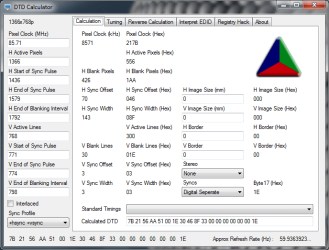
2. Start DTD Calculator and fill in the values on the left side as shown in the attachment.

3. After filling up the values, go to the Registry hack tab. There, click on More to add a row and then in the newly added row, click on Get Calculated.

4. The Registry Hack screen should have DTD1 as the calculated value. Now, click on Write DTDs to registry and reboot when prompted.

5. After you reboot, go to your favorite location of changing resolutions and you should have 1366x768 @ 60 Hz as an option and you can safely switch to it.

A few notes though:

a) I have tried this with Acer X193HQ which has native resolution of 1366x768. You will have to modify the left side values that I have filled in DTD calculator for getting 1360x768.

b) If you do modify the parameters on the right hand side, please do so at your own risk. I can't guarantee that they will be correct for your monitor and there is a chance that you may spoil your monitor.

Really hope this helps!
 

Attachments

  • monitor settings.png
    monitor settings.png
    25.7 KB · Views: 435
Last edited:

My Computer My Computer

At a glance

Windows 7 Ultimate (64 bit) dual boot with Fe...Intel Corei5-3470 @ 3.20Ghz (Turbo 3.60Ghz) [...8 GB [4 GB x 2] DDR3 1600 Mhz G.SkillZotac nVidia GeForce GTX 650 1024 MB GDDR5 (1...
Computer type
PC/Desktop
Computer Manufacturer/Model Number
Custom built
OS
Windows 7 Ultimate (64 bit) dual boot with Fedora KDE
CPU
Intel Corei5-3470 @ 3.20Ghz (Turbo 3.60Ghz) [6MB L3 cache]
Motherboard
GIGABYTE GA-B75M-D3H [intel B75 Express Chipset]
Memory
8 GB [4 GB x 2] DDR3 1600 Mhz G.Skill
Graphics Card(s)
Zotac nVidia GeForce GTX 650 1024 MB GDDR5 (128 bit)
Sound Card
Realtek ALC 887 HD Audio codec onboard
Monitor(s) Displays
Samsung SyncMaster 2033SW+
Screen Resolution
1600 x 900 @ 60Hz
Hard Drives
1 x S-ATA II Seagate 1 TB [Win7 Ultimate x86-64 RTM]
1 x S-ATA Samsung 1 TB [Fedora]
PSU
Cooler Master Thunder 650W
Case
Cooler Master Elite 344 - USB 3
Cooling
All Fan [1 on front and 1 at back]
Keyboard
Microsoft PS/2 Multimedia keyboard
Mouse
Microsoft Optical Mouse USB
Internet Speed
1 Mbps Cable
Antivirus
Kaspersky Internet Security
Browser
Firefox
Hi!

Just as I promised, here's the fix:

1. Download and install DTD Calculator from : clever technologies - products - clever freeware - Home to DTDCalculator

2. Start DTD Calculator and fill in the values on the left side as shown in the attachment.

3. After filling up the values, go to the Registry hack tab. There, click on More to add a row and then in the newly added row, click on Get Calculated.

4. The Registry Hack screen should have DTD1 as the calculated value. Now, click on Write DTDs to registry and reboot when prompted.

5. After you reboot, go to your favorite location of changing resolutions and you should have 1366x768 @ 60 Hz as an option and you can safely switch to it.

A few notes though:

a) I have tried this with Acer X193HQ which has native resolution of 1366x768. You will have to modify the left side values that I have filled in DTD calculator for getting 1360x768.

b) I have tried this only on Intel G31 onboard graphics, but I don't see any reason why it shouldn't work on non Intel graphics cards and

c) If you do modify the parameters on the right hand side, please do so at your own risk. I can't guarantee that they will be correct for your monitor and there is a chance that you may spoil your monitor.

Really hope this helps!

This doesnt work on none intel chips because when you click "get calculated" it states "there is no intel chip present" as i have just tried this.

So this is a no go for the original topic of "How to get the 1360x768 with my ATI Radeon"

Thanks for trying though, was worth a go. I wonder if there is another tool like this to enable 1360x760 on later ATI drivers, because i would like to use newer ones myself, i tried Powerstrip but that didnt do anything for me. Ah well, back to using old drivers till ATI pull their finger out, i know i wont be buying another ATI card, ever.
 

My Computer My Computer

At a glance

Windows 7 Ultimate x64
OS
Windows 7 Ultimate x64
Hi n0rthstar

:( that it didn't work for you. I'll try to get some info as it shouldn't be that hard to add a custom resolution.
 

My Computer My Computer

At a glance

Windows 7 Ultimate (64 bit) dual boot with Fe...Intel Corei5-3470 @ 3.20Ghz (Turbo 3.60Ghz) [...8 GB [4 GB x 2] DDR3 1600 Mhz G.SkillZotac nVidia GeForce GTX 650 1024 MB GDDR5 (1...
Computer type
PC/Desktop
Computer Manufacturer/Model Number
Custom built
OS
Windows 7 Ultimate (64 bit) dual boot with Fedora KDE
CPU
Intel Corei5-3470 @ 3.20Ghz (Turbo 3.60Ghz) [6MB L3 cache]
Motherboard
GIGABYTE GA-B75M-D3H [intel B75 Express Chipset]
Memory
8 GB [4 GB x 2] DDR3 1600 Mhz G.Skill
Graphics Card(s)
Zotac nVidia GeForce GTX 650 1024 MB GDDR5 (128 bit)
Sound Card
Realtek ALC 887 HD Audio codec onboard
Monitor(s) Displays
Samsung SyncMaster 2033SW+
Screen Resolution
1600 x 900 @ 60Hz
Hard Drives
1 x S-ATA II Seagate 1 TB [Win7 Ultimate x86-64 RTM]
1 x S-ATA Samsung 1 TB [Fedora]
PSU
Cooler Master Thunder 650W
Case
Cooler Master Elite 344 - USB 3
Cooling
All Fan [1 on front and 1 at back]
Keyboard
Microsoft PS/2 Multimedia keyboard
Mouse
Microsoft Optical Mouse USB
Internet Speed
1 Mbps Cable
Antivirus
Kaspersky Internet Security
Browser
Firefox

My Computer My Computer

At a glance

Windows 7 Ultimate (64 bit) dual boot with Fe...Intel Corei5-3470 @ 3.20Ghz (Turbo 3.60Ghz) [...8 GB [4 GB x 2] DDR3 1600 Mhz G.SkillZotac nVidia GeForce GTX 650 1024 MB GDDR5 (1...
Computer type
PC/Desktop
Computer Manufacturer/Model Number
Custom built
OS
Windows 7 Ultimate (64 bit) dual boot with Fedora KDE
CPU
Intel Corei5-3470 @ 3.20Ghz (Turbo 3.60Ghz) [6MB L3 cache]
Motherboard
GIGABYTE GA-B75M-D3H [intel B75 Express Chipset]
Memory
8 GB [4 GB x 2] DDR3 1600 Mhz G.Skill
Graphics Card(s)
Zotac nVidia GeForce GTX 650 1024 MB GDDR5 (128 bit)
Sound Card
Realtek ALC 887 HD Audio codec onboard
Monitor(s) Displays
Samsung SyncMaster 2033SW+
Screen Resolution
1600 x 900 @ 60Hz
Hard Drives
1 x S-ATA II Seagate 1 TB [Win7 Ultimate x86-64 RTM]
1 x S-ATA Samsung 1 TB [Fedora]
PSU
Cooler Master Thunder 650W
Case
Cooler Master Elite 344 - USB 3
Cooling
All Fan [1 on front and 1 at back]
Keyboard
Microsoft PS/2 Multimedia keyboard
Mouse
Microsoft Optical Mouse USB
Internet Speed
1 Mbps Cable
Antivirus
Kaspersky Internet Security
Browser
Firefox
Well im not sure even adding a new resolution would help me in getting 1360x768, because i have the option of selecting it at 60hz, my flat panel TV just tells me theres no signal when selecting 1360x768 and it goes black, like its receiving no signal. My PC monitor works fine at these resolutions upto 1440x900, my TV just wont do it with later drivers, it has no problems with drivers 9.12 and below though, and i can select those resolutions on Catalyst 9.9 which im using right now after extensive testing i decided these were the best for me. This is on XP and win 7, so the operating system doesnt seem to matter either, its got to be a driver issue that ATI messed up somewhere after 9.12.

Cheers anyway.
 

My Computer My Computer

At a glance

Windows 7 Ultimate x64
OS
Windows 7 Ultimate x64
Yes,
In my experience HDTV support gets worse and worse. I have used earlier drivers that do way better than later. I wonder whats up with the industry, they push and push HDTV's but its seems harder and harder to use them.
 

My Computer My Computer

At a glance

W7 Ulti/64, XP Pro/32INTEL i7 920 DO, Core2 Duo 6400KINGSTON DDR3 1333MHz, CORSAIR DDR2 800MHzEVGA GTX 260 x2, 8800 GTX
Computer Manufacturer/Model Number
DIY #3, #2
OS
W7 Ulti/64, XP Pro/32
CPU
INTEL i7 920 DO, Core2 Duo 6400
Motherboard
GIGABYTE EX58 UD3R-SLI, EP45-UD3R
Memory
KINGSTON DDR3 1333MHz, CORSAIR DDR2 800MHz
Graphics Card(s)
EVGA GTX 260 x2, 8800 GTX
Sound Card
REALTEK HD onboard, ditto
Monitor(s) Displays
SONY 40" BRAVIA LCD
Screen Resolution
1360 X 768
Hard Drives
OCZ VERTEX/RAID0 -3, Vertex 30GB
PSU
COOLERMASTER 900W, ENERMAX 850W
Case
COOLERMASTER HAF 932 x2
Cooling
stock
Keyboard
MS
Mouse
MS
Internet Speed
ADSL 3MB/768KBs
Other Info
amateur enthusiast
Back
Top