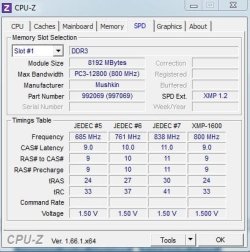
How to get the JEDEC value that is listed under SPD?

crankypenguin

qbasic gorillas champ
Local time
6:34 AM
Messages
590
Location
Eastern Europe
Here is a question that has been bothering me since yesterday. On SPD, I see a few JEDEC possibilities for my ram. I know how to set the XMP, by using profile1, but I actually went back to a manual timing and set it @ 9-9-9-24 @ 1600mhz. What I want to know is how I can get JEDEC#7 timings on the picture I attached. When I was in the bios, where you pick your timing such as 1333, 1600, 1866, I do not see a 1676 option. Now hear me out, before yesterday, before I got the new Mushkin ram, I did not know much if anything about changing timings, XMP and such, so I am a fast learner. Is there a way to get those JEDEC #7 timings set up in my rig. I know I would have to go for 11-11-11-30, but that is not an issue. And I am insinuating that since it's in the SPD section it is somehow doable. I just don't know the procedure. My exact specs are listed in my profile so if anyone feels up helping me out, I would be grateful :) Also wanted to add that I have my DRAM Voltages set to auto, well in fact the entire System Voltage section is set to auto. Not sure if that helps any.
 

Attachments

  • JEDEC1.JPG
    JEDEC1.JPG
    40.5 KB · Views: 3
  • JEDEC2.JPG
    JEDEC2.JPG
    34.2 KB · Views: 2

My Computer My Computer

At a glance

Windows 7 Ultimate x64FX 8350 @ 4.8ghz, turbo clocked to 5.4ghzMushkin Enhanced Blackline 16GB 1760mhz 10-10...Gigabyte-660 Windforce OC- GPU Clock 1212MHz ...
Computer type
PC/Desktop
Computer Manufacturer/Model Number
Custom Build
OS
Windows 7 Ultimate x64
CPU
FX 8350 @ 4.8ghz, turbo clocked to 5.4ghz
Motherboard
Asus Sabertooth FX990 Gen 3.0 R2.0
Memory
Mushkin Enhanced Blackline 16GB 1760mhz 10-10-9-24 T1
Graphics Card(s)
Gigabyte-660 Windforce OC- GPU Clock 1212MHz /3504MHz ram
Sound Card
Creative Sound Blaster Recon3D PCIe Sound Card
Monitor(s) Displays
Samsung SyncMaster S27B350H (HDMI)
Screen Resolution
1920x1080 60HZ
Hard Drives
1 x SSD Crucial M4 256GB (Primary OS)
3 x HDD WD 1TB
4 x HDD 2TB
1 x HDD 160GB (Secondary Backup OS)
Raid SATA III 6GB/s 4-port PCI-e Controller Card, Marvel 88SE9215 chipset
PSU
Chieftec-650-14CS (Modular) 80 Plus Gold-650 Watt
Case
Akasa Venom Toxic Gaming Big tower ( Custom Black ) Ver 2.0
Cooling
Water 2.0 PRO / GEIL Cyclone VRM / 6x120mm 2x220mm 2x140mm
Keyboard
Logitech G19
Mouse
Wireless Notebook Presenter Mouse 8000
Internet Speed
Fiber GBS
Antivirus
Don't Announce it to the world :)
Browser
Gotta have at least 1!
cranky, change from choosing preset values to manual settings in your Bios
 
Last edited:

My Computer My Computer

At a glance

Windows 10 Pro X64Intel(R) Core(TM) i5-3570K CPU OC@ 4.5GHZ Turbo8.00 GB DDR3 1600MhzMSI Gaming X GTX 1070
Computer type
PC/Desktop
Computer Manufacturer/Model Number
Dude Build
OS
Windows 10 Pro X64
CPU
Intel(R) Core(TM) i5-3570K CPU OC@ 4.5GHZ Turbo
Motherboard
MSI Z77A-G45 Gaming
Memory
8.00 GB DDR3 1600Mhz
Graphics Card(s)
MSI Gaming X GTX 1070
Sound Card
Realtek High Definition
Monitor(s) Displays
Dell S23O9W, HP L1710
Screen Resolution
DELL-1920 x 1080 HP-1280 x1024
Hard Drives
Crucial m4 256 SSD, WD 7200RPM 500GB WD 1TB
PSU
Seasonic X650 GOLD
Case
Zalman Z12
Cooling
Antec Kuhler 920
Keyboard
Logitech
Mouse
MSI DS100 Interceptor
Internet Speed
50 down and 5 up
Antivirus
MSE
Browser
Chrome, IE 11
Other Info
Logitech X-620 Speakers
cranky, change from choosing preset values to manual settings in your Bios
Hmm I wonder which Value to change in my bios for that...oh boy this will take time. Do you know the name by any chance of what I am looking for? Am I going to have to up the bus multiplier a bit?
 

My Computer My Computer

At a glance

Windows 7 Ultimate x64FX 8350 @ 4.8ghz, turbo clocked to 5.4ghzMushkin Enhanced Blackline 16GB 1760mhz 10-10...Gigabyte-660 Windforce OC- GPU Clock 1212MHz ...
Computer type
PC/Desktop
Computer Manufacturer/Model Number
Custom Build
OS
Windows 7 Ultimate x64
CPU
FX 8350 @ 4.8ghz, turbo clocked to 5.4ghz
Motherboard
Asus Sabertooth FX990 Gen 3.0 R2.0
Memory
Mushkin Enhanced Blackline 16GB 1760mhz 10-10-9-24 T1
Graphics Card(s)
Gigabyte-660 Windforce OC- GPU Clock 1212MHz /3504MHz ram
Sound Card
Creative Sound Blaster Recon3D PCIe Sound Card
Monitor(s) Displays
Samsung SyncMaster S27B350H (HDMI)
Screen Resolution
1920x1080 60HZ
Hard Drives
1 x SSD Crucial M4 256GB (Primary OS)
3 x HDD WD 1TB
4 x HDD 2TB
1 x HDD 160GB (Secondary Backup OS)
Raid SATA III 6GB/s 4-port PCI-e Controller Card, Marvel 88SE9215 chipset
PSU
Chieftec-650-14CS (Modular) 80 Plus Gold-650 Watt
Case
Akasa Venom Toxic Gaming Big tower ( Custom Black ) Ver 2.0
Cooling
Water 2.0 PRO / GEIL Cyclone VRM / 6x120mm 2x220mm 2x140mm
Keyboard
Logitech G19
Mouse
Wireless Notebook Presenter Mouse 8000
Internet Speed
Fiber GBS
Antivirus
Don't Announce it to the world :)
Browser
Gotta have at least 1!
Here is what I did exactly. I set System Voltages to Manual, left everything normal , except for DRAM Voltage, and set that to 1.500 as specified by Mushkin. I went into DRAM Config, and set DDR3 Timings to manual, but I only see a few multipliers in there which give me either 1033, 1333, 1600, 1866. I don't see any other numbers to multiply by to get 838mhz. I also set the correct timings as 9-9-9-24 manually. What am I missing that I can't get my ram to run at 1676mhz. I know it's not a boost at all, but this is more of a learning experience and I really want to learn this stuff. And trust me when I say I am googling my buns off as much as I can but I am not finding anything useful. Will I have to OC the CPU to get more precise ram clocks. I am only trying to get 1676mhz because in SPD it says my ram is capable of 838MHz 11-11-11-30 1.500V. So what can I do?
 

My Computer My Computer

At a glance

Windows 7 Ultimate x64FX 8350 @ 4.8ghz, turbo clocked to 5.4ghzMushkin Enhanced Blackline 16GB 1760mhz 10-10...Gigabyte-660 Windforce OC- GPU Clock 1212MHz ...
Computer type
PC/Desktop
Computer Manufacturer/Model Number
Custom Build
OS
Windows 7 Ultimate x64
CPU
FX 8350 @ 4.8ghz, turbo clocked to 5.4ghz
Motherboard
Asus Sabertooth FX990 Gen 3.0 R2.0
Memory
Mushkin Enhanced Blackline 16GB 1760mhz 10-10-9-24 T1
Graphics Card(s)
Gigabyte-660 Windforce OC- GPU Clock 1212MHz /3504MHz ram
Sound Card
Creative Sound Blaster Recon3D PCIe Sound Card
Monitor(s) Displays
Samsung SyncMaster S27B350H (HDMI)
Screen Resolution
1920x1080 60HZ
Hard Drives
1 x SSD Crucial M4 256GB (Primary OS)
3 x HDD WD 1TB
4 x HDD 2TB
1 x HDD 160GB (Secondary Backup OS)
Raid SATA III 6GB/s 4-port PCI-e Controller Card, Marvel 88SE9215 chipset
PSU
Chieftec-650-14CS (Modular) 80 Plus Gold-650 Watt
Case
Akasa Venom Toxic Gaming Big tower ( Custom Black ) Ver 2.0
Cooling
Water 2.0 PRO / GEIL Cyclone VRM / 6x120mm 2x220mm 2x140mm
Keyboard
Logitech G19
Mouse
Wireless Notebook Presenter Mouse 8000
Internet Speed
Fiber GBS
Antivirus
Don't Announce it to the world :)
Browser
Gotta have at least 1!
Here is what I did exactly. I set System Voltages to Manual, left everything normal , except for DRAM Voltage, and set that to 1.500 as specified by Mushkin. I went into DRAM Config, and set DDR3 Timings to manual, but I only see a few multipliers in there which give me either 1033, 1333, 1600, 1866. I don't see any other numbers to multiply by to get 838mhz. I also set the correct timings as 9-9-9-24 manually. What am I missing that I can't get my ram to run at 1676mhz. I know it's not a boost at all, but this is more of a learning experience and I really want to learn this stuff. And trust me when I say I am googling my buns off as much as I can but I am not finding anything useful. Will I have to OC the CPU to get more precise ram clocks. I am only trying to get 1676mhz because in SPD it says my ram is capable of 838MHz 11-11-11-30 1.500V. So what can I do?

When over clocking any AMD machine using the FSB will bring the ram up

Multi just brings the CPU freq up but using FSB makes the Mhz of the ram go up like say if you are at Multi 18 and fsb 205 you should be somewhere like 4.2 ghz just speculation

but the more FSB the higher the ram goes if you already manually set values try leaving your base clock on and upping the FSB but when you do this you might have to drop the multi lower to compensate because the fsb also makes the CPU CLOCK go up as well
 

My Computer My Computer

At a glance

Windows 10 Home Premium 64bit sp1Intel I7-6700K @ 4.6 Ghz 1.344 volts everyday OC32GB G-Skill TridentZ 3200mhz 16-18-18-38 DDR4Sli Gigabyte Windforce GTX 980 G1
Computer type
PC/Desktop
Computer Manufacturer/Model Number
CoreI7-6700K MrFingerIII Special Builds
OS
Windows 10 Home Premium 64bit sp1
CPU
Intel I7-6700K @ 4.6 Ghz 1.344 volts everyday OC
Motherboard
Asrock Fatality K6 Z170 Socket 1151
Memory
32GB G-Skill TridentZ 3200mhz 16-18-18-38 DDR4
Graphics Card(s)
Sli Gigabyte Windforce GTX 980 G1
Sound Card
AC97 Creative Rage Tactic 3D Headphones Bluetooth
Monitor(s) Displays
27" Asus ROG Swift PG278Q G-Sync 48" Vizio Smart HD TV
Screen Resolution
2560x1440p 27"- 48" Currently Gaming at 2560x1440p Res 2K
Hard Drives
250GB Samsung Evo840SSD Seagate baracuda 500 GB WD Mybook 500Gb 1TB Seagate Barracuda
PSU
HX1050w Corsair Silver 80plus certified crosfire/sli
Case
Enthod Pro Full Tower
Cooling
Corsair H110i GT 280 mm High Performance WaterBlock
Keyboard
Logitech wireless keyboard
Mouse
Logitech wireless mouse
Internet Speed
Cox Cable 100+ mb
Antivirus
WebRoot Spysweeper with Antivirus
Browser
IE-10, Chrome, Opera
Other Info
My Other Rig is a AMD FX8320E @4.6Ghz 16GB Ballistic Sport Ram
Mobo Asrock Fatality 990FX 120GB OCZ SSD 1TB Seagate Barracuda Corsair H75 Cooling PSU Corsair CX750
GPU GTX Gigabyte 970G1
Here is what I did exactly. I set System Voltages to Manual, left everything normal , except for DRAM Voltage, and set that to 1.500 as specified by Mushkin. I went into DRAM Config, and set DDR3 Timings to manual, but I only see a few multipliers in there which give me either 1033, 1333, 1600, 1866. I don't see any other numbers to multiply by to get 838mhz. I also set the correct timings as 9-9-9-24 manually. What am I missing that I can't get my ram to run at 1676mhz. I know it's not a boost at all, but this is more of a learning experience and I really want to learn this stuff. And trust me when I say I am googling my buns off as much as I can but I am not finding anything useful. Will I have to OC the CPU to get more precise ram clocks. I am only trying to get 1676mhz because in SPD it says my ram is capable of 838MHz 11-11-11-30 1.500V. So what can I do?

When over clocking any AMD machine using the FSB will bring the ram up

Multi just brings the CPU freq up but using FSB makes the Mhz of the ram go up like say if you are at Multi 18 and fsb 205 you should be somewhere like 4.2 ghz just speculation

but the more FSB the higher the ram goes if you already manually set values try leaving your base clock on and upping the FSB but when you do this you might have to drop the multi lower to compensate because the fsb also makes the CPU CLOCK go up as well

Would I have to bring the Bulldozer 6100 voltage up too? Along with Bus x multiplier ?
 

My Computer My Computer

At a glance

Windows 7 Ultimate x64FX 8350 @ 4.8ghz, turbo clocked to 5.4ghzMushkin Enhanced Blackline 16GB 1760mhz 10-10...Gigabyte-660 Windforce OC- GPU Clock 1212MHz ...
Computer type
PC/Desktop
Computer Manufacturer/Model Number
Custom Build
OS
Windows 7 Ultimate x64
CPU
FX 8350 @ 4.8ghz, turbo clocked to 5.4ghz
Motherboard
Asus Sabertooth FX990 Gen 3.0 R2.0
Memory
Mushkin Enhanced Blackline 16GB 1760mhz 10-10-9-24 T1
Graphics Card(s)
Gigabyte-660 Windforce OC- GPU Clock 1212MHz /3504MHz ram
Sound Card
Creative Sound Blaster Recon3D PCIe Sound Card
Monitor(s) Displays
Samsung SyncMaster S27B350H (HDMI)
Screen Resolution
1920x1080 60HZ
Hard Drives
1 x SSD Crucial M4 256GB (Primary OS)
3 x HDD WD 1TB
4 x HDD 2TB
1 x HDD 160GB (Secondary Backup OS)
Raid SATA III 6GB/s 4-port PCI-e Controller Card, Marvel 88SE9215 chipset
PSU
Chieftec-650-14CS (Modular) 80 Plus Gold-650 Watt
Case
Akasa Venom Toxic Gaming Big tower ( Custom Black ) Ver 2.0
Cooling
Water 2.0 PRO / GEIL Cyclone VRM / 6x120mm 2x220mm 2x140mm
Keyboard
Logitech G19
Mouse
Wireless Notebook Presenter Mouse 8000
Internet Speed
Fiber GBS
Antivirus
Don't Announce it to the world :)
Browser
Gotta have at least 1!
Back
Top