How to Icrease Dedicated Memory

Mado

New member
Local time
11:14 AM
Messages
3
Location
Alexandria, Egypt
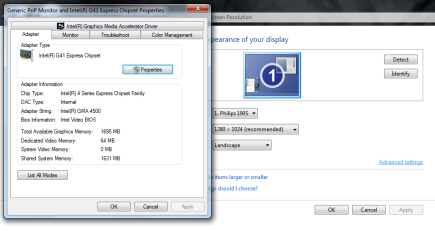
I found that my dedicated memory only 64 MB which are to small for Gaming
However the same Pc on win XP the vega was 1 GB
and when i try to icrease it from bios it icreased to only 144 MB and this affect using memory and decrease it
so any one can help me :cry:
to find a solution
 

Attachments

  • Untitled.png
    Untitled.png
    36 KB · Views: 216

My Computer My Computer

Computer Manufacturer/Model Number
Gigabyte Technology Co., Ltd.
OS
Windows 7 Ultimate x64
CPU
Pentium(R) Dual-Core CPU E5700 @ 3.00GHZ, 3000MHZ, 2Core(s)
Motherboard
G41MT-S2P
Memory
4.00 GB
Graphics Card(s)
Intel(R) G41 Express Chipset ‎(PS3.0/VS3.0)‎
Monitor(s) Displays
Philips 190S
Screen Resolution
1280x1024
Hard Drives
500 GB
Case
Jumbo
Keyboard
A4tech
Mouse
A4tech
Internet Speed
2 MB
I found that my dedicated memory only 64 MB which are to small for Gaming
However the same Pc on win XP the vega was 1 GB
and when i try to icrease it from bios it icreased to only 144 MB and this affect using memory and decrease it
so any one can help me :cry:
to find a solution

Dedicated is physically built onto the chipset. Shared uses system meory (ram) and your total is 1695.

You cant change what is built onto the card. If you have a desktop (doubtful) you can add a graphics card. Otherwise your stuck with it.
 
Last edited:

My Computer My Computer

Computer Manufacturer/Model Number
HP Pavillion dv-7 1005 Tx
OS
Win 8 Release candidate 8400
CPU
[email protected]
Memory
4 gigs
Graphics Card(s)
Nvidia 9600M
Sound Card
HD built-in
Monitor(s) Displays
17" Wxga
Screen Resolution
1440x900
Cooling
none
Internet Speed
45Mb down 5Mb up
Dedicated is physically built onto the chipset. Shared uses system meory (ram) and your total is 1695.

You cant change what is built onto the card. If you have a desktop (doubtful) you can add a graphics card. Otherwise your stuck with it.
Thank you I apperciate your effort
but why on win XP on the same pc it was 1024MB
and what you recomend me to use a graphic card e.g. Navidia Thanks again :)
 

My Computer My Computer

Computer Manufacturer/Model Number
Gigabyte Technology Co., Ltd.
OS
Windows 7 Ultimate x64
CPU
Pentium(R) Dual-Core CPU E5700 @ 3.00GHZ, 3000MHZ, 2Core(s)
Motherboard
G41MT-S2P
Memory
4.00 GB
Graphics Card(s)
Intel(R) G41 Express Chipset ‎(PS3.0/VS3.0)‎
Monitor(s) Displays
Philips 190S
Screen Resolution
1280x1024
Hard Drives
500 GB
Case
Jumbo
Keyboard
A4tech
Mouse
A4tech
Internet Speed
2 MB
What is your budget and what brand and wattage power supply are you using?
 

My Computer My Computer

Computer type
PC/Desktop
Computer Manufacturer/Model Number
Custom
OS
windows 10 pro 64 bit
CPU
i5 4690K@4500 COOLER MASTER Seidon 120M water cooler
Motherboard
ASUS SABERTOOTH Z87 LGA 1150 Intel
Memory
16gb Kingston HyperX DDR3 1600
Graphics Card(s)
EVGA GTX 1070 sc
Monitor(s) Displays
BenQ GL2760H Black 27" 2ms HDMI Widescreen LED 1920X1080
Screen Resolution
DSR 2103X1183
Hard Drives
ADATA 256 gig SSD + 4 junk
PSU
EVGA supernova 750
Case
coolermaster
Cooling
many...
Keyboard
z merc
Mouse
Logitech wireless G602
Internet Speed
2.5mbs cable
i don not know wattage but it's brand jumbo
my budget :) lol i need something play the most common games it require e.g navidia 8800
 

My Computer My Computer

Computer Manufacturer/Model Number
Gigabyte Technology Co., Ltd.
OS
Windows 7 Ultimate x64
CPU
Pentium(R) Dual-Core CPU E5700 @ 3.00GHZ, 3000MHZ, 2Core(s)
Motherboard
G41MT-S2P
Memory
4.00 GB
Graphics Card(s)
Intel(R) G41 Express Chipset ‎(PS3.0/VS3.0)‎
Monitor(s) Displays
Philips 190S
Screen Resolution
1280x1024
Hard Drives
500 GB
Case
Jumbo
Keyboard
A4tech
Mouse
A4tech
Internet Speed
2 MB
The wattage of the PSU is important. Most better graphics cards neeed a lot of power and I doubt that your stock PSU can handle that. It may not even have a spare lead for it. Check into the manual of your PC (it should be available on-line at your PC's manufacturer site) how many Watts the PSU has. You will most likely have to change the PSU when you want to install a graphics card with any reasonable power.
 
Last edited:

My Computer My Computer

Computer Manufacturer/Model Number
HP, Dell, Gateway, Toshiba - 4 laptops and 2 desktops
OS
Vista, Windows7, Mint Mate, Zorin, Windows 8
CPU
from 1.6GHz Duo to i7
Monitor(s) Displays
2x HP w2207
Hard Drives
5x HDD, 7x SSD, 12x Externals
Keyboard
with trackball - no mices
Mouse
Trackball mice
Internet Speed
DSL 6000
Easier to pop the side panel off and read the label on the side of the power supply, then either look it up or post it here and we can look it up.
 

My Computer My Computer

Computer type
PC/Desktop
Computer Manufacturer/Model Number
Me
OS
Win 7 Ultimate x64
CPU
FX-8350 @ 4.6 GHz so far
Motherboard
Asus M5A97 EVO
Memory
ADATA XPG V1 Series Black 8GB DDR3 1600
Graphics Card(s)
Sapphire R9 270x Dual-X
Sound Card
Xonar DGX w/ Corsair Vengence 1300
Monitor(s) Displays
Acer S232HL Abid
Screen Resolution
1920x1080
Hard Drives
120 GB OCZ Vertex 3
500 GB Seagate 7200.12
PSU
Antec Earthwatts 650W Green
Case
Antec Three Hundred
Cooling
Cooler Master 212 EVO
Keyboard
Logitech G510
Mouse
Logitech G500s
Internet Speed
35000/3000
Easier to pop the side panel off and read the label on the side of the power supply, then either look it up or post it here and we can look it up.
Hmm, would not be easier for me. Crawling under the desk, unplugging the wires, dragging the box out and opening it would be too much for an old man - LOL.

Checking on the web is a lot easier.
 

My Computer My Computer

Computer Manufacturer/Model Number
HP, Dell, Gateway, Toshiba - 4 laptops and 2 desktops
OS
Vista, Windows7, Mint Mate, Zorin, Windows 8
CPU
from 1.6GHz Duo to i7
Monitor(s) Displays
2x HP w2207
Hard Drives
5x HDD, 7x SSD, 12x Externals
Keyboard
with trackball - no mices
Mouse
Trackball mice
Internet Speed
DSL 6000
Not if the manufacturer is anything like Dell or HP where all they list in the specs and/or manual for the power supply is what its total wattage is, nothing about amps or anything else.

Unless it is a custom build and the builder provided a detailed list of what was used, the only way to know what is inside as far as the power supply goes is to look at it.
 

My Computer My Computer

Computer type
PC/Desktop
Computer Manufacturer/Model Number
Me
OS
Win 7 Ultimate x64
CPU
FX-8350 @ 4.6 GHz so far
Motherboard
Asus M5A97 EVO
Memory
ADATA XPG V1 Series Black 8GB DDR3 1600
Graphics Card(s)
Sapphire R9 270x Dual-X
Sound Card
Xonar DGX w/ Corsair Vengence 1300
Monitor(s) Displays
Acer S232HL Abid
Screen Resolution
1920x1080
Hard Drives
120 GB OCZ Vertex 3
500 GB Seagate 7200.12
PSU
Antec Earthwatts 650W Green
Case
Antec Three Hundred
Cooling
Cooler Master 212 EVO
Keyboard
Logitech G510
Mouse
Logitech G500s
Internet Speed
35000/3000
Well, I have both Dell and HP boxes and they have the info in the manual. And amps come with the Wattage - no need to worry about that. But everybody has his own ways.
 

My Computer My Computer

Computer Manufacturer/Model Number
HP, Dell, Gateway, Toshiba - 4 laptops and 2 desktops
OS
Vista, Windows7, Mint Mate, Zorin, Windows 8
CPU
from 1.6GHz Duo to i7
Monitor(s) Displays
2x HP w2207
Hard Drives
5x HDD, 7x SSD, 12x Externals
Keyboard
with trackball - no mices
Mouse
Trackball mice
Internet Speed
DSL 6000
but why on win XP on the same pc it was 1024MB

Because, drivers and the system lie. It doesn't tell you that 960 MB of the 1024 MB VRAM stated is actually using the system RAM.
 

My Computer My Computer

Computer type
PC/Desktop
Computer Manufacturer/Model Number
Alienware Aurora ALX R4
OS
Windows 10 Pro (x64)
CPU
Intel Core i7-3930K (3.2GHz - 4.5GHz)
Motherboard
Alienware Aurora-R4 x79
Memory
4x Samsung 4GB PC3-12800 DDR3 (16GB 1600MHz)
Graphics Card(s)
Nvidia Geforce GTX 690
Sound Card
SteelSeries Siberia Elite
Monitor(s) Displays
Dell UltraSharp U3011
Screen Resolution
2560x1600
Hard Drives
Samsung 850 Pro 256 GB, Seagate 1TB Desktop Hybrid HDD, 2x Western Digital 4TB Green HDD
PSU
875W Some Dell PSU <.<
Case
Alienware Aurora ALX
Cooling
Custom Liquid Cooling (EK CPU & GPU blocks) dual EK 480RAD
Keyboard
Logitech G710+ Mechanical
Mouse
Logitech G700s
Internet Speed
Verizon Fios (50 mbps average)
Other Info
Server: Intel NUC D54250WYK: i5-4250U, 16GB, 256 GB mSATA, Windows Server 2012 R2
With some Bios setups you can allocate more memory (system Ram) to be available to your graphics card. It's not fast it just allows your Ram to be hoovered up by the card for texturing, nothing else. I'ts not worth the loos of your Ram to the system. I believe a new card would be the optimum solution.
 

My Computer My Computer

Computer Manufacturer/Model Number
DIY
OS
Windows 7 home premium x64
CPU
AMD FX-4100 AM3+ 3.6GHz 12MB Black Edition
Motherboard
Asus M5A97 Pro
Memory
Crsair vengeance 12Gb DDR3 1600MHz CL9
Graphics Card(s)
Asus GTX 560 1GB
Sound Card
Realtek onboard
Monitor(s) Displays
Hanns G 1680x1050 native
Hard Drives
OCZ 128Gb Petrol ssd
2x500 Gb Samsung
PSU
OCZ StealthXstream II 500W
Internet Speed
8Mb or better
Given that the video is an onboard intel chip then for gaming yes, definitely go get an nvidia 265 card for something fast and cheap :)

But likely the real problem is that the drive for Windows 7 for that chip set (at least the one you have installed now) is not as good as the one you had installed for XP.

You can go to intel's website and look for a newer Windows 7 driver, that may fix it. But in the end, even if it does, that graphics chip is not going to be "good" for gaming anyway :/
 

My Computer My Computer

Computer Manufacturer/Model Number
Scratch built
OS
Windows 7 x64 Ultimate
CPU
i7 960
Motherboard
Asus P6X58D
Memory
12 Gig Corsair Dominator
Graphics Card(s)
Nvidia 480
Sound Card
Maudio Delta 44 + breakout box
Monitor(s) Displays
Dell UltraSharp U2410 24in and Samsung 21 dual monitors
Screen Resolution
1920x1200 and 1280x1024
Hard Drives
Primary: Intel X-25M G2 160G SSD
Secondary: Segate baracuda 1.0 TB
HDs in AHCI mode.
PSU
Corasair TX850
Case
Cooler Master HAF
Cooling
Corsair H50
Keyboard
Logitech G15 + N52 game pad
Mouse
Logitech MX518
Internet Speed
15kbs down 4.5kbps up
Other Info
WEI 7.6
CPU & RAM 7.6
Graphics 7.9
Hard disk 7.7
i have a dell work station desktop pc, which doesnt say a thing about its psu on the psu lol, its not even ATX form factor :p then again it does roll with a pentium 4 cpu :geek: .. then again its only use is to keep me occupied when i cant be bothered to go home from work and sleep in my den on its 3rd floor :p
 

My Computer My Computer

Computer type
PC/Desktop
Computer Manufacturer/Model Number
Built by badgers!!!
OS
Windows 7 Ultimate x64, & Mac OS X 10.9.2
CPU
Intel Core i5 2500k
Motherboard
Asus P8z68 LE
Memory
Corsair Vengence 8gb 1866mhz
Graphics Card(s)
Nvidia GTX 770 OC
Monitor(s) Displays
2x ASUS LED 22" IPS
Screen Resolution
3840x1080
Hard Drives
240GB Crucial M500 SSD
120gb Corsair Force 3 SSD
1TB Western Digital
PSU
Corsair HX650w Modular
Case
Corsair Air 540
Cooling
Corsair H60 Push/Pull
Keyboard
Corsair K70/ Logitech G27 wheel
Mouse
Saitek R.A.T 9
Internet Speed
Too slow!
Other Info
AMD fusion E350N Home server-Windows Home Server 2011 (also made by badgers!)
2011 Macbook 2.4ghz Core2Duo, 4gb ddr3, 120gb Ocz Vertex SSD
Adam it is likely there on the other side of the PSU. Wouldn't be the first Dell I've seen where the PSU is mounted so that you have to remove it to find the label.
 

My Computer My Computer

Computer type
PC/Desktop
Computer Manufacturer/Model Number
Me
OS
Win 7 Ultimate x64
CPU
FX-8350 @ 4.6 GHz so far
Motherboard
Asus M5A97 EVO
Memory
ADATA XPG V1 Series Black 8GB DDR3 1600
Graphics Card(s)
Sapphire R9 270x Dual-X
Sound Card
Xonar DGX w/ Corsair Vengence 1300
Monitor(s) Displays
Acer S232HL Abid
Screen Resolution
1920x1080
Hard Drives
120 GB OCZ Vertex 3
500 GB Seagate 7200.12
PSU
Antec Earthwatts 650W Green
Case
Antec Three Hundred
Cooling
Cooler Master 212 EVO
Keyboard
Logitech G510
Mouse
Logitech G500s
Internet Speed
35000/3000
Yeah thats a good point. lol that would just make it effort :p im not complaining, pc only cost me £20 on ebay with express shipping :D probably the first and only dell i shall own
 

My Computer My Computer

Computer type
PC/Desktop
Computer Manufacturer/Model Number
Built by badgers!!!
OS
Windows 7 Ultimate x64, & Mac OS X 10.9.2
CPU
Intel Core i5 2500k
Motherboard
Asus P8z68 LE
Memory
Corsair Vengence 8gb 1866mhz
Graphics Card(s)
Nvidia GTX 770 OC
Monitor(s) Displays
2x ASUS LED 22" IPS
Screen Resolution
3840x1080
Hard Drives
240GB Crucial M500 SSD
120gb Corsair Force 3 SSD
1TB Western Digital
PSU
Corsair HX650w Modular
Case
Corsair Air 540
Cooling
Corsair H60 Push/Pull
Keyboard
Corsair K70/ Logitech G27 wheel
Mouse
Saitek R.A.T 9
Internet Speed
Too slow!
Other Info
AMD fusion E350N Home server-Windows Home Server 2011 (also made by badgers!)
2011 Macbook 2.4ghz Core2Duo, 4gb ddr3, 120gb Ocz Vertex SSD
Back
Top