How to Increase my Partition drive C?

arshadmahmood

New member
Member
VIP
Local time
9:00 PM
Messages
129
Dear Sir,

I am using MS OUTLOOK 2007 for my emails & many software's are installed on my computer. now my PC windows drive C spare space near of 2GB I want to extend its volume because after some days my emails will be cover spare space due to up coming emails so please guide me how to extend drive C space?
 

My Computer My Computer

At a glance

Windows Seven 32Bit2.93GHz2GB
Computer Manufacturer/Model Number
Dell/GX380
OS
Windows Seven 32Bit
CPU
2.93GHz
Memory
2GB
Hard Drives
250Gb
Case
Tower
You might be able to do it with Windows Disk Management.

Can you post a picture of your Disk Management screen so we can see your current partition arrangement?
 

My Computer My Computer

At a glance

Windows 7 Home Premium SP1, 64-bitIntel Skylake i5-6600K, not overclocked8 GB HyperX DDR4-2666 (2 x 4 GB)none; graphics are integrated on CPU
Computer type
PC/Desktop
Computer Manufacturer/Model Number
Ignatz Special; 4 speed manual gearbox; factory air conditioning; one of one
OS
Windows 7 Home Premium SP1, 64-bit
CPU
Intel Skylake i5-6600K, not overclocked
Motherboard
AsRock Z170M Extreme 4, micro ATX
Memory
8 GB HyperX DDR4-2666 (2 x 4 GB)
Graphics Card(s)
none; graphics are integrated on CPU
Sound Card
onboard: Realtek ALC1150; external: USB Behringer UF0-202
Monitor(s) Displays
Dell S2340M 23 inch IPS
Screen Resolution
1600 x 900
Hard Drives
System: Crucial MX100 series SSD, 128 GB;
Data: Samsung Spinpoint 103SJ, 1 TB;
Backup: WD Caviar Green WD30EZRX-00D8PB0, 3 TB
PSU
Rosewill SilentNight 500 watt fanless, semi-modular
Case
Antec Solo II
Cooling
Noctua NH-U12S; Noctua F12 intake, Noctua S12A exhaust
Keyboard
Microsoft 200 6JH-00001 USB
Mouse
Dell or Microsoft optical wired; USB
Antivirus
Microsoft Security Essentials and Malwarebytes Premium
Browser
Pale Moon
Other Info
All fans PWM; speeds at idle: CPU circa 500 rpm; intake circa 600 rpm; exhaust circa 600 rpm; CPU temps 27 idle and 47 C load in a warm room (27 C/81 F) when running Intel Extreme Tuning Utility stress test.
Here is how.

1, Right Click on "My Computer" Select Manage
2, Select Disk Management
3, Locate your Drive on the Left and Click on the C Drive.
4, Right Click and only if its Dark text select Extend Volume...

This willl give you options and allow you to do so.

Other options are, Move your Email folder too another drive.
 

My Computer My Computer

At a glance

Windows 7 Home PreQ8200 Intell 2.333DDR3 1333 4gigAti HD4870
Computer Manufacturer/Model Number
Home Build.
OS
Windows 7 Home Pre
CPU
Q8200 Intell 2.333
Motherboard
Asus P5Q3 Delux
Memory
DDR3 1333 4gig
Graphics Card(s)
Ati HD4870
Sound Card
Onboard Soundmax. 7.1
Monitor(s) Displays
1, 20" Samsung
Screen Resolution
1600/900
PSU
Good enough
Case
Le Shark
Cooling
FAN FAN FAN FAN, Thermaltake Minitype 90 with speed fan 4.
Keyboard
Standard, Gaming Wolfking
Mouse
Cm-storm-inferno-wired-gaming-mouse
Internet Speed
Sky Crappy upto 20meg I get a whapping 5.8mbs.
Please post back the Disk mgmt screenshot so we can give you the exact steps. Type Disk Mgmt in Start Search box, maximize window, use Snipping Tool in Start Menu to draw a rectangular box around all listings and drive map.

attach file using paper clip in reply box.
 
moz-screenshot.png
dear sir,
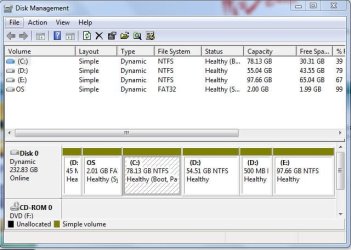
this picture not of exact my PC but both computer are same model. please check attach picture of disk mgmt.
 

Attachments

  • disk mgmt.JPG
    disk mgmt.JPG
    53.8 KB · Views: 175

My Computer My Computer

At a glance

Windows Seven 32Bit2.93GHz2GB
Computer Manufacturer/Model Number
Dell/GX380
OS
Windows Seven 32Bit
CPU
2.93GHz
Memory
2GB
Hard Drives
250Gb
Case
Tower
Unfortunately you have converted your HD to a Dynamic Disk, which was probably offered to you when you attempted to add a fourth partition. Dynamic Disks are meant to span partition on separate HD's, not on the same HD. It would be best to convert it back to Basic.

In order to extend C you will have to delete or Resize D to make space for C to expand.
 
Dear Sir,
Please tell me how to convert my HD dynamic to basic?
As mention in my picture, I create new partition with the help of shrink volume in drive D. after whole procedure I try to press extend volume in drive C but that was not enable? why
please give me my answer of 2 question.
 

My Computer My Computer

At a glance

Windows Seven 32Bit2.93GHz2GB
Computer Manufacturer/Model Number
Dell/GX380
OS
Windows Seven 32Bit
CPU
2.93GHz
Memory
2GB
Hard Drives
250Gb
Case
Tower
To non-destructively convert Dynamic Disk back to Basic use free Partition Wizard 4.2: click on Disk, then choose Convert Disk to Basic on Disk tab, click OK, then Apply.

This is only available free in PW v. 4..2 downloaded here: partition wizard 4.2 free.zip - Windows Live

Next rightclick D partition to Resize, slide left grey border to the right to make room to extend C, click OK.

Now Resize C, extend right border to right to take up space you made, OK, Apply all steps.

Always back up your files when doing a conversion or repartitioning.
 
Last edited:
OK thank you very much I will check & back to you
 

My Computer My Computer

At a glance

Windows Seven 32Bit2.93GHz2GB
Computer Manufacturer/Model Number
Dell/GX380
OS
Windows Seven 32Bit
CPU
2.93GHz
Memory
2GB
Hard Drives
250Gb
Case
Tower
Back
Top