How to install a W7 from DVD.iso files

keristop

New member
Local time
6:38 PM
Messages
9
Hi,
I tried to clone my System HDD on a new SSD, and it failed: my HDD has been restored to default system:mad:, and the SSD, although having received most of the data, is not bootable (seen by the Bios, but won't boot).
So I'll have to put the SSD Inside the laptop, and install W7 from scratch :confused:.


What I have (I don't have any installation CD or DVD) is:
  • 6 DVDn.iso files I've generated when I bought the PC (if I correctly remember), totalling 19GB
  • a recovery partition in my HDD (18.9GB out of 25GB)
  • on the SSD, I have a 200MB EFI partition, but the recovery partition is declared empty, and the C partition is not labelled as containing any boot. I suppose none of this will help.
How can I proceed, once I've swapped my internal HDD with the SSD ?
(sorry, it's in french! Sain = healthy, démarrer = boot, récupération = recovery, o = B)
 

Attachments
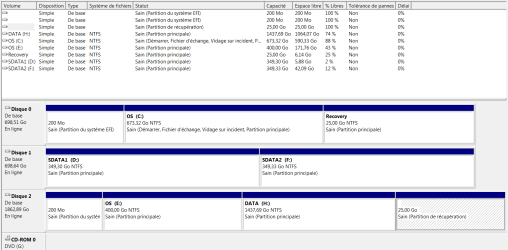
  • Etat disques 20190426.PNG
    Etat disques 20190426.PNG
    25.4 KB · Views: 1

My Computer My Computer

At a glance

Windows 7 64 Family8GB
Computer type
Laptop
Computer Manufacturer/Model Number
ASUS N76VZ
OS
Windows 7 64 Family
Memory
8GB
Hard Drives
2 HDD 750GB

My Computer My Computer

At a glance

Windows 7 64 Family8GB
Computer type
Laptop
Computer Manufacturer/Model Number
ASUS N76VZ
OS
Windows 7 64 Family
Memory
8GB
Hard Drives
2 HDD 750GB
What edition are you using. Pro, Home premium, etc?
 

My Computers My Computers

  • At a glance

    7 X64i5 84002x8gb 3200mhz
    Computer type
    PC/Desktop
    OS
    7 X64
    CPU
    i5 8400
    Motherboard
    gigabyte b365m ds3h
    Memory
    2x8gb 3200mhz
    Hard Drives
    various
    PSU
    pure power 11 400w cm
    Case
    Coolermaster
    Cooling
    cryorig m9i
  • At a glance

    7x64g54008gb ddr4 2400
    Computer type
    PC/Desktop
    OS
    7x64
    CPU
    g5400
    Motherboard
    ga b365m ds3h
    Memory
    8gb ddr4 2400
    PSU
    xfx pro 450w
In french they call it "Family", I suppose it would be Home Premium. 64bits for sure.
I suppose you are suggesting I download a brand new generic Windows, but wouldn't it be better to use the Windows that have been delivered with my laptop, which is stored in my recovery partition or in my DVDn.iso files ? I suppose this Windows has been twicked by Asus to be compatible with this laptop, no ?
The other aspect is that if I use a generic iso file, I may have problems to register the system, because of course I don't know at all my W7 license number.
 

My Computer My Computer

At a glance

Windows 7 64 Family8GB
Computer type
Laptop
Computer Manufacturer/Model Number
ASUS N76VZ
OS
Windows 7 64 Family
Memory
8GB
Hard Drives
2 HDD 750GB
You should have a COA key on a sticker somewhere on the machine.

You can try restoring fom the recovery image, but it may not restore to a different disk easily, you can use your COA key and

Win7_HomePrem_SP1_French_x64.iso

link only available for 24 hours.
 

My Computers My Computers

  • At a glance

    7 X64i5 84002x8gb 3200mhz
    Computer type
    PC/Desktop
    OS
    7 X64
    CPU
    i5 8400
    Motherboard
    gigabyte b365m ds3h
    Memory
    2x8gb 3200mhz
    Hard Drives
    various
    PSU
    pure power 11 400w cm
    Case
    Coolermaster
    Cooling
    cryorig m9i
  • At a glance

    7x64g54008gb ddr4 2400
    Computer type
    PC/Desktop
    OS
    7x64
    CPU
    g5400
    Motherboard
    ga b365m ds3h
    Memory
    8gb ddr4 2400
    PSU
    xfx pro 450w
Hi keristop,

The Product Key on a laptop it will either be on a sticker on the bottom, or in the battery compartment. If the sticker is too worn to read, or there isn't one, then you can retrieve it by either using Belarc Advisor or Magic Jelly Bean. Write this Product Key down and keep it in a safe place.

I hope this helps!
 

My Computer My Computer

At a glance

Win 7 HP SP1 64-bit Vista HB SP2 32-bit Linux...Intel(R) Pentium(R) CPU P6200 @ 2.13GHz4.00 GBIntel(R) Graphics Media Accelerator HD
Computer type
Laptop
Computer Manufacturer/Model Number
Fujitsu LIFEBOOK
OS
Win 7 HP SP1 64-bit Vista HB SP2 32-bit Linux Mint 18.3
CPU
Intel(R) Pentium(R) CPU P6200 @ 2.13GHz
Motherboard
FUJITSU FJNBB06
Memory
4.00 GB
Graphics Card(s)
Intel(R) Graphics Media Accelerator HD
Sound Card
[1] Realtek High Definition Audio [2] Intel(R) Display Audio
Screen Resolution
1366 x 768 x 32 bits (4294967296 colors) @ 59 Hz
Hard Drives
TOSHIBA MK5076GSX
Antivirus
AVG FREE

My Computers My Computers

  • At a glance

    7 X64i5 84002x8gb 3200mhz
    Computer type
    PC/Desktop
    OS
    7 X64
    CPU
    i5 8400
    Motherboard
    gigabyte b365m ds3h
    Memory
    2x8gb 3200mhz
    Hard Drives
    various
    PSU
    pure power 11 400w cm
    Case
    Coolermaster
    Cooling
    cryorig m9i
  • At a glance

    7x64g54008gb ddr4 2400
    Computer type
    PC/Desktop
    OS
    7x64
    CPU
    g5400
    Motherboard
    ga b365m ds3h
    Memory
    8gb ddr4 2400
    PSU
    xfx pro 450w
Hi keristop,

The Product Key on a laptop it will either be on a sticker on the bottom, or in the battery compartment. If the sticker is too worn to read, or there isn't one, then you can retrieve it by either using Belarc Advisor or Magic Jelly Bean. Write this Product Key down and keep it in a safe place.

I hope this helps!

Hi, thanks, I found the OA sticker Under the laptop with a 25 letters product key.
 

My Computer My Computer

At a glance

Windows 7 64 Family8GB
Computer type
Laptop
Computer Manufacturer/Model Number
ASUS N76VZ
OS
Windows 7 64 Family
Memory
8GB
Hard Drives
2 HDD 750GB
You should have a COA key on a sticker somewhere on the machine.
You can try restoring fom the recovery image, but it may not restore to a different disk easily, you can use your COA key and
Win7_HomePrem_SP1_French_x64.iso
link only available for 24 hours.

Thank you, I'll download this file.
Meanwhile, I'd prefer to try to restore from the recovery image that is on my former HDD. I thought it would be as simple as installing my SSD inside the laptop, booting on my former HDD via usb, and hoping that the system would offer me the choice of restoring a system partition on the SSD... Or alternately, try to boot on the SSD, and since it wouldn't work, the system would offer me to restore a system on it, hopefully giving me the choice of where to find a recovery partition (the one on the SSD being apparently empty)...
It would not be as simple as this ?
 

My Computer My Computer

At a glance

Windows 7 64 Family8GB
Computer type
Laptop
Computer Manufacturer/Model Number
ASUS N76VZ
OS
Windows 7 64 Family
Memory
8GB
Hard Drives
2 HDD 750GB
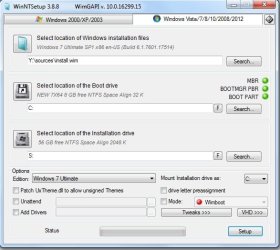
There will likely be a large file on your recovery partition called install.wim. It might Factory.wim, or it might be several .swm files. It is often in a folder called "Sources".

It is possible to restore those by using my boot media.

17514x64-v10.iso

In it you will find WinNtsetup.

Suggest you format the SSD first ( there are partition managers in the boot media).


Select Location of Windows Installation files:

Browse to the .wim/.swm file.

Edition:

Select the image from your recovery .wim or .swm in the dropdown.
If there is more than one image, select the biggest one.

Boot Drive is your ESP/System partition


Location of the Installation drive:

The partition you want to install windows onto


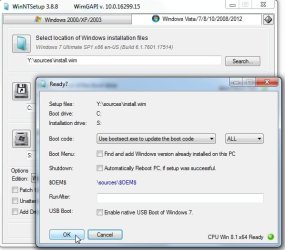
Some pics to give you the general idea ( bootsect is not used for efi installation - winntsetup knows that.)

winntsetup.jpg


Click Setup.


winntsetup2.jpg


Accept the defaults and Click OK.
 
Last edited:

My Computers My Computers

  • At a glance

    7 X64i5 84002x8gb 3200mhz
    Computer type
    PC/Desktop
    OS
    7 X64
    CPU
    i5 8400
    Motherboard
    gigabyte b365m ds3h
    Memory
    2x8gb 3200mhz
    Hard Drives
    various
    PSU
    pure power 11 400w cm
    Case
    Coolermaster
    Cooling
    cryorig m9i
  • At a glance

    7x64g54008gb ddr4 2400
    Computer type
    PC/Desktop
    OS
    7x64
    CPU
    g5400
    Motherboard
    ga b365m ds3h
    Memory
    8gb ddr4 2400
    PSU
    xfx pro 450w
There will likely be a large file on your recovery partition called install.wim. It might Factory.wim, or it might be several .swm files. It is often in a folder called "Sources".

It is possible to restore those by using my boot media.

...

Hey thanks, that will probably help me...
But before: here is what happened meanwhile... I (finally) succeeded in generating a repair CD, so I put my SSD inside the laptop, and waited to see what happens... I started the laptop, entered the boot menu (esc esc...), chose the SSD to boot on...

--> AND IT WORKED !!! All that fuss for (almost) nothing !

So the situation is now:

  • The SSD is booting correctly using the boot choice menu, and I can see all my data as before (although 50GB are missing somewhere in C:)
  • The SSD cannot boot if I start directly without going in the boot choice menu: as it did before when I tried to boot on the SSD through USB, I see a very short blue screen at one point (20ms long!); by trying that several time, I could read in the first lines : "... for the first time..." I guess there is something to change somewhere to get rid of this problem...
  • The other bad point is that the SSD recovery partition is (still) empty: I'll have to find a way to put something in it (I've read somewhere I can copy the content of my HDD recovery partition on it ? I can access the HDD recovery partition, but not the SSD recovery partition, I don't even see it in the explorer...) Maybe WinNtsetup can do that ?
The HDD recovery partition contains: 3 .wim files, the biggest being Driver64.wim (3GB), the others AsKit.wim and AsKit64.wim. The source directory is empty. The biggest files are 5 asus?.SWM about 4GB each, on the root, probably the ones you mentionned.
 

My Computer My Computer

At a glance

Windows 7 64 Family8GB
Computer type
Laptop
Computer Manufacturer/Model Number
ASUS N76VZ
OS
Windows 7 64 Family
Memory
8GB
Hard Drives
2 HDD 750GB
hmm... when I unplug my HDD on usb, Windows can boot on the SSD directly (just tried once)... So it would be related to something I read, like there is a conflict between the 2 disks, because one being the image of the other they share the same ... the same what ?
 

My Computer My Computer

At a glance

Windows 7 64 Family8GB
Computer type
Laptop
Computer Manufacturer/Model Number
ASUS N76VZ
OS
Windows 7 64 Family
Memory
8GB
Hard Drives
2 HDD 750GB
When you clone a disk to another, both C: disk partitions has the same ID.
The boot loader on the Efi Fat32 partition will look for that partition ID. If it finds two disks partitions with same ID, it doesn't know witch one to boot from.
I suspect that you didn't clone it well, as the SSD doesn't have the Recovery partition and it didn't set the ID on the SSD properly.
When it finish cloning it ask to reboot. Did you reboot immediately after the clone?
 
Last edited:

My Computers My Computers

  • At a glance

    Windows 7 HP 64i5 6600K - 800MHz to 4200MHz4+4G GSkill DDR4 3000IG - Intel 530
    Computer type
    PC/Desktop
    Computer Manufacturer/Model Number
    custom build
    OS
    Windows 7 HP 64
    CPU
    i5 6600K - 800MHz to 4200MHz
    Motherboard
    GA-Z170-HD3P
    Memory
    4+4G GSkill DDR4 3000
    Graphics Card(s)
    IG - Intel 530
    Monitor(s) Displays
    Samsung 226BW
    Screen Resolution
    1680x1050
    Hard Drives
    (1) -1 SM951 – 128GB M.2 AHCI PCIe SSD drive for Windows 7 and Lubuntu
    (2) -1 WD SATA 3 - 1T for Data
    (3) -1 WD SATA 3 - 1T for backup
    PSU
    Thermaltake 450W TR2 gold
    Keyboard
    Old and good Chicony mechanical keyboard
    Mouse
    Logitech mX performance - 9 buttons (had to disable some)
    Internet Speed
    500Mb/s
    Browser
    Firefox 64
    Other Info
    TinyWall firewall
  • At a glance

    Windows 7 Proi7-4500U 800MHz to 3.0GHz(4+4)G DDR3 1600IG intel 4400 + NVIDIA GeForce GT 745M
    Computer type
    Laptop
    System Manufacturer/Model Number
    Asus Q550LF
    OS
    Windows 7 Pro
    CPU
    i7-4500U 800MHz to 3.0GHz
    Motherboard
    Asus Q550LF
    Memory
    (4+4)G DDR3 1600
    Graphics Card(s)
    IG intel 4400 + NVIDIA GeForce GT 745M
    Sound Card
    Realtek
    Monitor(s) Displays
    LG Display LP156WF4-SPH1
    Screen Resolution
    1920 x 1080
    Hard Drives
    BX500 120G SSD for Windows and programs +
    1T HDD for data
    Internet Speed
    500 Mb/s
    Browser
    Firefox
    Other Info
    TinyWall firewall
When you clone a disk to another, both disks has the same ID.
The boot loader on the Efi Fat32 partition will look for that partition. If it finds two disks with same ID, it doesn't know witch one to boot from.
I suspect that you didn't clone it well, as the SSD doesn't have the Recovery partition and it didn't set the ID on the SSD properly.
When it finish cloning it ask to reboot. Did you reboot immediately after the clone?
Thanks, that's exactly what happened: at some point, before it was fully finished (it said it remained 2h of copy...) the Acronis cloning sw asked to reboot, which I did, but then the boot got confused and proposed to reinstall Windows, and as we sometimes do, knowing I was doing something stupid, I clicked on yes...
So clearly, something got wrong, but not all is my fault!, the boot should never have proposed to reinstall Windows, especially on the source disk that was perfect !
What is strange also is that the SSD is yet bootable...

The question is then:

  • how can I correctly set the Id of the disk (of one of the 2 disks that are identical: the SSD and the HDD, I would like to be able to boot on it also) ?
  • Another question is: how do I restore the recovery partition ?
 

My Computer My Computer

At a glance

Windows 7 64 Family8GB
Computer type
Laptop
Computer Manufacturer/Model Number
ASUS N76VZ
OS
Windows 7 64 Family
Memory
8GB
Hard Drives
2 HDD 750GB
- How can I correctly set the Id of the disk (of one of the 2 disks that are identical: the SSD and the HDD, I would like to be able to boot on it also) ?

Detach the HDD leaving on only the SSD.
Boot from a Win 7 installation disk and do a startup repair. It will correct the Disk ID.
To build a boot able USB:
As you have a UEFI BIOS, just extract the Win7 x64 iso (SIW2 gave you the link to download it), rename \sources\ei.cfg to ei.cfg.org and copy the boot folder (attached) to \efi
Boot.zip
391487d1473287656-windows-7-installer-stuck-setup-starting-efi.jpg


- How do I restore the recovery partition ?
First delete the Restore partition that is empty on the SSD.
On the 25G RAW space you have two options.
- Use Acronis to copy the Recovery partition from the HDD to the SSD.
- Do it yourself:
- Create a NTFS partition (Use disk manager) on the RAW space of the SSD and assign a letter to it and name it Recovery.
- Assign a letter to the Recovery partition of the HDD (Use disk manager).
- Copy all files and folders from Recovery partition of the HDD to the Recovery partition of the SSD.
- Remove the drive letters from both Recovery partitions (Use disk manager).
 

My Computers My Computers

  • At a glance

    Windows 7 HP 64i5 6600K - 800MHz to 4200MHz4+4G GSkill DDR4 3000IG - Intel 530
    Computer type
    PC/Desktop
    Computer Manufacturer/Model Number
    custom build
    OS
    Windows 7 HP 64
    CPU
    i5 6600K - 800MHz to 4200MHz
    Motherboard
    GA-Z170-HD3P
    Memory
    4+4G GSkill DDR4 3000
    Graphics Card(s)
    IG - Intel 530
    Monitor(s) Displays
    Samsung 226BW
    Screen Resolution
    1680x1050
    Hard Drives
    (1) -1 SM951 – 128GB M.2 AHCI PCIe SSD drive for Windows 7 and Lubuntu
    (2) -1 WD SATA 3 - 1T for Data
    (3) -1 WD SATA 3 - 1T for backup
    PSU
    Thermaltake 450W TR2 gold
    Keyboard
    Old and good Chicony mechanical keyboard
    Mouse
    Logitech mX performance - 9 buttons (had to disable some)
    Internet Speed
    500Mb/s
    Browser
    Firefox 64
    Other Info
    TinyWall firewall
  • At a glance

    Windows 7 Proi7-4500U 800MHz to 3.0GHz(4+4)G DDR3 1600IG intel 4400 + NVIDIA GeForce GT 745M
    Computer type
    Laptop
    System Manufacturer/Model Number
    Asus Q550LF
    OS
    Windows 7 Pro
    CPU
    i7-4500U 800MHz to 3.0GHz
    Motherboard
    Asus Q550LF
    Memory
    (4+4)G DDR3 1600
    Graphics Card(s)
    IG intel 4400 + NVIDIA GeForce GT 745M
    Sound Card
    Realtek
    Monitor(s) Displays
    LG Display LP156WF4-SPH1
    Screen Resolution
    1920 x 1080
    Hard Drives
    BX500 120G SSD for Windows and programs +
    1T HDD for data
    Internet Speed
    500 Mb/s
    Browser
    Firefox
    Other Info
    TinyWall firewall
Detach the HDD leaving on only the SSD.
Boot from a Win 7 installation disk and do a startup repair. It will correct the Disk ID.
Hmmm so I have to be confident on what the repair will do... I suppose I should first save an image of the disk...
Questions:
- if the only problem is that the SSD and the HDD have the same Id, if I detach the HDD, how the repair will know that there is a pb on the SSD Id ?
- can I use a Repair disk (I have one) instead of an Installation Disk (that I don't have) ? (Well ok I can build a bootable usb key... I probably have an old usb key that I don't use any more)

- How do I restore the recovery partition ?
First delete the Restore partition that is empty on the SSD.
On the 25G RAW space you have two options.
- Use Acronis to copy the Recovery partition from the HDD to the SSD.
- Do it yourself:
- Create a NTFS partition (Use disk manager) on the RAW space of the SSD and assign a letter to it and name it Recovery.
- Assign a letter to the Recovery partition of the HDD (Use disk manager).
- Copy all files and folders from Recovery partition of the HDD to the Recovery partition of the SSD.
- Remove the drive letters from both Recovery partitions (Use disk manager).
Thanks, that's so clear and simple, I'm confused not having been able to find that on the web...
 

My Computer My Computer

At a glance

Windows 7 64 Family8GB
Computer type
Laptop
Computer Manufacturer/Model Number
ASUS N76VZ
OS
Windows 7 64 Family
Memory
8GB
Hard Drives
2 HDD 750GB
On a UEFI disk, the Boot loader is on the Fat32 partition and it will look for a partition ID on the disk that has windows. It will find the ID on the HDD partition, not on the SSD partition that has a different partition ID.
When you do a startup repair with only the SSD attached, it will correct the Boot loader with the SSD partition ID that has windows.
Never had any problems with startup repair but it is always good to have a disk image backup.
 

My Computers My Computers

  • At a glance

    Windows 7 HP 64i5 6600K - 800MHz to 4200MHz4+4G GSkill DDR4 3000IG - Intel 530
    Computer type
    PC/Desktop
    Computer Manufacturer/Model Number
    custom build
    OS
    Windows 7 HP 64
    CPU
    i5 6600K - 800MHz to 4200MHz
    Motherboard
    GA-Z170-HD3P
    Memory
    4+4G GSkill DDR4 3000
    Graphics Card(s)
    IG - Intel 530
    Monitor(s) Displays
    Samsung 226BW
    Screen Resolution
    1680x1050
    Hard Drives
    (1) -1 SM951 – 128GB M.2 AHCI PCIe SSD drive for Windows 7 and Lubuntu
    (2) -1 WD SATA 3 - 1T for Data
    (3) -1 WD SATA 3 - 1T for backup
    PSU
    Thermaltake 450W TR2 gold
    Keyboard
    Old and good Chicony mechanical keyboard
    Mouse
    Logitech mX performance - 9 buttons (had to disable some)
    Internet Speed
    500Mb/s
    Browser
    Firefox 64
    Other Info
    TinyWall firewall
  • At a glance

    Windows 7 Proi7-4500U 800MHz to 3.0GHz(4+4)G DDR3 1600IG intel 4400 + NVIDIA GeForce GT 745M
    Computer type
    Laptop
    System Manufacturer/Model Number
    Asus Q550LF
    OS
    Windows 7 Pro
    CPU
    i7-4500U 800MHz to 3.0GHz
    Motherboard
    Asus Q550LF
    Memory
    (4+4)G DDR3 1600
    Graphics Card(s)
    IG intel 4400 + NVIDIA GeForce GT 745M
    Sound Card
    Realtek
    Monitor(s) Displays
    LG Display LP156WF4-SPH1
    Screen Resolution
    1920 x 1080
    Hard Drives
    BX500 120G SSD for Windows and programs +
    1T HDD for data
    Internet Speed
    500 Mb/s
    Browser
    Firefox
    Other Info
    TinyWall firewall
Another way is to use this:

HERE

AND HERE


I have issue with the install, too. The laptop skips the Win 7 install usb and goes to desktop directly even I set USB as the first boot device
 
Last edited:

My Computer My Computer

At a glance

7i58G
Computer type
PC/Desktop
OS
7
CPU
i5
Motherboard
Asus B150
Memory
8G
Hard Drives
256 SSD
Welcome to the Forum Stasy.

Please edit your profile with ALL your hardware specs. It will help us to help you.

How did you created the Usb with the Win 7 installation files?
Does your computer has a Legacy or UEFI BIOS?
 

My Computers My Computers

  • At a glance

    Windows 7 HP 64i5 6600K - 800MHz to 4200MHz4+4G GSkill DDR4 3000IG - Intel 530
    Computer type
    PC/Desktop
    Computer Manufacturer/Model Number
    custom build
    OS
    Windows 7 HP 64
    CPU
    i5 6600K - 800MHz to 4200MHz
    Motherboard
    GA-Z170-HD3P
    Memory
    4+4G GSkill DDR4 3000
    Graphics Card(s)
    IG - Intel 530
    Monitor(s) Displays
    Samsung 226BW
    Screen Resolution
    1680x1050
    Hard Drives
    (1) -1 SM951 – 128GB M.2 AHCI PCIe SSD drive for Windows 7 and Lubuntu
    (2) -1 WD SATA 3 - 1T for Data
    (3) -1 WD SATA 3 - 1T for backup
    PSU
    Thermaltake 450W TR2 gold
    Keyboard
    Old and good Chicony mechanical keyboard
    Mouse
    Logitech mX performance - 9 buttons (had to disable some)
    Internet Speed
    500Mb/s
    Browser
    Firefox 64
    Other Info
    TinyWall firewall
  • At a glance

    Windows 7 Proi7-4500U 800MHz to 3.0GHz(4+4)G DDR3 1600IG intel 4400 + NVIDIA GeForce GT 745M
    Computer type
    Laptop
    System Manufacturer/Model Number
    Asus Q550LF
    OS
    Windows 7 Pro
    CPU
    i7-4500U 800MHz to 3.0GHz
    Motherboard
    Asus Q550LF
    Memory
    (4+4)G DDR3 1600
    Graphics Card(s)
    IG intel 4400 + NVIDIA GeForce GT 745M
    Sound Card
    Realtek
    Monitor(s) Displays
    LG Display LP156WF4-SPH1
    Screen Resolution
    1920 x 1080
    Hard Drives
    BX500 120G SSD for Windows and programs +
    1T HDD for data
    Internet Speed
    500 Mb/s
    Browser
    Firefox
    Other Info
    TinyWall firewall
Welcome to the Forum Stasy.

Please edit your profile with ALL your hardware specs. It will help us to help you.

How did you created the Usb with the Win 7 installation files?
Does your computer has a Legacy or UEFI BIOS?

Hardware specs updated.

p.s I am using Windows USB/DVD Download Tool
 

My Computer My Computer

At a glance

7i58G
Computer type
PC/Desktop
OS
7
CPU
i5
Motherboard
Asus B150
Memory
8G
Hard Drives
256 SSD
Back
Top