
How to install drivers using Windows Recovery "Load Drivers" option.

Ok, thx for the input guys!

For now I just removed GPU, uninstalled its drivers and everything is working fine, so I'll leave it as it is till tomorrow, since I have to get some work done. Tomorrow morning I'll make a brand new clean. barebones install including all those tips here and go from there.

Is there a way to test that power supply in a meantime?
 

My Computer My Computer

At a glance

Windows 7 Home Premium x64Intel Core i5-2310 2.9GHz (BX80623I52310)Kingston HyperX 4GB DDR3-1333 Non-ECC CL9 Red...Gigabyte GeForce GTX 560 1GB (not working pro...
OS
Windows 7 Home Premium x64
CPU
Intel Core i5-2310 2.9GHz (BX80623I52310)
Motherboard
Asus P8H61-M LX2/SI
Memory
Kingston HyperX 4GB DDR3-1333 Non-ECC CL9 Red (KHX1333C9D3B1
Graphics Card(s)
Gigabyte GeForce GTX 560 1GB (not working properly)
Monitor(s) Displays
NEC LCD19WV *2
Screen Resolution
1440x900 *2
Hard Drives
SSD: Crucial MX100 256GB (system)
HDD : WD 500GB 7200 16MB
PSU
Builder Series™ CX600 V2 — 80 PLUS® Certified Po
Antivirus
Microsoft Security Essentials and Malwarebytes Anti-Malware
Browser
Mozzilla Firefox and Google Chrome
Other Info
Atm single monitor plugged into motherboard due to video card causing BSODs
Ok, I got that new, clean install. Those 2 1st drivers, then all the Windows Updates and then Firefox. That's it. No errors to speak of so far, but I'm yet to plug in that GPU. And GPU problems started before that MoBo mess, so I don't have high hopes that it will solve everything.

Should i just go with newest drivers for GPU or rather go for some specific ones? Known for their stability, for example.

Not sure what to do about the PSU - would prefer to check if it is indeed the issue, before replacing it (due to both cost and all the ****ing cables). Are there some kind of tests or should I try to just get a certified PSU, plug it in a see how it goes?
 

My Computer My Computer

At a glance

Windows 7 Home Premium x64Intel Core i5-2310 2.9GHz (BX80623I52310)Kingston HyperX 4GB DDR3-1333 Non-ECC CL9 Red...Gigabyte GeForce GTX 560 1GB (not working pro...
OS
Windows 7 Home Premium x64
CPU
Intel Core i5-2310 2.9GHz (BX80623I52310)
Motherboard
Asus P8H61-M LX2/SI
Memory
Kingston HyperX 4GB DDR3-1333 Non-ECC CL9 Red (KHX1333C9D3B1
Graphics Card(s)
Gigabyte GeForce GTX 560 1GB (not working properly)
Monitor(s) Displays
NEC LCD19WV *2
Screen Resolution
1440x900 *2
Hard Drives
SSD: Crucial MX100 256GB (system)
HDD : WD 500GB 7200 16MB
PSU
Builder Series™ CX600 V2 — 80 PLUS® Certified Po
Antivirus
Microsoft Security Essentials and Malwarebytes Anti-Malware
Browser
Mozzilla Firefox and Google Chrome
Other Info
Atm single monitor plugged into motherboard due to video card causing BSODs
Run the system for a day or so and test stability, then add the graphics card. Boot into BIOS and check your voltages on the 3.3V, 5V and 12V and report back with the voltages.
 

My Computer My Computer

At a glance

W7 Pro x64 SP1 | W10 Pro IP x64 | W8.1 Pro x6...i7-4790k @ 4GHz (4.4GHz Boost)16GB DDR3 Kingston HyperX Fury @ 1600MHz CL 9...EVGA GTX 980 Classified
Computer type
PC/Desktop
Computer Manufacturer/Model Number
Custom Build
OS
W7 Pro x64 SP1 | W10 Pro IP x64 | W8.1 Pro x64 VM | Linux Mint VM
CPU
i7-4790k @ 4GHz (4.4GHz Boost)
Motherboard
ASUS Sabertooth Z87 (BIOS Rev 2004)
Memory
16GB DDR3 Kingston HyperX Fury @ 1600MHz CL 9-9-9-27
Graphics Card(s)
EVGA GTX 980 Classified
Sound Card
Realtek Onboard
Monitor(s) Displays
Samsung S27D390
Screen Resolution
1920 x 1080
Hard Drives
240GB Intel 520 Series SSD |
Samsung 850 EVO 120GB SSD |
2TB WD Caviar Black |
2TB WD Caviar Green
PSU
Corsair HX850-80 Gold Modular
Case
Cooler Master Silencio 650
Cooling
Corsair H80i w/2 x Corsair SP120 | 2 x 120mm Noctua NF-S12B
Keyboard
Microsoft Sidewinder X4
Mouse
Gigabyte M6900 optical
Internet Speed
152mb
Antivirus
F-Secure
Browser
Firefox 38.0
Other Info
Backup Rig: Win 7 Pro 64-bit | AMD A10-5800k | ASUS F2A85-V Pro | 8GB Samsung DDR3 @1600MHz | 120GB Toshiba SDD | 2TB Seagate HDD | Cooler Master Silencio 550
Personally I wouldn't use that power supply period. Corsair or Seasonic is my choices.

Keep in mind a power supply can be erratic. Work great one time and then not work properly the next time. That is why you pick known quality brand names.

A power supply can go bad or erratic and nothing in the computer works properly.
Or a power supply can go bad and destroy the complete computer. Every thing in the computer a wire hooks to.

In the last year or so I use Nvidia drivers that come from Windows 7 updates and they work just fine on my computers.

You can always update the drivers from the manufacturer at a later date when you have your system working properly.

Getting drivers from Windows 7 Updates have their plus and minus.

The minus is they will be a little older than the manufacturer drivers.

The plus is drivers have been checked to work with the video card by the manufacturer and Microsoft verifies that plus Microsoft verifies it works well with Windows 7.
 

My Computer My Computer

At a glance

Windows 10 Pro. 64/ version 1709 Windows 7 Pr...Intel i7-6800K @ 4.3Corsair Platinum 16 gig @2400EVGA GTX 1070 OC
Computer type
PC/Desktop
Computer Manufacturer/Model Number
Home made Desktop
OS
Windows 10 Pro. 64/ version 1709 Windows 7 Pro/64
CPU
Intel i7-6800K @ 4.3
Motherboard
ASUS X-99 Deluxe II
Memory
Corsair Platinum 16 gig @2400
Graphics Card(s)
EVGA GTX 1070 OC
Monitor(s) Displays
Asus 27" LED LCD/VE278Q
Screen Resolution
1920-1080 or 1280-720 HDMI
Hard Drives
INTEL SSD 730-240 Gb Sata 3.0/
PSU
EVGA Platium 1200W
Case
Phanteks Luxe Tempered Glass 8 fans/ one radiator
Cooling
XSPC/ Water Cooled CPU
Keyboard
Das 4 Professional
Mouse
Logitech M705/MX Anywhere 2-S
Internet Speed
100 mbits
Antivirus
Microsoft Security Essentials/ Malwarebytes Premium 3.0/ SAS
Browser
I.E. 11 default/Firefox/ ISP Time Warner Cable/Spectrum
Other Info
LG BluRay Burner/
Sound system-KLipsch-THX/
Icy Dock ssd Hot Swap bays.
I'd have to second Jack's recommendation about the PSU to be honest.
 

My Computer My Computer

At a glance

W7 Pro x64 SP1 | W10 Pro IP x64 | W8.1 Pro x6...i7-4790k @ 4GHz (4.4GHz Boost)16GB DDR3 Kingston HyperX Fury @ 1600MHz CL 9...EVGA GTX 980 Classified
Computer type
PC/Desktop
Computer Manufacturer/Model Number
Custom Build
OS
W7 Pro x64 SP1 | W10 Pro IP x64 | W8.1 Pro x64 VM | Linux Mint VM
CPU
i7-4790k @ 4GHz (4.4GHz Boost)
Motherboard
ASUS Sabertooth Z87 (BIOS Rev 2004)
Memory
16GB DDR3 Kingston HyperX Fury @ 1600MHz CL 9-9-9-27
Graphics Card(s)
EVGA GTX 980 Classified
Sound Card
Realtek Onboard
Monitor(s) Displays
Samsung S27D390
Screen Resolution
1920 x 1080
Hard Drives
240GB Intel 520 Series SSD |
Samsung 850 EVO 120GB SSD |
2TB WD Caviar Black |
2TB WD Caviar Green
PSU
Corsair HX850-80 Gold Modular
Case
Cooler Master Silencio 650
Cooling
Corsair H80i w/2 x Corsair SP120 | 2 x 120mm Noctua NF-S12B
Keyboard
Microsoft Sidewinder X4
Mouse
Gigabyte M6900 optical
Internet Speed
152mb
Antivirus
F-Secure
Browser
Firefox 38.0
Other Info
Backup Rig: Win 7 Pro 64-bit | AMD A10-5800k | ASUS F2A85-V Pro | 8GB Samsung DDR3 @1600MHz | 120GB Toshiba SDD | 2TB Seagate HDD | Cooler Master Silencio 550
Damn, I'm on a bit of a tight budget atm and while I'll definitely replace it outright if it shows a sign of being unstable, I'd rather wait, in case my issues atm are are solely caused by GPU. Buying both quality PSU and GPU atm would hurt my wallet significantly. First things first. I googled that PSU and it was apparently a decently popular mid-tier PSU around here at the time. Not a great one, but not a timebomb-tier either.

That being said, are there specific models you guys would suggest? And assuming I may need to replace my GPU, upgreading it a bit - would 500W be enough or should I aim higher?

After all I can order one online and if it happens to not help I'd have 2 weeks for returning it.

For now I'll just leave system till tomorrow and keep HWMonitor open all day, since it records Min and Max Voltage encountered, so I guess it could help in noticing anything funny, right?
 

My Computer My Computer

At a glance

Windows 7 Home Premium x64Intel Core i5-2310 2.9GHz (BX80623I52310)Kingston HyperX 4GB DDR3-1333 Non-ECC CL9 Red...Gigabyte GeForce GTX 560 1GB (not working pro...
OS
Windows 7 Home Premium x64
CPU
Intel Core i5-2310 2.9GHz (BX80623I52310)
Motherboard
Asus P8H61-M LX2/SI
Memory
Kingston HyperX 4GB DDR3-1333 Non-ECC CL9 Red (KHX1333C9D3B1
Graphics Card(s)
Gigabyte GeForce GTX 560 1GB (not working properly)
Monitor(s) Displays
NEC LCD19WV *2
Screen Resolution
1440x900 *2
Hard Drives
SSD: Crucial MX100 256GB (system)
HDD : WD 500GB 7200 16MB
PSU
Builder Series™ CX600 V2 — 80 PLUS® Certified Po
Antivirus
Microsoft Security Essentials and Malwarebytes Anti-Malware
Browser
Mozzilla Firefox and Google Chrome
Other Info
Atm single monitor plugged into motherboard due to video card causing BSODs
I always recommend Corsair PSUs as they're all I use, but Seasonic (both previously mentioned by Jack) are solid PSUs too. The GPU may not be the problem if the power supply wasn't man enough, it could have been that it was just being blamed when an unstable power supply was the real problem.
 

My Computer My Computer

At a glance

W7 Pro x64 SP1 | W10 Pro IP x64 | W8.1 Pro x6...i7-4790k @ 4GHz (4.4GHz Boost)16GB DDR3 Kingston HyperX Fury @ 1600MHz CL 9...EVGA GTX 980 Classified
Computer type
PC/Desktop
Computer Manufacturer/Model Number
Custom Build
OS
W7 Pro x64 SP1 | W10 Pro IP x64 | W8.1 Pro x64 VM | Linux Mint VM
CPU
i7-4790k @ 4GHz (4.4GHz Boost)
Motherboard
ASUS Sabertooth Z87 (BIOS Rev 2004)
Memory
16GB DDR3 Kingston HyperX Fury @ 1600MHz CL 9-9-9-27
Graphics Card(s)
EVGA GTX 980 Classified
Sound Card
Realtek Onboard
Monitor(s) Displays
Samsung S27D390
Screen Resolution
1920 x 1080
Hard Drives
240GB Intel 520 Series SSD |
Samsung 850 EVO 120GB SSD |
2TB WD Caviar Black |
2TB WD Caviar Green
PSU
Corsair HX850-80 Gold Modular
Case
Cooler Master Silencio 650
Cooling
Corsair H80i w/2 x Corsair SP120 | 2 x 120mm Noctua NF-S12B
Keyboard
Microsoft Sidewinder X4
Mouse
Gigabyte M6900 optical
Internet Speed
152mb
Antivirus
F-Secure
Browser
Firefox 38.0
Other Info
Backup Rig: Win 7 Pro 64-bit | AMD A10-5800k | ASUS F2A85-V Pro | 8GB Samsung DDR3 @1600MHz | 120GB Toshiba SDD | 2TB Seagate HDD | Cooler Master Silencio 550
Yeah, yeah, I'm totally sold on whole Corsair thing, but will for example VS 550W Corsair be decent enough or you had something like gold certified RM in mind?
 

My Computer My Computer

At a glance

Windows 7 Home Premium x64Intel Core i5-2310 2.9GHz (BX80623I52310)Kingston HyperX 4GB DDR3-1333 Non-ECC CL9 Red...Gigabyte GeForce GTX 560 1GB (not working pro...
OS
Windows 7 Home Premium x64
CPU
Intel Core i5-2310 2.9GHz (BX80623I52310)
Motherboard
Asus P8H61-M LX2/SI
Memory
Kingston HyperX 4GB DDR3-1333 Non-ECC CL9 Red (KHX1333C9D3B1
Graphics Card(s)
Gigabyte GeForce GTX 560 1GB (not working properly)
Monitor(s) Displays
NEC LCD19WV *2
Screen Resolution
1440x900 *2
Hard Drives
SSD: Crucial MX100 256GB (system)
HDD : WD 500GB 7200 16MB
PSU
Builder Series™ CX600 V2 — 80 PLUS® Certified Po
Antivirus
Microsoft Security Essentials and Malwarebytes Anti-Malware
Browser
Mozzilla Firefox and Google Chrome
Other Info
Atm single monitor plugged into motherboard due to video card causing BSODs
Your video card requires this
450 WMinimum System Power Requirement
A Corsair 550W gold should work just fine.

Do a little shopping. Sometime you will find a higher wattage Corsair for less money. Just because they are on sale. You can't have a power supply with to many watts.
 

My Computer My Computer

At a glance

Windows 10 Pro. 64/ version 1709 Windows 7 Pr...Intel i7-6800K @ 4.3Corsair Platinum 16 gig @2400EVGA GTX 1070 OC
Computer type
PC/Desktop
Computer Manufacturer/Model Number
Home made Desktop
OS
Windows 10 Pro. 64/ version 1709 Windows 7 Pro/64
CPU
Intel i7-6800K @ 4.3
Motherboard
ASUS X-99 Deluxe II
Memory
Corsair Platinum 16 gig @2400
Graphics Card(s)
EVGA GTX 1070 OC
Monitor(s) Displays
Asus 27" LED LCD/VE278Q
Screen Resolution
1920-1080 or 1280-720 HDMI
Hard Drives
INTEL SSD 730-240 Gb Sata 3.0/
PSU
EVGA Platium 1200W
Case
Phanteks Luxe Tempered Glass 8 fans/ one radiator
Cooling
XSPC/ Water Cooled CPU
Keyboard
Das 4 Professional
Mouse
Logitech M705/MX Anywhere 2-S
Internet Speed
100 mbits
Antivirus
Microsoft Security Essentials/ Malwarebytes Premium 3.0/ SAS
Browser
I.E. 11 default/Firefox/ ISP Time Warner Cable/Spectrum
Other Info
LG BluRay Burner/
Sound system-KLipsch-THX/
Icy Dock ssd Hot Swap bays.
Ok, I guess I'll order one tomorrow.

I still watched voltages in BIOS for ~15 minutes:

CPU Voltage: 1.088V (jumps to 1.080 occasionally)

3.3V:
3.312V (jumps to 3.296 every several seconds)

5V: 4.480V (hasn't changed once)

12V: 12.288V (hasn't changed once)

On the other hand SpeedFan 4.51 shows +12V at either 6.71V or 6.76V. Either one value or another for ~7 hours with 6.76V being more or less constant and occasional changes to 6.71V only when I'm actually using the PC.


And I have a HWMonitor screenshot with 7-ish hours of data. Let me know if there is anything interesting here:
CBZFhQl.jpg
 
Last edited:

My Computer My Computer

At a glance

Windows 7 Home Premium x64Intel Core i5-2310 2.9GHz (BX80623I52310)Kingston HyperX 4GB DDR3-1333 Non-ECC CL9 Red...Gigabyte GeForce GTX 560 1GB (not working pro...
OS
Windows 7 Home Premium x64
CPU
Intel Core i5-2310 2.9GHz (BX80623I52310)
Motherboard
Asus P8H61-M LX2/SI
Memory
Kingston HyperX 4GB DDR3-1333 Non-ECC CL9 Red (KHX1333C9D3B1
Graphics Card(s)
Gigabyte GeForce GTX 560 1GB (not working properly)
Monitor(s) Displays
NEC LCD19WV *2
Screen Resolution
1440x900 *2
Hard Drives
SSD: Crucial MX100 256GB (system)
HDD : WD 500GB 7200 16MB
PSU
Builder Series™ CX600 V2 — 80 PLUS® Certified Po
Antivirus
Microsoft Security Essentials and Malwarebytes Anti-Malware
Browser
Mozzilla Firefox and Google Chrome
Other Info
Atm single monitor plugged into motherboard due to video card causing BSODs
Trust your BIOS voltages over everything else, software readouts aren't that trustworthy. Your 5v rail looks low and is pretty suspect in my opinion.
 

My Computer My Computer

At a glance

W7 Pro x64 SP1 | W10 Pro IP x64 | W8.1 Pro x6...i7-4790k @ 4GHz (4.4GHz Boost)16GB DDR3 Kingston HyperX Fury @ 1600MHz CL 9...EVGA GTX 980 Classified
Computer type
PC/Desktop
Computer Manufacturer/Model Number
Custom Build
OS
W7 Pro x64 SP1 | W10 Pro IP x64 | W8.1 Pro x64 VM | Linux Mint VM
CPU
i7-4790k @ 4GHz (4.4GHz Boost)
Motherboard
ASUS Sabertooth Z87 (BIOS Rev 2004)
Memory
16GB DDR3 Kingston HyperX Fury @ 1600MHz CL 9-9-9-27
Graphics Card(s)
EVGA GTX 980 Classified
Sound Card
Realtek Onboard
Monitor(s) Displays
Samsung S27D390
Screen Resolution
1920 x 1080
Hard Drives
240GB Intel 520 Series SSD |
Samsung 850 EVO 120GB SSD |
2TB WD Caviar Black |
2TB WD Caviar Green
PSU
Corsair HX850-80 Gold Modular
Case
Cooler Master Silencio 650
Cooling
Corsair H80i w/2 x Corsair SP120 | 2 x 120mm Noctua NF-S12B
Keyboard
Microsoft Sidewinder X4
Mouse
Gigabyte M6900 optical
Internet Speed
152mb
Antivirus
F-Secure
Browser
Firefox 38.0
Other Info
Backup Rig: Win 7 Pro 64-bit | AMD A10-5800k | ASUS F2A85-V Pro | 8GB Samsung DDR3 @1600MHz | 120GB Toshiba SDD | 2TB Seagate HDD | Cooler Master Silencio 550
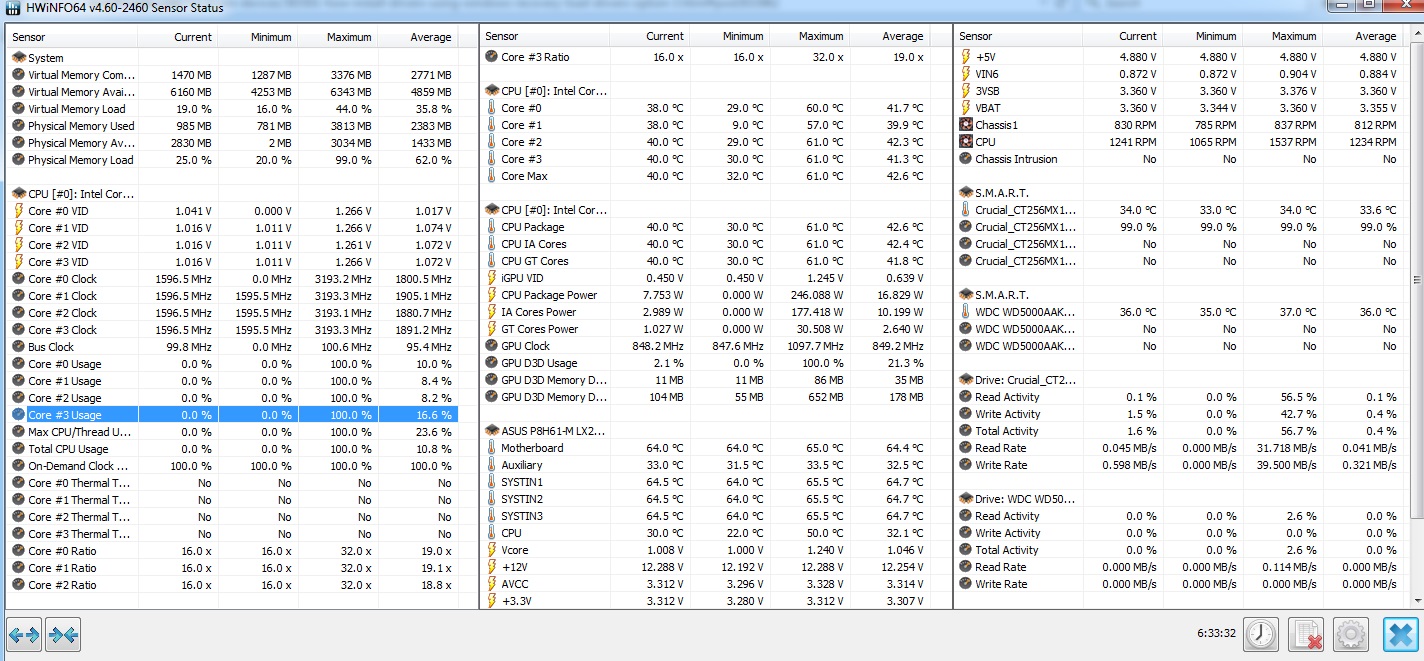
Ok. I found another software, that was giving reading in line with what BIOS showed (HWiNFO64) and ran it for a few hours, before testing the GPU once again.
 
1oIjV5R.jpg


GPU crashed in similar manner the 1st time, and the second it was dieing a bit slower so I turned the PC off to not press my luck. I logged both situations in HWiNFO but also in GPU-Z (check last two logs down the bottom). That second one sure gathered some interesting data, but I'm obviously too ignorant to understand it. Should I keep posting the DM Log along with additional logs here, or should I start a new topic with more relevant title on GPU or BSOD forums?
 

Attachments

Last edited:

My Computer My Computer

At a glance

Windows 7 Home Premium x64Intel Core i5-2310 2.9GHz (BX80623I52310)Kingston HyperX 4GB DDR3-1333 Non-ECC CL9 Red...Gigabyte GeForce GTX 560 1GB (not working pro...
OS
Windows 7 Home Premium x64
CPU
Intel Core i5-2310 2.9GHz (BX80623I52310)
Motherboard
Asus P8H61-M LX2/SI
Memory
Kingston HyperX 4GB DDR3-1333 Non-ECC CL9 Red (KHX1333C9D3B1
Graphics Card(s)
Gigabyte GeForce GTX 560 1GB (not working properly)
Monitor(s) Displays
NEC LCD19WV *2
Screen Resolution
1440x900 *2
Hard Drives
SSD: Crucial MX100 256GB (system)
HDD : WD 500GB 7200 16MB
PSU
Builder Series™ CX600 V2 — 80 PLUS® Certified Po
Antivirus
Microsoft Security Essentials and Malwarebytes Anti-Malware
Browser
Mozzilla Firefox and Google Chrome
Other Info
Atm single monitor plugged into motherboard due to video card causing BSODs
The BSOD is another 0x116 and isn't really giving anything away. I'll ask for some extra eyes to take a look over to see if I'm missing anything, although I think the proof will be in the installation of a new PSU.

Out of interest, do you have a Data Traveller 2.0 plugged into your machine?
Code:
  [FONT=&quot]Event[2315]:[/FONT]
  [FONT=&quot]  Log Name: System[/FONT]
  [FONT=&quot]  Source: Microsoft-Windows-DriverFrameworks-UserMode[/FONT]
  [FONT=&quot]  Date: 2015-03-31T20:56:34.140[/FONT]
  [FONT=&quot]  Event ID: 10114[/FONT]
  [FONT=&quot]  Task: Startup of the UMDF reflector[/FONT]
  [FONT=&quot]  Level: Information[/FONT]
  [FONT=&quot]  Opcode: Info[/FONT]
  [FONT=&quot]  Keyword: N/A[/FONT]
  [FONT=&quot]  User: S-1-5-18[/FONT]
  [FONT=&quot]  User Name: NT AUTHORITY\SYSTEM[/FONT]
  [FONT=&quot]  Computer: MICHAL-PC[/FONT]
  [FONT=&quot]  Description: [/FONT]
  [FONT=&quot]The UMDF reflector was unable to complete startup because the WUDFPf service was not found.  This service may be started later during boot, at which point Windows will attempt to start the device again.[/FONT]
  
  [FONT=&quot]Event[2316]:[/FONT]
  [FONT=&quot]  Log Name: System[/FONT]
  [FONT=&quot]  Source: Microsoft-Windows-Kernel-PnP[/FONT]
  [FONT=&quot]  Date: 2015-03-31T20:56:34.140[/FONT]
  [FONT=&quot]  Event ID: 219[/FONT]
  [FONT=&quot]  Task: N/A[/FONT]
  [FONT=&quot]  Level: Warning[/FONT]
  [FONT=&quot]  Opcode: Info[/FONT]
  [FONT=&quot]  Keyword: N/A[/FONT]
  [FONT=&quot]  User: S-1-5-18[/FONT]
  [FONT=&quot]  User Name: NT AUTHORITY\SYSTEM[/FONT]
  [FONT=&quot]  Computer: MICHAL-PC[/FONT]
  [FONT=&quot]  Description: [/FONT]
  [FONT=&quot]The driver \Driver\WUDFRd failed to load for the device WpdBusEnumRoot\UMB\2&37c186b&0&STORAGE#VOLUME#_??_USBSTOR#DISK&VEN_KINGSTON&PROD_DATATRAVELER_2.0&REV_1.00#60A44C4138F0FE41E98B2593&0#.

[/FONT]
 [FONT=&quot]Event[2250]:[/FONT]
  [FONT=&quot]  Log Name: System[/FONT]
  [FONT=&quot]  Source: Microsoft-Windows-UserPnp[/FONT]
  [FONT=&quot]  Date: 2015-03-31T20:52:10.873[/FONT]
  [FONT=&quot]  Event ID: 20010[/FONT]
  [FONT=&quot]  Task: N/A[/FONT]
  [FONT=&quot]  Level: Information[/FONT]
  [FONT=&quot]  Opcode: Info[/FONT]
  [FONT=&quot]  Keyword: N/A[/FONT]
  [FONT=&quot]  User: S-1-5-18[/FONT]
  [FONT=&quot]  User Name: NT AUTHORITY\SYSTEM[/FONT]
  [FONT=&quot]  Computer: MICHAL-PC[/FONT]
  [FONT=&quot]  Description: [/FONT]
  [FONT=&quot]One or more of the Plug and Play service's subsystems has changed state. [/FONT]
  
  [FONT=&quot]PlugPlay install subsystem enabled: 'false' [/FONT]
  [FONT=&quot]PlugPlay caching subsystem enabled: 'false' [/FONT]
  
  
  [FONT=&quot]Event[2251]:[/FONT]
  [FONT=&quot]  Log Name: System[/FONT]
  [FONT=&quot]  Source: Service Control Manager[/FONT]
  [FONT=&quot]  Date: 2015-03-31T20:52:10.873[/FONT]
  [FONT=&quot]  Event ID: 7036[/FONT]
  [FONT=&quot]  Task: N/A[/FONT]
  [FONT=&quot]  Level: Information[/FONT]
  [FONT=&quot]  Opcode: N/A[/FONT]
  [FONT=&quot]  Keyword: Classic[/FONT]
  [FONT=&quot]  User: N/A[/FONT]
  [FONT=&quot]  User Name: N/A[/FONT]
  [FONT=&quot]  Computer: MICHAL-PC[/FONT]
  [FONT=&quot]  Description: [/FONT]
  [FONT=&quot]The Plug and Play service entered the stopped state.[/FONT]
  
  [FONT=&quot]Event[2252]:[/FONT]
  [FONT=&quot]  Log Name: System[/FONT]
  [FONT=&quot]  Source: Microsoft-Windows-Kernel-Power[/FONT]
  [FONT=&quot]  Date: 2015-03-31T20:52:10.889[/FONT]
  [FONT=&quot]  Event ID: 109[/FONT]
  [FONT=&quot]  Task: N/A[/FONT]
  [FONT=&quot]  Level: Information[/FONT]
  [FONT=&quot]  Opcode: Info[/FONT]
  [FONT=&quot]  Keyword: N/A[/FONT]
  [FONT=&quot]  User: N/A[/FONT]
  [FONT=&quot]  User Name: N/A[/FONT]
  [FONT=&quot]  Computer: MICHAL-PC[/FONT]
  [FONT=&quot]  Description: [/FONT]
  [FONT=&quot]The kernel power manager has initiated a shutdown transition.[/FONT]
  
  [FONT=&quot]Event[2253]:[/FONT]
  [FONT=&quot]  Log Name: System[/FONT]
  [FONT=&quot]  Source: Microsoft-Windows-Kernel-General[/FONT]
  [FONT=&quot]  Date: 2015-03-31T20:52:11.326[/FONT]
  [FONT=&quot]  Event ID: 13[/FONT]
  [FONT=&quot]  Task: N/A[/FONT]
  [FONT=&quot]  Level: Information[/FONT]
  [FONT=&quot]  Opcode: Info[/FONT]
  [FONT=&quot]  Keyword: N/A[/FONT]
  [FONT=&quot]  User: N/A[/FONT]
  [FONT=&quot]  User Name: N/A[/FONT]
  [FONT=&quot]  Computer: MICHAL-PC[/FONT]
  [FONT=&quot]  Description: [/FONT]
  [FONT=&quot]The operating system is shutting down at system time ?2015?-?03?-?31T18:52:11.326220200Z.[/FONT]
There are a few throttle states happening too indicating overheating to your CPU.
Code:
[FONT=&quot]Event[2257]:[/FONT]
  [FONT=&quot]  Log Name: System[/FONT]
  [FONT=&quot]  Source: Microsoft-Windows-Kernel-Processor-Power[/FONT]
  [FONT=&quot]  Date: 2015-03-31T20:56:28.914[/FONT]
  [FONT=&quot]  Event ID: 26[/FONT]
  [FONT=&quot]  Task: N/A[/FONT]
  [FONT=&quot]  Level: Information[/FONT]
  [FONT=&quot]  Opcode: Info[/FONT]
  [FONT=&quot]  Keyword: N/A[/FONT]
  [FONT=&quot]  User: S-1-5-18[/FONT]
  [FONT=&quot]  User Name: NT AUTHORITY\SYSTEM[/FONT]
  [FONT=&quot]  Computer: MICHAL-PC[/FONT]
  [FONT=&quot]  Description: [/FONT]
  [FONT=&quot]Processor 0 in group 0 exposes the following:[/FONT]
  
  [FONT=&quot]3 idle state(s)[/FONT]
  [FONT=&quot]15 performance state(s)[/FONT]
  [FONT=&quot]8 throttle state(s)[/FONT]
  
  [FONT=&quot]Event[2258]:[/FONT]
  [FONT=&quot]  Log Name: System[/FONT]
  [FONT=&quot]  Source: Microsoft-Windows-Kernel-Processor-Power[/FONT]
  [FONT=&quot]  Date: 2015-03-31T20:56:28.914[/FONT]
  [FONT=&quot]  Event ID: 26[/FONT]
  [FONT=&quot]  Task: N/A[/FONT]
  [FONT=&quot]  Level: Information[/FONT]
  [FONT=&quot]  Opcode: Info[/FONT]
  [FONT=&quot]  Keyword: N/A[/FONT]
  [FONT=&quot]  User: S-1-5-18[/FONT]
  [FONT=&quot]  User Name: NT AUTHORITY\SYSTEM[/FONT]
  [FONT=&quot]  Computer: MICHAL-PC[/FONT]
  [FONT=&quot]  Description: [/FONT]
  [FONT=&quot]Processor 1 in group 0 exposes the following:[/FONT]
  
  [FONT=&quot]3 idle state(s)[/FONT]
  [FONT=&quot]15 performance state(s)[/FONT]
  [FONT=&quot]8 throttle state(s)[/FONT]
  
  [FONT=&quot]Event[2259]:[/FONT]
  [FONT=&quot]  Log Name: System[/FONT]
  [FONT=&quot]  Source: Microsoft-Windows-Kernel-Processor-Power[/FONT]
  [FONT=&quot]  Date: 2015-03-31T20:56:28.914[/FONT]
  [FONT=&quot]  Event ID: 26[/FONT]
  [FONT=&quot]  Task: N/A[/FONT]
  [FONT=&quot]  Level: Information[/FONT]
  [FONT=&quot]  Opcode: Info[/FONT]
  [FONT=&quot]  Keyword: N/A[/FONT]
  [FONT=&quot]  User: S-1-5-18[/FONT]
  [FONT=&quot]  User Name: NT AUTHORITY\SYSTEM[/FONT]
  [FONT=&quot]  Computer: MICHAL-PC[/FONT]
  [FONT=&quot]  Description: [/FONT]
  [FONT=&quot]Processor 2 in group 0 exposes the following:[/FONT]
  
  [FONT=&quot]3 idle state(s)[/FONT]
  [FONT=&quot]15 performance state(s)[/FONT]
  [FONT=&quot]8 throttle state(s)[/FONT]
  
  [FONT=&quot]Event[2260]:[/FONT]
  [FONT=&quot]  Log Name: System[/FONT]
  [FONT=&quot]  Source: Microsoft-Windows-Kernel-Processor-Power[/FONT]
  [FONT=&quot]  Date: 2015-03-31T20:56:28.914[/FONT]
  [FONT=&quot]  Event ID: 26[/FONT]
  [FONT=&quot]  Task: N/A[/FONT]
  [FONT=&quot]  Level: Information[/FONT]
  [FONT=&quot]  Opcode: Info[/FONT]
  [FONT=&quot]  Keyword: N/A[/FONT]
  [FONT=&quot]  User: S-1-5-18[/FONT]
  [FONT=&quot]  User Name: NT AUTHORITY\SYSTEM[/FONT]
  [FONT=&quot]  Computer: MICHAL-PC[/FONT]
  [FONT=&quot]  Description: [/FONT]
  [FONT=&quot]Processor 3 in group 0 exposes the following:[/FONT]
  
  [FONT=&quot]3 idle state(s)[/FONT]
  [FONT=&quot]15 performance state(s)[/FONT]
  [FONT=&quot]8 throttle state(s)[/FONT]
The Event logs show the nVidia card causing an issue.
Code:
  [FONT=&quot]Event[2219]:[/FONT]
  [FONT=&quot]  Log Name: System[/FONT]
  [FONT=&quot]  Source: Display[/FONT]
  [FONT=&quot]  Date: 2015-03-31T20:51:59.000[/FONT]
  [FONT=&quot]  Event ID: 4101[/FONT]
  [FONT=&quot]  Task: N/A[/FONT]
  [FONT=&quot]  Level: Warning[/FONT]
  [FONT=&quot]  Opcode: Info[/FONT]
  [FONT=&quot]  Keyword: Classic[/FONT]
  [FONT=&quot]  User: N/A[/FONT]
  [FONT=&quot]  User Name: N/A[/FONT]
  [FONT=&quot]  Computer: MICHAL-PC[/FONT]
  [FONT=&quot]  Description: [/FONT]
  [FONT=&quot]Display driver nvlddmkm stopped responding and has successfully recovered.[/FONT]
  [FONT=&quot] [/FONT]
  [FONT=&quot]Event[2220]:[/FONT]
  [FONT=&quot]  Log Name: System[/FONT]
  [FONT=&quot]  Source: USER32[/FONT]
  [FONT=&quot]  Date: 2015-03-31T20:52:02.000[/FONT]
  [FONT=&quot]  Event ID: 1074[/FONT]
  [FONT=&quot]  Task: N/A[/FONT]
  [FONT=&quot]  Level: Information[/FONT]
  [FONT=&quot]  Opcode: N/A[/FONT]
  [FONT=&quot]  Keyword: Classic[/FONT]
  [FONT=&quot]  User: S-1-5-21-3691808210-2949442167-3034012631-1000[/FONT]
  [FONT=&quot]  User Name: MICHAL-PC\MICHAL[/FONT]
  [FONT=&quot]  Computer: MICHAL-PC[/FONT]
  [FONT=&quot]  Description: [/FONT]
  [FONT=&quot]The process Explorer.EXE has initiated the power off of computer MICHAL-PC on behalf of user MICHAL-PC\MICHAL for the following reason: Other (Unplanned)[/FONT]
  [FONT=&quot] Reason Code: 0x0[/FONT]
  [FONT=&quot] Shutdown Type: power off[/FONT]
  [FONT=&quot] Comment: [/FONT]
  [FONT=&quot] [/FONT]
  [FONT=&quot]Event[2221]:[/FONT]
  [FONT=&quot]  Log Name: System[/FONT]
  [FONT=&quot]  Source: USER32[/FONT]
  [FONT=&quot]  Date: 2015-03-31T20:52:09.000[/FONT]
  [FONT=&quot]  Event ID: 1074[/FONT]
  [FONT=&quot]  Task: N/A[/FONT]
  [FONT=&quot]  Level: Information[/FONT]
  [FONT=&quot]  Opcode: N/A[/FONT]
  [FONT=&quot]  Keyword: Classic[/FONT]
  [FONT=&quot]  User: S-1-5-21-3691808210-2949442167-3034012631-1000[/FONT]
  [FONT=&quot]  User Name: MICHAL-PC\MICHAL[/FONT]
  [FONT=&quot]  Computer: MICHAL-PC[/FONT]
  [FONT=&quot]  Description: [/FONT]
  [FONT=&quot]The process C:\Windows\system32\winlogon.exe (MICHAL-PC) has initiated the power off of computer MICHAL-PC on behalf of user MICHAL-PC\MICHAL for the following reason: No title for this reason could be found[/FONT]
  [FONT=&quot] Reason Code: 0x500ff[/FONT]
  [FONT=&quot] Shutdown Type: power off[/FONT]
  [FONT=&quot] Comment: [/FONT]
  [FONT=&quot] [/FONT]
  [FONT=&quot]Event[2222]:[/FONT]
  [FONT=&quot]  Log Name: System[/FONT]
  [FONT=&quot]  Source: Microsoft-Windows-Winlogon[/FONT]
  [FONT=&quot]  Date: 2015-03-31T20:52:09.859[/FONT]
  [FONT=&quot]  Event ID: 7002[/FONT]
  [FONT=&quot]  Task: N/A[/FONT]
  [FONT=&quot]  Level: Information[/FONT]
  [FONT=&quot]  Opcode: Info[/FONT]
  [FONT=&quot]  Keyword: N/A[/FONT]
  [FONT=&quot]  User: S-1-5-18[/FONT]
  [FONT=&quot]  User Name: NT AUTHORITY\SYSTEM[/FONT]
  [FONT=&quot]  Computer: MICHAL-PC[/FONT]
  [FONT=&quot]  Description: [/FONT]
  [FONT=&quot]User Logoff Notification for Customer Experience Improvement Program[/FONT]
  [FONT=&quot] [/FONT]
  [FONT=&quot]Event[2223]:[/FONT]
  [FONT=&quot]  Log Name: System[/FONT]
  [FONT=&quot]  Source: EventLog[/FONT]
  [FONT=&quot]  Date: 2015-03-31T20:52:10.000[/FONT]
  [FONT=&quot]  Event ID: 6006[/FONT]
  [FONT=&quot]  Task: N/A[/FONT]
  [FONT=&quot]  Level: Information[/FONT]
  [FONT=&quot]  Opcode: N/A[/FONT]
  [FONT=&quot]  Keyword: Classic[/FONT]
  [FONT=&quot]  User: N/A[/FONT]
  [FONT=&quot]  User Name: N/A[/FONT]
  [FONT=&quot]  Computer: MICHAL-PC[/FONT]
  [FONT=&quot]  Description: [/FONT]
  [FONT=&quot]The Event log service was stopped.[/FONT]
  [FONT=&quot] [/FONT]
  [FONT=&quot]Event[2224]:[/FONT]
  [FONT=&quot]  Log Name: System[/FONT]
  [FONT=&quot]  Source: Service Control Manager[/FONT]
  [FONT=&quot]  Date: 2015-03-31T20:52:10.140[/FONT]
  [FONT=&quot]  Event ID: 7036[/FONT]
  [FONT=&quot]  Task: N/A[/FONT]
  [FONT=&quot]  Level: Information[/FONT]
  [FONT=&quot]  Opcode: N/A[/FONT]
  [FONT=&quot]  Keyword: Classic[/FONT]
  [FONT=&quot]  User: N/A[/FONT]
  [FONT=&quot]  User Name: N/A[/FONT]
  [FONT=&quot]  Computer: MICHAL-PC[/FONT]
  [FONT=&quot]  Description: [/FONT]
  [FONT=&quot]The Windows Update service entered the stopped state.[/FONT]
  [FONT=&quot] [/FONT]
  [FONT=&quot]Event[2225]:[/FONT]
  [FONT=&quot]  Log Name: System[/FONT]
  [FONT=&quot]  Source: Service Control Manager[/FONT]
  [FONT=&quot]  Date: 2015-03-31T20:52:10.249[/FONT]
  [FONT=&quot]  Event ID: 7036[/FONT]
  [FONT=&quot]  Task: N/A[/FONT]
  [FONT=&quot]  Level: Information[/FONT]
  [FONT=&quot]  Opcode: N/A[/FONT]
  [FONT=&quot]  Keyword: Classic[/FONT]
  [FONT=&quot]  User: N/A[/FONT]
  [FONT=&quot]  User Name: N/A[/FONT]
  [FONT=&quot]  Computer: MICHAL-PC[/FONT]
  [FONT=&quot]  Description: [/FONT]
  [FONT=&quot]The Group Policy Client service entered the stopped state.[/FONT]
  [FONT=&quot] [/FONT]
  [FONT=&quot]Event[2226]:[/FONT]
  [FONT=&quot]  Log Name: System[/FONT]
  [FONT=&quot]  Source: Service Control Manager[/FONT]
  [FONT=&quot]  Date: 2015-03-31T20:52:10.359[/FONT]
  [FONT=&quot]  Event ID: 7036[/FONT]
  [FONT=&quot]  Task: N/A[/FONT]
  [FONT=&quot]  Level: Information[/FONT]
  [FONT=&quot]  Opcode: N/A[/FONT]
  [FONT=&quot]  Keyword: Classic[/FONT]
  [FONT=&quot]  User: N/A[/FONT]
  [FONT=&quot]  User Name: N/A[/FONT]
  [FONT=&quot]  Computer: MICHAL-PC[/FONT]
  [FONT=&quot]  Description: [/FONT]
  [FONT=&quot]The Human Interface Device Access service entered the stopped state.[/FONT]
  [FONT=&quot] [/FONT]
  [FONT=&quot]Event[2227]:[/FONT]
  [FONT=&quot]  Log Name: System[/FONT]
  [FONT=&quot]  Source: Service Control Manager[/FONT]
  [FONT=&quot]  Date: 2015-03-31T20:52:10.359[/FONT]
  [FONT=&quot]  Event ID: 7036[/FONT]
  [FONT=&quot]  Task: N/A[/FONT]
  [FONT=&quot]  Level: Information[/FONT]
  [FONT=&quot]  Opcode: N/A[/FONT]
  [FONT=&quot]  Keyword: Classic[/FONT]
  [FONT=&quot]  User: N/A[/FONT]
  [FONT=&quot]  User Name: N/A[/FONT]
  [FONT=&quot]  Computer: MICHAL-PC[/FONT]
  [FONT=&quot]  Description: [/FONT]
  [FONT=&quot]The NVIDIA Display Driver Service service entered the stopped state.[/FONT]
 

My Computer My Computer

At a glance

W7 Pro x64 SP1 | W10 Pro IP x64 | W8.1 Pro x6...i7-4790k @ 4GHz (4.4GHz Boost)16GB DDR3 Kingston HyperX Fury @ 1600MHz CL 9...EVGA GTX 980 Classified
Computer type
PC/Desktop
Computer Manufacturer/Model Number
Custom Build
OS
W7 Pro x64 SP1 | W10 Pro IP x64 | W8.1 Pro x64 VM | Linux Mint VM
CPU
i7-4790k @ 4GHz (4.4GHz Boost)
Motherboard
ASUS Sabertooth Z87 (BIOS Rev 2004)
Memory
16GB DDR3 Kingston HyperX Fury @ 1600MHz CL 9-9-9-27
Graphics Card(s)
EVGA GTX 980 Classified
Sound Card
Realtek Onboard
Monitor(s) Displays
Samsung S27D390
Screen Resolution
1920 x 1080
Hard Drives
240GB Intel 520 Series SSD |
Samsung 850 EVO 120GB SSD |
2TB WD Caviar Black |
2TB WD Caviar Green
PSU
Corsair HX850-80 Gold Modular
Case
Cooler Master Silencio 650
Cooling
Corsair H80i w/2 x Corsair SP120 | 2 x 120mm Noctua NF-S12B
Keyboard
Microsoft Sidewinder X4
Mouse
Gigabyte M6900 optical
Internet Speed
152mb
Antivirus
F-Secure
Browser
Firefox 38.0
Other Info
Backup Rig: Win 7 Pro 64-bit | AMD A10-5800k | ASUS F2A85-V Pro | 8GB Samsung DDR3 @1600MHz | 120GB Toshiba SDD | 2TB Seagate HDD | Cooler Master Silencio 550
Out of interest, do you have a Data Traveller 2.0 plugged into your machine?
Yeah. Forgot about it. My ODD has been dead for years and I never felt a need to replace it, so I had to use it for system installation.

I attach an older DM Log with 1st x116s and the x124 that followed. Maybe that will be more telling. I kinda wonder if the fact that I was launching that software that was causing the x116s was the reason behind the possible hardware damage that transpired in x124s.

I should have the new PSU in 2-3 days, and we'll see. But do you really think that all the problems triggered GPU are caused by the PSU and not damaged GPU itself? In those GPU-Z logs voltage seems steady-ish while all other numbers including temperature are all over the bloody place.
 

Attachments

My Computer My Computer

At a glance

Windows 7 Home Premium x64Intel Core i5-2310 2.9GHz (BX80623I52310)Kingston HyperX 4GB DDR3-1333 Non-ECC CL9 Red...Gigabyte GeForce GTX 560 1GB (not working pro...
OS
Windows 7 Home Premium x64
CPU
Intel Core i5-2310 2.9GHz (BX80623I52310)
Motherboard
Asus P8H61-M LX2/SI
Memory
Kingston HyperX 4GB DDR3-1333 Non-ECC CL9 Red (KHX1333C9D3B1
Graphics Card(s)
Gigabyte GeForce GTX 560 1GB (not working properly)
Monitor(s) Displays
NEC LCD19WV *2
Screen Resolution
1440x900 *2
Hard Drives
SSD: Crucial MX100 256GB (system)
HDD : WD 500GB 7200 16MB
PSU
Builder Series™ CX600 V2 — 80 PLUS® Certified Po
Antivirus
Microsoft Security Essentials and Malwarebytes Anti-Malware
Browser
Mozzilla Firefox and Google Chrome
Other Info
Atm single monitor plugged into motherboard due to video card causing BSODs
Unplug the Data Traveller as it's causing issues. I'll take another look tomorrow as I've got to head to bed.
 

My Computer My Computer

At a glance

W7 Pro x64 SP1 | W10 Pro IP x64 | W8.1 Pro x6...i7-4790k @ 4GHz (4.4GHz Boost)16GB DDR3 Kingston HyperX Fury @ 1600MHz CL 9...EVGA GTX 980 Classified
Computer type
PC/Desktop
Computer Manufacturer/Model Number
Custom Build
OS
W7 Pro x64 SP1 | W10 Pro IP x64 | W8.1 Pro x64 VM | Linux Mint VM
CPU
i7-4790k @ 4GHz (4.4GHz Boost)
Motherboard
ASUS Sabertooth Z87 (BIOS Rev 2004)
Memory
16GB DDR3 Kingston HyperX Fury @ 1600MHz CL 9-9-9-27
Graphics Card(s)
EVGA GTX 980 Classified
Sound Card
Realtek Onboard
Monitor(s) Displays
Samsung S27D390
Screen Resolution
1920 x 1080
Hard Drives
240GB Intel 520 Series SSD |
Samsung 850 EVO 120GB SSD |
2TB WD Caviar Black |
2TB WD Caviar Green
PSU
Corsair HX850-80 Gold Modular
Case
Cooler Master Silencio 650
Cooling
Corsair H80i w/2 x Corsair SP120 | 2 x 120mm Noctua NF-S12B
Keyboard
Microsoft Sidewinder X4
Mouse
Gigabyte M6900 optical
Internet Speed
152mb
Antivirus
F-Secure
Browser
Firefox 38.0
Other Info
Backup Rig: Win 7 Pro 64-bit | AMD A10-5800k | ASUS F2A85-V Pro | 8GB Samsung DDR3 @1600MHz | 120GB Toshiba SDD | 2TB Seagate HDD | Cooler Master Silencio 550
Yeah, done that. Thx again for your time!
 

My Computer My Computer

At a glance

Windows 7 Home Premium x64Intel Core i5-2310 2.9GHz (BX80623I52310)Kingston HyperX 4GB DDR3-1333 Non-ECC CL9 Red...Gigabyte GeForce GTX 560 1GB (not working pro...
OS
Windows 7 Home Premium x64
CPU
Intel Core i5-2310 2.9GHz (BX80623I52310)
Motherboard
Asus P8H61-M LX2/SI
Memory
Kingston HyperX 4GB DDR3-1333 Non-ECC CL9 Red (KHX1333C9D3B1
Graphics Card(s)
Gigabyte GeForce GTX 560 1GB (not working properly)
Monitor(s) Displays
NEC LCD19WV *2
Screen Resolution
1440x900 *2
Hard Drives
SSD: Crucial MX100 256GB (system)
HDD : WD 500GB 7200 16MB
PSU
Builder Series™ CX600 V2 — 80 PLUS® Certified Po
Antivirus
Microsoft Security Essentials and Malwarebytes Anti-Malware
Browser
Mozzilla Firefox and Google Chrome
Other Info
Atm single monitor plugged into motherboard due to video card causing BSODs
Back
Top