Windows 7 unable to install on nvme even after nvme drivers are added.

VaniTS

Member
Member
Local time
12:17 PM
Messages
43
Basically a continuation of my previous thread here because they seem to be abandoned most of the time before they get solved, even after I slipstream N.V.M.E drivers into the installation media by using the update installation media tool, it still blue-screens after the first restart because it can't detect the N.V.M.E anymore. This seems to be a problem across all installs I do this on. and I can't seem to be able to solve it.
 

My Computers My Computers

  • At a glance

    Windows 10 IoT Enterprise LTSC 2019, Windows ...11th Gen Intel(R) Core(TM) i7-11700KF @ 3.60GHz32GB DDR4NVIDIA Geforce RTX 3050 8GB & AMD Radeon HD 7...
    Computer type
    PC/Desktop
    Computer Manufacturer/Model Number
    CyberPowerPC
    OS
    Windows 10 IoT Enterprise LTSC 2019, Windows 7 Ultimate X64
    CPU
    11th Gen Intel(R) Core(TM) i7-11700KF @ 3.60GHz
    Motherboard
    Gigabyte Z590 UD AC Rev 1.1
    Memory
    32GB DDR4
    Graphics Card(s)
    NVIDIA Geforce RTX 3050 8GB & AMD Radeon HD 7850 HIS Fan 2GB
    Screen Resolution
    2560x1080, 1920x1080
    Hard Drives
    Samsung 970 EVO Plus PCIe 3.0 SSD, external drives are unknown.
    Antivirus
    Bitdefender
    Browser
    Firefox 140
    Other Info
    Running Windows 10 and Windows 7 in a dual-boot setup.
  • At a glance

    Windows 7 Home Premium x64Intel Core i5-2410M @2.30GHz6GB DDR3-1333Mhz DIMMsNvidia Geforce GT555M
    Computer type
    Laptop
    System Manufacturer/Model Number
    Lenovo Ideapad Y570
    OS
    Windows 7 Home Premium x64
    CPU
    Intel Core i5-2410M @2.30GHz
    Memory
    6GB DDR3-1333Mhz DIMMs
    Graphics Card(s)
    Nvidia Geforce GT555M
    Sound Card
    Integrated Audio
    Monitor(s) Displays
    Integrated
    Screen Resolution
    1366x768
    Hard Drives
    Single Toshiba 5400rpm 750gb HDD
    PSU
    90W
    Browser
    Chrome 58
    Antivirus
    Bitdefender
    Other Info
    Personal Laptop
Why not just use a HDD or SSD? This is an old operating system, newer technologies are bound to be problematic. I have a NVME, but I use it for storage, and use more age-appropriate drives for the system.
 

My Computer My Computer

At a glance

Windows 7 x64 SP1AMD Athlon 64 X2 6000+ / 3.0 GHz6 GB
Computer type
PC/Desktop
Computer Manufacturer/Model Number
Gateway GT5656
OS
Windows 7 x64 SP1
CPU
AMD Athlon 64 X2 6000+ / 3.0 GHz
Motherboard
NVIDIA GeForce 6150 SE
Memory
6 GB
Monitor(s) Displays
Lenovo LED
Screen Resolution
1920 X 1080
Hard Drives
Windows on 500 GB spinner; Ubuntu 16 on Sandisk 250GB SSD; Bodhi5 on Samsung 250GB SSD; another old spinner for fooling around.
PSU
Original that came with computer
Keyboard
Logitech wireless
Mouse
Logitech wireless
Antivirus
Microsoft Sec Essentials
Browser
Vivaldi
I agree. However, today for older computers with Windows 7 I think it is better to use 2.5-inch SATA SSDs. Experience has shown me that this is a much better option than any any HDD.

I only use M.2 NVMe SSDs for newer motherboards that support them and with Windows 10 or 11.
 

My Computers My Computers

  • At a glance

    Windows 7 Professional 64bit / Windows 10 Hom...AMD FX-8350GSKILL Ripjaw-X PC3 12800 12GB (2x4GB, 2x2GB)ASUS ENGTX560 DCII OC/2DI/1GD5 1GB
    Computer type
    PC/Desktop
    Computer Manufacturer/Model Number
    Custom build
    OS
    Windows 7 Professional 64bit / Windows 10 Home 64bit
    CPU
    AMD FX-8350
    Motherboard
    Gigabyte GA-990FXA-UD3 (AM3+) Rev. 4.0
    Memory
    GSKILL Ripjaw-X PC3 12800 12GB (2x4GB, 2x2GB)
    Graphics Card(s)
    ASUS ENGTX560 DCII OC/2DI/1GD5 1GB
    Sound Card
    Integrated
    Monitor(s) Displays
    Asus VE228H (21.5-in)
    Screen Resolution
    1920x1080 60Hz
    Hard Drives
    SAMSUNG 870 EVO 1TB (2.5" SATA SSD)
    SAMSUNG 870 EVO 500GB (2.5" SATA SSD)
    PSU
    Antec TruePower (new) TP-650 (650 watts)
    Case
    Antec Three Hundred
    Cooling
    AMD stock (plan to upgrade to Cooler Master Hyper 212 EVO)
    Keyboard
    Logitech K540 (wireless)
    Mouse
    Logitech M310 (wireless)
    Internet Speed
    Comcast Gigabit X2 Internet (2100Mbps down / 300Mbps up)
    Browser
    Firefox, Edge, Chrome
    Other Info
    Optical drive: ASUS DRW-24B3ST/BLK/G (Black) (24X)
    External hard drives: 2TB & 6TB
    Internet Gateway: Comcast XB8
  • Computer type
    PC/Desktop
Why not just use a HDD or SSD? This is an old operating system, newer technologies are bound to be problematic. I have a NVME, but I use it for storage, and use more age-appropriate drives for the system.
Sadly I don't have a proper way to attach a SATA SSD/HDD to this motherboard.

- - - Updated - - -

you need to add both these updates into the install media with DISM, how ever you want to achieve that there is several ways.

KB2990941

KB3087873

Where can I download KB2990941. Can't find anywhere to download it.
 

My Computers My Computers

  • At a glance

    Windows 10 IoT Enterprise LTSC 2019, Windows ...11th Gen Intel(R) Core(TM) i7-11700KF @ 3.60GHz32GB DDR4NVIDIA Geforce RTX 3050 8GB & AMD Radeon HD 7...
    Computer type
    PC/Desktop
    Computer Manufacturer/Model Number
    CyberPowerPC
    OS
    Windows 10 IoT Enterprise LTSC 2019, Windows 7 Ultimate X64
    CPU
    11th Gen Intel(R) Core(TM) i7-11700KF @ 3.60GHz
    Motherboard
    Gigabyte Z590 UD AC Rev 1.1
    Memory
    32GB DDR4
    Graphics Card(s)
    NVIDIA Geforce RTX 3050 8GB & AMD Radeon HD 7850 HIS Fan 2GB
    Screen Resolution
    2560x1080, 1920x1080
    Hard Drives
    Samsung 970 EVO Plus PCIe 3.0 SSD, external drives are unknown.
    Antivirus
    Bitdefender
    Browser
    Firefox 140
    Other Info
    Running Windows 10 and Windows 7 in a dual-boot setup.
  • At a glance

    Windows 7 Home Premium x64Intel Core i5-2410M @2.30GHz6GB DDR3-1333Mhz DIMMsNvidia Geforce GT555M
    Computer type
    Laptop
    System Manufacturer/Model Number
    Lenovo Ideapad Y570
    OS
    Windows 7 Home Premium x64
    CPU
    Intel Core i5-2410M @2.30GHz
    Memory
    6GB DDR3-1333Mhz DIMMs
    Graphics Card(s)
    Nvidia Geforce GT555M
    Sound Card
    Integrated Audio
    Monitor(s) Displays
    Integrated
    Screen Resolution
    1366x768
    Hard Drives
    Single Toshiba 5400rpm 750gb HDD
    PSU
    90W
    Browser
    Chrome 58
    Antivirus
    Bitdefender
    Other Info
    Personal Laptop
Just click on the links, they take you to the page you need. then follow instructions.
 

My Computer My Computer

At a glance

Windows 7 x64 SP1AMD Athlon 64 X2 6000+ / 3.0 GHz6 GB
Computer type
PC/Desktop
Computer Manufacturer/Model Number
Gateway GT5656
OS
Windows 7 x64 SP1
CPU
AMD Athlon 64 X2 6000+ / 3.0 GHz
Motherboard
NVIDIA GeForce 6150 SE
Memory
6 GB
Monitor(s) Displays
Lenovo LED
Screen Resolution
1920 X 1080
Hard Drives
Windows on 500 GB spinner; Ubuntu 16 on Sandisk 250GB SSD; Bodhi5 on Samsung 250GB SSD; another old spinner for fooling around.
PSU
Original that came with computer
Keyboard
Logitech wireless
Mouse
Logitech wireless
Antivirus
Microsoft Sec Essentials
Browser
Vivaldi
Just click on the links, they take you to the page you need. then follow instructions.

The link for KB2990941 doesn't tell me where do download it.

- - - Updated - - -

I however found a rollup pack that includes it, however I can't get DISM to actually get it into the install.wim. It just fails.

- - - Updated - - -

KB3087873 however I could find on the catalog, and could just use 7UPDATERv64Q to also do the job for me.
 

My Computers My Computers

  • At a glance

    Windows 10 IoT Enterprise LTSC 2019, Windows ...11th Gen Intel(R) Core(TM) i7-11700KF @ 3.60GHz32GB DDR4NVIDIA Geforce RTX 3050 8GB & AMD Radeon HD 7...
    Computer type
    PC/Desktop
    Computer Manufacturer/Model Number
    CyberPowerPC
    OS
    Windows 10 IoT Enterprise LTSC 2019, Windows 7 Ultimate X64
    CPU
    11th Gen Intel(R) Core(TM) i7-11700KF @ 3.60GHz
    Motherboard
    Gigabyte Z590 UD AC Rev 1.1
    Memory
    32GB DDR4
    Graphics Card(s)
    NVIDIA Geforce RTX 3050 8GB & AMD Radeon HD 7850 HIS Fan 2GB
    Screen Resolution
    2560x1080, 1920x1080
    Hard Drives
    Samsung 970 EVO Plus PCIe 3.0 SSD, external drives are unknown.
    Antivirus
    Bitdefender
    Browser
    Firefox 140
    Other Info
    Running Windows 10 and Windows 7 in a dual-boot setup.
  • At a glance

    Windows 7 Home Premium x64Intel Core i5-2410M @2.30GHz6GB DDR3-1333Mhz DIMMsNvidia Geforce GT555M
    Computer type
    Laptop
    System Manufacturer/Model Number
    Lenovo Ideapad Y570
    OS
    Windows 7 Home Premium x64
    CPU
    Intel Core i5-2410M @2.30GHz
    Memory
    6GB DDR3-1333Mhz DIMMs
    Graphics Card(s)
    Nvidia Geforce GT555M
    Sound Card
    Integrated Audio
    Monitor(s) Displays
    Integrated
    Screen Resolution
    1366x768
    Hard Drives
    Single Toshiba 5400rpm 750gb HDD
    PSU
    90W
    Browser
    Chrome 58
    Antivirus
    Bitdefender
    Other Info
    Personal Laptop
Sadly I don't have a proper way to attach a SATA SSD/HDD to this motherboard.
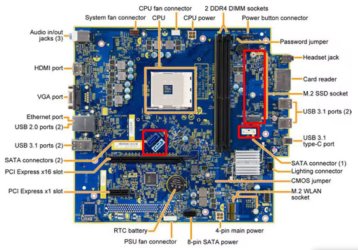
Why not? You have more than one SATA data connector on the motherboard. For each SATA HDD or SSD you need a SATA power connector.

3 x SATA connectors - HDDs or SSDs
1 x M.2 socket, key M - NVMe or SATA SSD
HP Sunflower.jpg
 

My Computers My Computers

  • At a glance

    Windows 7 Professional 64bit / Windows 10 Hom...AMD FX-8350GSKILL Ripjaw-X PC3 12800 12GB (2x4GB, 2x2GB)ASUS ENGTX560 DCII OC/2DI/1GD5 1GB
    Computer type
    PC/Desktop
    Computer Manufacturer/Model Number
    Custom build
    OS
    Windows 7 Professional 64bit / Windows 10 Home 64bit
    CPU
    AMD FX-8350
    Motherboard
    Gigabyte GA-990FXA-UD3 (AM3+) Rev. 4.0
    Memory
    GSKILL Ripjaw-X PC3 12800 12GB (2x4GB, 2x2GB)
    Graphics Card(s)
    ASUS ENGTX560 DCII OC/2DI/1GD5 1GB
    Sound Card
    Integrated
    Monitor(s) Displays
    Asus VE228H (21.5-in)
    Screen Resolution
    1920x1080 60Hz
    Hard Drives
    SAMSUNG 870 EVO 1TB (2.5" SATA SSD)
    SAMSUNG 870 EVO 500GB (2.5" SATA SSD)
    PSU
    Antec TruePower (new) TP-650 (650 watts)
    Case
    Antec Three Hundred
    Cooling
    AMD stock (plan to upgrade to Cooler Master Hyper 212 EVO)
    Keyboard
    Logitech K540 (wireless)
    Mouse
    Logitech M310 (wireless)
    Internet Speed
    Comcast Gigabit X2 Internet (2100Mbps down / 300Mbps up)
    Browser
    Firefox, Edge, Chrome
    Other Info
    Optical drive: ASUS DRW-24B3ST/BLK/G (Black) (24X)
    External hard drives: 2TB & 6TB
    Internet Gateway: Comcast XB8
  • Computer type
    PC/Desktop
Why not? You have more than one SATA data connector on the motherboard. For each SATA HDD or SSD you need a SATA power connector.

3 x SATA connectors - HDDs or SSDs
1 x M.2 socket, key M - NVMe or SATA SSD
View attachment 423928

Don’t have any cables to put the data in.
 

My Computers My Computers

  • At a glance

    Windows 10 IoT Enterprise LTSC 2019, Windows ...11th Gen Intel(R) Core(TM) i7-11700KF @ 3.60GHz32GB DDR4NVIDIA Geforce RTX 3050 8GB & AMD Radeon HD 7...
    Computer type
    PC/Desktop
    Computer Manufacturer/Model Number
    CyberPowerPC
    OS
    Windows 10 IoT Enterprise LTSC 2019, Windows 7 Ultimate X64
    CPU
    11th Gen Intel(R) Core(TM) i7-11700KF @ 3.60GHz
    Motherboard
    Gigabyte Z590 UD AC Rev 1.1
    Memory
    32GB DDR4
    Graphics Card(s)
    NVIDIA Geforce RTX 3050 8GB & AMD Radeon HD 7850 HIS Fan 2GB
    Screen Resolution
    2560x1080, 1920x1080
    Hard Drives
    Samsung 970 EVO Plus PCIe 3.0 SSD, external drives are unknown.
    Antivirus
    Bitdefender
    Browser
    Firefox 140
    Other Info
    Running Windows 10 and Windows 7 in a dual-boot setup.
  • At a glance

    Windows 7 Home Premium x64Intel Core i5-2410M @2.30GHz6GB DDR3-1333Mhz DIMMsNvidia Geforce GT555M
    Computer type
    Laptop
    System Manufacturer/Model Number
    Lenovo Ideapad Y570
    OS
    Windows 7 Home Premium x64
    CPU
    Intel Core i5-2410M @2.30GHz
    Memory
    6GB DDR3-1333Mhz DIMMs
    Graphics Card(s)
    Nvidia Geforce GT555M
    Sound Card
    Integrated Audio
    Monitor(s) Displays
    Integrated
    Screen Resolution
    1366x768
    Hard Drives
    Single Toshiba 5400rpm 750gb HDD
    PSU
    90W
    Browser
    Chrome 58
    Antivirus
    Bitdefender
    Other Info
    Personal Laptop
Don’t have any cables to put the data in.
It's hard to tell from the fuzzy picture but it looks like the SATA data connectors are standard ones. If so you can by SATA data cables from numerous places online. Even then you need to check the power supply to make sure it has SATA power cables.

BTW, SATA data cable haven't changed much since they first came out. I bought my first motherboard with SATA in November 2002.
 

My Computers My Computers

  • At a glance

    Windows 7 Professional 64bit / Windows 10 Hom...AMD FX-8350GSKILL Ripjaw-X PC3 12800 12GB (2x4GB, 2x2GB)ASUS ENGTX560 DCII OC/2DI/1GD5 1GB
    Computer type
    PC/Desktop
    Computer Manufacturer/Model Number
    Custom build
    OS
    Windows 7 Professional 64bit / Windows 10 Home 64bit
    CPU
    AMD FX-8350
    Motherboard
    Gigabyte GA-990FXA-UD3 (AM3+) Rev. 4.0
    Memory
    GSKILL Ripjaw-X PC3 12800 12GB (2x4GB, 2x2GB)
    Graphics Card(s)
    ASUS ENGTX560 DCII OC/2DI/1GD5 1GB
    Sound Card
    Integrated
    Monitor(s) Displays
    Asus VE228H (21.5-in)
    Screen Resolution
    1920x1080 60Hz
    Hard Drives
    SAMSUNG 870 EVO 1TB (2.5" SATA SSD)
    SAMSUNG 870 EVO 500GB (2.5" SATA SSD)
    PSU
    Antec TruePower (new) TP-650 (650 watts)
    Case
    Antec Three Hundred
    Cooling
    AMD stock (plan to upgrade to Cooler Master Hyper 212 EVO)
    Keyboard
    Logitech K540 (wireless)
    Mouse
    Logitech M310 (wireless)
    Internet Speed
    Comcast Gigabit X2 Internet (2100Mbps down / 300Mbps up)
    Browser
    Firefox, Edge, Chrome
    Other Info
    Optical drive: ASUS DRW-24B3ST/BLK/G (Black) (24X)
    External hard drives: 2TB & 6TB
    Internet Gateway: Comcast XB8
  • Computer type
    PC/Desktop
It's hard to tell from the fuzzy picture but it looks like the SATA data connectors are standard ones. If so you can by SATA data cables from numerous places online. Even then you need to check the power supply to make sure it has SATA power cables.

BTW, SATA data cable haven't changed much since they first came out. I bought my first motherboard with SATA in November 2002.

The main problem is that I don't have any money right now, or atleast any to spend on my computer right now. Sorry I forgot to respond, completely forgot about the post.

- - - Updated - - -

I've tried all of the tutorial I could find on how to slipstream N.V.M.E drivers into the ISO and not a single one will work. How am I supposed to do this, I'm so confused????

- - - Updated - - -

I also can't find a single extracted driver for my exact N.V.M.E, only exe's that download it online and don't extract it anywhere.
 

My Computers My Computers

  • At a glance

    Windows 10 IoT Enterprise LTSC 2019, Windows ...11th Gen Intel(R) Core(TM) i7-11700KF @ 3.60GHz32GB DDR4NVIDIA Geforce RTX 3050 8GB & AMD Radeon HD 7...
    Computer type
    PC/Desktop
    Computer Manufacturer/Model Number
    CyberPowerPC
    OS
    Windows 10 IoT Enterprise LTSC 2019, Windows 7 Ultimate X64
    CPU
    11th Gen Intel(R) Core(TM) i7-11700KF @ 3.60GHz
    Motherboard
    Gigabyte Z590 UD AC Rev 1.1
    Memory
    32GB DDR4
    Graphics Card(s)
    NVIDIA Geforce RTX 3050 8GB & AMD Radeon HD 7850 HIS Fan 2GB
    Screen Resolution
    2560x1080, 1920x1080
    Hard Drives
    Samsung 970 EVO Plus PCIe 3.0 SSD, external drives are unknown.
    Antivirus
    Bitdefender
    Browser
    Firefox 140
    Other Info
    Running Windows 10 and Windows 7 in a dual-boot setup.
  • At a glance

    Windows 7 Home Premium x64Intel Core i5-2410M @2.30GHz6GB DDR3-1333Mhz DIMMsNvidia Geforce GT555M
    Computer type
    Laptop
    System Manufacturer/Model Number
    Lenovo Ideapad Y570
    OS
    Windows 7 Home Premium x64
    CPU
    Intel Core i5-2410M @2.30GHz
    Memory
    6GB DDR3-1333Mhz DIMMs
    Graphics Card(s)
    Nvidia Geforce GT555M
    Sound Card
    Integrated Audio
    Monitor(s) Displays
    Integrated
    Screen Resolution
    1366x768
    Hard Drives
    Single Toshiba 5400rpm 750gb HDD
    PSU
    90W
    Browser
    Chrome 58
    Antivirus
    Bitdefender
    Other Info
    Personal Laptop
[QUOTE


I also can't find a single extracted driver for my exact N.V.M.E, only exe's that download it online and don't extract it anywhere.[/QUOTE]

If you need to extract an .exe file, you can use 7Zip. download it from here:

7-Zip

Then you can run the .exe file.
 

My Computer My Computer

At a glance

Windows 7 x64 SP1AMD Athlon 64 X2 6000+ / 3.0 GHz6 GB
Computer type
PC/Desktop
Computer Manufacturer/Model Number
Gateway GT5656
OS
Windows 7 x64 SP1
CPU
AMD Athlon 64 X2 6000+ / 3.0 GHz
Motherboard
NVIDIA GeForce 6150 SE
Memory
6 GB
Monitor(s) Displays
Lenovo LED
Screen Resolution
1920 X 1080
Hard Drives
Windows on 500 GB spinner; Ubuntu 16 on Sandisk 250GB SSD; Bodhi5 on Samsung 250GB SSD; another old spinner for fooling around.
PSU
Original that came with computer
Keyboard
Logitech wireless
Mouse
Logitech wireless
Antivirus
Microsoft Sec Essentials
Browser
Vivaldi
[QUOTE


I also can't find a single extracted driver for my exact N.V.M.E, only exe's that download it online and don't extract it anywhere.

If you need to extract an .exe file, you can use 7Zip. download it from here:

7-Zip

Then you can run the .exe file.[/QUOTE]

Thats not the problem, the problem is that the exe itself will only install the driver, with no way to extract it.

- - - Updated - - -

Why not? You have more than one SATA data connector on the motherboard. For each SATA HDD or SSD you need a SATA power connector.

3 x SATA connectors - HDDs or SSDs
1 x M.2 socket, key M - NVMe or SATA SSD
View attachment 423928

I just checked and this isn't even the correct motherboard, this is a HP Sunflower, not a Gigabyte Z590 UD AC gen 1.1.
 

My Computers My Computers

  • At a glance

    Windows 10 IoT Enterprise LTSC 2019, Windows ...11th Gen Intel(R) Core(TM) i7-11700KF @ 3.60GHz32GB DDR4NVIDIA Geforce RTX 3050 8GB & AMD Radeon HD 7...
    Computer type
    PC/Desktop
    Computer Manufacturer/Model Number
    CyberPowerPC
    OS
    Windows 10 IoT Enterprise LTSC 2019, Windows 7 Ultimate X64
    CPU
    11th Gen Intel(R) Core(TM) i7-11700KF @ 3.60GHz
    Motherboard
    Gigabyte Z590 UD AC Rev 1.1
    Memory
    32GB DDR4
    Graphics Card(s)
    NVIDIA Geforce RTX 3050 8GB & AMD Radeon HD 7850 HIS Fan 2GB
    Screen Resolution
    2560x1080, 1920x1080
    Hard Drives
    Samsung 970 EVO Plus PCIe 3.0 SSD, external drives are unknown.
    Antivirus
    Bitdefender
    Browser
    Firefox 140
    Other Info
    Running Windows 10 and Windows 7 in a dual-boot setup.
  • At a glance

    Windows 7 Home Premium x64Intel Core i5-2410M @2.30GHz6GB DDR3-1333Mhz DIMMsNvidia Geforce GT555M
    Computer type
    Laptop
    System Manufacturer/Model Number
    Lenovo Ideapad Y570
    OS
    Windows 7 Home Premium x64
    CPU
    Intel Core i5-2410M @2.30GHz
    Memory
    6GB DDR3-1333Mhz DIMMs
    Graphics Card(s)
    Nvidia Geforce GT555M
    Sound Card
    Integrated Audio
    Monitor(s) Displays
    Integrated
    Screen Resolution
    1366x768
    Hard Drives
    Single Toshiba 5400rpm 750gb HDD
    PSU
    90W
    Browser
    Chrome 58
    Antivirus
    Bitdefender
    Other Info
    Personal Laptop
I just checked and this isn't even the correct motherboard, this is a HP Sunflower, not a Gigabyte Z590 UD AC gen 1.1.
Sorry I just realized that you have more than one computer. Also, I can't even see where you even said which computer you are talking about in this thread. It doesn't matter. For Windows 7 why don't you just boot Windows 7 from a 2.5" SATA SSD. It would really make your life easier. BTW, with Windows 10 it doesn't matter so you easily boot from a NVME SSD.

BTW, I have two old computers with dual-boot of Windows 7 and 10. They started with 3.5" SATA HDDs. Now they are both using 2.5" SATA SSDs. That was easy to do since 2.5"/3.5" SATA HDDs and 2.5" SATA SSDs are directly compatible with each other.
 

My Computers My Computers

  • At a glance

    Windows 7 Professional 64bit / Windows 10 Hom...AMD FX-8350GSKILL Ripjaw-X PC3 12800 12GB (2x4GB, 2x2GB)ASUS ENGTX560 DCII OC/2DI/1GD5 1GB
    Computer type
    PC/Desktop
    Computer Manufacturer/Model Number
    Custom build
    OS
    Windows 7 Professional 64bit / Windows 10 Home 64bit
    CPU
    AMD FX-8350
    Motherboard
    Gigabyte GA-990FXA-UD3 (AM3+) Rev. 4.0
    Memory
    GSKILL Ripjaw-X PC3 12800 12GB (2x4GB, 2x2GB)
    Graphics Card(s)
    ASUS ENGTX560 DCII OC/2DI/1GD5 1GB
    Sound Card
    Integrated
    Monitor(s) Displays
    Asus VE228H (21.5-in)
    Screen Resolution
    1920x1080 60Hz
    Hard Drives
    SAMSUNG 870 EVO 1TB (2.5" SATA SSD)
    SAMSUNG 870 EVO 500GB (2.5" SATA SSD)
    PSU
    Antec TruePower (new) TP-650 (650 watts)
    Case
    Antec Three Hundred
    Cooling
    AMD stock (plan to upgrade to Cooler Master Hyper 212 EVO)
    Keyboard
    Logitech K540 (wireless)
    Mouse
    Logitech M310 (wireless)
    Internet Speed
    Comcast Gigabit X2 Internet (2100Mbps down / 300Mbps up)
    Browser
    Firefox, Edge, Chrome
    Other Info
    Optical drive: ASUS DRW-24B3ST/BLK/G (Black) (24X)
    External hard drives: 2TB & 6TB
    Internet Gateway: Comcast XB8
  • Computer type
    PC/Desktop
Sorry I just realized that you have more than one computer. Also, I can't even see where you even said which computer you are talking about in this thread. It doesn't matter. For Windows 7 why don't you just boot Windows 7 from a 2.5" SATA SSD. It would really make your life easier. BTW, with Windows 10 it doesn't matter so you easily boot from a NVME SSD.

BTW, I have two old computers with dual-boot of Windows 7 and 10. They started with 3.5" SATA HDDs. Now they are both using 2.5" SATA SSDs. That was easy to do since 2.5"/3.5" SATA HDDs and 2.5" SATA SSDs are directly compatible with each other.
Sorry about that, should've said what computer I was using.
I can't afford to add or replace any hardware in this PC.
I tried using the driver from the official driver installer and instead of giving an 0x7b error, gives and 0xc0000098 error. Is there really no way for me to do this without replacing or adding hardware? Do I just have to accept that?

- - - Updated - - -

I tried using the 7updater tool once again. Said it worked, tried booting from the USB, and it just kept throwing out an 0xc0000001 error for some reason?
Only happens when I use 7updater on this specific ISO and it doesn't work on this specific computer. Why does windows 7 suddenly refuse to even boot from the USB???

- - - Updated - - -

I also cant put anything else in because I don't have the power cables that go to this PSU, nor do I even know what the PSU in this PC is.

I also don't know what this computer was even called.

And am I gonna get ignored again?
 

My Computers My Computers

  • At a glance

    Windows 10 IoT Enterprise LTSC 2019, Windows ...11th Gen Intel(R) Core(TM) i7-11700KF @ 3.60GHz32GB DDR4NVIDIA Geforce RTX 3050 8GB & AMD Radeon HD 7...
    Computer type
    PC/Desktop
    Computer Manufacturer/Model Number
    CyberPowerPC
    OS
    Windows 10 IoT Enterprise LTSC 2019, Windows 7 Ultimate X64
    CPU
    11th Gen Intel(R) Core(TM) i7-11700KF @ 3.60GHz
    Motherboard
    Gigabyte Z590 UD AC Rev 1.1
    Memory
    32GB DDR4
    Graphics Card(s)
    NVIDIA Geforce RTX 3050 8GB & AMD Radeon HD 7850 HIS Fan 2GB
    Screen Resolution
    2560x1080, 1920x1080
    Hard Drives
    Samsung 970 EVO Plus PCIe 3.0 SSD, external drives are unknown.
    Antivirus
    Bitdefender
    Browser
    Firefox 140
    Other Info
    Running Windows 10 and Windows 7 in a dual-boot setup.
  • At a glance

    Windows 7 Home Premium x64Intel Core i5-2410M @2.30GHz6GB DDR3-1333Mhz DIMMsNvidia Geforce GT555M
    Computer type
    Laptop
    System Manufacturer/Model Number
    Lenovo Ideapad Y570
    OS
    Windows 7 Home Premium x64
    CPU
    Intel Core i5-2410M @2.30GHz
    Memory
    6GB DDR3-1333Mhz DIMMs
    Graphics Card(s)
    Nvidia Geforce GT555M
    Sound Card
    Integrated Audio
    Monitor(s) Displays
    Integrated
    Screen Resolution
    1366x768
    Hard Drives
    Single Toshiba 5400rpm 750gb HDD
    PSU
    90W
    Browser
    Chrome 58
    Antivirus
    Bitdefender
    Other Info
    Personal Laptop
Funny thing - I have been toying with 2 laptops Lenovo Yoga serie with 1xSATA and 1x m.2 SSD (non-nvme)
Win7 during installation sees both disks and installs without problems on both.... but starts only from SATA, never from m.2
UNLESS I install EasyBCD and re-write mbr startup, then I was capable of booting even from HDD-USB connected :D
So - there are ways around :p
Has anyone even noticed that stornvme dll from M$ is dated to 21/06/2006? And yet they could not make it to work in 2007-8

EDIT
Even funnier now. Seems like only Win7HomePremium with xyz language edition is capable of working straight forward with m.2 ssd....
Every other edition (which I have on different media) - normally does not sees M.2 until aforementioned Windows6.1-KB2990941-v3 and Windows6.1-KB3087873-v2
But when I integrate them via RT7 or DISM - then I have blue screens instead of disk list. So it is better to avoid drivers to inconvenient devices and wait after installation on another HDD. Especially in portable, cheap, all-in-one...

Method that works for me: Clean drive with 1catalog on it, full of drivers, so during installation you can add your own.... from very same drive :) Usb3, chipset, touchpad, HDD ... Just prepare drivers in physical (digital) file form. Not installer crap. DLL INI INF CAB
 
Last edited:

My Computers My Computers

  • At a glance

    w7rt, w7x64 pro, w10ltsc
    OS
    w7rt, w7x64 pro, w10ltsc
  • Computer type
    PC/Desktop
Back
Top