How to install Windows 7 in this situation?

vijay1700

New member
Local time
2:06 PM
Messages
4
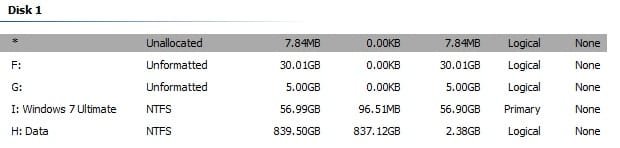
My current partition on my hard disk looks like this - https://www.facebook.com/photo.php?fbid=10213814099775423&set=a.2780535001272&type=3&theater - I wanna install Windows 7 Ultimate in the already created, named, and converted to primary partition from logical partition (57 GB one), which I have not activated yet, coz I got to know you cannot install OS on an active partition. The other two, that is, 30 GB and 5 GB are for BackSlash Linux and Swap partition. When I tried to install on an activated partition, as said earlier, it did not work. If I Delete or Format the 57 GB partition, it is trying to merge "Data" partition! How should I go ahead to install Win 7?
 
Last edited:

My Computer My Computer

At a glance

Windows 7 Ultimate (64-Bit)Intel Core i5-2400 Processor (2nd Generation)Transcend 4 GB RAMAMD ATI Radeon HD 3470 Graphics Card
Computer type
PC/Desktop
Computer Manufacturer/Model Number
Assembled
OS
Windows 7 Ultimate (64-Bit)
CPU
Intel Core i5-2400 Processor (2nd Generation)
Motherboard
Intel DZ68AF
Memory
Transcend 4 GB RAM
Graphics Card(s)
AMD ATI Radeon HD 3470 Graphics Card
Hard Drives
Seagate SSHD 1 TB - Actually, a laptop drive connected by metal mounting.
Antivirus
Avast
Browser
Chrome and Opera
I got to know you cannot install OS on an active partition

Yes you can.


Boot media:

17514x86.iso

17514x64-v10.iso


Post screenshot of disk management and aomei partition assistant.

Use the paperclip to post screenshots

attachments#.jpg
 

My Computers My Computers

  • At a glance

    7 X64i5 84002x8gb 3200mhz
    Computer type
    PC/Desktop
    OS
    7 X64
    CPU
    i5 8400
    Motherboard
    gigabyte b365m ds3h
    Memory
    2x8gb 3200mhz
    Hard Drives
    various
    PSU
    pure power 11 400w cm
    Case
    Coolermaster
    Cooling
    cryorig m9i
  • At a glance

    7x64g54008gb ddr4 2400
    Computer type
    PC/Desktop
    OS
    7x64
    CPU
    g5400
    Motherboard
    ga b365m ds3h
    Memory
    8gb ddr4 2400
    PSU
    xfx pro 450w
I typed "I got to know you cannot install OS on an active partition" coz the Windows 7 installer was showing the message you cannot install OS in the System Partition! I "think" this happened because I made it an Active partition after I created, labelled, and converted to Primary from Logical. So, I wanted to know if I can go ahead without marking that 57 GB partition as Active and install Win 7. Or what alterations do you suggest me to do in partitions, so that I can install Win 7 hassle-free? By the by, I am using AOMEI Partition Assistant in Win 10 in PE environment.

Since no one responded with solution, I tried deleting all partition, expect the Data partition, but everything merged into single unallocated partition, and now, I am trying AOMEI Partition Assistant to recover lost partition since many hours! And the result seems to be grim! Almost 1 TB of data might be lost! Do not mess with partition or rely on Windows completely!

Why does this bloody Windows merge unrelated partitions - I don't understand!?
 

Attachments

  • My current partitions on my HDD.jpg
    My current partitions on my HDD.jpg
    12 KB · Views: 21
Last edited:

My Computer My Computer

At a glance

Windows 7 Ultimate (64-Bit)Intel Core i5-2400 Processor (2nd Generation)Transcend 4 GB RAMAMD ATI Radeon HD 3470 Graphics Card
Computer type
PC/Desktop
Computer Manufacturer/Model Number
Assembled
OS
Windows 7 Ultimate (64-Bit)
CPU
Intel Core i5-2400 Processor (2nd Generation)
Motherboard
Intel DZ68AF
Memory
Transcend 4 GB RAM
Graphics Card(s)
AMD ATI Radeon HD 3470 Graphics Card
Hard Drives
Seagate SSHD 1 TB - Actually, a laptop drive connected by metal mounting.
Antivirus
Avast
Browser
Chrome and Opera
Back
Top