How to install windows 7 x64 with dual boot?

whirlwind8

New member
Local time
6:33 PM
Messages
12
Hello,

I have
Windows xp x86 and Windows 7 x86 in dual boot. I have a 1 tb HDD which is partitioned into 6. XP is on C: while 7 is on M. Now i want to install windows 7 x 64 in place of XP. Can i just overwrite onto C:? If not what should be done? the x64 windows 7 is on a bootable usb.

Thank You
 

My Computer My Computer

At a glance

Windows 7 Professional SP 1 x64Core i5 4670k16gb Corsair VengeanceMSI GTX 770 Gaming Edition
Computer type
PC/Desktop
Computer Manufacturer/Model Number
Desktop
OS
Windows 7 Professional SP 1 x64
CPU
Core i5 4670k
Motherboard
Gigabyte H85
Memory
16gb Corsair Vengeance
Graphics Card(s)
MSI GTX 770 Gaming Edition
Sound Card
AMD High Definition Audio Device
Monitor(s) Displays
SyncMaster (1600x900@60Hz)
Screen Resolution
1600*900
Hard Drives
977GB Seagate ST31000333AS ATA Device (SATA)
PSU
600W Coolermaster 90+
Case
Coolermaster Storm
Cooling
Fan
Keyboard
Device Kind Keyboard Device Name Standard PS/2 Keyboard Loca
Mouse
Device Kind Mouse Device Name HID-compliant mouse Vendor Log
Internet Speed
25mbps
Win7 should always be on C when you boot it, unless is was incorrectly installed from an OS and not from a booted installer. So be sure to boot the flash stick to delete C, create and format a new partition there using the drive tools shown in Steps 7 and 8 of Clean Install Windows 7.

It should configure a Dual Boot with the other Win7 during install. If not install EasyBCD to add the other.

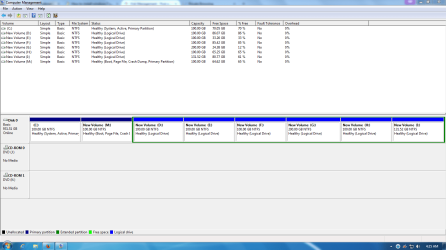
If you'd like to post back a screenshot of Disk Management - Post a Screen Capture Image
then we can advise you better and look it over for other potential problems or suggestions. Tell us what is on each partition.
 
Thanks for your reply Greg. Attached is my screenshot.Capture.PNG. All help would be really appreciated. So can i just format C: and install using the bootable usb?
 
Last edited:

My Computer My Computer

At a glance

Windows 7 Professional SP 1 x64Core i5 4670k16gb Corsair VengeanceMSI GTX 770 Gaming Edition
Computer type
PC/Desktop
Computer Manufacturer/Model Number
Desktop
OS
Windows 7 Professional SP 1 x64
CPU
Core i5 4670k
Motherboard
Gigabyte H85
Memory
16gb Corsair Vengeance
Graphics Card(s)
MSI GTX 770 Gaming Edition
Sound Card
AMD High Definition Audio Device
Monitor(s) Displays
SyncMaster (1600x900@60Hz)
Screen Resolution
1600*900
Hard Drives
977GB Seagate ST31000333AS ATA Device (SATA)
PSU
600W Coolermaster 90+
Case
Coolermaster Storm
Cooling
Fan
Keyboard
Device Kind Keyboard Device Name Standard PS/2 Keyboard Loca
Mouse
Device Kind Mouse Device Name HID-compliant mouse Vendor Log
Internet Speed
25mbps
Yes delete the C partition during booted install to recreate/format as described earlier.

If you plan to get rid of the erroneously installed Win7 later then I would preformat C and mark it Active using Partition Wizard CD so it keeps its own boot files and doesn't place them on M. Otherwise we can help you move them later.
 
Greg, from your post i understand the following. is it correct?
1. Boot into windows 7 x86
2. Using partition wizard format C: and mark it active & primary
3. Log off windows 7 x86
4. Use bootable USB to install windows 7 x64 on C:
5. If dual boot does not appear install easy BCD.
 

My Computer My Computer

At a glance

Windows 7 Professional SP 1 x64Core i5 4670k16gb Corsair VengeanceMSI GTX 770 Gaming Edition
Computer type
PC/Desktop
Computer Manufacturer/Model Number
Desktop
OS
Windows 7 Professional SP 1 x64
CPU
Core i5 4670k
Motherboard
Gigabyte H85
Memory
16gb Corsair Vengeance
Graphics Card(s)
MSI GTX 770 Gaming Edition
Sound Card
AMD High Definition Audio Device
Monitor(s) Displays
SyncMaster (1600x900@60Hz)
Screen Resolution
1600*900
Hard Drives
977GB Seagate ST31000333AS ATA Device (SATA)
PSU
600W Coolermaster 90+
Case
Coolermaster Storm
Cooling
Fan
Keyboard
Device Kind Keyboard Device Name Standard PS/2 Keyboard Loca
Mouse
Device Kind Mouse Device Name HID-compliant mouse Vendor Log
Internet Speed
25mbps
You missed deleting C first before creating new NTFS primary partition to Modify>Set to Active.
 
Do you mean deleting C: as specified in Step 8 of Clean install of windows?
 

My Computer My Computer

At a glance

Windows 7 Professional SP 1 x64Core i5 4670k16gb Corsair VengeanceMSI GTX 770 Gaming Edition
Computer type
PC/Desktop
Computer Manufacturer/Model Number
Desktop
OS
Windows 7 Professional SP 1 x64
CPU
Core i5 4670k
Motherboard
Gigabyte H85
Memory
16gb Corsair Vengeance
Graphics Card(s)
MSI GTX 770 Gaming Edition
Sound Card
AMD High Definition Audio Device
Monitor(s) Displays
SyncMaster (1600x900@60Hz)
Screen Resolution
1600*900
Hard Drives
977GB Seagate ST31000333AS ATA Device (SATA)
PSU
600W Coolermaster 90+
Case
Coolermaster Storm
Cooling
Fan
Keyboard
Device Kind Keyboard Device Name Standard PS/2 Keyboard Loca
Mouse
Device Kind Mouse Device Name HID-compliant mouse Vendor Log
Internet Speed
25mbps
Hello Greg,

I installed x64. It went off smoothly. But i dont have the dual boot at the start. The computer directly boots into x64. What should i do?

Thank You
 

My Computer My Computer

At a glance

Windows 7 Professional SP 1 x64Core i5 4670k16gb Corsair VengeanceMSI GTX 770 Gaming Edition
Computer type
PC/Desktop
Computer Manufacturer/Model Number
Desktop
OS
Windows 7 Professional SP 1 x64
CPU
Core i5 4670k
Motherboard
Gigabyte H85
Memory
16gb Corsair Vengeance
Graphics Card(s)
MSI GTX 770 Gaming Edition
Sound Card
AMD High Definition Audio Device
Monitor(s) Displays
SyncMaster (1600x900@60Hz)
Screen Resolution
1600*900
Hard Drives
977GB Seagate ST31000333AS ATA Device (SATA)
PSU
600W Coolermaster 90+
Case
Coolermaster Storm
Cooling
Fan
Keyboard
Device Kind Keyboard Device Name Standard PS/2 Keyboard Loca
Mouse
Device Kind Mouse Device Name HID-compliant mouse Vendor Log
Internet Speed
25mbps
Ok that is to be expected since by marking the partition Active you restricted the boot files to the new install partition which didn't allow it to place them on the extant OS for a Dual Boot.

This is why the next step given is to install EasyBCD to add the old OS by drive letter and custom name to create your Boot Menu.
 

My Computer My Computer

At a glance

Windows 10 Pro x64Intel Core i7 6700KGSkill TridentZ RGB 16GB 3600 16-16-16-36EVGA GTX 980 Ti SC x2
Computer type
PC/Desktop
Computer Manufacturer/Model Number
Skylake Special #666
OS
Windows 10 Pro x64
CPU
Intel Core i7 6700K
Motherboard
Asus Sabertooth Z170 Mark 1
Memory
GSkill TridentZ RGB 16GB 3600 16-16-16-36
Graphics Card(s)
EVGA GTX 980 Ti SC x2
Sound Card
Realtek High Definition
Monitor(s) Displays
AOC G2460PG
Screen Resolution
1920 x 1080 144Hz
Hard Drives
Samsung 860 Pro 256GB, Seagate Barracuda 4TB x2
PSU
EVGA 1000 P2, EVGA White Custom Braided Cables
Case
Corsair Vengeance C70 Gunmetal Black
Cooling
Corsair H100i v2, Corsair ML120 x2, Thermal Grizzly Kryonaut
Keyboard
Logitech G910 Orion Spectrum
Mouse
Logitech G700s
Internet Speed
Verizon Fios Quantum Gateway 75/75
Antivirus
Windows Defender, Malwarebytes Free 3.8.3
Browser
Chrome
Other Info
Corsair SP120 x4, LG Blu-ray Drive, Durabrand HT-395 100 Watt Dolby Digital Amp, Corsair H2100 Wireless 7.1 Headset
Back
Top