How to know what drivers you will need for clean install.

Your Documents did not get moved to a Data Partition. They are still sitting on C - right? Are the others the same?

I restored them back when It didn't work right. Remember I posted the picture on you tutorial?


The error message you are getting seems to come from the search server and has something to do with indexing. From here I can only speculate: It is possible that the files you deleted were present when the index was built and since you deleted them, indexing cannot find them any more.

Can you possibly switch the indexing off and make a straight search?
I just did a search in Explorer to test it..... Duh! :o It said search may be slow in non indexed locations C:/. So apparently Nothing is indexed.
I'm sorry I was just going through and trying to fix whatever errors where in the log. So I guess I need to set up my indexing correctly first then check back with the log to see if the errors are gone.
But wait I just read that if my documents are added to the Library they are auto indexed. I can explore any file through the Library. I need a tutorial on setting up and customizing the index. Thanks Whs. :D
 

My Computer My Computer

At a glance

7 professionalYour Processor type and speed - AMD ATHLON(tm...2.5gbNVIDIA GeForce 7150/nForce 64MB
Computer Manufacturer/Model Number
Hp presario v6620us 6500notebook series.
OS
7 professional
CPU
Your Processor type and speed - AMD ATHLON(tm) 64X2 DUAL-COR
Motherboard
Quanta 30CF
Memory
2.5gb
Graphics Card(s)
NVIDIA GeForce 7150/nForce 64MB
Sound Card
conextant smartaudio hd2
Hard Drives
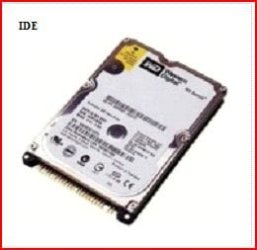
FUJITSU PLATA 160GB IDE
PSU
Wth? is this
Case
The judge threw it out. Not enough evidence.
Cooling
sometimes.
Keyboard
Yep
Mouse
Nope
Internet Speed
fast
Hope you have luck with that. Keep us posted.
 

My Computer My Computer

At a glance

Vista, Windows7, Mint Mate, Zorin, Windows 8from 1.6GHz Duo to i7
Computer Manufacturer/Model Number
HP, Dell, Gateway, Toshiba - 4 laptops and 2 desktops
OS
Vista, Windows7, Mint Mate, Zorin, Windows 8
CPU
from 1.6GHz Duo to i7
Monitor(s) Displays
2x HP w2207
Hard Drives
5x HDD, 7x SSD, 12x Externals
Keyboard
with trackball - no mices
Mouse
Trackball mice
Internet Speed
DSL 6000
I went to search indexing/modify and all my user folders from A:data drive were still listed and checked for indexing. Strange... because I did use the restore button when I moved them back to C: drive. As per your tutorial. :D
 

My Computer My Computer

At a glance

7 professionalYour Processor type and speed - AMD ATHLON(tm...2.5gbNVIDIA GeForce 7150/nForce 64MB
Computer Manufacturer/Model Number
Hp presario v6620us 6500notebook series.
OS
7 professional
CPU
Your Processor type and speed - AMD ATHLON(tm) 64X2 DUAL-COR
Motherboard
Quanta 30CF
Memory
2.5gb
Graphics Card(s)
NVIDIA GeForce 7150/nForce 64MB
Sound Card
conextant smartaudio hd2
Hard Drives
FUJITSU PLATA 160GB IDE
PSU
Wth? is this
Case
The judge threw it out. Not enough evidence.
Cooling
sometimes.
Keyboard
Yep
Mouse
Nope
Internet Speed
fast
Click on Modify, delete the unwanted folders, select User and storage folders plus anything else you want indexed, then on Advanced click Rebuild Index to reindex with the new choices.

What you select depends on what you may want to find in the future. If you're not sure, index it all. I need to find Windows files for reference here, and Program Files to know they are installed.
 
Click on Modify, delete the unwanted folders, select User and storage folders plus anything else you want indexed, then on Advanced click Rebuild Index to reindex with the new choices.

What you select depends on what you may want to find in the future. If you're not sure, index it all. I need to find Windows files for reference here, and Program Files to know they are installed.
Ok I did this and no more errors.

Now I have the following errors that seem to point to the bios. I was just checking with you first before I flash again.
1. Boot time is slow
2. Thumbdrive Scan disk slow read problems
3. Stanby mode degredation
4. Wake from sleep is slow.

I couldn't use this method for http://www.sevenforums.com/tutorials/73420-hardware-identification.html No ven id nor dev id in device manager for Mobo.

I found this site and supposedly all AMD bios are universal. Does this site look reputable to you? AMD Bios Drivers for Windows XP, Vista & Windows 7
And is this what I am looking for?


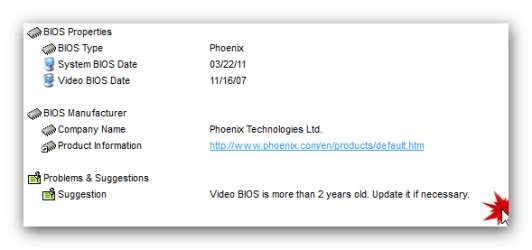
I ran a benchmarking program and it list my bios for an update.
bios .png
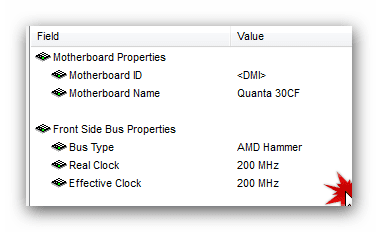
This is my Mobo
mobo.png
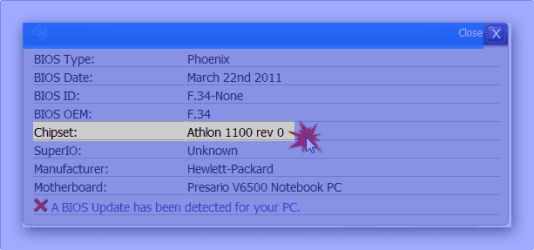
this is my chipset
chipset.png
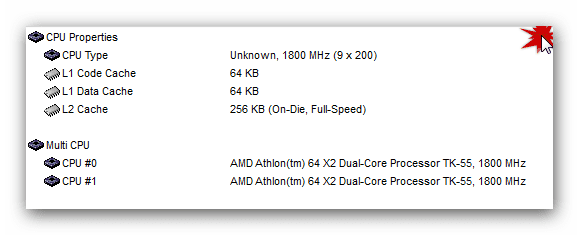
this is my Cpu
cpu.png

So do I go ahead with the flash? Is AMD my bios manufacturer? Is the above site the correct place to get my bios driver?

Thanks again Rocker!
I really enjoy learning all this stuff. I didn't know about the event viewer before this. I love it!
 

My Computer My Computer

At a glance

7 professionalYour Processor type and speed - AMD ATHLON(tm...2.5gbNVIDIA GeForce 7150/nForce 64MB
Computer Manufacturer/Model Number
Hp presario v6620us 6500notebook series.
OS
7 professional
CPU
Your Processor type and speed - AMD ATHLON(tm) 64X2 DUAL-COR
Motherboard
Quanta 30CF
Memory
2.5gb
Graphics Card(s)
NVIDIA GeForce 7150/nForce 64MB
Sound Card
conextant smartaudio hd2
Hard Drives
FUJITSU PLATA 160GB IDE
PSU
Wth? is this
Case
The judge threw it out. Not enough evidence.
Cooling
sometimes.
Keyboard
Yep
Mouse
Nope
Internet Speed
fast
Hey greg. I bought a new HD. A 7200 16mb cache Seagate 2.5. I used disk wizard and cloned my hard drive. I put the new drive in and windows will not boot up says it cannot find device. So I guess I cannot upgrade my hard drive since I cannot get any firmware drivers from HP to support the drive. I'm guessing :confused: because I don't know. Seagate has no firmware for the model hd I bought. It says I have to go to my manufactorer. I may be wrong but I think I am only allowed to use a certain HD or can I get a driver from somewhere else?
 

My Computer My Computer

At a glance

7 professionalYour Processor type and speed - AMD ATHLON(tm...2.5gbNVIDIA GeForce 7150/nForce 64MB
Computer Manufacturer/Model Number
Hp presario v6620us 6500notebook series.
OS
7 professional
CPU
Your Processor type and speed - AMD ATHLON(tm) 64X2 DUAL-COR
Motherboard
Quanta 30CF
Memory
2.5gb
Graphics Card(s)
NVIDIA GeForce 7150/nForce 64MB
Sound Card
conextant smartaudio hd2
Hard Drives
FUJITSU PLATA 160GB IDE
PSU
Wth? is this
Case
The judge threw it out. Not enough evidence.
Cooling
sometimes.
Keyboard
Yep
Mouse
Nope
Internet Speed
fast
The SATA controller driver (not firmware) for your new Seagate will be in installed Win7's driverstore.

It's likely the cloning didn't go correctly. Try Seagates' premium Acronis cloning app: Seagate Acronis cloning free util
Make sure you clone the MBR and Track 1.

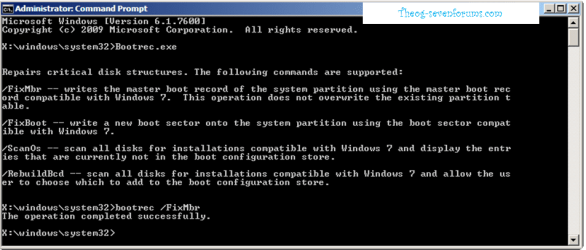
Plug the cloned HD into 1st SATA port, set first to boot in BIOS setup, unplug the source HD. Does HD show up in BIOS setup? If so, boot the WIn7 DVD Repair console or Repair CD to Startup Repair - Run 3 Separate Times after checking that Win7 partition is marked Active: Partition - Mark as Active (Method Two)
 
The SATA controller driver (not firmware) for your new Seagate will be in installed Win7's driverstore.
This is what Seagate said.

Seagate does not supply drivers for SATA drives because hard drives themselves do not require specific device drivers. Operating systems such as Windows or MacOS may not automatically recognize the SATA controller in the system. This is especially true if the hardware is newer than the operating system.

The SATA controller will either be embedded on the motherboard or a SATA add-on card. Windows 7, Vista and XP operating systems will usually recognize a SATA motherboard controller. SATA add-on cards will more than likely prompt for a driver. In either case, if the drive is not recognized by the OS Setup software, then you will need to supply a controller device driver.

The SATA controller driver can usually be found on the CD or website of the system, motherboard or SATA controller card manufacturer.

If the SATA controller is recognized during Setup without special drivers, then you can complete the installation. After the initial setup, check for driver updates from the OS or controller manufacturer.

Common Windows scenario:
When performing a new installation of Windows from CD of Windows XP or 2000, you will be prompted to push the F6 key to "install additional controller drivers".

When performing a new installation from DVD of Windows 7 or Vista a box will prompt “Where do you want to install Windows?” If the SATA hard drive is not showing then click the Load Driver option.

The "additional controller driver" is the SATA controller driver. Whether the SATA controller is embedded on the motherboard or is an add-on card, the driver(s) can be found on the CD or website of the manufacturer. If you need more information on installing SATA controller drivers, please consult the manufacturer's website.

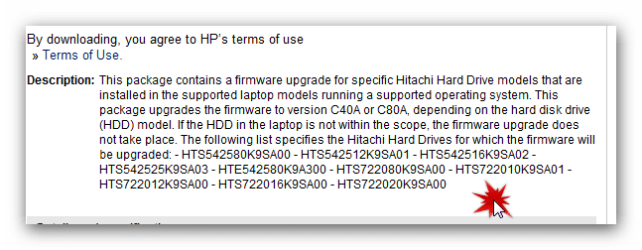
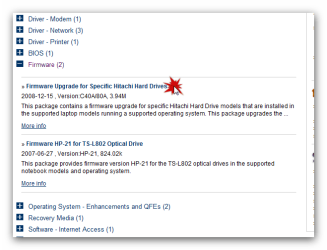
So I checked HP and they have them listed under firmware but only for Hitachi brand HD.
Hp firmware.png

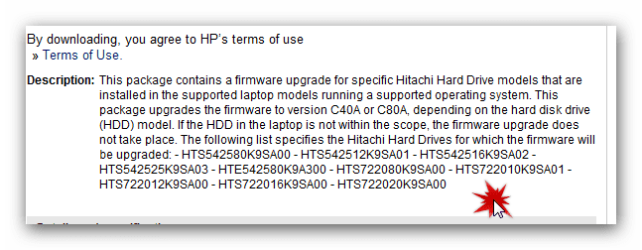
Only for these models. The firmware update would entail me using a USB Key to make it.
Hitachi Models.png

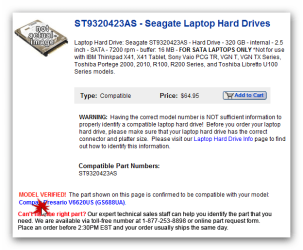
Yet..... I bought the Seagate because this site said it was compatible with my computer.
Seagate verified.png


It's likely the cloning didn't go correctly. Try Seagates' premium Acronis cloning app: Seagate Acronis cloning free util
Make sure you clone the MBR and Track 1.
This is exactly what I did.... and yes both the Mbr and track1 was recognized and cloned.
I ran repair from the install cd 5 times. It doesn't see the new drive. There are no error codes as far as the repair report goes everything works fine in boot.

Should I try to clone it again?
Seagate has no driver for me. Hp has no driver for me. So what do I do. Return and buy a Hitachi model that HP lists for Vista? Because that is all they list is Vista Hitachi drivers.

I do not understand the other tutorials you linked me to. You would have to slow it down for me.
 

My Computer My Computer

At a glance

7 professionalYour Processor type and speed - AMD ATHLON(tm...2.5gbNVIDIA GeForce 7150/nForce 64MB
Computer Manufacturer/Model Number
Hp presario v6620us 6500notebook series.
OS
7 professional
CPU
Your Processor type and speed - AMD ATHLON(tm) 64X2 DUAL-COR
Motherboard
Quanta 30CF
Memory
2.5gb
Graphics Card(s)
NVIDIA GeForce 7150/nForce 64MB
Sound Card
conextant smartaudio hd2
Hard Drives
FUJITSU PLATA 160GB IDE
PSU
Wth? is this
Case
The judge threw it out. Not enough evidence.
Cooling
sometimes.
Keyboard
Yep
Mouse
Nope
Internet Speed
fast
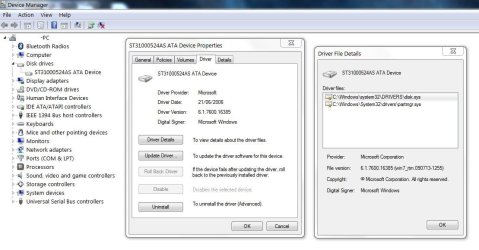
I'm a bit confused about your confusion concerning your Seagate sata HDD drivers. Windows provides them. See here for my Seagate
HDD Driver.jpg
and the statement Seagate post
Where can I get the most popular downloads for my hard drive?
Note the reference to firmware which may need attention sometimes will be addressed by Seagate.

Drivers for other devices can be provided by your Motherboard manufacturer or direct from the device manufacturer if required.

Frustration: No acknowledgement - Why do I waste my time!
subsequent posts deleted.
 
Last edited:

My Computer My Computer

At a glance

Windows 7x64 Home Premium SP1Intel i7 2600kG.Skill Ripjaws (DDR3-1600) 2x4GBNvidia GeForce GTS 450; Intel HD Graphics 300...
Computer type
PC/Desktop
Computer Manufacturer/Model Number
Own build
OS
Windows 7x64 Home Premium SP1
CPU
Intel i7 2600k
Motherboard
ASUS P8Z68 Deluxe
Memory
G.Skill Ripjaws (DDR3-1600) 2x4GB
Graphics Card(s)
Nvidia GeForce GTS 450; Intel HD Graphics 3000(GT2+)
Monitor(s) Displays
Dell Ultrasharp IPS panel U2311H, Samsung SyncMaster P2350
Screen Resolution
1920x1080
Hard Drives
Samsung 850 Pro SSD 256GB, Samsung SSD 840 120GB, Seagates 1TB Barracuda ST31000528AS x2
PSU
Seasonic M12II 520W
Case
Lian Li Lancool PC-K60
Cooling
Case: 1x120mm, 3x140mm CPU: Hyper 212+
Keyboard
Logitech MK520 (wireless)
Mouse
Logitech MK520
Internet Speed
6-7 Mbps
Antivirus
Norton Security Premium, Malwarebytes on 2 (MSE on 3rd PC)
Browser
FireFox
Other Info
Audio: Logitech Z523 2.1
Maybe I didn't make it clear in my last post, you do not need a driver for your HD as Win7 already has it.

There is another reason the clone isn't working, likely found in the cloning process. This is why I suggested you try it again using Acronis' Seagate app.

Is the cloned HD seen by the BIOS, determined by entering BIOS setup at boot? Is it set first to boot and plugged into first SATA port on mobo?

Is Win7 marked System Active on cloned HD when viewing the HD using free Partition Wizard bootable CD?
 
Maybe I didn't make it clear in my last post, you do not need a driver for your HD as Win7 already has it.
You are clear.

There is another reason the clone isn't working, likely found in the cloning process. This is why I suggested you try it again using Acronis' Seagate app.
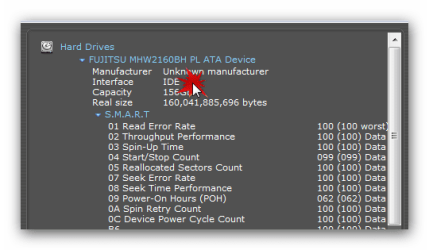
I re-ran and re-cloned with acronis disk wizard. Here is an interesting picture.

fujitsu Ide.png

It is marked IDE. Is that a clue?

Is the cloned HD seen by the BIOS, determined by entering BIOS setup at boot? Is it set first to boot and plugged into first SATA port on mobo?
I entered Bios (while new HD was in First and ONLY slot) and I went through everything and I do not know how to see if it is SEEN by bios. Yet My new drive is not listed anywhere in bios.

Is Win7 marked System Active on cloned HD when viewing the HD using free Partition Wizard bootable CD?
I assume I needed the bootable version, and I burned it, and yes...... it lists both partitions and the system reserve as Active. The C: partition is marked status=NONE/primary.

I then immediately went into diskpart in dos from shift/f10 and it listed both partitions as primary. I selected system reserve Partition and marked it as active.
Then it still would not boot. I went to repair using win install disk and in the system restore UI box my HD is not found nor seen. Only the D:drive DVD windows 7 install disk is seen.
I ran the repair 3 times. Windows said I need to remove whatever thing is new that I plugged in and try again.
The reason I think I need some driver is because windows repair=system restore box said If my System partition (HD) is not listed in this box then load drivers.
Seagate said that it will not be recognized allot of times and that I need a driver from my manufacturer.

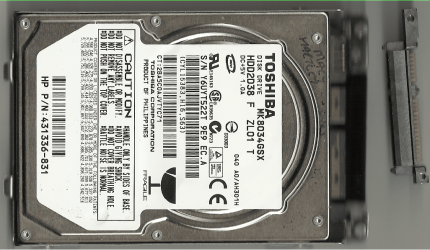
Is this some kind of Hybrid IDE/SATA controller thingy? The old and new drives have the same connection. Though there is an adapter I have to change out on the tip of the connector. Yet this is pin for pin to be able to connect by snapping down into my laptop instead of sliding sideways into a connector.

I think the firmaware updates that HP has is to change the MOBO controller from IDE to Sata. Of course I do not know what I'm talking about. :cry:

Ps. I am not hardwired while doing all of this. If windows needs to connect to internet I do not believe it can unless the repair cd has wireless driver.

Please don't get frustrated with me. :(
I know I'm stupid. :o

Thanks again for the help. Your are awesome. :D
 

My Computer My Computer

At a glance

7 professionalYour Processor type and speed - AMD ATHLON(tm...2.5gbNVIDIA GeForce 7150/nForce 64MB
Computer Manufacturer/Model Number
Hp presario v6620us 6500notebook series.
OS
7 professional
CPU
Your Processor type and speed - AMD ATHLON(tm) 64X2 DUAL-COR
Motherboard
Quanta 30CF
Memory
2.5gb
Graphics Card(s)
NVIDIA GeForce 7150/nForce 64MB
Sound Card
conextant smartaudio hd2
Hard Drives
FUJITSU PLATA 160GB IDE
PSU
Wth? is this
Case
The judge threw it out. Not enough evidence.
Cooling
sometimes.
Keyboard
Yep
Mouse
Nope
Internet Speed
fast

My Computer My Computer

At a glance

ME/XP/Vista/Win7
OS
ME/XP/Vista/Win7
Are you saying that you bought a SATA drive but are using an adapter to plug it into an IDE port because you don't have SATA ports on the mobo? Can you plug a new SATA HD into a SATA port? What ports are available?

What is the SATA controller setting in BIOS setup?

While in BIOS setup see how the HD is recognized.
 
Hi Greg

HP/Compaq adapter

HP - 1.png
 

My Computer My Computer

At a glance

ME/XP/Vista/Win7
OS
ME/XP/Vista/Win7
Are you saying that you bought a SATA drive but are using an adapter to plug it into an IDE port because you don't have SATA ports on the mobo? Can you plug a new SATA HD into a SATA port? What ports are available?

What is the SATA controller setting in BIOS setup?

While in BIOS setup see how the HD is recognized.

Hi Greg

HP/Compaq adapter

View attachment 171776
Yes that is the adapter. Further investigating shows that my old fujitsi hd is ide interface.

fujitsu Ide.png

The Hp firmware updates for Hitachi SATA drives will change the controller from Ide to sata. I think it might work for The seagate I bought because the site said it was compatible with my model HP Presario.
I am thinking of doing this firmware update which I will have to load onto a usb key and then reboot and follow instructions. If it does not work with the Seagate I bought then I will order The Hitachi that I have already found that matches the supported model numbers at HP support site.
Hitachi Models.png
Unless you guys see a big NO-No.
 

My Computer My Computer

At a glance

7 professionalYour Processor type and speed - AMD ATHLON(tm...2.5gbNVIDIA GeForce 7150/nForce 64MB
Computer Manufacturer/Model Number
Hp presario v6620us 6500notebook series.
OS
7 professional
CPU
Your Processor type and speed - AMD ATHLON(tm) 64X2 DUAL-COR
Motherboard
Quanta 30CF
Memory
2.5gb
Graphics Card(s)
NVIDIA GeForce 7150/nForce 64MB
Sound Card
conextant smartaudio hd2
Hard Drives
FUJITSU PLATA 160GB IDE
PSU
Wth? is this
Case
The judge threw it out. Not enough evidence.
Cooling
sometimes.
Keyboard
Yep
Mouse
Nope
Internet Speed
fast
The Hp firmware updates for Hitachi SATA drives will change the controller from Ide to sata.

Sorry, but it will not.

Capture1.JPG Capture2.JPG
 

My Computer My Computer

At a glance

ME/XP/Vista/Win7
OS
ME/XP/Vista/Win7
Ok.... I have a sata connector on both the new drive and the old drive. Yet the speccy report says my old drive has IDE interface. Yes both the drives I have look like the Sata picture you posted on the right.
 

My Computer My Computer

At a glance

7 professionalYour Processor type and speed - AMD ATHLON(tm...2.5gbNVIDIA GeForce 7150/nForce 64MB
Computer Manufacturer/Model Number
Hp presario v6620us 6500notebook series.
OS
7 professional
CPU
Your Processor type and speed - AMD ATHLON(tm) 64X2 DUAL-COR
Motherboard
Quanta 30CF
Memory
2.5gb
Graphics Card(s)
NVIDIA GeForce 7150/nForce 64MB
Sound Card
conextant smartaudio hd2
Hard Drives
FUJITSU PLATA 160GB IDE
PSU
Wth? is this
Case
The judge threw it out. Not enough evidence.
Cooling
sometimes.
Keyboard
Yep
Mouse
Nope
Internet Speed
fast
Yes I have swapped them out 10 times in my Laptop. I just read that the firmware update will not take place unless I have one of the supported Hitachi HD's in my Laptop at the time. I think that Hp somehow was able to use Sata HD with IDE controllers. The supported HD for my Hp laptop (hitachi) all are sata drives, I googled them and They are all SATA drives. The one I have now in my laptop is IDE yet it plugs in just Like a sata.
 

My Computer My Computer

At a glance

7 professionalYour Processor type and speed - AMD ATHLON(tm...2.5gbNVIDIA GeForce 7150/nForce 64MB
Computer Manufacturer/Model Number
Hp presario v6620us 6500notebook series.
OS
7 professional
CPU
Your Processor type and speed - AMD ATHLON(tm) 64X2 DUAL-COR
Motherboard
Quanta 30CF
Memory
2.5gb
Graphics Card(s)
NVIDIA GeForce 7150/nForce 64MB
Sound Card
conextant smartaudio hd2
Hard Drives
FUJITSU PLATA 160GB IDE
PSU
Wth? is this
Case
The judge threw it out. Not enough evidence.
Cooling
sometimes.
Keyboard
Yep
Mouse
Nope
Internet Speed
fast
Back
Top