Solved How to make a directory list contents as a menu

molokaicreeper

New member
Local time
10:49 AM
Messages
7
Location
Philadelphia PA
Hello everyone!

I am here because I am wondering if Windows has such thing as the capability of listing a menu of the contents of a folder. For example, I am an ex-MacOS user and in the old days (pre-OSX) there was a program called FreePPP that had a menu item to which you could add applications to. It would simulate what the taskbar does in Windows. Also, the extension gave the ability to the system to "right-click" or "control-click" to list contents of a folder as a menu. There were other programs that would do the same job.

As the MacOS evolved, then OSX brought the dock. With it, any folder that you insert in it becomes a menu, listing the contents. Any folder in it, becomes a submenu, and consecutively, and shortcuts/applications in it; can be launched.

I tried to do the same thing in the Taskbar and no go :(

I have it in the start menu "All programs" and I click it and opens a list of the contents where I can choose what I want to open. Requires four clicks at least and a hell of a lot of navigation. The above mentioned task, should require no more than two clicks.

This is one of the few features I miss about certain great things the MacOSX has. Can I have a Windows 7 Christmas wish to have it granted? I have looked in the internet extensively for it and there doesn't seem to be an application to do the job. And it doesn't look like the taskbar has those properties currently. Anyone familiar with this, and therefore can recommend a program to do this? Appreciate it very much!

:geek:
 

My Computer My Computer

At a glance

Windows 7 Home Premium 64-bitT4500(2.30GHz)3GB MemoryIntel GMA 4500M
Computer Manufacturer/Model Number
Acer Aspire AS5736Z-4801 Notebook
OS
Windows 7 Home Premium 64-bit
CPU
T4500(2.30GHz)
Motherboard
Intel Pentium dual-core T4500(2.30GHz)
Memory
3GB Memory
Graphics Card(s)
Intel GMA 4500M
Sound Card
MS-Sound compatible
Monitor(s) Displays
1366 x 768 LED backlight 15.6"
Screen Resolution
1366x768
Hard Drives
250GB HDD 5400rpm internal
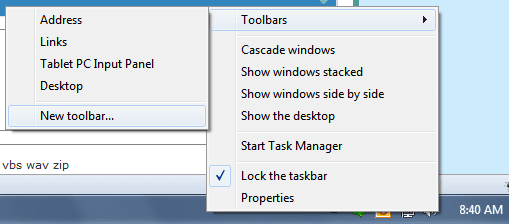
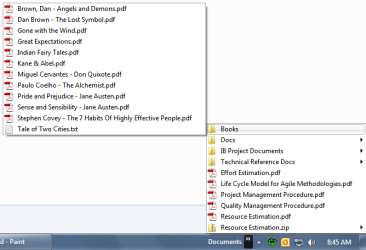
You can add a folder to the taskbar as a menu.
1. Right click on the taskbar and select the Toolbars -> New Folder
2. Select the folder you want to display as a menu
3. Done.

1.png

2.png

3.png
 

My Computer My Computer

At a glance

Windows 7 Ultimate x64 (XP, 98SE, 95, 3.11, D...Intel Core 2 Duo Processor P8600 (2.40 GHz, 3...4GB 800 MHz DDR2 SDRAMATI Mobility FireGL V5700 with 256 MB
Computer type
Laptop
Computer Manufacturer/Model Number
HP EliteBook 8530w Mobile Workstation
OS
Windows 7 Ultimate x64 (XP, 98SE, 95, 3.11, DOS 7.10 on VM) + Ubuntu 10.04 LTS Lucid Lynx
CPU
Intel Core 2 Duo Processor P8600 (2.40 GHz, 3 MB L2 cache)
Motherboard
Mobile Intel PM45 Express Chipset ICH9M-Enhanced
Memory
4GB 800 MHz DDR2 SDRAM
Graphics Card(s)
ATI Mobility FireGL V5700 with 256 MB
Sound Card
SoundMAX Integrated Digital HD Audio
Monitor(s) Displays
15.4-inch WXGA anti-glare (1280 x 800 resolution)
Screen Resolution
1280 x 800
Hard Drives
500GB + 1TB
Mouse
Synaptics PS/2 Port Touchpad, USB Mouse
Internet Speed
4 Mbps
Antivirus
MSE
Browser
Firefox, Chrome, IE
Other Info
Authentec AES2810 Fingerprint Reader
You could setup a new toolbar or two. It would look something like this:

NestedToolbar.jpg

The one I show is the System Tools toolbar then the Information folder under that. As the picture shows, I have one for System Tools and one for WebServer.

Edit:
Rats, I posted this too slowly, gladson1976 beat me to it.
 

My Computer My Computer

At a glance

Windows 10 Pro X64Intel Quad Core i7-4770 @ 3.4Ghz16.0GB PC3-12800 DDR3 SDRAM 1600 MHzIntel Integrated HD Graphics
Computer type
PC/Desktop
Computer Manufacturer/Model Number
Lenovo IdeaCenter 450
OS
Windows 10 Pro X64
CPU
Intel Quad Core i7-4770 @ 3.4Ghz
Memory
16.0GB PC3-12800 DDR3 SDRAM 1600 MHz
Graphics Card(s)
Intel Integrated HD Graphics
Sound Card
Realtek HD Audio
Monitor(s) Displays
HP 22" LCD
Screen Resolution
1680 x 1050
Hard Drives
250GB Samsung EVO SATA-3 SSD
2TB Seagate ST2000DM001 SATA-2
1.5TB Seagate ST3150041AS SATA
Keyboard
Dell USB
Mouse
Lenovo USB
Internet Speed
Cable via Road Runner 3MB Upload, 30MB Download
Antivirus
Windows Defender, MBAM Pro, MBAE
Browser
Seamonkey
Other Info
UEFI/GPT
PLDS DVD-RW DH16AERSH
Sorry about that Rich :)
Its good to be back
 

My Computer My Computer

At a glance

Windows 7 Ultimate x64 (XP, 98SE, 95, 3.11, D...Intel Core 2 Duo Processor P8600 (2.40 GHz, 3...4GB 800 MHz DDR2 SDRAMATI Mobility FireGL V5700 with 256 MB
Computer type
Laptop
Computer Manufacturer/Model Number
HP EliteBook 8530w Mobile Workstation
OS
Windows 7 Ultimate x64 (XP, 98SE, 95, 3.11, DOS 7.10 on VM) + Ubuntu 10.04 LTS Lucid Lynx
CPU
Intel Core 2 Duo Processor P8600 (2.40 GHz, 3 MB L2 cache)
Motherboard
Mobile Intel PM45 Express Chipset ICH9M-Enhanced
Memory
4GB 800 MHz DDR2 SDRAM
Graphics Card(s)
ATI Mobility FireGL V5700 with 256 MB
Sound Card
SoundMAX Integrated Digital HD Audio
Monitor(s) Displays
15.4-inch WXGA anti-glare (1280 x 800 resolution)
Screen Resolution
1280 x 800
Hard Drives
500GB + 1TB
Mouse
Synaptics PS/2 Port Touchpad, USB Mouse
Internet Speed
4 Mbps
Antivirus
MSE
Browser
Firefox, Chrome, IE
Other Info
Authentec AES2810 Fingerprint Reader
Amazing, you guys are awesome! :D
Both posts are highly appreciated, thanks!

I was thinking Win 7 just had to have something like that and I just couldn't find how to do it. I'm glad the developers thought of that.
 

My Computer My Computer

At a glance

Windows 7 Home Premium 64-bitT4500(2.30GHz)3GB MemoryIntel GMA 4500M
Computer Manufacturer/Model Number
Acer Aspire AS5736Z-4801 Notebook
OS
Windows 7 Home Premium 64-bit
CPU
T4500(2.30GHz)
Motherboard
Intel Pentium dual-core T4500(2.30GHz)
Memory
3GB Memory
Graphics Card(s)
Intel GMA 4500M
Sound Card
MS-Sound compatible
Monitor(s) Displays
1366 x 768 LED backlight 15.6"
Screen Resolution
1366x768
Hard Drives
250GB HDD 5400rpm internal
Liliana,

This feature is available in Windows XP also
 

My Computer My Computer

At a glance

Windows 7 Ultimate x64 (XP, 98SE, 95, 3.11, D...Intel Core 2 Duo Processor P8600 (2.40 GHz, 3...4GB 800 MHz DDR2 SDRAMATI Mobility FireGL V5700 with 256 MB
Computer type
Laptop
Computer Manufacturer/Model Number
HP EliteBook 8530w Mobile Workstation
OS
Windows 7 Ultimate x64 (XP, 98SE, 95, 3.11, DOS 7.10 on VM) + Ubuntu 10.04 LTS Lucid Lynx
CPU
Intel Core 2 Duo Processor P8600 (2.40 GHz, 3 MB L2 cache)
Motherboard
Mobile Intel PM45 Express Chipset ICH9M-Enhanced
Memory
4GB 800 MHz DDR2 SDRAM
Graphics Card(s)
ATI Mobility FireGL V5700 with 256 MB
Sound Card
SoundMAX Integrated Digital HD Audio
Monitor(s) Displays
15.4-inch WXGA anti-glare (1280 x 800 resolution)
Screen Resolution
1280 x 800
Hard Drives
500GB + 1TB
Mouse
Synaptics PS/2 Port Touchpad, USB Mouse
Internet Speed
4 Mbps
Antivirus
MSE
Browser
Firefox, Chrome, IE
Other Info
Authentec AES2810 Fingerprint Reader
Oh great, sorry I didn't know. I only dealt with XP a handful of times. When I saw Vista I wasn't too impressed either. Windows 7 though was Godsent to me. I liked it from the beginning and I am still finding great things about it everyday that I just love. :)
 

My Computer My Computer

At a glance

Windows 7 Home Premium 64-bitT4500(2.30GHz)3GB MemoryIntel GMA 4500M
Computer Manufacturer/Model Number
Acer Aspire AS5736Z-4801 Notebook
OS
Windows 7 Home Premium 64-bit
CPU
T4500(2.30GHz)
Motherboard
Intel Pentium dual-core T4500(2.30GHz)
Memory
3GB Memory
Graphics Card(s)
Intel GMA 4500M
Sound Card
MS-Sound compatible
Monitor(s) Displays
1366 x 768 LED backlight 15.6"
Screen Resolution
1366x768
Hard Drives
250GB HDD 5400rpm internal
Back
Top