Solved how to make os option menu appear in a dual boot pc?

Hi,
Sir/Madam, Amina Alomari : I will be back tomorrow evening. Till then 2 tasks :

1. check out for Secure Boot as here : Confirm-SecureBootUEFI
((You need to do it from windows 10. It has to be done from Elevated PowerShell & not cmd prompt!
Open Elevated Windows PowerShell in Windows 10 | Windows 10 Tutorials
Then type ''Confirm-SecureBootUEFI'' & press Enter [Type Without Quotes ""] ))

2. If you find Secure Boot is available for your motherboard and is enabled, look in 'Boot' Menu and disable it. As you posted : https://www.sevenforums.com/attachments/installation-setup/404367d1530307527-how-make-os-option-menu-appear-dual-boot-pc-img_20180629_235522.jpg

3. I am also looking towards seniors for the last words but i would like to look into somethings, etc.

Thanks & Regards. ...
 
Last edited:

My Computer My Computer

At a glance

Windows 7 Ultimate x32 With Sp1 + Vista Ultim...Intel Mobile Core 2 Duo T5750 @ 2.00GHz Merom...2.00GB Dual-Channel DDR2 @ 332MHz (5-5-5-15)Mobile Intel(R) 965 Express Chipset Family
Computer type
Laptop
Computer Manufacturer/Model Number
hp compaq presario c795VU notebook pc
OS
Windows 7 Ultimate x32 With Sp1 + Vista Ultimate x32 with Sp1 & Sp2 !!
CPU
Intel Mobile Core 2 Duo T5750 @ 2.00GHz Merom 65nm Technolog
Motherboard
Hewlett-Packard 30D9 (CPU)
Memory
2.00GB Dual-Channel DDR2 @ 332MHz (5-5-5-15)
Graphics Card(s)
Mobile Intel(R) 965 Express Chipset Family
Sound Card
High Definition Audio Device
Monitor(s) Displays
LP154WX4-TLCB on Mobile Intel 965 Express Chipset Family
Screen Resolution
1280x800 @ 60Hz
Hard Drives
149GB Western Digital WDC WD1600BEVS-60VAT0 ATA Device (SATA)
Keyboard
Standard 101/102-Key or Microsoft Natural PS/2 Key + HP QLB
Mouse
ALPS pointing device
Antivirus
Kaspersky AV 2017(Win 7) & AVG AntiVirus Free 2016 (VISTA)
Browser
google chrome
Hi,
Sir/Madam, @Amina Alomari : I will be back tomorrow evening. Till then 2 tasks :

1. check out for Secure Boot as here : Confirm-SecureBootUEFI
((You need to do it from windows 10. It has to be done from Elevated PowerShell & not cmd prompt!
Open Elevated Windows PowerShell in Windows 10 | Windows 10 Tutorials
Then type ''Confirm-SecureBootUEFI'' & press Enter [Type Without Quotes ""] ))

2. If you find Secure Boot is available for your motherboard and is enabled, look in 'Boot' Menu and disable it. As you posted : https://www.sevenforums.com/attachm...u-appear-dual-boot-pc-img_20180629_235522.jpg

3. I am also looking towards seniors for the last words but i would like to look into somethings, etc.

Thanks & Regards. ...


Hello
I did as you instructed me ..
The result was "true" meaning i have secure boot in my mb.
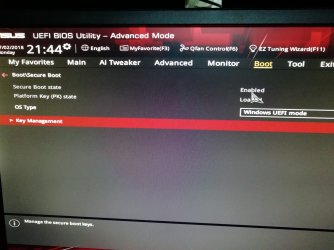
However when i found it in boot menu, it is actually enabled but i dont have the option to disable it. Its greyed out and unchangeable.

And i am still awaiting your opinion concerning the way to show up boot menu at startup.

Many thanks again.
 

Attachments

  • IMG_20180702_214413.jpg
    IMG_20180702_214413.jpg
    294.9 KB · Views: 0

My Computer My Computer

At a glance

Windows 7 ultimate ×64Core-i7 770016GB DDR4 2400Geforce GTX 1070
Computer type
PC/Desktop
Computer Manufacturer/Model Number
Costum built
OS
Windows 7 ultimate ×64
CPU
Core-i7 7700
Motherboard
ASUS STRIX H270F GAMING
Memory
16GB DDR4 2400
Graphics Card(s)
Geforce GTX 1070
Hard Drives
Terra ...
First These Two !

Hi,
Sir/Madam,
Amina Alomari :
1) https://www.sevenforums.com/attachments/installation-setup/404367d1530307527-how-make-os-option-menu-appear-dual-boot-pc-img_20180629_235522.jpg
This is not going to work, Keep both drives always enabled for what we want to achieve & maintain. Need not fear.
2) To disable secure boot refer here carefully.
How to Disable or Enable Secure Boot for ASUS Motherboard
Go to section : Step-by-Step: Take Backup of Existing Keys and Disable Secure Boot, take backup of keys ( you may want to enable secure boot again in future!) and get it done. Boot in windows 10 i.e. "Windows Boot Manager'' ( SATA6G_2: WDC WD 10EZEX 00RKKA0 ) & Run the same command to confirm the 'Secure Boot' status. If done well, go again in the bios AND make sure that the 'Secure Boot' is 'disabled' & 'Platform Key (KY) State' is 'unloaded' for all the 'OS Types'. ( choose all the OS Type one by one in the menu and check the status for the two!) Go again in windows 10, run the same command & check the Secure Boot status again to make sure everything is fine. ( While doing changes in bios, be a little careful )
3. To avoid any problems : back up the files on USB pen drive, quick format it and then use to save keys.

Please Report.

Thank & Regards. ...
 
Last edited:

My Computer My Computer

At a glance

Windows 7 Ultimate x32 With Sp1 + Vista Ultim...Intel Mobile Core 2 Duo T5750 @ 2.00GHz Merom...2.00GB Dual-Channel DDR2 @ 332MHz (5-5-5-15)Mobile Intel(R) 965 Express Chipset Family
Computer type
Laptop
Computer Manufacturer/Model Number
hp compaq presario c795VU notebook pc
OS
Windows 7 Ultimate x32 With Sp1 + Vista Ultimate x32 with Sp1 & Sp2 !!
CPU
Intel Mobile Core 2 Duo T5750 @ 2.00GHz Merom 65nm Technolog
Motherboard
Hewlett-Packard 30D9 (CPU)
Memory
2.00GB Dual-Channel DDR2 @ 332MHz (5-5-5-15)
Graphics Card(s)
Mobile Intel(R) 965 Express Chipset Family
Sound Card
High Definition Audio Device
Monitor(s) Displays
LP154WX4-TLCB on Mobile Intel 965 Express Chipset Family
Screen Resolution
1280x800 @ 60Hz
Hard Drives
149GB Western Digital WDC WD1600BEVS-60VAT0 ATA Device (SATA)
Keyboard
Standard 101/102-Key or Microsoft Natural PS/2 Key + HP QLB
Mouse
ALPS pointing device
Antivirus
Kaspersky AV 2017(Win 7) & AVG AntiVirus Free 2016 (VISTA)
Browser
google chrome
Hi,
Sir/Madam,
Amina Alomari:

1) Done ?

2) Having done that boot into win10 & win7, run 'bcdedit' from elevated command prompt and report the results.

(a) In windows 7: Elevated Command Prompt - Windows 7 Help Forums
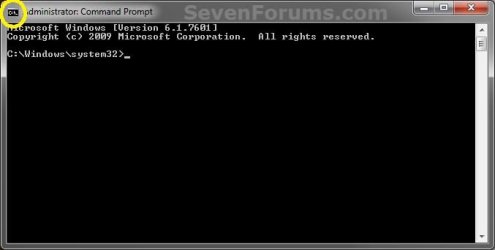
[ Go to 'Here's How: > Step 3'. In the cmd prompt window type 'bcdedit' (without quotes ' ') and press 'enter'. To Copy the result :'click the top left small icon ( marked as yellow in the below attached image) > Edit > Select All'. Once selected press 'Ctrl+C' to copy the report, go where you want to paste it and press 'Ctrl+V' ]
Elevated_Command_Prompt.jpg

(b) In windows 10 : Open Elevated Command Prompt in Windows 10 | Windows 10 Tutorials
[ option 3. In the cmd prompt window same as in windows 7 ]

Report & let us know.

Thanks & Regards. ...
 
Last edited:

My Computer My Computer

At a glance

Windows 7 Ultimate x32 With Sp1 + Vista Ultim...Intel Mobile Core 2 Duo T5750 @ 2.00GHz Merom...2.00GB Dual-Channel DDR2 @ 332MHz (5-5-5-15)Mobile Intel(R) 965 Express Chipset Family
Computer type
Laptop
Computer Manufacturer/Model Number
hp compaq presario c795VU notebook pc
OS
Windows 7 Ultimate x32 With Sp1 + Vista Ultimate x32 with Sp1 & Sp2 !!
CPU
Intel Mobile Core 2 Duo T5750 @ 2.00GHz Merom 65nm Technolog
Motherboard
Hewlett-Packard 30D9 (CPU)
Memory
2.00GB Dual-Channel DDR2 @ 332MHz (5-5-5-15)
Graphics Card(s)
Mobile Intel(R) 965 Express Chipset Family
Sound Card
High Definition Audio Device
Monitor(s) Displays
LP154WX4-TLCB on Mobile Intel 965 Express Chipset Family
Screen Resolution
1280x800 @ 60Hz
Hard Drives
149GB Western Digital WDC WD1600BEVS-60VAT0 ATA Device (SATA)
Keyboard
Standard 101/102-Key or Microsoft Natural PS/2 Key + HP QLB
Mouse
ALPS pointing device
Antivirus
Kaspersky AV 2017(Win 7) & AVG AntiVirus Free 2016 (VISTA)
Browser
google chrome
Hi,
Sir/Madam,
@Amina Alomari:

1) Done ?

2) Having done that boot into win10 & win7, run 'bcdedit' from elevated command prompt and report the results.

(a) In windows 7: Elevated Command Prompt - Windows 7 Help Forums
[ Go to 'Here's How: > Step 3'. In the cmd prompt window type 'bcdedit' (without quotes ' ') and press 'enter'. To Copy the result :'click the top left small icon ( marked as yellow in the below attached image) > Edit > Select All'. Once selected press 'Ctrl+C' to copy the report, go where you want to paste it and press 'Ctrl+V' ]
View attachment 404419

(b) In windows 10 : Open Elevated Command Prompt in Windows 10 | Windows 10 Tutorials
[ option 3. In the cmd prompt window same as in windows 7 ]

Report & let us know.

Thanks & Regards. ...


Hello again.
Sorry for being late to respond but i was busy at my job.


1.i have successfully disabled secure boot as you instructed me . It worked fine. However i wonder if it has any disadvantage on my pc in the future?


2. I did the bcdedit step and here are the results:
Win7:


Microsoft Windows [Version 6.1.7601]
Copyright (c) 2009 Microsoft Corporation. All rights reserved.

C:\Windows\system32>bcdedit

Windows Boot Manager
--------------------
identifier {bootmgr}
device partition=\Device\HarddiskVolume7
description Windows Boot Manager
locale en-US
inherit {globalsettings}
default {current}
resumeobject {e5525293-7cc0-11e7-81ba-fa6823bef606}
displayorder {current}
toolsdisplayorder {memdiag}
timeout 30

Windows Boot Loader
-------------------
identifier {current}
device partition=C:
path \Windows\system32\winload.exe
description Windows 7
locale en-US
inherit {bootloadersettings}
osdevice partition=C:
systemroot \Windows
resumeobject {e5525293-7cc0-11e7-81ba-fa6823bef606}
nx OptIn

C:\Windows\system32>


And for win10:
Windows PowerShell
Copyright (C) Microsoft Corporation. All rights reserved.

PS C:\Windows\system32> bcdedit

Windows Boot Manager
--------------------
identifier {bootmgr}
device partition=\Device\HarddiskVolume2
path \EFI\MICROSOFT\BOOT\BOOTMGFW.EFI
description Windows Boot Manager
locale en-US
inherit {globalsettings}
default {current}
resumeobject {c095c508-776e-11e8-a437-a111ef555d69}
displayorder {current}
toolsdisplayorder {memdiag}
timeout 30

Windows Boot Loader
-------------------
identifier {current}
device partition=C:
path \Windows\system32\winload.efi
description Windows 10
locale en-US
inherit {bootloadersettings}
recoverysequence {c095c50a-776e-11e8-a437-a111ef555d69}
displaymessageoverride Recovery
recoveryenabled Yes
isolatedcontext Yes
allowedinmemorysettings 0x15000075
osdevice partition=C:
systemroot \Windows
resumeobject {c095c508-776e-11e8-a437-a111ef555d69}
nx OptIn
bootmenupolicy Standard
PS C:\Windows\system32>


I cant thank you enough for your patience with me and i am looking forward to the next step.
 

My Computer My Computer

At a glance

Windows 7 ultimate ×64Core-i7 770016GB DDR4 2400Geforce GTX 1070
Computer type
PC/Desktop
Computer Manufacturer/Model Number
Costum built
OS
Windows 7 ultimate ×64
CPU
Core-i7 7700
Motherboard
ASUS STRIX H270F GAMING
Memory
16GB DDR4 2400
Graphics Card(s)
Geforce GTX 1070
Hard Drives
Terra ...

My Computer My Computer

At a glance

Win 10 x64, Linux Lite, Win 7 x64, BlackArch,...
Computer type
PC/Desktop
Computer Manufacturer/Model Number
HP Desktop & Compaq Laptop
OS
Win 10 x64, Linux Lite, Win 7 x64, BlackArch, & Kali
Hard Drives
Samsung 850 Pro 256Gb,
Hitachi HDD 1Tb,
Crucial MX SSD 250Gb
Segate 3Tb USB 3.0 Ext. Backup HDD
Internet Speed
150Mbps dn, 20Mbps up
Antivirus
Avast Free, Malwarebytes Anti-Exploit & Anti-Ransomware
Browser
Firefox, Chrome, Opera, & VPN
Hi All,
Greets,
Sir/Madam,

1 Snick: Sir, Thanks for the link. But i would like to go deeper a little later!

Amina Alomari: Mam,

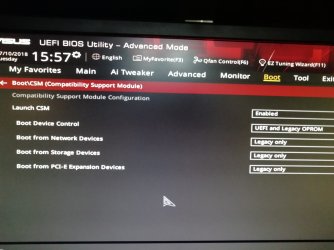
2.Please go back to ''BIOS Setup > Boot Menu > expand 'CSM' & get us a snap.

3.It is needed to show file extensions. It should be always helpful! Follow:
Hide or Show File Name Extensions in Windows 10 | Windows 10 Tutorials
(Go for OPTION TWO)

4. we need to know your windows edition and system type ( 32/64 bit ) :
See System Information in Windows 10 | Windows 10 Tutorials
(Go for OPTION THREE)

Thanks & Regards. ...
 

My Computer My Computer

At a glance

Windows 7 Ultimate x32 With Sp1 + Vista Ultim...Intel Mobile Core 2 Duo T5750 @ 2.00GHz Merom...2.00GB Dual-Channel DDR2 @ 332MHz (5-5-5-15)Mobile Intel(R) 965 Express Chipset Family
Computer type
Laptop
Computer Manufacturer/Model Number
hp compaq presario c795VU notebook pc
OS
Windows 7 Ultimate x32 With Sp1 + Vista Ultimate x32 with Sp1 & Sp2 !!
CPU
Intel Mobile Core 2 Duo T5750 @ 2.00GHz Merom 65nm Technolog
Motherboard
Hewlett-Packard 30D9 (CPU)
Memory
2.00GB Dual-Channel DDR2 @ 332MHz (5-5-5-15)
Graphics Card(s)
Mobile Intel(R) 965 Express Chipset Family
Sound Card
High Definition Audio Device
Monitor(s) Displays
LP154WX4-TLCB on Mobile Intel 965 Express Chipset Family
Screen Resolution
1280x800 @ 60Hz
Hard Drives
149GB Western Digital WDC WD1600BEVS-60VAT0 ATA Device (SATA)
Keyboard
Standard 101/102-Key or Microsoft Natural PS/2 Key + HP QLB
Mouse
ALPS pointing device
Antivirus
Kaspersky AV 2017(Win 7) & AVG AntiVirus Free 2016 (VISTA)
Browser
google chrome
Hi All,
Greets,
Sir/Madam,

1 @Snick: Sir, Thanks for the link. But i would like to go deeper a little later!

@Amina Alomari: Mam,

2.Please go back to ''BIOS Setup > Boot Menu > expand 'CSM' & get us a snap.

3.It is needed to show file extensions. It should be always helpful! Follow:
Hide or Show File Name Extensions in Windows 10 | Windows 10 Tutorials
(Go for OPTION TWO)

4. we need to know your windows edition and system type ( 32/64 bit ) :
See System Information in Windows 10 | Windows 10 Tutorials
(Go for OPTION THREE)

Thanks & Regards. ...


Hello sir,

1- i turned on file extension viewer. But i dont know if you need something more from it.

2- my win 10 version is 64bit and so is my win 7.

3- the picture you requested is attached.


Thank you for your time.
 

Attachments

  • IMG_20180710_155748-1984x1488.jpg
    IMG_20180710_155748-1984x1488.jpg
    179.4 KB · Views: 0

My Computer My Computer

At a glance

Windows 7 ultimate ×64Core-i7 770016GB DDR4 2400Geforce GTX 1070
Computer type
PC/Desktop
Computer Manufacturer/Model Number
Costum built
OS
Windows 7 ultimate ×64
CPU
Core-i7 7700
Motherboard
ASUS STRIX H270F GAMING
Memory
16GB DDR4 2400
Graphics Card(s)
Geforce GTX 1070
Hard Drives
Terra ...
During POST, Del key launches BIOS options / config.
On a Asus MB, F8 launches the boot menu (without entering BIOS)
 

My Computers My Computers

  • At a glance

    Windows 7 HP 64i5 6600K - 800MHz to 4200MHz4+4G GSkill DDR4 3000IG - Intel 530
    Computer type
    PC/Desktop
    Computer Manufacturer/Model Number
    custom build
    OS
    Windows 7 HP 64
    CPU
    i5 6600K - 800MHz to 4200MHz
    Motherboard
    GA-Z170-HD3P
    Memory
    4+4G GSkill DDR4 3000
    Graphics Card(s)
    IG - Intel 530
    Monitor(s) Displays
    Samsung 226BW
    Screen Resolution
    1680x1050
    Hard Drives
    (1) -1 SM951 – 128GB M.2 AHCI PCIe SSD drive for Windows 7 and Lubuntu
    (2) -1 WD SATA 3 - 1T for Data
    (3) -1 WD SATA 3 - 1T for backup
    PSU
    Thermaltake 450W TR2 gold
    Keyboard
    Old and good Chicony mechanical keyboard
    Mouse
    Logitech mX performance - 9 buttons (had to disable some)
    Internet Speed
    500Mb/s
    Browser
    Firefox 64
    Other Info
    TinyWall firewall
  • At a glance

    Windows 7 Proi7-4500U 800MHz to 3.0GHz(4+4)G DDR3 1600IG intel 4400 + NVIDIA GeForce GT 745M
    Computer type
    Laptop
    System Manufacturer/Model Number
    Asus Q550LF
    OS
    Windows 7 Pro
    CPU
    i7-4500U 800MHz to 3.0GHz
    Motherboard
    Asus Q550LF
    Memory
    (4+4)G DDR3 1600
    Graphics Card(s)
    IG intel 4400 + NVIDIA GeForce GT 745M
    Sound Card
    Realtek
    Monitor(s) Displays
    LG Display LP156WF4-SPH1
    Screen Resolution
    1920 x 1080
    Hard Drives
    BX500 120G SSD for Windows and programs +
    1T HDD for data
    Internet Speed
    500 Mb/s
    Browser
    Firefox
    Other Info
    TinyWall firewall
Hi All,
Greets,

1.During POST, Del key launches BIOS options / config.
On a Asus MB, F8 launches the boot menu (without entering BIOS)
Amina Alomari : Mam, Take note of what Sir says. You can launch one time boot menu on your system by pressing F8 repeatedly as soon as you press the power button. We will need it in the near future.

2. And you should remove the letter from either OS when you`re booted into either OS, so they don`t see each other, unless for some reason you want them to
Now i came to understand what Sir AddRAM was saying. just have a look at your disks:

Disk ManagementJPG.JPG

Here the red marked partitions are crucial system parts of each OS and they should not be touched from the other OS. Always take care. Never access from other OS for now. We would see whether we can permanently do that.
We can take that into account only after establishing our objective

3. Everything is well in BIOS.

4. Its done if you have enabled showing extensions.

5. We would be working mainly on windows 10 for now. Have & keep a good look on it. Be familiar & attentive with the drive letters assigned to each drive & partition from within windows 10. Even forget windows 7 for a while. Apart from that always follow the instructions.

6. The task would take a few more days. Because i have to take proper cover if something goes wrong so that we can revert back to present status. Whatever happens you will be always able to use windows 7 and revert back windows 10 to the present status.

7.We need to know what is the full edition name of windows 10 ? You are using english version ? We need to download that iso which would be about 4GB. Are you ready ?

Thanks & Regards. ...
 
Last edited:

My Computer My Computer

At a glance

Windows 7 Ultimate x32 With Sp1 + Vista Ultim...Intel Mobile Core 2 Duo T5750 @ 2.00GHz Merom...2.00GB Dual-Channel DDR2 @ 332MHz (5-5-5-15)Mobile Intel(R) 965 Express Chipset Family
Computer type
Laptop
Computer Manufacturer/Model Number
hp compaq presario c795VU notebook pc
OS
Windows 7 Ultimate x32 With Sp1 + Vista Ultimate x32 with Sp1 & Sp2 !!
CPU
Intel Mobile Core 2 Duo T5750 @ 2.00GHz Merom 65nm Technolog
Motherboard
Hewlett-Packard 30D9 (CPU)
Memory
2.00GB Dual-Channel DDR2 @ 332MHz (5-5-5-15)
Graphics Card(s)
Mobile Intel(R) 965 Express Chipset Family
Sound Card
High Definition Audio Device
Monitor(s) Displays
LP154WX4-TLCB on Mobile Intel 965 Express Chipset Family
Screen Resolution
1280x800 @ 60Hz
Hard Drives
149GB Western Digital WDC WD1600BEVS-60VAT0 ATA Device (SATA)
Keyboard
Standard 101/102-Key or Microsoft Natural PS/2 Key + HP QLB
Mouse
ALPS pointing device
Antivirus
Kaspersky AV 2017(Win 7) & AVG AntiVirus Free 2016 (VISTA)
Browser
google chrome
Take a look at EasyBCD which is free for personal use and should be able to easily setup your boot menu to load multiple operating systems
 

My Computers My Computers

  • At a glance

    Windows 11 Pro x64 [Latest Release and Releas...Ryzen 9 5950X, 3.8 - 5.2 MHz64GB [2 x 32GB] DDR4 3200MHz4GB NVIDIA GEFORCE GTX 1650 Ti
    Computer type
    PC/Desktop
    Computer Manufacturer/Model Number
    ChillBlast - Custom to my design
    OS
    Windows 11 Pro x64 [Latest Release and Release Preview]
    CPU
    Ryzen 9 5950X, 3.8 - 5.2 MHz
    Motherboard
    Asus Prime X570-Pro
    Memory
    64GB [2 x 32GB] DDR4 3200MHz
    Graphics Card(s)
    4GB NVIDIA GEFORCE GTX 1650 Ti
    Sound Card
    On-board SPDIF to 5.1 System + HDMI [5.1 system]
    Monitor(s) Displays
    32" UHD 32 Bit HDR Monitor + 43" UHD 4K 32Bit HDR TV
    Screen Resolution
    2 x 3840 x 2160 @60Hz
    Hard Drives
    1TB M2 SSD OS, 500GB Fast Access SSD, 2 x 8TB Data + Various Externals from 1TB to 4TB, 10TB NAS
    PSU
    NZXT C750 80 PLUS Gold 750W Modular PSU
    Case
    Workstation Case [Matt Black]
    Cooling
    NZXT Kraken X63 280mm CPU Cooler +2x Quiet Case fans
    Keyboard
    Logitech Wireless MX Keys & K400 + others
    Mouse
    Logitech Wireless MX Master 3S
    Internet Speed
    920 MB Down 50 MB Up
    Antivirus
    BitDefender Total Security Pro
    Browser
    Chrome (always run latest Non-Beta)
    Other Info
    Also run ...
    Laptop - Quad 8GB - Windows 10 Pro x64
    Nexus 7 Android tablet x2
    Samsung 10.2" tablet
    Blackview TAB 8 4G Android Tablet c/w Keyboard
    Wacom Intuos Pro Medium Pen Pad
    Wacom Intuos Pro Small Pen Pad
    Wacom Expresskeys Remote
    Loopdeck+ Graphics Controller
    Shuttle Pro v2 Control
  • At a glance

    Windows 11 Pro x64 Latest RPIntel I7 10750H 5.0GHz32GB [2x16GB] DDR4 2933 MHznVidia GTX1650Ti 4 GB GDDR6
    Computer type
    Laptop
    System Manufacturer/Model Number
    Dell XPS 17 10750H
    OS
    Windows 11 Pro x64 Latest RP
    CPU
    Intel I7 10750H 5.0GHz
    Motherboard
    Dell XPS
    Memory
    32GB [2x16GB] DDR4 2933 MHz
    Graphics Card(s)
    nVidia GTX1650Ti 4 GB GDDR6
    Sound Card
    Stock [Realtek] 4 Speaker
    Monitor(s) Displays
    17" IPS UHD+ Infinity Edge Touchscreen
    Screen Resolution
    3840 x 2400
    Hard Drives
    2TB M2 NVMe, 4TB External + various 500GB & 1TB External NVMe (also have access to spinner HDD from
    PSU
    Stock
    Case
    Stock XPS Aluminium & Carbon Fibre
    Cooling
    Stock - Active Fan Control
    Keyboard
    Backlit + Various Logitech
    Mouse
    Stock Track Pad + Logitech MX Trackball
    Internet Speed
    72 MB Down 18MB Up
    Browser
    Chrome
    Other Info
    Also run ...
    Laptop - Quad 8GB - Windows 10 Pro x64
    Nexus 7 Android tablet x2
    10.2" tablet
    Sony Z3 Android Smartphone
    Wacom Intuos Pro Medium Pen Pad
    Wacom Intuos Pro Small Pen Pad
    Wacom Expresskeys Remote
    Loopdeck+ Graphics Controller
    Shuttle Pro v2 Control Pad
    10TB NAS
Take a look at EasyBCD which is free for personal use and should be able to easily setup your boot menu to load multiple operating systems

Thanks Sir, we are going to use the same !

Thanks & Regards. ...
 

My Computer My Computer

At a glance

Windows 7 Ultimate x32 With Sp1 + Vista Ultim...Intel Mobile Core 2 Duo T5750 @ 2.00GHz Merom...2.00GB Dual-Channel DDR2 @ 332MHz (5-5-5-15)Mobile Intel(R) 965 Express Chipset Family
Computer type
Laptop
Computer Manufacturer/Model Number
hp compaq presario c795VU notebook pc
OS
Windows 7 Ultimate x32 With Sp1 + Vista Ultimate x32 with Sp1 & Sp2 !!
CPU
Intel Mobile Core 2 Duo T5750 @ 2.00GHz Merom 65nm Technolog
Motherboard
Hewlett-Packard 30D9 (CPU)
Memory
2.00GB Dual-Channel DDR2 @ 332MHz (5-5-5-15)
Graphics Card(s)
Mobile Intel(R) 965 Express Chipset Family
Sound Card
High Definition Audio Device
Monitor(s) Displays
LP154WX4-TLCB on Mobile Intel 965 Express Chipset Family
Screen Resolution
1280x800 @ 60Hz
Hard Drives
149GB Western Digital WDC WD1600BEVS-60VAT0 ATA Device (SATA)
Keyboard
Standard 101/102-Key or Microsoft Natural PS/2 Key + HP QLB
Mouse
ALPS pointing device
Antivirus
Kaspersky AV 2017(Win 7) & AVG AntiVirus Free 2016 (VISTA)
Browser
google chrome
Hi All,
Greets,

1.During POST, Del key launches BIOS options / config.
On a Asus MB, F8 launches the boot menu (without entering BIOS)
@Amina Alomari : Mam, Take note of what Sir says. You can launch one time boot menu on your system by pressing F8 repeatedly as soon as you press the power button. We will need it in the near future.

2. And you should remove the letter from either OS when you`re booted into either OS, so they don`t see each other, unless for some reason you want them to
Now i came to understand what Sir AddRAM was saying. just have a look at your disks:

View attachment 404475

Here the red marked partitions are crucial system parts of each OS and they should not be touched from the other OS. Always take care. Never access from other OS for now. We would see whether we can permanently do that.
We can take that into account only after establishing our objective

3. Everything is well in BIOS.

4. Its done if you have enabled showing extensions.

5. We would be working mainly on windows 10 for now. Have & keep a good look on it. Be familiar & attentive with the drive letters assigned to each drive & partition from within windows 10. Even forget windows 7 for a while. Apart from that always follow the instructions.

6. The task would take a few more days. Because i have to take proper cover if something goes wrong so that we can revert back to present status. Whatever happens you will be always able to use windows 7 and revert back windows 10 to the present status.

7.We need to know what is the full edition name of windows 10 ? You are using english version ? We need to download that iso which would be about 4GB. Are you ready ?

Thanks & Regards. ...


Hello again mr. Vineet Garg,
My windows 10 version is windows 10 home, version 1709.
Os build 16299.15


Regarding the final point you mentioned .. i have my windows 10 on a DVD disc.like a virtual disk not an iso file.


For easybcd should i download it now? Or not?


Thank you again ..
 

My Computer My Computer

At a glance

Windows 7 ultimate ×64Core-i7 770016GB DDR4 2400Geforce GTX 1070
Computer type
PC/Desktop
Computer Manufacturer/Model Number
Costum built
OS
Windows 7 ultimate ×64
CPU
Core-i7 7700
Motherboard
ASUS STRIX H270F GAMING
Memory
16GB DDR4 2400
Graphics Card(s)
Geforce GTX 1070
Hard Drives
Terra ...
Hi,
Greets,

Mam,
Be ready with a pen drive of 8gb or more capacity for dedicated use & make these downloads :

1) EasyBCD : Software Library - NeoSmart Technologies
( You need not register, just click the "DOWNLOAD!'' button)

2) Rufus Portable : Rufus - Create bootable USB drives the easy way
( go to the ''Download'' section & download Rufus 3.1 portable)

3) HashMyFiles : HashMyFiles: Calculate MD5/SHA1/CRC32 hash of files
(around bottom there will be ''Download HashMyFiles for 64 bit systems''


Get a new link yourself : TechBench by WZT (v4.1.1)
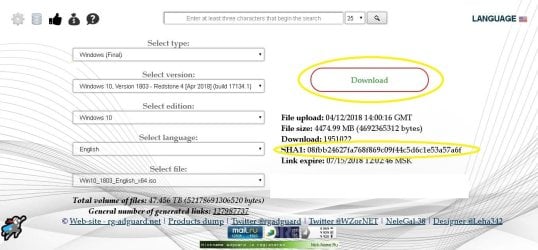
select your edition etc, take note of SHA-1 value and click/copy the download link. Every time the link will work for next 24 hours. Any problem in selection ? Just see/click the below image :

Let us know.

Thanks & Regards. ...
 

Attachments

  • TechBench by WZT page.JPG
    TechBench by WZT page.JPG
    117.8 KB · Views: 2
Last edited by a moderator:

My Computer My Computer

At a glance

Windows 7 Ultimate x32 With Sp1 + Vista Ultim...Intel Mobile Core 2 Duo T5750 @ 2.00GHz Merom...2.00GB Dual-Channel DDR2 @ 332MHz (5-5-5-15)Mobile Intel(R) 965 Express Chipset Family
Computer type
Laptop
Computer Manufacturer/Model Number
hp compaq presario c795VU notebook pc
OS
Windows 7 Ultimate x32 With Sp1 + Vista Ultimate x32 with Sp1 & Sp2 !!
CPU
Intel Mobile Core 2 Duo T5750 @ 2.00GHz Merom 65nm Technolog
Motherboard
Hewlett-Packard 30D9 (CPU)
Memory
2.00GB Dual-Channel DDR2 @ 332MHz (5-5-5-15)
Graphics Card(s)
Mobile Intel(R) 965 Express Chipset Family
Sound Card
High Definition Audio Device
Monitor(s) Displays
LP154WX4-TLCB on Mobile Intel 965 Express Chipset Family
Screen Resolution
1280x800 @ 60Hz
Hard Drives
149GB Western Digital WDC WD1600BEVS-60VAT0 ATA Device (SATA)
Keyboard
Standard 101/102-Key or Microsoft Natural PS/2 Key + HP QLB
Mouse
ALPS pointing device
Antivirus
Kaspersky AV 2017(Win 7) & AVG AntiVirus Free 2016 (VISTA)
Browser
google chrome
To be contd. ...
After above downloads :

1. check the integrity of the downloaded iso with HashMyFiles against the noted SHA-1 checksum.

(a) As you can see downloaded HashMyFiles is a zip. We need to extract it to a folder to actually use it. There are many good free extractor programs like 7-zip ( https://www.7-zip.org/download.html > x64.exe ). Its possible that there is already one on your windows 10.
OR
if you are not interested in installing, the other option is the inbuilt feature in windows 10 :
Unzip Files from Zipped Folder in Windows 10 | Windows 10 Tutorials
(check 'show extracted files when complete' )
OR
I have uploaded the extracted files here :
hashmyfiles-x64 - Google Drive
(download them one by one (3 files) & keep in a folder. )

b) After extraction, go in the extracted folder & launch HashMyFiles.exe. Then browse to the iso using 'File' menu item or simply drag & drop the iso in the window. The iso will take sometime to load & then checksums will appear. Now compare the SHA-1 with the noted one & its done !

2.
 
Last edited:

My Computer My Computer

At a glance

Windows 7 Ultimate x32 With Sp1 + Vista Ultim...Intel Mobile Core 2 Duo T5750 @ 2.00GHz Merom...2.00GB Dual-Channel DDR2 @ 332MHz (5-5-5-15)Mobile Intel(R) 965 Express Chipset Family
Computer type
Laptop
Computer Manufacturer/Model Number
hp compaq presario c795VU notebook pc
OS
Windows 7 Ultimate x32 With Sp1 + Vista Ultimate x32 with Sp1 & Sp2 !!
CPU
Intel Mobile Core 2 Duo T5750 @ 2.00GHz Merom 65nm Technolog
Motherboard
Hewlett-Packard 30D9 (CPU)
Memory
2.00GB Dual-Channel DDR2 @ 332MHz (5-5-5-15)
Graphics Card(s)
Mobile Intel(R) 965 Express Chipset Family
Sound Card
High Definition Audio Device
Monitor(s) Displays
LP154WX4-TLCB on Mobile Intel 965 Express Chipset Family
Screen Resolution
1280x800 @ 60Hz
Hard Drives
149GB Western Digital WDC WD1600BEVS-60VAT0 ATA Device (SATA)
Keyboard
Standard 101/102-Key or Microsoft Natural PS/2 Key + HP QLB
Mouse
ALPS pointing device
Antivirus
Kaspersky AV 2017(Win 7) & AVG AntiVirus Free 2016 (VISTA)
Browser
google chrome
Hi,
Greets,


Get a new link yourself : TechBench by WZT (v4.1.1)
select your edition etc, take note of SHA-1 value and click/copy the download link. Every time the link will work for next 24 hours. Any problem in selection ? Just see/click the below image :

Let us know.

Thanks & Regards. ...


Hello , i doenloaded the first 3 programs .
But the 4th, is it win 10? Because if its so .. cant my cd work instead?
Also in options when i want to select edition (mine is win 10 home) while the availble edition is home china? So is the language options (only china simplified). So what to do here?


Thank you.
 

My Computer My Computer

At a glance

Windows 7 ultimate ×64Core-i7 770016GB DDR4 2400Geforce GTX 1070
Computer type
PC/Desktop
Computer Manufacturer/Model Number
Costum built
OS
Windows 7 ultimate ×64
CPU
Core-i7 7700
Motherboard
ASUS STRIX H270F GAMING
Memory
16GB DDR4 2400
Graphics Card(s)
Geforce GTX 1070
Hard Drives
Terra ...
Regular windows 10 iso includes both Pro and Home editions.
 

My Computers My Computers

  • At a glance

    7 X64i5 84002x8gb 3200mhz
    Computer type
    PC/Desktop
    OS
    7 X64
    CPU
    i5 8400
    Motherboard
    gigabyte b365m ds3h
    Memory
    2x8gb 3200mhz
    Hard Drives
    various
    PSU
    pure power 11 400w cm
    Case
    Coolermaster
    Cooling
    cryorig m9i
  • At a glance

    7x64g54008gb ddr4 2400
    Computer type
    PC/Desktop
    OS
    7x64
    CPU
    g5400
    Motherboard
    ga b365m ds3h
    Memory
    8gb ddr4 2400
    PSU
    xfx pro 450w
Hi All,
Greets,
Mam,
1.The attached image (above) tells you exactly what selections to make for your said version , just click the image and it will zoom ! No problem : This link will work for next 24 hours :
https://tb.rg-adguard.net/dl.php?go=11e91ad4
Download Info : File upload: 04/12/2018 14:00:16 GMT
File size: 4474.99 MB (4692365312 bytes)
Download: 1953247
SHA1: 08fbb24627fa768f869c09f44c5d6c1e53a57a6f

2.cant my cd work instead?
I don't know exactly what is there & If it is still good ?
What i meant by ''Dedicated pen drive'' is only that all the data will be deleted on it. Once our goal is achieved & everything goes well, you can use it for any other thing. Just keep Win 10 Iso handy & you can prepare media whenever required. That's all.

( The power was down here )

Thanks & Regards. ...
 
Last edited:

My Computer My Computer

At a glance

Windows 7 Ultimate x32 With Sp1 + Vista Ultim...Intel Mobile Core 2 Duo T5750 @ 2.00GHz Merom...2.00GB Dual-Channel DDR2 @ 332MHz (5-5-5-15)Mobile Intel(R) 965 Express Chipset Family
Computer type
Laptop
Computer Manufacturer/Model Number
hp compaq presario c795VU notebook pc
OS
Windows 7 Ultimate x32 With Sp1 + Vista Ultimate x32 with Sp1 & Sp2 !!
CPU
Intel Mobile Core 2 Duo T5750 @ 2.00GHz Merom 65nm Technolog
Motherboard
Hewlett-Packard 30D9 (CPU)
Memory
2.00GB Dual-Channel DDR2 @ 332MHz (5-5-5-15)
Graphics Card(s)
Mobile Intel(R) 965 Express Chipset Family
Sound Card
High Definition Audio Device
Monitor(s) Displays
LP154WX4-TLCB on Mobile Intel 965 Express Chipset Family
Screen Resolution
1280x800 @ 60Hz
Hard Drives
149GB Western Digital WDC WD1600BEVS-60VAT0 ATA Device (SATA)
Keyboard
Standard 101/102-Key or Microsoft Natural PS/2 Key + HP QLB
Mouse
ALPS pointing device
Antivirus
Kaspersky AV 2017(Win 7) & AVG AntiVirus Free 2016 (VISTA)
Browser
google chrome
Hi All,
Greets,
Mam,
1.The attached image (above) tells you exactly what selections to make for your said version , just click the image and it will zoom ! No problem : This link will work for next 24 hours :
https://tb.rg-adguard.net/dl.php?go=11e91ad4
Download Info : File upload: 04/12/2018 14:00:16 GMT
File size: 4474.99 MB (4692365312 bytes)
Download: 1953247
SHA1: 08fbb24627fa768f869c09f44c5d6c1e53a57a6f

2.cant my cd work instead?
I don't know exactly what is there & If it is still good ?

( The power was down here )

Thanks & Regards. ...


Hello mr. Vinnet.
My installed win 10 version is 1709 not 1803.
Anyway i started downloading it , does that mean ill have to install windows 10 all over again?


And yes my cd is good i have used it 1 month ago. So i suppose it works fine.


Looking for your advice here , thanks a lot again.
 

My Computer My Computer

At a glance

Windows 7 ultimate ×64Core-i7 770016GB DDR4 2400Geforce GTX 1070
Computer type
PC/Desktop
Computer Manufacturer/Model Number
Costum built
OS
Windows 7 ultimate ×64
CPU
Core-i7 7700
Motherboard
ASUS STRIX H270F GAMING
Memory
16GB DDR4 2400
Graphics Card(s)
Geforce GTX 1070
Hard Drives
Terra ...
Regular windows 10 iso includes both Pro and Home editions.


Well i remember the options availble when i made the setup were home only or pro only.
Anyway what scared me is china option 😁😁
 

My Computer My Computer

At a glance

Windows 7 ultimate ×64Core-i7 770016GB DDR4 2400Geforce GTX 1070
Computer type
PC/Desktop
Computer Manufacturer/Model Number
Costum built
OS
Windows 7 ultimate ×64
CPU
Core-i7 7700
Motherboard
ASUS STRIX H270F GAMING
Memory
16GB DDR4 2400
Graphics Card(s)
Geforce GTX 1070
Hard Drives
Terra ...
Back
Top