
You are using an out of date browser. It may not display this or other websites correctly.
You should upgrade or use an alternative browser.
You should upgrade or use an alternative browser.
How to make Acrobat XI splash screen at startup available?
- Thread starter tkrojam
- Start date


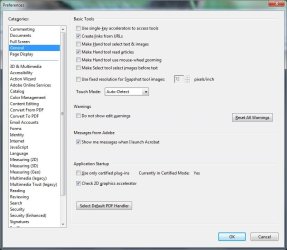
Don't use Adobe myself, but it looks like the path is
Edit> Preferences> General> Application Startup> Show Splash Screen
A Guy
Edit> Preferences> General> Application Startup> Show Splash Screen
A Guy
My Computer
At a glance
Windows 10 Home x64INTEL Core i5-750 Quad-Core 3.37GHzHyperX Fury Black Series 8GB (2 x 4GB) 1866MhzEVGA GeForce GTX 750 Superclocked 1GB 128-Bit...
- Computer type
- PC/Desktop
- OS
- Windows 10 Home x64
- CPU
- INTEL Core i5-750 Quad-Core 3.37GHz
- Motherboard
- ASUS P7P55D
- Memory
- HyperX Fury Black Series 8GB (2 x 4GB) 1866Mhz
- Graphics Card(s)
- EVGA GeForce GTX 750 Superclocked 1GB 128-Bit GDDR5
- Monitor(s) Displays
- LG 32MA68HY 32" IPS
- Screen Resolution
- 1920 x 1080
- Hard Drives
- Samsung 840 Evo 120GB, SEAGATE 500GB Barracuda® 7200.12, SATA 3 Gb/s, 7200 RPM, 16MB cache
- PSU
- ANTEC TruePower New TP-550, 80 PLUS, 550W
- Case
- ANTEC Three Hundred Illusion
- Cooling
- COOLER MASTER Hyper 212 Plus, 4 x 120mm 1 x 140mm Noctua's
- Internet Speed
- 85 + Mbps
- Antivirus
- Avast
- Browser
- Vivaldi
Don't use Adobe myself, but it looks like the path is
Edit> Preferences> General> Application Startup> Show Splash Screen
A Guy
Hi, invisible?
Attachments
My Computer
At a glance
Windows 7 VL (64-bit)
- OS
- Windows 7 VL (64-bit)
- Internet Speed
- PCCW Global IMS Ultraline@500Mbps (FTTH)
Hmmm, sorry, even found this:
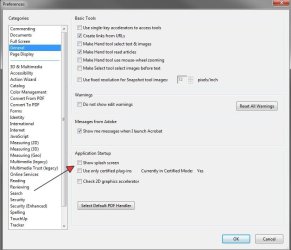
You do have the latest version version 10.1.1?
Also found a registry change, but it is in the Policies section. If you attempt it, make a backup of your registry just in case
http://www.sevenforums.com/tutorials/4230-registry-backup-restore.html
Source
That is to turn it off, so you'd want
HKLM\SOFTWARE\Policies\Adobe\(product name)\(version)\FeatureLockDown\cWelcomeScreen\bShowWelcomeScreen = 1
A Guy
You do have the latest version version 10.1.1?
Also found a registry change, but it is in the Policies section. If you attempt it, make a backup of your registry just in case
http://www.sevenforums.com/tutorials/4230-registry-backup-restore.html
For those Windows users begging to have a way to hide the Welcome Screen, now you can - but not via the Acrobat UI - instead you must create a new Registry key (cWelcomeScreen) and a new DWORD value (bShowWelcomeScreen = 0):
HKLM\SOFTWARE\Policies\Adobe\(product name)\(version)\FeatureLockDown\cWelcomeScreen\bShowWelcomeScreen = 0
We'd have preferred to do it with a checkbox or preference, but it seems there are limits to what can be extracted from an engineer even with the best-quality thumbscrews.Setting it to 1 wakes the Welcome Screen up again, but as this key is within the HKLM "administration" hive, normal Windows users may not have access to it. There is no matching user-context key under HKCU.
Source
That is to turn it off, so you'd want
HKLM\SOFTWARE\Policies\Adobe\(product name)\(version)\FeatureLockDown\cWelcomeScreen\bShowWelcomeScreen = 1
A Guy
My Computer
At a glance
Windows 10 Home x64INTEL Core i5-750 Quad-Core 3.37GHzHyperX Fury Black Series 8GB (2 x 4GB) 1866MhzEVGA GeForce GTX 750 Superclocked 1GB 128-Bit...
- Computer type
- PC/Desktop
- OS
- Windows 10 Home x64
- CPU
- INTEL Core i5-750 Quad-Core 3.37GHz
- Motherboard
- ASUS P7P55D
- Memory
- HyperX Fury Black Series 8GB (2 x 4GB) 1866Mhz
- Graphics Card(s)
- EVGA GeForce GTX 750 Superclocked 1GB 128-Bit GDDR5
- Monitor(s) Displays
- LG 32MA68HY 32" IPS
- Screen Resolution
- 1920 x 1080
- Hard Drives
- Samsung 840 Evo 120GB, SEAGATE 500GB Barracuda® 7200.12, SATA 3 Gb/s, 7200 RPM, 16MB cache
- PSU
- ANTEC TruePower New TP-550, 80 PLUS, 550W
- Case
- ANTEC Three Hundred Illusion
- Cooling
- COOLER MASTER Hyper 212 Plus, 4 x 120mm 1 x 140mm Noctua's
- Internet Speed
- 85 + Mbps
- Antivirus
- Avast
- Browser
- Vivaldi
Hmmm, sorry, even found this:
View attachment 243019
You do have the latest version version 10.1.1?
Also found a registry change, but it is in the Policies section. If you attempt it, make a backup of your registry just in case
http://www.sevenforums.com/tutorials/4230-registry-backup-restore.html
SourceFor those Windows users begging to have a way to hide the Welcome Screen, now you can - but not via the Acrobat UI - instead you must create a new Registry key (cWelcomeScreen) and a new DWORD value (bShowWelcomeScreen = 0):
HKLM\SOFTWARE\Policies\Adobe\(product name)\(version)\FeatureLockDown\cWelcomeScreen\bShowWelcomeScreen = 0
We'd have preferred to do it with a checkbox or preference, but it seems there are limits to what can be extracted from an engineer even with the best-quality thumbscrews.Setting it to 1 wakes the Welcome Screen up again, but as this key is within the HKLM "administration" hive, normal Windows users may not have access to it. There is no matching user-context key under HKCU.
That is to turn it off, so you'd want
HKLM\SOFTWARE\Policies\Adobe\(product name)\(version)\FeatureLockDown\cWelcomeScreen\bShowWelcomeScreen = 1
A Guy
Thanks but you just missed that my version is XI(11.0) not X(10.1.1)
My Computer
At a glance
Windows 7 VL (64-bit)
- OS
- Windows 7 VL (64-bit)
- Internet Speed
- PCCW Global IMS Ultraline@500Mbps (FTTH)
HKLM\SOFTWARE\Policies\Adobe\(product name)\(version)\FeatureLockDown\cWelcomeScreen\bShowWelcomeScreen = 1
A Guy
The welcome screen appears for me but I just done a quick check on this and it appears to work.
The key didn't exist on my system but it might on yours. Find instructions here if it doesn't but change the DWORD Value to 1.
My Computer
At a glance
Windows 7 Ultimate x64Intel Pentium Dual Core E5200 2.5GHz (3.77GHz...Corsair 4GB DDR2 (4x1GB CM2X1024-6400C4)Palit GeForce GTS 250 (1024MB)
- Computer Manufacturer/Model Number
- Self built
- OS
- Windows 7 Ultimate x64
- CPU
- Intel Pentium Dual Core E5200 2.5GHz (3.77GHz OC)
- Motherboard
- Asus P5Q-E
- Memory
- Corsair 4GB DDR2 (4x1GB CM2X1024-6400C4)
- Graphics Card(s)
- Palit GeForce GTS 250 (1024MB)
- Sound Card
- On Board (ADI AD2000B 8ch HD)
- Monitor(s) Displays
- Samsung 32in LCD TV
- Screen Resolution
- 1360x768
- Hard Drives
- 2 x 1TB Samsung 103SJ (Raid0)
2 x External 500GB Samsung 502IJ (NexStar 3 HD Enclosures)
- PSU
- 550W Antec Neo HE 550
- Case
- Antec P180
- Cooling
- Xigmatex Red Scorpion CPU Cooler. 3x120mm Fans
- Keyboard
- Logitech MX5000 Laser (Combo)
- Mouse
- Logitech MX5000 Laser (Combo)
- Internet Speed
- ADSL2+ (avg 10 Mbps Down, 0.80 Mbps up)
- Other Info
- Gigabyte GN-WP01GS 54g Wireless Lan Card
HKLM\SOFTWARE\Policies\Adobe\(product name)\(version)\FeatureLockDown\cWelcomeScreen\bShowWelcomeScreen = 1
A Guy
The welcome screen appears for me but I just done a quick check on this and it appears to work.
The key didn't exist on my system but it might on yours. Find instructions here if it doesn't but change the DWORD Value to 1.
Created but no luck...
http://s16.postimage.org/dtbv19dpv/image.jpg
My Computer
At a glance
Windows 7 VL (64-bit)
- OS
- Windows 7 VL (64-bit)
- Internet Speed
- PCCW Global IMS Ultraline@500Mbps (FTTH)
Sorry I tested it with Adobe Reader XI not Acrobat XI. A friend has a copy of Acrobat X (10.1.4) which I tried and works as well so they must of changed something with XI.
Normally the Welcome Screen is shown by default so if no one else here can help I could only suggest uninstalling and reinstalling Acrobat or try a repair install otherwise you may have better luck by contacting Adobe or using the Adobe forums.
PS. You might want to confirm if it is the Welcome screen you want or the Splash screen, I was presuming the Welcome screen as the splash screen is not useful.
Normally the Welcome Screen is shown by default so if no one else here can help I could only suggest uninstalling and reinstalling Acrobat or try a repair install otherwise you may have better luck by contacting Adobe or using the Adobe forums.
PS. You might want to confirm if it is the Welcome screen you want or the Splash screen, I was presuming the Welcome screen as the splash screen is not useful.
My Computer
At a glance
Windows 7 Ultimate x64Intel Pentium Dual Core E5200 2.5GHz (3.77GHz...Corsair 4GB DDR2 (4x1GB CM2X1024-6400C4)Palit GeForce GTS 250 (1024MB)
- Computer Manufacturer/Model Number
- Self built
- OS
- Windows 7 Ultimate x64
- CPU
- Intel Pentium Dual Core E5200 2.5GHz (3.77GHz OC)
- Motherboard
- Asus P5Q-E
- Memory
- Corsair 4GB DDR2 (4x1GB CM2X1024-6400C4)
- Graphics Card(s)
- Palit GeForce GTS 250 (1024MB)
- Sound Card
- On Board (ADI AD2000B 8ch HD)
- Monitor(s) Displays
- Samsung 32in LCD TV
- Screen Resolution
- 1360x768
- Hard Drives
- 2 x 1TB Samsung 103SJ (Raid0)
2 x External 500GB Samsung 502IJ (NexStar 3 HD Enclosures)
- PSU
- 550W Antec Neo HE 550
- Case
- Antec P180
- Cooling
- Xigmatex Red Scorpion CPU Cooler. 3x120mm Fans
- Keyboard
- Logitech MX5000 Laser (Combo)
- Mouse
- Logitech MX5000 Laser (Combo)
- Internet Speed
- ADSL2+ (avg 10 Mbps Down, 0.80 Mbps up)
- Other Info
- Gigabyte GN-WP01GS 54g Wireless Lan Card
Ironically, most searches found people who wanted to disable it, lol. A Guy
My Computer
At a glance
Windows 10 Home x64INTEL Core i5-750 Quad-Core 3.37GHzHyperX Fury Black Series 8GB (2 x 4GB) 1866MhzEVGA GeForce GTX 750 Superclocked 1GB 128-Bit...
- Computer type
- PC/Desktop
- OS
- Windows 10 Home x64
- CPU
- INTEL Core i5-750 Quad-Core 3.37GHz
- Motherboard
- ASUS P7P55D
- Memory
- HyperX Fury Black Series 8GB (2 x 4GB) 1866Mhz
- Graphics Card(s)
- EVGA GeForce GTX 750 Superclocked 1GB 128-Bit GDDR5
- Monitor(s) Displays
- LG 32MA68HY 32" IPS
- Screen Resolution
- 1920 x 1080
- Hard Drives
- Samsung 840 Evo 120GB, SEAGATE 500GB Barracuda® 7200.12, SATA 3 Gb/s, 7200 RPM, 16MB cache
- PSU
- ANTEC TruePower New TP-550, 80 PLUS, 550W
- Case
- ANTEC Three Hundred Illusion
- Cooling
- COOLER MASTER Hyper 212 Plus, 4 x 120mm 1 x 140mm Noctua's
- Internet Speed
- 85 + Mbps
- Antivirus
- Avast
- Browser
- Vivaldi
That's true and just made me think if it is the welcome screen the main use of that is for opening recent files which you could say is solved on Windows 7 by the use of Jump Lists if you pin it to the Task Bar, Start Menu or frequently use it and it's on the list of frequently used programs, unless you like the messages from Adobe or it's on different OS.Ironically, most searches found people who wanted to disable it, lol. A Guy
My Computer
At a glance
Windows 7 Ultimate x64Intel Pentium Dual Core E5200 2.5GHz (3.77GHz...Corsair 4GB DDR2 (4x1GB CM2X1024-6400C4)Palit GeForce GTS 250 (1024MB)
- Computer Manufacturer/Model Number
- Self built
- OS
- Windows 7 Ultimate x64
- CPU
- Intel Pentium Dual Core E5200 2.5GHz (3.77GHz OC)
- Motherboard
- Asus P5Q-E
- Memory
- Corsair 4GB DDR2 (4x1GB CM2X1024-6400C4)
- Graphics Card(s)
- Palit GeForce GTS 250 (1024MB)
- Sound Card
- On Board (ADI AD2000B 8ch HD)
- Monitor(s) Displays
- Samsung 32in LCD TV
- Screen Resolution
- 1360x768
- Hard Drives
- 2 x 1TB Samsung 103SJ (Raid0)
2 x External 500GB Samsung 502IJ (NexStar 3 HD Enclosures)
- PSU
- 550W Antec Neo HE 550
- Case
- Antec P180
- Cooling
- Xigmatex Red Scorpion CPU Cooler. 3x120mm Fans
- Keyboard
- Logitech MX5000 Laser (Combo)
- Mouse
- Logitech MX5000 Laser (Combo)
- Internet Speed
- ADSL2+ (avg 10 Mbps Down, 0.80 Mbps up)
- Other Info
- Gigabyte GN-WP01GS 54g Wireless Lan Card
Sadly, there is no longer a [menu] option to disable the "welcome" screen as Adobe calls it in Arcobat X or XI.
My Computer
At a glance
Windows 7, Windows 10 ProIntel Core i7 930G.SKILL F3-12800CL9T-6GBNQ 6GB DDR3 3X2GB DDR...ATI Radeon HD 5700
- Computer type
- PC/Desktop
- Computer Manufacturer/Model Number
- Asus P6X58D-E, Lenovo
- OS
- Windows 7, Windows 10 Pro
- CPU
- Intel Core i7 930
- Motherboard
- Asus X58 P6X58D-E
- Memory
- G.SKILL F3-12800CL9T-6GBNQ 6GB DDR3 3X2GB DDR3-1600 CL 9-9-9
- Graphics Card(s)
- ATI Radeon HD 5700
- Hard Drives
- Seagate Barracuda 1TB x2 SATA3 6GB/S 7200RPM 64MB
WD 1TB SATA3
- PSU
- Coolermaster Silent Pro 700W Modular Power Supply
Similar threads

- Replies
- 3
- Views
- 2K
- Replies
- 1
- Views
- 2K

- Replies
- 1
- Views
- 1K
- Replies
- 3
- Views
- 4K
