How to make folder search result show same columns as default view?

larrydonline

New member
Local time
7:12 AM
Messages
11
When I search in a music folder the results show #, Title, Contributing artists, Album, Rating, and Folder. I don't show any of those in my normal default view for music files except for title. Is there anyway to make the search results show the same columns that I normally see. What it's showing is of very little use. I have to right click and chose "open file location" before I can recognize what files I'm looking at in the results window. When you get many matches to a folder search that becomes a long and tedious process. Thanks.

Windows 7 Professional (x64) Service Pack 1 (build 7601)
 

My Computer My Computer

Computer Manufacturer/Model Number
Dell XPS 420
OS
Windows 7
CPU
2.40GH Q6600 Intel 2 Quad
Motherboard
?
Memory
4.0 GB
Graphics Card(s)
NVIDIA GeForce 8800 GT
Sound Card
Creative X-FI (WDM)
Monitor(s) Displays
Dell
Hard Drives
C is 1 terabyte
Also use four 1 terabyte USB drives
PSU
?
Case
?
Cooling
?
Larry don't know if this will help as I am on my 8 laptop but I think the same thing applies.
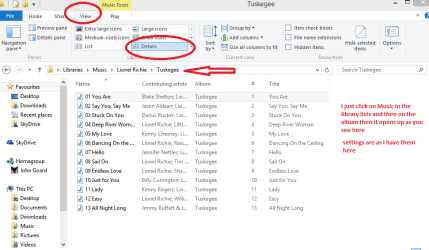
See my pic I just pick Music form the Start library list and you can see the path I take and the settings for the listing.

I am running in 8 but with the 7 set up look so it shouldn't be much of a difference.

I hope this is what you are after.
 

Attachments

  • MUSIC.PNG
    MUSIC.PNG
    31.2 KB · Views: 0

My Computer My Computer

Computer type
PC/Desktop
Computer Manufacturer/Model Number
Own build (new) Desk1 / Asus ROG Win 7 / Desk2 1st build
OS
Desk1 7 Home Prem / Desk2 10 Pro / Main lap Asus ROG 10 Pro 2 laptop Toshiba 7 Pro Asus P2520 7 & 10
CPU
Desk1 i5 3750K / Laptop i7 GTX 860M / Desk2 i5 2500
Motherboard
Desk1 Asus P877-V / Desk2 Gigabyte H67 UD3H / Laptop ?
Memory
Desk1 8GB (1866) / Desk2 16GB (1333) / Laptop 8Gb DDR3
Graphics Card(s)
Desk 1& 2NVidia GTX 650 & Laptops on board Intel
Sound Card
Desk 1 & 2 -XONAR DG Realtek High Def audio Laptop
Monitor(s) Displays
Desk 1 Benq HD 2450 / Desk2 Philips 24" / Laptop 17.5"
Screen Resolution
1920x1080 D1 & D2 & Laptop 1
Hard Drives
Desk1 Samsung 120GB 830 SSD
Asus ROG 256GB 850 Pro SSD
Desk2 Samsung 840 256 SSD
Toshiba 120GB EVO
PSU
Desk 1 Corsair HX 1050/ Laptop ? / Desk 2 Corsair HX 650
Case
Desk 1 Cooler HAF XM ? Toshiba laptop / Desk2 Coolermaster
Cooling
Fans on all Desk1 -2 Desk2 - all Coolermasters 5 Laptop ?
Keyboard
Desk 1 MS Sidewinder X6 Desk 2 MS Sidewinder X 4
Mouse
Desk 1&2 - Gigabyte MS 900 gamer - laptop - Logitec wireless
Internet Speed
ADSL2+
Other Info
One other Desktop (tester) and spare Toshba laptop both with SSD's
Running Kaspersky 2016 ISS on all machines config'd identically
Logitec audio stereo systems on each machine (x3)
Canon MG5250MFC
Router/modem TP-Link running WPA2SK
Libraries view settings

Hi,

I've posted some screenshots. Ignore the layout and library name as I've changed them from defaults.

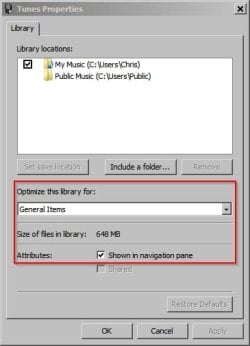
Right click on your Music library in an Explorer window then choose "properties" and then "General Items" then OK.

Tunes.jpg
Tunes 2.jpg

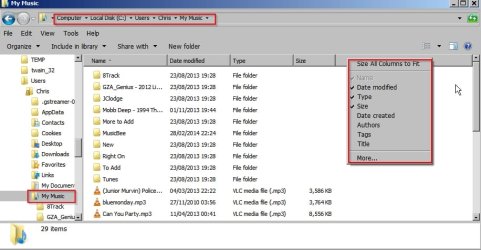
Also apply the same settings by navigating to C:\Users\Username\

then scroll down to your Music folder and right click, choose "properties", select "General Items" and "Apply to all subfolders" then OK. Right click a column heading to add or remove details.

Tunes 3.jpg

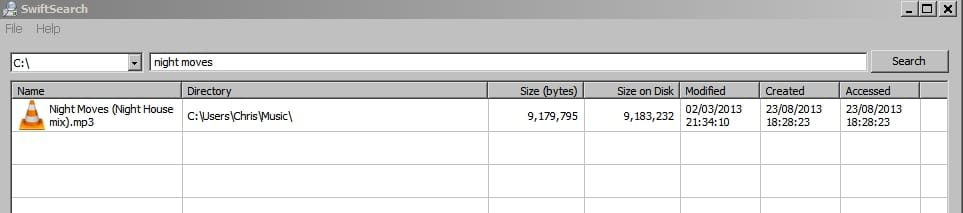
Edit: After reading your question again it seems that you're talking about the search results window when you use windows search. I've disabled windows search and indexing on my machine and use another method or two for searches so I can't determine what you will see in search results after applying the suggested settings!

Tunes 4.jpg
 
Last edited:

My Computer My Computer

Computer type
Laptop
Computer Manufacturer/Model Number
ASUS
OS
Microsoft Windows 7 Home Premium 64-bit 7601 Multiprocessor Free Service Pack 1
CPU
AMD C-60 APU with Radeon(tm) HD Graphics
Motherboard
ASUSTeK COMPUTER INC. X501U
Memory
4.00 GB
Graphics Card(s)
AMD Radeon HD 6290 Graphics
Sound Card
(1) AMD High Definition Audio Device (2) Realtek High Defi
Screen Resolution
1366 x 768 x 32 bits (4294967296 colors) @ 60 Hz
Hard Drives
Hitachi HTS545050A7E380 SATA Disk Device
Antivirus
Comodo CIS & FW, SecureAplus App Whitelisting, Threatfire
Browser
Cyberfox 64bit, Opera 64bit, Airfox
Other Info
Spy-The-Spy, HitmanPro.Alert, Norton Connect Safe, MJRegWatcher, BitDefender TrafficLight, Voodoo Shield, Zemana AntiMalware
Hum Callender mine seems to be a tad different to yours as I cannot open it up that way. My original post is the easiest way of just opening them up as far as my machines go, perhaps I have misinterpreted the OP first post?
 

My Computer My Computer

Computer type
PC/Desktop
Computer Manufacturer/Model Number
Own build (new) Desk1 / Asus ROG Win 7 / Desk2 1st build
OS
Desk1 7 Home Prem / Desk2 10 Pro / Main lap Asus ROG 10 Pro 2 laptop Toshiba 7 Pro Asus P2520 7 & 10
CPU
Desk1 i5 3750K / Laptop i7 GTX 860M / Desk2 i5 2500
Motherboard
Desk1 Asus P877-V / Desk2 Gigabyte H67 UD3H / Laptop ?
Memory
Desk1 8GB (1866) / Desk2 16GB (1333) / Laptop 8Gb DDR3
Graphics Card(s)
Desk 1& 2NVidia GTX 650 & Laptops on board Intel
Sound Card
Desk 1 & 2 -XONAR DG Realtek High Def audio Laptop
Monitor(s) Displays
Desk 1 Benq HD 2450 / Desk2 Philips 24" / Laptop 17.5"
Screen Resolution
1920x1080 D1 & D2 & Laptop 1
Hard Drives
Desk1 Samsung 120GB 830 SSD
Asus ROG 256GB 850 Pro SSD
Desk2 Samsung 840 256 SSD
Toshiba 120GB EVO
PSU
Desk 1 Corsair HX 1050/ Laptop ? / Desk 2 Corsair HX 650
Case
Desk 1 Cooler HAF XM ? Toshiba laptop / Desk2 Coolermaster
Cooling
Fans on all Desk1 -2 Desk2 - all Coolermasters 5 Laptop ?
Keyboard
Desk 1 MS Sidewinder X6 Desk 2 MS Sidewinder X 4
Mouse
Desk 1&2 - Gigabyte MS 900 gamer - laptop - Logitec wireless
Internet Speed
ADSL2+
Other Info
One other Desktop (tester) and spare Toshba laptop both with SSD's
Running Kaspersky 2016 ISS on all machines config'd identically
Logitec audio stereo systems on each machine (x3)
Canon MG5250MFC
Router/modem TP-Link running WPA2SK
Different Library options?

Hum Callender mine seems to be a tad different to yours as I cannot open it up that way. My original post is the easiest way of just opening them up as far as my machines go, perhaps I have misinterpreted the OP first post?

Hi,

Yes. I figured that it might be the case. I've used third party software to customize libraries and have also switched off folder template discovery so that might explain it!

I posted a solution that works on my machine without being sure that it would work on a machine with default settings for library and folder views.
 
Last edited:

My Computer My Computer

Computer type
Laptop
Computer Manufacturer/Model Number
ASUS
OS
Microsoft Windows 7 Home Premium 64-bit 7601 Multiprocessor Free Service Pack 1
CPU
AMD C-60 APU with Radeon(tm) HD Graphics
Motherboard
ASUSTeK COMPUTER INC. X501U
Memory
4.00 GB
Graphics Card(s)
AMD Radeon HD 6290 Graphics
Sound Card
(1) AMD High Definition Audio Device (2) Realtek High Defi
Screen Resolution
1366 x 768 x 32 bits (4294967296 colors) @ 60 Hz
Hard Drives
Hitachi HTS545050A7E380 SATA Disk Device
Antivirus
Comodo CIS & FW, SecureAplus App Whitelisting, Threatfire
Browser
Cyberfox 64bit, Opera 64bit, Airfox
Other Info
Spy-The-Spy, HitmanPro.Alert, Norton Connect Safe, MJRegWatcher, BitDefender TrafficLight, Voodoo Shield, Zemana AntiMalware
Hum Callender mine seems to be a tad different to yours as I cannot open it up that way. My original post is the easiest way of just opening them up as far as my machines go, perhaps I have misinterpreted the OP first post?

Hi,

Yes. I figured that it might be the case. I've used third party software to customize libraries and have also switched off folder template discovery so that might explain it!

I posted a solution that works on my machine without being sure that it would work on a machine with default settings for library and folder views!

View attachment 308689
Yep I saw the VLC? symbol somewhere and thought that was the case but hey two heads better than one eh?:)
 

My Computer My Computer

Computer type
PC/Desktop
Computer Manufacturer/Model Number
Own build (new) Desk1 / Asus ROG Win 7 / Desk2 1st build
OS
Desk1 7 Home Prem / Desk2 10 Pro / Main lap Asus ROG 10 Pro 2 laptop Toshiba 7 Pro Asus P2520 7 & 10
CPU
Desk1 i5 3750K / Laptop i7 GTX 860M / Desk2 i5 2500
Motherboard
Desk1 Asus P877-V / Desk2 Gigabyte H67 UD3H / Laptop ?
Memory
Desk1 8GB (1866) / Desk2 16GB (1333) / Laptop 8Gb DDR3
Graphics Card(s)
Desk 1& 2NVidia GTX 650 & Laptops on board Intel
Sound Card
Desk 1 & 2 -XONAR DG Realtek High Def audio Laptop
Monitor(s) Displays
Desk 1 Benq HD 2450 / Desk2 Philips 24" / Laptop 17.5"
Screen Resolution
1920x1080 D1 & D2 & Laptop 1
Hard Drives
Desk1 Samsung 120GB 830 SSD
Asus ROG 256GB 850 Pro SSD
Desk2 Samsung 840 256 SSD
Toshiba 120GB EVO
PSU
Desk 1 Corsair HX 1050/ Laptop ? / Desk 2 Corsair HX 650
Case
Desk 1 Cooler HAF XM ? Toshiba laptop / Desk2 Coolermaster
Cooling
Fans on all Desk1 -2 Desk2 - all Coolermasters 5 Laptop ?
Keyboard
Desk 1 MS Sidewinder X6 Desk 2 MS Sidewinder X 4
Mouse
Desk 1&2 - Gigabyte MS 900 gamer - laptop - Logitec wireless
Internet Speed
ADSL2+
Other Info
One other Desktop (tester) and spare Toshba laptop both with SSD's
Running Kaspersky 2016 ISS on all machines config'd identically
Logitec audio stereo systems on each machine (x3)
Canon MG5250MFC
Router/modem TP-Link running WPA2SK
Thanks people for the suggestions but they don't address my issue from what I can tell. Let me try again. When a folder containing music files is open, to the right of the song titles I have these columns selected: Length, Size, Bit rate, Type, Date Modified, Date Created. I'm looking at my list of Springsteen songs and I use that little search box at the top, right beside the address bar, the one with a magnifying icon in it and I type Nebraska. The view changes to show just one title, Nebraska, but to the right I now see #, Title, Contributing Artists, Album, Rating, and Folder. As you can see I don't care about any of those columns I want to see same columns I have when I haven't made any search in that folder. That is: Length,Size,Bit rate, Type, Date Modified and Date Created. There must be some code in the program that tells windows what columns to show along with a search result. Is there anyway to change it to what I want?
 

My Computer My Computer

Computer Manufacturer/Model Number
Dell XPS 420
OS
Windows 7
CPU
2.40GH Q6600 Intel 2 Quad
Motherboard
?
Memory
4.0 GB
Graphics Card(s)
NVIDIA GeForce 8800 GT
Sound Card
Creative X-FI (WDM)
Monitor(s) Displays
Dell
Hard Drives
C is 1 terabyte
Also use four 1 terabyte USB drives
PSU
?
Case
?
Cooling
?
Windows Search Results

Hi again, thanks for explaining.

As far as I can work out it's not possible to customize windows search results based on the type of folder searched - that's just as far as I know!

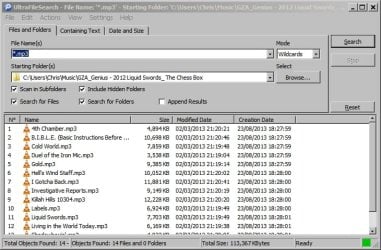
Like I mentioned - I'm not a huge fan of Windows Search and Indexing and it's disabled on my machine at home. I use a few other third party search tools to replace it. Of the ones that I use the one that displays results close to your requirements is Ultra File Search. Here's a screenshot after searching a music folder and selecting columns to be displayed. It does remember the settings that were used. There's no way to select "length" to be displayed. I reckon that your best bet is to attempt to find a replacement for Windows Search!

Maybe other members will contribute with better suggestions....
 

Attachments

  • UltraFileSearch.jpg
    UltraFileSearch.jpg
    66.9 KB · Views: 2

My Computer My Computer

Computer type
Laptop
Computer Manufacturer/Model Number
ASUS
OS
Microsoft Windows 7 Home Premium 64-bit 7601 Multiprocessor Free Service Pack 1
CPU
AMD C-60 APU with Radeon(tm) HD Graphics
Motherboard
ASUSTeK COMPUTER INC. X501U
Memory
4.00 GB
Graphics Card(s)
AMD Radeon HD 6290 Graphics
Sound Card
(1) AMD High Definition Audio Device (2) Realtek High Defi
Screen Resolution
1366 x 768 x 32 bits (4294967296 colors) @ 60 Hz
Hard Drives
Hitachi HTS545050A7E380 SATA Disk Device
Antivirus
Comodo CIS & FW, SecureAplus App Whitelisting, Threatfire
Browser
Cyberfox 64bit, Opera 64bit, Airfox
Other Info
Spy-The-Spy, HitmanPro.Alert, Norton Connect Safe, MJRegWatcher, BitDefender TrafficLight, Voodoo Shield, Zemana AntiMalware
There is a way to customize Search results, I have to look in the tutorial section or dredge up some memory.

One way would be to create a custom search and use that for your object types so that the coulmns always appear as you expect them.

Search as you normally would and when the results stop shaking the window, click on the custom link at the bottom (or side depending on the current view). Specify the criteria for the search, arrange the columns and save the search.

Bill
.
 

My Computer My Computer

Computer type
Laptop
Computer Manufacturer/Model Number
HP Pavilion dv6-6c10us
OS
x64 (6.3.9600) Win8.1 Pro & soon dual boot x64 (6.1.7601) Win7_SP1 HomePrem
CPU
AMD A6-3420M APU with Radeon(tm) HD Graphics
Motherboard
Hewlett-Packard 1805
Memory
6.00 GB
Graphics Card(s)
AMD Radeon(TM) HD 6520G
Sound Card
(1) AMD High Definition Audio Device (2) IDT High Definiti
Monitor(s) Displays
HP W2072a 20" LCD (1600 x 900) @ 60 Hz
Screen Resolution
1366 x 768 x 32 bits (4294967296 colors) @ 60 Hz
Hard Drives
ST640LM0 00 HM641JI SATA Disk Device
Keyboard
Logitech k520 wireless KB
Mouse
Logitech m320 wireless mouse (bundled with KB)
Internet Speed
15/5 | 54 MB Wireless 'n'
Antivirus
Realtime: Defender or Avast | On-demand: Malwarebytes, ESET
Browser
IE 11 on Win8, IE 10 on win 7
Other Info
Media: [Gimp, Audacity, VLC] || Comm: [WEmail 2012, Skype] || Productivity: [OpenOffice,| Textpad] || Utils: [Sysinternals, cCleaner, Speccy, Defraggler]
I'm going to give Ultra File Search a try, Callender, and see if it will do what I need. I see there's a free lite version which I think I'll try first, then there's a 30 day trial period on the standard version if I need more power. For a general hard drive search I like Google's desktop search function pretty well, but it can be slow even when I have all of the drives indexed. I especially like that it will search inside archived files (those zip and rar files). But that's an entirely different thing from what I wrote in about.
 

My Computer My Computer

Computer Manufacturer/Model Number
Dell XPS 420
OS
Windows 7
CPU
2.40GH Q6600 Intel 2 Quad
Motherboard
?
Memory
4.0 GB
Graphics Card(s)
NVIDIA GeForce 8800 GT
Sound Card
Creative X-FI (WDM)
Monitor(s) Displays
Dell
Hard Drives
C is 1 terabyte
Also use four 1 terabyte USB drives
PSU
?
Case
?
Cooling
?
Back
Top