Solved How to make my Win7 OS drive work on new PC

BlueBonnett

New member
Pro User
VIP
Local time
1:09 PM
Messages
139
So I finally got my new computer, a Dell with no CSM/legacy boot so I have to work with UEFI. All the resources I see on the web are about INSTALLING Windows 7 on a modern PC but I'm not doing a clean install, I'm just moving my SSD from my old computer to this one.

How do I make it bootable on a UEFI motherboard? I'm guessing the first step is to convert the MBR disk to GPT which I did with EaseUS but that still doesn't make it bootable. I have the drive image backed up so I am ready to experiment.
 

My Computer My Computer

At a glance

Windows 7 Ultimate 64-bitIntel(R) Core(TM) i5-7400 CPU8GB DDR4Intel HD Graphics 630
Computer type
PC/Desktop
Computer Manufacturer/Model Number
Acer
OS
Windows 7 Ultimate 64-bit
CPU
Intel(R) Core(TM) i5-7400 CPU
Motherboard
Aspire TC-780
Memory
8GB DDR4
Graphics Card(s)
Intel HD Graphics 630
Monitor(s) Displays
1
Screen Resolution
1920x1080
Hard Drives
One system SSD, one data SSD, one 2TB data HDD.
PSU
240w
Keyboard
Logitech USB wireless
Mouse
USB wireless
Browser
Firefox
(this is Part 2 of your inquiry
What modern hardware is good for upgrading my Win7 rig?)

So I finally got my new computer, a Dell
(what is inside that Dell ? Pentium-4 or ThreadRipper?)
I have the drive image backed up
(isn't an image of an MBR disk an MBR image ?)
__________________________________

In the meantime, please download the upgraded Win7 installation .iso recommended and linked to by SIW2.
Place the SSD (and no other hard-drive) into your newly-acquired Dell.
Start the installation process.
 

My Computers My Computers

  • At a glance

    slackwarehaswell amdhave somebuilt in
    Computer type
    PC/Desktop
    Computer Manufacturer/Model Number
    IBM, HP, Gateway, Dell
    OS
    slackware
    CPU
    haswell amd
    Motherboard
    q87
    Memory
    have some
    Graphics Card(s)
    built in
    Hard Drives
    spinning m.2 mSata
  • Computer type
    PC/Desktop
(this is Part 2 of your inquiry

Yes.
(what is inside that Dell ? Pentium-4 or ThreadRipper?)

10th gen i5.
(isn't an image of an MBR disk an MBR image ?)
Yes.
In the meantime, please download the upgraded Win7 installation .iso recommended and linked to by SIW2.
Place the SSD (and no other hard-drive) into your newly-acquired Dell.
Start the installation process.
I don't want to reinstall, my OS is already installed, I just need it to boot on UEFI. How do I do that?
 

My Computer My Computer

At a glance

Windows 7 Ultimate 64-bitIntel(R) Core(TM) i5-7400 CPU8GB DDR4Intel HD Graphics 630
Computer type
PC/Desktop
Computer Manufacturer/Model Number
Acer
OS
Windows 7 Ultimate 64-bit
CPU
Intel(R) Core(TM) i5-7400 CPU
Motherboard
Aspire TC-780
Memory
8GB DDR4
Graphics Card(s)
Intel HD Graphics 630
Monitor(s) Displays
1
Screen Resolution
1920x1080
Hard Drives
One system SSD, one data SSD, one 2TB data HDD.
PSU
240w
Keyboard
Logitech USB wireless
Mouse
USB wireless
Browser
Firefox
If it an mbr disk it can be converted to gpt. You could try mbr2gpt which is included in win10 installation media.

Or a 3rd party program such as aomei partition assistant pro.
convert to gpt post#16

or you can do it manually using the free version of diskgenius and then the bcdboot command.

convert to gpt with diskgenius post #17
 

My Computers My Computers

  • At a glance

    7 X64i5 84002x8gb 3200mhz
    Computer type
    PC/Desktop
    OS
    7 X64
    CPU
    i5 8400
    Motherboard
    gigabyte b365m ds3h
    Memory
    2x8gb 3200mhz
    Hard Drives
    various
    PSU
    pure power 11 400w cm
    Case
    Coolermaster
    Cooling
    cryorig m9i
  • At a glance

    7x64g54008gb ddr4 2400
    Computer type
    PC/Desktop
    OS
    7x64
    CPU
    g5400
    Motherboard
    ga b365m ds3h
    Memory
    8gb ddr4 2400
    PSU
    xfx pro 450w
I already tried the conversion with EaseUS, it clearly corrupted it. I'm disappointed as that is my go-to company for any partitioning or disk rescue tools.

I'll try MBR2GPT since it's Microsoft's tool built for their OS, but it's not located on my Win10 installation ISO. I did retrieve the EXE from the Win10 OS on my new PC so how do I run it from boot?
 

My Computer My Computer

At a glance

Windows 7 Ultimate 64-bitIntel(R) Core(TM) i5-7400 CPU8GB DDR4Intel HD Graphics 630
Computer type
PC/Desktop
Computer Manufacturer/Model Number
Acer
OS
Windows 7 Ultimate 64-bit
CPU
Intel(R) Core(TM) i5-7400 CPU
Motherboard
Aspire TC-780
Memory
8GB DDR4
Graphics Card(s)
Intel HD Graphics 630
Monitor(s) Displays
1
Screen Resolution
1920x1080
Hard Drives
One system SSD, one data SSD, one 2TB data HDD.
PSU
240w
Keyboard
Logitech USB wireless
Mouse
USB wireless
Browser
Firefox
It is in boot.wim .

boot the win10 installation media. Go to command prompt

mbr2gpt.exe /validate /disk:0
MBR2GPT: Attempting to validate disk 0
hopefuly it will say:
MBR2GPT: Retrieving layout of disk
MBR2GPT: Validating layout, disk sector size is: 512
MBR2GPT: Validation completed successfully
then type:
mbr2gpt.exe /convert /disk:0

obviously if there is more than one disk, you will first have to check which is the target disk by typing:
diskpart
lis dis
exi
 

My Computers My Computers

  • At a glance

    7 X64i5 84002x8gb 3200mhz
    Computer type
    PC/Desktop
    OS
    7 X64
    CPU
    i5 8400
    Motherboard
    gigabyte b365m ds3h
    Memory
    2x8gb 3200mhz
    Hard Drives
    various
    PSU
    pure power 11 400w cm
    Case
    Coolermaster
    Cooling
    cryorig m9i
  • At a glance

    7x64g54008gb ddr4 2400
    Computer type
    PC/Desktop
    OS
    7x64
    CPU
    g5400
    Motherboard
    ga b365m ds3h
    Memory
    8gb ddr4 2400
    PSU
    xfx pro 450w
I looked in boot.wim and found no mbr2gpt in there. My Windows 10 ISO is a small lite version that's free of all the bloatware so that tool was probably excluded.
EDIT: I tried the regular Win10 ISO and it too did not have mbr2gpt. Is there a way I can just force it inside the .wim? I have the damn thing.

Also, I followed your instructions for the AOMEI method and I got this error:
The file (2Gpt_BCD or 2Mbr_BCD) may be lost, we suggest you reinstall AOMEI software and try again.

EDIT: After getting my hands on a AOMEI Partition Pro WinPE ISO, I converted to GPT but it destroyed the drive just like EaseUS. At least it provided a more detailed error this time.

- - - Updated - - -

Another update, I finally got MBR2GPT to work. It appears the ISO I downloaded was the original from 2015 which didn't contain it.

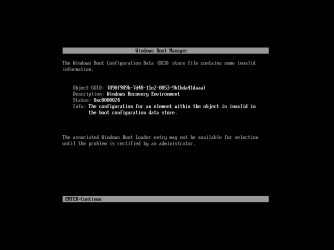
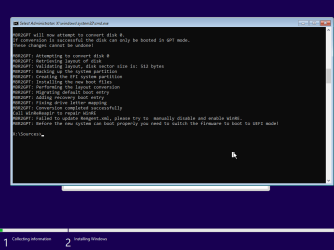
Not that it matters, because Windows just crashes when starting up just like before. The only error MBR2GPT reported was that it didn't update an xml file or something.
 

Attachments

  • VirtualBox_W7UEFItest1 error.png
    VirtualBox_W7UEFItest1 error.png
    3.9 KB · Views: 0
  • VirtualBox_W7UEFItest1 error2.png
    VirtualBox_W7UEFItest1 error2.png
    15.8 KB · Views: 0
Last edited:

My Computer My Computer

At a glance

Windows 7 Ultimate 64-bitIntel(R) Core(TM) i5-7400 CPU8GB DDR4Intel HD Graphics 630
Computer type
PC/Desktop
Computer Manufacturer/Model Number
Acer
OS
Windows 7 Ultimate 64-bit
CPU
Intel(R) Core(TM) i5-7400 CPU
Motherboard
Aspire TC-780
Memory
8GB DDR4
Graphics Card(s)
Intel HD Graphics 630
Monitor(s) Displays
1
Screen Resolution
1920x1080
Hard Drives
One system SSD, one data SSD, one 2TB data HDD.
PSU
240w
Keyboard
Logitech USB wireless
Mouse
USB wireless
Browser
Firefox
This gentleman just assembled a high-horsepower machine and installed Windows 7 on it:
Super Windows 7 Build Project Help

So far you spent much more time and effort and frustration on trying to convert an MBR image, than you would have on a new installation.

Perhaps:
attach your SSD with Windows 7 to a machine operating on Windows 10, and attempt the conversion process

How to convert MBR to GPT drive to switch BIOS to UEFI on Windows 10 | Windows Central
"You can use the MBR2GPT tool on a traditional hard drive (HDD), solid-state drive (SSD), or an M.2 drive with virtually any version of Windows 10, but you must run the tool from a Windows 10 (version 1703 or later) installation.

"Finally, Microsoft designed the tool to convert drives running Windows 8.1, 7, or from an older version, but you can always upgrade the installation to the latest release of Windows 10 and then use the tool to convert from MBR to GPT."
 

My Computers My Computers

  • At a glance

    slackwarehaswell amdhave somebuilt in
    Computer type
    PC/Desktop
    Computer Manufacturer/Model Number
    IBM, HP, Gateway, Dell
    OS
    slackware
    CPU
    haswell amd
    Motherboard
    q87
    Memory
    have some
    Graphics Card(s)
    built in
    Hard Drives
    spinning m.2 mSata
  • Computer type
    PC/Desktop
Perhaps:
attach your SSD with Windows 7 to a machine operating on Windows 10, and attempt the conversion process

How to convert MBR to GPT drive to switch BIOS to UEFI on Windows 10 | Windows Central
"You can use the MBR2GPT tool on a traditional hard drive (HDD), solid-state drive (SSD), or an M.2 drive with virtually any version of Windows 10, but you must run the tool from a Windows 10 (version 1703 or later) installation.

"Finally, Microsoft designed the tool to convert drives running Windows 8.1, 7, or from an older version, but you can always upgrade the installation to the latest release of Windows 10 and then use the tool to convert from MBR to GPT."
I tried that just now and got "Cannot find OS partition for disk 0" when doing mbr2gpt /validate /disk:0

Both when running it from the Win10 installation USB and from a Win10 OS. Note that I did a "clone data" rather than "clone OS" with EaseUS Partition Master so could this have been a problem?

EDIT: FFS, that wasn't the problem. Still no OS detected.
 
Last edited:

My Computer My Computer

At a glance

Windows 7 Ultimate 64-bitIntel(R) Core(TM) i5-7400 CPU8GB DDR4Intel HD Graphics 630
Computer type
PC/Desktop
Computer Manufacturer/Model Number
Acer
OS
Windows 7 Ultimate 64-bit
CPU
Intel(R) Core(TM) i5-7400 CPU
Motherboard
Aspire TC-780
Memory
8GB DDR4
Graphics Card(s)
Intel HD Graphics 630
Monitor(s) Displays
1
Screen Resolution
1920x1080
Hard Drives
One system SSD, one data SSD, one 2TB data HDD.
PSU
240w
Keyboard
Logitech USB wireless
Mouse
USB wireless
Browser
Firefox
"Cannot find OS partition for disk 0" when doing mbr2gpt /validate /disk:0

disk:0 is the disk on which Windows 10 is, and boots and operates the windows 10 computer. Very likely you also have a spinning hard-drive where you keep your videos, games, etc.

So, your SSD, which you attached for the purpose of converting, should be disk:2
 

My Computers My Computers

  • At a glance

    slackwarehaswell amdhave somebuilt in
    Computer type
    PC/Desktop
    Computer Manufacturer/Model Number
    IBM, HP, Gateway, Dell
    OS
    slackware
    CPU
    haswell amd
    Motherboard
    q87
    Memory
    have some
    Graphics Card(s)
    built in
    Hard Drives
    spinning m.2 mSata
  • Computer type
    PC/Desktop
So I finally got my new computer, a Dell with no CSM/legacy boot so I have to work with UEFI. All the resources I see on the web are about INSTALLING Windows 7 on a modern PC but I'm not doing a clean install, I'm just moving my SSD from my old computer to this one.

How do I make it bootable on a UEFI motherboard? I'm guessing the first step is to convert the MBR disk to GPT which I did with EaseUS but that still doesn't make it bootable. I have the drive image backed up so I am ready to experiment.

What is the exact model of the Dell? Win 7 wont efi boot without csm unless you use some kind of shim to get around lack of csm support.
 

My Computers My Computers

  • At a glance

    7 X64i5 84002x8gb 3200mhz
    Computer type
    PC/Desktop
    OS
    7 X64
    CPU
    i5 8400
    Motherboard
    gigabyte b365m ds3h
    Memory
    2x8gb 3200mhz
    Hard Drives
    various
    PSU
    pure power 11 400w cm
    Case
    Coolermaster
    Cooling
    cryorig m9i
  • At a glance

    7x64g54008gb ddr4 2400
    Computer type
    PC/Desktop
    OS
    7x64
    CPU
    g5400
    Motherboard
    ga b365m ds3h
    Memory
    8gb ddr4 2400
    PSU
    xfx pro 450w
disk:0 is the disk on which Windows 10 is, and boots and operates the windows 10 computer. Very likely you also have a spinning hard-drive where you keep your videos, games, etc.
So, your SSD, which you attached for the purpose of converting, should be disk:2
No, the pre-installed Win10 on the new PC is disk 1. I confirmed it with diskpart. The attached SSD is disk 0. I don't have an HDD either, my movies and games are on a bigger SSD.

- - - Updated - - -

What is the exact model of the Dell? Win 7 wont efi boot without csm unless you use some kind of shim to get around lack of csm support.
Vostro 3681.
A shim? I heard MS quietly added UEFI support in Win7 with update KB5017361 but I've been having trouble finding it. Will that work?

- - - Updated - - -

By the way, my Win7 SSD doesn't have that 100 MB EFI partition. If this is the reason the OS is not being recognized by UEFI, is it possible to recreate it and copy-paste the EFI/Boot folder?

- - - Updated - - -

I added an EFI drive from the installation disk using this guide and copied the EFI/boot files.

It finally recognizes the OS and boots... but crashes. Big red bar at the top forms after pressing "Start windows normally", the same thing that happened on the VM.

So back to the drawing board. At this point, I don't mind just doing a clean install on my modern PC and copying everything over, except for the fact that my patched bootable Windows 7 ISO freezes at "loading files".

Alright, I had a look at this thread and patched my already-patched ISO so now it's 12GB! I was able to get setup to start on the new PC but now it's stuck on "starting windows" after the second reboot. No crash, though.
I don't understand why there's no startup repair, it would've been over by now if there was.

Another edit: While running the 7UPv64P.cmd there was this following error, does it have anything to do with my current roadblock?

Code:
---------------------------
UpdatePack 7 / 2008 R2 / 24.2.14 Setup
---------------------------
Failed to mount the image, the error code: 11.
---------------------------
OK   
---------------------------
 
Last edited:

My Computer My Computer

At a glance

Windows 7 Ultimate 64-bitIntel(R) Core(TM) i5-7400 CPU8GB DDR4Intel HD Graphics 630
Computer type
PC/Desktop
Computer Manufacturer/Model Number
Acer
OS
Windows 7 Ultimate 64-bit
CPU
Intel(R) Core(TM) i5-7400 CPU
Motherboard
Aspire TC-780
Memory
8GB DDR4
Graphics Card(s)
Intel HD Graphics 630
Monitor(s) Displays
1
Screen Resolution
1920x1080
Hard Drives
One system SSD, one data SSD, one 2TB data HDD.
PSU
240w
Keyboard
Logitech USB wireless
Mouse
USB wireless
Browser
Firefox

My Computers My Computers

  • At a glance

    7 X64i5 84002x8gb 3200mhz
    Computer type
    PC/Desktop
    OS
    7 X64
    CPU
    i5 8400
    Motherboard
    gigabyte b365m ds3h
    Memory
    2x8gb 3200mhz
    Hard Drives
    various
    PSU
    pure power 11 400w cm
    Case
    Coolermaster
    Cooling
    cryorig m9i
  • At a glance

    7x64g54008gb ddr4 2400
    Computer type
    PC/Desktop
    OS
    7x64
    CPU
    g5400
    Motherboard
    ga b365m ds3h
    Memory
    8gb ddr4 2400
    PSU
    xfx pro 450w

My Computer My Computer

At a glance

Windows 7 Ultimate 64-bitIntel(R) Core(TM) i5-7400 CPU8GB DDR4Intel HD Graphics 630
Computer type
PC/Desktop
Computer Manufacturer/Model Number
Acer
OS
Windows 7 Ultimate 64-bit
CPU
Intel(R) Core(TM) i5-7400 CPU
Motherboard
Aspire TC-780
Memory
8GB DDR4
Graphics Card(s)
Intel HD Graphics 630
Monitor(s) Displays
1
Screen Resolution
1920x1080
Hard Drives
One system SSD, one data SSD, one 2TB data HDD.
PSU
240w
Keyboard
Logitech USB wireless
Mouse
USB wireless
Browser
Firefox
Acronis image
 

My Computers My Computers

  • At a glance

    7 X64i5 84002x8gb 3200mhz
    Computer type
    PC/Desktop
    OS
    7 X64
    CPU
    i5 8400
    Motherboard
    gigabyte b365m ds3h
    Memory
    2x8gb 3200mhz
    Hard Drives
    various
    PSU
    pure power 11 400w cm
    Case
    Coolermaster
    Cooling
    cryorig m9i
  • At a glance

    7x64g54008gb ddr4 2400
    Computer type
    PC/Desktop
    OS
    7x64
    CPU
    g5400
    Motherboard
    ga b365m ds3h
    Memory
    8gb ddr4 2400
    PSU
    xfx pro 450w
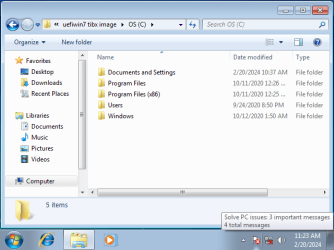
Here's what's in there, it doesn't look like an installation CD but an image of an installed 7 OS. What use do I have for this?
 

Attachments

  • VirtualBox_W7UEFItest2_20_02_2024_12_23_47.png
    VirtualBox_W7UEFItest2_20_02_2024_12_23_47.png
    22.4 KB · Views: 18

My Computer My Computer

At a glance

Windows 7 Ultimate 64-bitIntel(R) Core(TM) i5-7400 CPU8GB DDR4Intel HD Graphics 630
Computer type
PC/Desktop
Computer Manufacturer/Model Number
Acer
OS
Windows 7 Ultimate 64-bit
CPU
Intel(R) Core(TM) i5-7400 CPU
Motherboard
Aspire TC-780
Memory
8GB DDR4
Graphics Card(s)
Intel HD Graphics 630
Monitor(s) Displays
1
Screen Resolution
1920x1080
Hard Drives
One system SSD, one data SSD, one 2TB data HDD.
PSU
240w
Keyboard
Logitech USB wireless
Mouse
USB wireless
Browser
Firefox
What do you mean a cd ?

I think the idea is that both partitions ( the esp partition and the os partition) in the .tibx file are restored to a disk

Have you never heard of disk/partition imaging and restoring before ?
 
Last edited:

My Computers My Computers

  • At a glance

    7 X64i5 84002x8gb 3200mhz
    Computer type
    PC/Desktop
    OS
    7 X64
    CPU
    i5 8400
    Motherboard
    gigabyte b365m ds3h
    Memory
    2x8gb 3200mhz
    Hard Drives
    various
    PSU
    pure power 11 400w cm
    Case
    Coolermaster
    Cooling
    cryorig m9i
  • At a glance

    7x64g54008gb ddr4 2400
    Computer type
    PC/Desktop
    OS
    7x64
    CPU
    g5400
    Motherboard
    ga b365m ds3h
    Memory
    8gb ddr4 2400
    PSU
    xfx pro 450w
What do you mean a cd ?
I think the idea is that both partitions ( the esp partition and the os partition) in the .tibx file are restored to a disk
Have you never heard of disk/partition imaging and restoring before ?

Meant to say ISO.

Here's the thing, it took a lot of effort to finally create that stupid EFI partition and get that MBR2GPT to finally work. If I overwrite all that with this disk image (which isn't guaranteed to work and I have no idea which Windows 7 version this even is) then how am I supposed to copy my original MBR OS to this GPT SSD?
 

My Computer My Computer

At a glance

Windows 7 Ultimate 64-bitIntel(R) Core(TM) i5-7400 CPU8GB DDR4Intel HD Graphics 630
Computer type
PC/Desktop
Computer Manufacturer/Model Number
Acer
OS
Windows 7 Ultimate 64-bit
CPU
Intel(R) Core(TM) i5-7400 CPU
Motherboard
Aspire TC-780
Memory
8GB DDR4
Graphics Card(s)
Intel HD Graphics 630
Monitor(s) Displays
1
Screen Resolution
1920x1080
Hard Drives
One system SSD, one data SSD, one 2TB data HDD.
PSU
240w
Keyboard
Logitech USB wireless
Mouse
USB wireless
Browser
Firefox
It is win7 pro x64

I supposed to copy my original MBR OS to this GPT SSD?

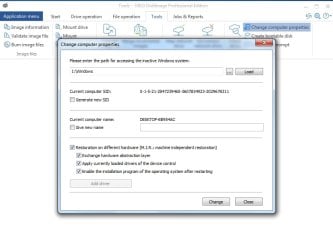
It needs the correct boot files and a whole lot of drivers. And because the new hardware is very different your old os would need to be syprep-generalized or instead use an adjust to new hardware module. which are avialble in various programs such as O&O or paragon, etc

o&Oadjusttonewhardware.jpg


If I overwrite all that with this disk image

:ar: Easier to use the image. If it boots and runs fine, then install any programs you desperately need and copy over any documents etc from your mbr installation.
 

My Computers My Computers

  • At a glance

    7 X64i5 84002x8gb 3200mhz
    Computer type
    PC/Desktop
    OS
    7 X64
    CPU
    i5 8400
    Motherboard
    gigabyte b365m ds3h
    Memory
    2x8gb 3200mhz
    Hard Drives
    various
    PSU
    pure power 11 400w cm
    Case
    Coolermaster
    Cooling
    cryorig m9i
  • At a glance

    7x64g54008gb ddr4 2400
    Computer type
    PC/Desktop
    OS
    7x64
    CPU
    g5400
    Motherboard
    ga b365m ds3h
    Memory
    8gb ddr4 2400
    PSU
    xfx pro 450w
It is win7 pro x64

I have ultimate.
It needs the correct boot files and a whole lot of drivers. And because the new hardware is very different your old os would need to be syprep-generalized or instead use an adjust to new hardware module. which are avialble in various programs such as O&O or paragon, etc

Good to know but first...
:ar: Easier to use the image. If it boots and runs fine, then install any programs you desperately need and copy over any documents etc from your mbr installation.
But how do I copy an MBR partition to a GPT SSD? I have run out of temporary media, I only have this SSD to work with which is twice the size of my OS SSD.
 

My Computer My Computer

At a glance

Windows 7 Ultimate 64-bitIntel(R) Core(TM) i5-7400 CPU8GB DDR4Intel HD Graphics 630
Computer type
PC/Desktop
Computer Manufacturer/Model Number
Acer
OS
Windows 7 Ultimate 64-bit
CPU
Intel(R) Core(TM) i5-7400 CPU
Motherboard
Aspire TC-780
Memory
8GB DDR4
Graphics Card(s)
Intel HD Graphics 630
Monitor(s) Displays
1
Screen Resolution
1920x1080
Hard Drives
One system SSD, one data SSD, one 2TB data HDD.
PSU
240w
Keyboard
Logitech USB wireless
Mouse
USB wireless
Browser
Firefox
Back
Top