Solved How to make my Win7 OS drive work on new PC

You could sysprep-generalize the os, then capture it into a wim file, which could be applied to the os partition on a gpt disk.

gpt disk should have an esp partition which contains the boot critical files and an os partition.
 

My Computers My Computers

  • At a glance

    7 X64i5 84002x8gb 3200mhz
    Computer type
    PC/Desktop
    OS
    7 X64
    CPU
    i5 8400
    Motherboard
    gigabyte b365m ds3h
    Memory
    2x8gb 3200mhz
    Hard Drives
    various
    PSU
    pure power 11 400w cm
    Case
    Coolermaster
    Cooling
    cryorig m9i
  • At a glance

    7x64g54008gb ddr4 2400
    Computer type
    PC/Desktop
    OS
    7x64
    CPU
    g5400
    Motherboard
    ga b365m ds3h
    Memory
    8gb ddr4 2400
    PSU
    xfx pro 450w
I'm unfamiliar with the procedure, I need some details. Do I sysprep-generalize the OS right now while it's running or can I do it on the copy I made to the other SSD? When it produces a WIM file, is it gonna be the size of the entire OS? What then do I do with this WIM file?

- - - Updated - - -

Bad news. I used Acronis to recover the disk image to a flash drive. It crashed on the logo.
'Guess I'm gonna try the other one.
 

My Computer My Computer

At a glance

Windows 7 Ultimate 64-bitIntel(R) Core(TM) i5-7400 CPU8GB DDR4Intel HD Graphics 630
Computer type
PC/Desktop
Computer Manufacturer/Model Number
Acer
OS
Windows 7 Ultimate 64-bit
CPU
Intel(R) Core(TM) i5-7400 CPU
Motherboard
Aspire TC-780
Memory
8GB DDR4
Graphics Card(s)
Intel HD Graphics 630
Monitor(s) Displays
1
Screen Resolution
1920x1080
Hard Drives
One system SSD, one data SSD, one 2TB data HDD.
PSU
240w
Keyboard
Logitech USB wireless
Mouse
USB wireless
Browser
Firefox
wim file is typically 1/3rd size of the captured used space. But it depends on the type of files because some files hardly compress particularly video files and photos.

look up how to sysprep-generalize.

Microsoft:
Before you can deploy a Windows image to new PCs, you have to first generalize the image. Generalizing the image removes computer-specific information such as installed drivers and the computer security identifier (SID).

%WINDIR%\system32\sysprep\sysprep.exe /generalize /shutdown /oobe

do not boot back into the sysprepped os. Because when it is booted into it will go through the oobe ( out of box experience ) and it will specialize again.

boot into a different os or winpe to capture the generalized os into a wim file.

dism commands or useful ui such as gimagex or dism++ can be used to capture or apply wim files.

https://github.com/Chuyu-Team/Dism-.../download/v10.1.1002.2/Dism++10.1.1002.1B.zip
 

My Computers My Computers

  • At a glance

    7 X64i5 84002x8gb 3200mhz
    Computer type
    PC/Desktop
    OS
    7 X64
    CPU
    i5 8400
    Motherboard
    gigabyte b365m ds3h
    Memory
    2x8gb 3200mhz
    Hard Drives
    various
    PSU
    pure power 11 400w cm
    Case
    Coolermaster
    Cooling
    cryorig m9i
  • At a glance

    7x64g54008gb ddr4 2400
    Computer type
    PC/Desktop
    OS
    7x64
    CPU
    g5400
    Motherboard
    ga b365m ds3h
    Memory
    8gb ddr4 2400
    PSU
    xfx pro 450w
Better news: I tried the 3671 TIBX image and this one had a BSOD, but not a crash. It said the BCD file is missing. I would fix that on boot-time but I only have one disposable flash drive to work with, so I'll have to burn the image to the disposable SSD so I can use the installation disc on this flash drive.

Do you want me to sysprep-generalize my OS or the one on the TIBX? I'm not clear on that.
 

My Computer My Computer

At a glance

Windows 7 Ultimate 64-bitIntel(R) Core(TM) i5-7400 CPU8GB DDR4Intel HD Graphics 630
Computer type
PC/Desktop
Computer Manufacturer/Model Number
Acer
OS
Windows 7 Ultimate 64-bit
CPU
Intel(R) Core(TM) i5-7400 CPU
Motherboard
Aspire TC-780
Memory
8GB DDR4
Graphics Card(s)
Intel HD Graphics 630
Monitor(s) Displays
1
Screen Resolution
1920x1080
Hard Drives
One system SSD, one data SSD, one 2TB data HDD.
PSU
240w
Keyboard
Logitech USB wireless
Mouse
USB wireless
Browser
Firefox

My Computers My Computers

  • At a glance

    7 X64i5 84002x8gb 3200mhz
    Computer type
    PC/Desktop
    OS
    7 X64
    CPU
    i5 8400
    Motherboard
    gigabyte b365m ds3h
    Memory
    2x8gb 3200mhz
    Hard Drives
    various
    PSU
    pure power 11 400w cm
    Case
    Coolermaster
    Cooling
    cryorig m9i
  • At a glance

    7x64g54008gb ddr4 2400
    Computer type
    PC/Desktop
    OS
    7x64
    CPU
    g5400
    Motherboard
    ga b365m ds3h
    Memory
    8gb ddr4 2400
    PSU
    xfx pro 450w
I know, I'll do it tomorrow, I gotta go to work.

Can you answer my question? Do you want me to sysprep-generalize my OS or the one on the TIBX? I'm not clear on that.
 

My Computer My Computer

At a glance

Windows 7 Ultimate 64-bitIntel(R) Core(TM) i5-7400 CPU8GB DDR4Intel HD Graphics 630
Computer type
PC/Desktop
Computer Manufacturer/Model Number
Acer
OS
Windows 7 Ultimate 64-bit
CPU
Intel(R) Core(TM) i5-7400 CPU
Motherboard
Aspire TC-780
Memory
8GB DDR4
Graphics Card(s)
Intel HD Graphics 630
Monitor(s) Displays
1
Screen Resolution
1920x1080
Hard Drives
One system SSD, one data SSD, one 2TB data HDD.
PSU
240w
Keyboard
Logitech USB wireless
Mouse
USB wireless
Browser
Firefox
If you were attempting to transfer your current os to different hardware, it should be sysprepped. But it probably wont work just by being sysprepped because there is also lack of csm support and missing drivers to overcome.

You could only sysprep the applied image if you can boot into it. Cant be done from outside as far as I know. However there are 3rd party "adjust to new hardware" tools that can be used without booting into the os.

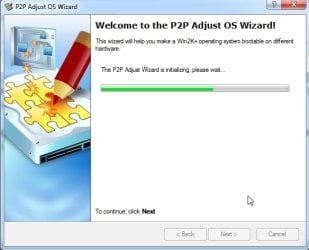
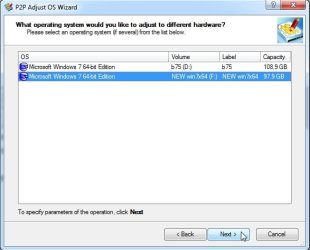
for example this one

p2p-1.jpg

p2p-2.jpg
 

My Computers My Computers

  • At a glance

    7 X64i5 84002x8gb 3200mhz
    Computer type
    PC/Desktop
    OS
    7 X64
    CPU
    i5 8400
    Motherboard
    gigabyte b365m ds3h
    Memory
    2x8gb 3200mhz
    Hard Drives
    various
    PSU
    pure power 11 400w cm
    Case
    Coolermaster
    Cooling
    cryorig m9i
  • At a glance

    7x64g54008gb ddr4 2400
    Computer type
    PC/Desktop
    OS
    7x64
    CPU
    g5400
    Motherboard
    ga b365m ds3h
    Memory
    8gb ddr4 2400
    PSU
    xfx pro 450w
So should I first fix the bcdboot problem on the applied image or use that P2P adjust tool you recommended?
 

My Computer My Computer

At a glance

Windows 7 Ultimate 64-bitIntel(R) Core(TM) i5-7400 CPU8GB DDR4Intel HD Graphics 630
Computer type
PC/Desktop
Computer Manufacturer/Model Number
Acer
OS
Windows 7 Ultimate 64-bit
CPU
Intel(R) Core(TM) i5-7400 CPU
Motherboard
Aspire TC-780
Memory
8GB DDR4
Graphics Card(s)
Intel HD Graphics 630
Monitor(s) Displays
1
Screen Resolution
1920x1080
Hard Drives
One system SSD, one data SSD, one 2TB data HDD.
PSU
240w
Keyboard
Logitech USB wireless
Mouse
USB wireless
Browser
Firefox
Likely need to do both.

the bcd entry must be fixed so bootmgr ( or bootmgfw for efi ) can find the location of winload.

need to adjust to new hardware to hopefully avoid bsods when winload tries to load the os.

- - - Updated - - -

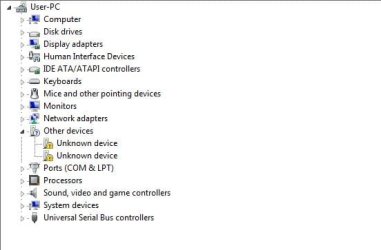
I just applied the 3888 image to a consumer b365 motherboard. After fixing the osletter it booted up fine, then after a reboot only a couple of drivers missing which was easy to sort out. Not necessary to use "adjust to new hardware module" in that case.

prob-devs-0.JPG

But applying the 3671 image to b375 consumer motherboard got stuck on the dancing balls, so adjust to new hardware module was needed.
 

My Computers My Computers

  • At a glance

    7 X64i5 84002x8gb 3200mhz
    Computer type
    PC/Desktop
    OS
    7 X64
    CPU
    i5 8400
    Motherboard
    gigabyte b365m ds3h
    Memory
    2x8gb 3200mhz
    Hard Drives
    various
    PSU
    pure power 11 400w cm
    Case
    Coolermaster
    Cooling
    cryorig m9i
  • At a glance

    7x64g54008gb ddr4 2400
    Computer type
    PC/Desktop
    OS
    7x64
    CPU
    g5400
    Motherboard
    ga b365m ds3h
    Memory
    8gb ddr4 2400
    PSU
    xfx pro 450w
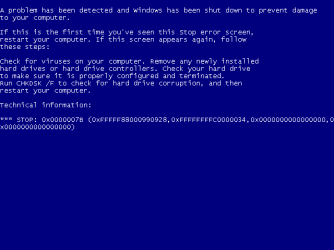
Dancing balls, love it! That's where 3888 would crash for me and 3671 gets the following BSOD:


Before I go any further, can you tell me if this is normal? When trying to do bootrec /rebuildbcd I was told no OS was detected. Then I noticed there is no boot folder on the C drive and no BCD (it does boot it just gives the BSOD during the dancing balls). This is what they look like:

EFI drive

EFI>
Microsoft > Boot >
BCD, bootmgfw.efi, bootmgr.efi, memtest.efi (and a bunch of language folders)
Boot > bootx64.efi (757,760 bytes)

C drive
No boot folder

Is this normal?

Btw, what program is that for P2P OS Wizard? O&O or Paragon?
 

Attachments

  • TIBX BSOD.PNG
    TIBX BSOD.PNG
    2.7 KB · Views: 9
Last edited:

My Computer My Computer

At a glance

Windows 7 Ultimate 64-bitIntel(R) Core(TM) i5-7400 CPU8GB DDR4Intel HD Graphics 630
Computer type
PC/Desktop
Computer Manufacturer/Model Number
Acer
OS
Windows 7 Ultimate 64-bit
CPU
Intel(R) Core(TM) i5-7400 CPU
Motherboard
Aspire TC-780
Memory
8GB DDR4
Graphics Card(s)
Intel HD Graphics 630
Monitor(s) Displays
1
Screen Resolution
1920x1080
Hard Drives
One system SSD, one data SSD, one 2TB data HDD.
PSU
240w
Keyboard
Logitech USB wireless
Mouse
USB wireless
Browser
Firefox
EFI>
Microsoft > Boot >
BCD, bootmgfw.efi, bootmgr.efi, memtest.efi (and a bunch of language folders)
Boot > bootx64.efi (757,760 bytes)

Sounds right for esp partition contents.

Did you use the esp partition from the .tibx image ? It presumably contains some kind of shim or modded files to get around lack of csm support.


p2p is paragon. It means adjust Physical to Physical disk.

no boot folder on the C drive

for bios booting using mbr disk , there would a Boot folder on the active partition.

- - - Updated - - -

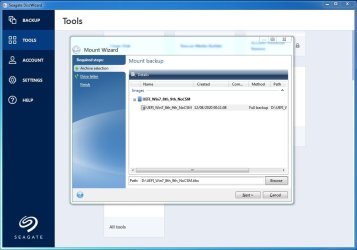
I had a look at those .tibx images

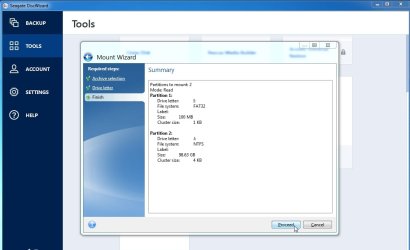
Used seagate discwizard to mount the .tibx image partitions and then captured the mounted partions into .wim files.

[seagate discwizard is a free cut down Acronis but only works if you have a seagate disk attached. Western digital do a similar one which only works if you have a wd disk attached]

It is then easy to apply the contents of the wim files onto a prepared esp partition and os partition. Then it is simple to adjust the osletter and fix the bcd entry before attemting to boot.

If there is a bsod then p2p or similar can be used.

tibx-mount1.jpg

tibx-mount2.jpg

tibx-mount3.jpg

After the partitions are mounted ( using letters I and J in the screenshot above ) capture partition I into a .wim

Then capture partition J into a .wim file.

Then unmount the partitions.

Same with the other image. Here are the .wims

tibx-to-wim.jpg

I used wimlib command line tool to capture the mounted partitions,

wimlib-imagex.exe capture SOURCE DestinationWIMFILE IMAGE_NAME [IMAGE_DESC] [OPTION...]

wimlib-imagex.exe capture I:\ "d:\UEFI_Win7_Pro_3888-ESP.wim" "UEFI_Win7_Pro_3888-ESP" --compress=fast
wimlib - Main page


but a gui such as dism++ could also do the job

https://github.com/Chuyu-Team/Dism-.../download/v10.1.1002.2/Dism++10.1.1002.1B.zip

 
Last edited:

My Computers My Computers

  • At a glance

    7 X64i5 84002x8gb 3200mhz
    Computer type
    PC/Desktop
    OS
    7 X64
    CPU
    i5 8400
    Motherboard
    gigabyte b365m ds3h
    Memory
    2x8gb 3200mhz
    Hard Drives
    various
    PSU
    pure power 11 400w cm
    Case
    Coolermaster
    Cooling
    cryorig m9i
  • At a glance

    7x64g54008gb ddr4 2400
    Computer type
    PC/Desktop
    OS
    7x64
    CPU
    g5400
    Motherboard
    ga b365m ds3h
    Memory
    8gb ddr4 2400
    PSU
    xfx pro 450w
Sounds right for esp partition contents.
Ok good, just making sure.
Did you use the esp partition from the .tibx image ? It presumably contains some kind of shim or modded files to get around lack of csm support.

Yes and it works, I don't know why I got that BCD error before but I can't reproduce it.
p2p is paragon. It means adjust Physical to Physical disk.
Alright, I got the Paragon WinPE and ran the "Adjust OS" feature. It said my OS needed the chipset driver and two ethernet drivers. It found the chipset driver but not the other two. The OS on the TIBX booted on my new PC! But both my keyboard and mouse stopped working (USB, wireless) so I couldn't do anything on it, couldn't fix the 640x480 resolution. We're making progress!

But I'm a bit confused because this feature wasn't called the P2P wizard, just "Adjust OS" for new hardware so I assume it's the same thing?

Anyway, you want me to convert the mounted TIBX image into two WIM files. Copy my original OS to the spare SSD, plug into new PC, then replace the install.wim on the Windows 7 ISO with the UEFI_Win7_8th_9th_noCSM.WIM to install.wim, then do a repair install?

Is this accurate?
 

My Computer My Computer

At a glance

Windows 7 Ultimate 64-bitIntel(R) Core(TM) i5-7400 CPU8GB DDR4Intel HD Graphics 630
Computer type
PC/Desktop
Computer Manufacturer/Model Number
Acer
OS
Windows 7 Ultimate 64-bit
CPU
Intel(R) Core(TM) i5-7400 CPU
Motherboard
Aspire TC-780
Memory
8GB DDR4
Graphics Card(s)
Intel HD Graphics 630
Monitor(s) Displays
1
Screen Resolution
1920x1080
Hard Drives
One system SSD, one data SSD, one 2TB data HDD.
PSU
240w
Keyboard
Logitech USB wireless
Mouse
USB wireless
Browser
Firefox

My Computers My Computers

  • At a glance

    7 X64i5 84002x8gb 3200mhz
    Computer type
    PC/Desktop
    OS
    7 X64
    CPU
    i5 8400
    Motherboard
    gigabyte b365m ds3h
    Memory
    2x8gb 3200mhz
    Hard Drives
    various
    PSU
    pure power 11 400w cm
    Case
    Coolermaster
    Cooling
    cryorig m9i
  • At a glance

    7x64g54008gb ddr4 2400
    Computer type
    PC/Desktop
    OS
    7x64
    CPU
    g5400
    Motherboard
    ga b365m ds3h
    Memory
    8gb ddr4 2400
    PSU
    xfx pro 450w
Yeah but the input devices didn't work. I'll keep the EFI partition and then see if I can copy my original OS and do the Paragon P2P on it.
It's gonna be annoying because my original OS has no EFI drive and I can't copy a MBR disk to a GPT disk, so there will be a lot of partition dancing.
 

My Computer My Computer

At a glance

Windows 7 Ultimate 64-bitIntel(R) Core(TM) i5-7400 CPU8GB DDR4Intel HD Graphics 630
Computer type
PC/Desktop
Computer Manufacturer/Model Number
Acer
OS
Windows 7 Ultimate 64-bit
CPU
Intel(R) Core(TM) i5-7400 CPU
Motherboard
Aspire TC-780
Memory
8GB DDR4
Graphics Card(s)
Intel HD Graphics 630
Monitor(s) Displays
1
Screen Resolution
1920x1080
Hard Drives
One system SSD, one data SSD, one 2TB data HDD.
PSU
240w
Keyboard
Logitech USB wireless
Mouse
USB wireless
Browser
Firefox
I can't copy a MBR disk to a GPT disk

capture your original os partition into a wim file. It is file based and can therefore be applied to a gpt partition.

EITHER

format ( not delete ) the gpt target partition before applying the wim

OR

create a folder on the target partition call it something sensible like TIBXOS. Then MOVE everything on that partition into the TIBXOS folder before applying the wim. That way all the stuff you restored from the .tibx will be in TIBXOS folder in case you want it later.

After applying the wim :

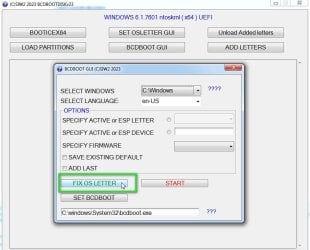
You will need to adjust the os to new hardware AND fix the osletter. Cant remember if paragon fixes the osletter as part of the adjust process, I think it has a separate module for that.

I have made a thing to do the osletter fix

bcdbootdisk-fixosletter.jpg

In addition

Your original os wont have the usb3 drivers so I sugggest using the usb3_win7_2021.zip update and drivers linked at the bottom of all my posts
 

My Computers My Computers

  • At a glance

    7 X64i5 84002x8gb 3200mhz
    Computer type
    PC/Desktop
    OS
    7 X64
    CPU
    i5 8400
    Motherboard
    gigabyte b365m ds3h
    Memory
    2x8gb 3200mhz
    Hard Drives
    various
    PSU
    pure power 11 400w cm
    Case
    Coolermaster
    Cooling
    cryorig m9i
  • At a glance

    7x64g54008gb ddr4 2400
    Computer type
    PC/Desktop
    OS
    7x64
    CPU
    g5400
    Motherboard
    ga b365m ds3h
    Memory
    8gb ddr4 2400
    PSU
    xfx pro 450w
Okay this is weird, EaseUS was able to copy my MBR partition to the GPT SSD. I was able to keep the system reserved and EFI partition, I just overwrote the TIBX OS partition with my OS partition. I booted with Paragon PE and did the adjust OS thing. This time it didn't complain about a chipset driver missing but about SATA RAID driver. I rebooted and it complains that system32/winload.efi is corrupted or missing. You think I can replace it with the one from the TIBX OS?

EDIT: Paragon PE had a boot correcting feature like yours to change the registry drive letter. It said none so I changed it to C. It didn't make it bootable but now when I try to access that feature, it crashes the liveUSB. Wtf?

I may just try your method to do a WIM.
 

My Computer My Computer

At a glance

Windows 7 Ultimate 64-bitIntel(R) Core(TM) i5-7400 CPU8GB DDR4Intel HD Graphics 630
Computer type
PC/Desktop
Computer Manufacturer/Model Number
Acer
OS
Windows 7 Ultimate 64-bit
CPU
Intel(R) Core(TM) i5-7400 CPU
Motherboard
Aspire TC-780
Memory
8GB DDR4
Graphics Card(s)
Intel HD Graphics 630
Monitor(s) Displays
1
Screen Resolution
1920x1080
Hard Drives
One system SSD, one data SSD, one 2TB data HDD.
PSU
240w
Keyboard
Logitech USB wireless
Mouse
USB wireless
Browser
Firefox
EaseUS was able to copy my MBR partition to the GPT SSD...
system32/winload.efi is corrupted or missing

Easeus might have changed the partition id but not the bcd entry, which is why bootmgfw cant find winload.efi.

If so, fix the bcd os entry to make it point at the windows partition
 

My Computers My Computers

  • At a glance

    7 X64i5 84002x8gb 3200mhz
    Computer type
    PC/Desktop
    OS
    7 X64
    CPU
    i5 8400
    Motherboard
    gigabyte b365m ds3h
    Memory
    2x8gb 3200mhz
    Hard Drives
    various
    PSU
    pure power 11 400w cm
    Case
    Coolermaster
    Cooling
    cryorig m9i
  • At a glance

    7x64g54008gb ddr4 2400
    Computer type
    PC/Desktop
    OS
    7x64
    CPU
    g5400
    Motherboard
    ga b365m ds3h
    Memory
    8gb ddr4 2400
    PSU
    xfx pro 450w
Easeus might have changed the partition id but not the bcd entry, which is why bootmgfw cant find winload.efi.

If so, fix the bcd os entry to make it point at the windows partition
How do i do that again?

- - - Updated - - -

bootrec /fixboot and bcdedit were returning access denied/not found errors, but that doesn't matter because I just re-copied the EFI partition from the TIBX and my OS partition. This time I chose the "correct BCD/boot errors" feature from the Paragon WinPE as well as the adjustOS.

I was able to boot into my OS!!! But the problem of input devices not working remains. Why is this? The mini receiver doesn't even light up when I press the button, but they certainly do work on the boot menu or on a liveUSB.

usb is an issue. Does the bios have port 60/64 emulation ?

I don't see that option there, no. I tried all USB ports, both 2.0 and 3.0. Why does this happen?

- - - Updated - - -

It doesn't work on safe mode either.
 

My Computer My Computer

At a glance

Windows 7 Ultimate 64-bitIntel(R) Core(TM) i5-7400 CPU8GB DDR4Intel HD Graphics 630
Computer type
PC/Desktop
Computer Manufacturer/Model Number
Acer
OS
Windows 7 Ultimate 64-bit
CPU
Intel(R) Core(TM) i5-7400 CPU
Motherboard
Aspire TC-780
Memory
8GB DDR4
Graphics Card(s)
Intel HD Graphics 630
Monitor(s) Displays
1
Screen Resolution
1920x1080
Hard Drives
One system SSD, one data SSD, one 2TB data HDD.
PSU
240w
Keyboard
Logitech USB wireless
Mouse
USB wireless
Browser
Firefox
Have you integrated the usb3 update and drivers linked at the bottom of all my posts ?
 

My Computers My Computers

  • At a glance

    7 X64i5 84002x8gb 3200mhz
    Computer type
    PC/Desktop
    OS
    7 X64
    CPU
    i5 8400
    Motherboard
    gigabyte b365m ds3h
    Memory
    2x8gb 3200mhz
    Hard Drives
    various
    PSU
    pure power 11 400w cm
    Case
    Coolermaster
    Cooling
    cryorig m9i
  • At a glance

    7x64g54008gb ddr4 2400
    Computer type
    PC/Desktop
    OS
    7x64
    CPU
    g5400
    Motherboard
    ga b365m ds3h
    Memory
    8gb ddr4 2400
    PSU
    xfx pro 450w
Have you integrated the usb3 update and drivers linked at the bottom of all my posts ?
I tried, Paragon was able to add the UASPSTOR one but not the XHCI one. Then I was gonna just install it on my running OS here and re-copy the entire partition, but running the .msu returned a "This update is not applicable to your computer." Trying to install either of the .INFs returned "The INF file you selected does not support this method of installation"

EDIT: I got them installed via pnputil. Will re-copy partition and report back.
EDIT2: Still no dice.
EDIT3: ****in' A! I disabled driver signature enforcement during that advanced options screen you get when you press F8, and now my input devices work!

This will make things much easier.

However, I'm disturbed how fragile this installation on this new UEFI/GPT layout is. I tried installing a temporary Windows 7 on some unused space on the SSD using the latest patched ISO from that 7upv64P you linked to. It failed to get past the dancing balls during login so I abandoned the operation, but for some reason this affected my ability to boot into my adjustedOS as well. Even after deleting that botched-install partition and correcting boot parameters with Paragon, it still failed, so I had to redo everything all over again.

This fragility worries me. But oh well, the hardest part of the learning curve is over.

Thanks SIW2 for your patience and guiding me thru all this.
 
Last edited:

My Computer My Computer

At a glance

Windows 7 Ultimate 64-bitIntel(R) Core(TM) i5-7400 CPU8GB DDR4Intel HD Graphics 630
Computer type
PC/Desktop
Computer Manufacturer/Model Number
Acer
OS
Windows 7 Ultimate 64-bit
CPU
Intel(R) Core(TM) i5-7400 CPU
Motherboard
Aspire TC-780
Memory
8GB DDR4
Graphics Card(s)
Intel HD Graphics 630
Monitor(s) Displays
1
Screen Resolution
1920x1080
Hard Drives
One system SSD, one data SSD, one 2TB data HDD.
PSU
240w
Keyboard
Logitech USB wireless
Mouse
USB wireless
Browser
Firefox
Back
Top