Solved How to make windows 7 dvd SL (4.7gb) uefi bootable

houdini17

New member
Local time
10:47 AM
Messages
21
Hello,

I have made a windows 7 image with the versions I want in it and it fits on a sl 4.7 dvd. All I did was take the install.wim out of the original genuine windows 7 ultimate iso and modify it and put it back in it with daemon tools then burned it to a dvd SL. The problem is that I am not getting the UEFI boot option for the dvd!! My bios is configured correctly 100%. If I take rufus program and put the w7 on usb, uefi shows up as boot option. My dvd does boot but only in mbr mode. So how do I make the dvd bootable with uefi? It can be done because the original w7 ultimate iso can boot as uefi or mbr mode. What am I doing wrong or what do I need to do?? I used daemon tools to extract and put the wim in the iso and ashampoo burning studio to burn the iso to dvd. Any help thanks!! ohh forgot, I am using x64 w7 dvd version
 
Last edited:

My Computer My Computer

At a glance

Windows 8.1 Professional x64AMD A1012GB DDR3AMD Radeon HD 8650G + 8750M Dual Graphics
Computer type
Laptop
Computer Manufacturer/Model Number
HP
OS
Windows 8.1 Professional x64
CPU
AMD A10
Motherboard
AMD A55/ A60
Memory
12GB DDR3
Graphics Card(s)
AMD Radeon HD 8650G + 8750M Dual Graphics
Screen Resolution
1920x1080
Hard Drives
1TB Seagate Sata-III 6GB/s
Antivirus
Norton Secuirty Suite
Browser
Google Chrome
I think you misunderstood my question. I know how to boot from a dvd with uefi. The problem is that when I created my install.wim somehow I lost the uefi boot option on the dvd itself. I need to know how to properly create a dvd with uefi option. Every time I create a w7 disc I always loose the uefi option but the uefi files are on the disc but I dont know how to make it so I get uefi as a boot option on the dvd. All I did was extract the install.wim out of the original. genuine, untouched w7 iso and modify it then put it back in without damaging the file system of the disc image (UDF). I can see the efi folder on the dvd with the files for uefi. Again I lost the uefi boot option on the DVD itself but I can see the efi folder and files on it so idk what happened. Thanks though, anyone know what I mean?
 

My Computer My Computer

At a glance

Windows 8.1 Professional x64AMD A1012GB DDR3AMD Radeon HD 8650G + 8750M Dual Graphics
Computer type
Laptop
Computer Manufacturer/Model Number
HP
OS
Windows 8.1 Professional x64
CPU
AMD A10
Motherboard
AMD A55/ A60
Memory
12GB DDR3
Graphics Card(s)
AMD Radeon HD 8650G + 8750M Dual Graphics
Screen Resolution
1920x1080
Hard Drives
1TB Seagate Sata-III 6GB/s
Antivirus
Norton Secuirty Suite
Browser
Google Chrome
I think you misunderstood my answer: You're using tools that are not supported at all by Win7 and never seen to do a successful operation here before. In fact Daemon tools is a chronic problem we see here.

What are the exact mods you're making to the install.wim as this can also affect it. If you only want to unlock all versions then why not use the way that millions of others have done so without problem?
 
Well I'm not using any tools actually. I only mentioned rufus because I have to use that as an alternative to run w7 off a usb drive so I can install it in uefi mode. Anyway, I serviced this w7 image just like everyone else does through dism command and imagex. First, I have original, genuine, untouched, w7 ultimate iso. mount that with dt (daemon tools) extract the install.wim leaving the original disc unharmed. service wim with imagex and remove all versions of 7 except: home premium, pro, and ultimate (done for x64 only no x32). Then save the wim with my now custom image with home premium, pro, and ult (only x64). Then mount the original w7 ult iso with dt and replace my custom wim with the one already on the disc. Then resave the iso with dt and burn it to sl dvd. Also I'm not trying to unlock all version of 7, I have the ones I want, thats not the issue. Issue is my dvd (with my custom wim) cannot be installed with uefi mode like the original iso can, when I put in dvd drive and select what device to boot, I see no option for uefi for my dvd even though its a x64 w7 disc. I didnt touch any other files on the disc and it is the same exact unotuched iso that works with uefi, all i did was replace the wim and save the new iso. Then I burn the iso with ashampoo burning studio. Do you see more clearly now what I'm trying to solve? Thank you.
 

My Computer My Computer

At a glance

Windows 8.1 Professional x64AMD A1012GB DDR3AMD Radeon HD 8650G + 8750M Dual Graphics
Computer type
Laptop
Computer Manufacturer/Model Number
HP
OS
Windows 8.1 Professional x64
CPU
AMD A10
Motherboard
AMD A55/ A60
Memory
12GB DDR3
Graphics Card(s)
AMD Radeon HD 8650G + 8750M Dual Graphics
Screen Resolution
1920x1080
Hard Drives
1TB Seagate Sata-III 6GB/s
Antivirus
Norton Secuirty Suite
Browser
Google Chrome
You just confirmed you used Daemon Tools and AShampoo which are not supported for Win7 and won't burn a bootable Win7 disk. When I point this out you say you're not using any tools while telling me again that you've used them. Hello?

You don't need to do all of this to unlock any other versions in the .iso. There is no point to removing versions because they install from the same set of files so you regain nothing except these problems. The Disk isn't UEFI bootable because you've modified the .wim unnecessarily and fouled it out.

Now, unlock all versions of a pristine ISO with eicfg removal tool, burn to disk or flash stick with Windows 7 USB-DVD Download Tool or UEFI Bootable USB Flash Drive - Create in Windows which works for everyone else to achieve the same thing you want to do - unless there's something else you want to modify that you're not telling us.
 
Last edited:
Ok a little of a misunderstanding because I and people I work with in computers don't consider daemon tools and ashampoo burning studio tools, we consider that software so a little mix up there. The link you provided which I checked out says right at the top in red the windows 7 dvd download tool will not work for uefi. The link in that post to get uefi working is to rufus which is what I already have been doing to install w7 from a flash drive which is not what I want. I need to install from dvd so I am still at the same spot. Instead of beating me up for using these "tools" why don't you suggest the right software to use to burn a windows iso and I have w8.1 so the built in dvd burner doesnt exist like it did in 7. I am trying to maintain a friendly attitude given what you have been giving me a little frustration with my responses.
 

My Computer My Computer

At a glance

Windows 8.1 Professional x64AMD A1012GB DDR3AMD Radeon HD 8650G + 8750M Dual Graphics
Computer type
Laptop
Computer Manufacturer/Model Number
HP
OS
Windows 8.1 Professional x64
CPU
AMD A10
Motherboard
AMD A55/ A60
Memory
12GB DDR3
Graphics Card(s)
AMD Radeon HD 8650G + 8750M Dual Graphics
Screen Resolution
1920x1080
Hard Drives
1TB Seagate Sata-III 6GB/s
Antivirus
Norton Secuirty Suite
Browser
Google Chrome
Ohh I'm well aware that I can just delete the ei.cfg file to unlock all versions. The reason why I only want the three (hp, pro, and ult) is because I integrated all the newest updates into each image so by leaving out the versions I dont need its alot less time to spend integrated each image with updates. But again rufus is not my solution because I need uefi from dvd not flash drive. Really though, I don't see why it's not working, all I did was just replace the wim and nothing else so I dont see what I could of damaged. I guess I could just not take any images out but I should be able to and have it still work. If you could figure out why its not working I would be happier but if I have to just leave it then I'll do it. Do you have a link to integrate all updates into each image on wim without having to extract it from iso so that way I could still have uefi? How do other people make an aio with updates and uefi dvd? Thanks but would be ALOT happier for a solution as why the uefi on dvd is not working.
 

My Computer My Computer

At a glance

Windows 8.1 Professional x64AMD A1012GB DDR3AMD Radeon HD 8650G + 8750M Dual Graphics
Computer type
Laptop
Computer Manufacturer/Model Number
HP
OS
Windows 8.1 Professional x64
CPU
AMD A10
Motherboard
AMD A55/ A60
Memory
12GB DDR3
Graphics Card(s)
AMD Radeon HD 8650G + 8750M Dual Graphics
Screen Resolution
1920x1080
Hard Drives
1TB Seagate Sata-III 6GB/s
Antivirus
Norton Secuirty Suite
Browser
Google Chrome
Thank you for finally explaining why you wanted to edit install.wim since it is immediately apparent how it can be done correctly, which is why I asked you twice what else you were trying to achieve besides unlock all versions.

Follow this procedure to Update 7 installation media to slipstream the Updates into each version you want updated, after unlocking all versions.

The tool will recompile an ISO which should be bootable as UEFI since it has worked for me and others. If not then you can get help from the author in the tutorial thread.
 
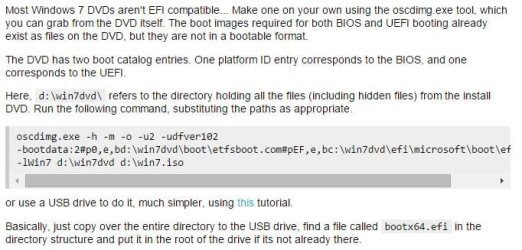
Sorry buddy but that still didn't work for me. Fortunately for me and others who are looking for what I asked, I have found the solution after many hours of searching. If you have your bios configured correctly for uefi boot but your x64 dvd doesnt show up as uefi boot option then listen up! Check out the attached image taken from superuser.com or visit the link and scroll down to the response from Milind R. (link: Installing Win 7 To GPT and Why My UEFI Mobo Won't Boot From CD Unless In Legacy Mode - Super User). After you create the iso with oscdimg of which you could just google search it and download or I attached it here then just burn the iso with any burning software you want and put your disc in and enjoy a uefi bootable w7 disc!! Thank you for your efforts gregrocker. BTW I used my custom iso with my modified wim file and it works just fine, now in uefi mode on dvd!! Here, code got cut off in image (space after "udfver102" and after "...\efisys.bin" then "lwin7" is the label for your dvd, l is the command and no space between command and name:

download oscdimg and put in a folder on your c drive like "c:\oscdimg\oscdimg.exe" then run cmd.exe as admin and change to that directory with "cd c:\oscdimg" without quotes then run the command below. ***Remember to replace the "d:\win7dvd" directory with yours and the iso name too. Also you want to copy the contents of your w7 iso or dvd to a folder on the root of the c drive then substitute the directory in the command below with your directory name. (The "win7dvd" directory would be where you copy your iso or dvd contents to).

oscdimg.exe -h -m -o -u2 -udfver102
-bootdata:2#p0,e,bd:\win7dvd\boot\etfsboot.com#pEF,e,bc:\win7dvd\efi\microsoft\boot\efisys.bin
-lWin7 d:\win7dvd d:\win7.iso

oscdimg commands: (link: http://technet.microsoft.com/en-us/library/cc749036(v=ws.10).aspx)
 

Attachments

  • UEFI DVD Boot.JPG
    UEFI DVD Boot.JPG
    52.4 KB · Views: 91
  • oscdimg.zip
    oscdimg.zip
    64.7 KB · Views: 78
Last edited:

My Computer My Computer

At a glance

Windows 8.1 Professional x64AMD A1012GB DDR3AMD Radeon HD 8650G + 8750M Dual Graphics
Computer type
Laptop
Computer Manufacturer/Model Number
HP
OS
Windows 8.1 Professional x64
CPU
AMD A10
Motherboard
AMD A55/ A60
Memory
12GB DDR3
Graphics Card(s)
AMD Radeon HD 8650G + 8750M Dual Graphics
Screen Resolution
1920x1080
Hard Drives
1TB Seagate Sata-III 6GB/s
Antivirus
Norton Secuirty Suite
Browser
Google Chrome
But again rufus is not my solution because I need uefi from dvd not flash drive.

I am just curious to know. Why ?. Installing from USB is a lot faster when compared to DVD.
 

My Computer My Computer

At a glance

Windows 7 Ultimate x64
Computer type
PC/Desktop
OS
Windows 7 Ultimate x64
Yes totally true, I agree %100 with you Anshad Edavana!! I wish I could just use a flash drive every time but sometimes you have special circumstances where you have to use a dvd. Well, like what you might ask? I do alot of work on computers and spend alot of time fixing, troubleshooting, and maintaining multiple systems with different os's on them. One pc came with 8.1 on it but decided that the two computers with 8 on it should be running w7 becasue w7 is so much better and best optimized for desktop or laptop users not touch screen oriented and other reasons. So the laptop came with 8.1 and since 8.1 installer natively supports usb 3 during install I have no issue using a flash drive becasue it works with the usb 3 drivers and the laptop only has all usb 3 ports not even a single 2.0 port!! So since I want w7 on it and w7 installer doesn't natively support usb 3 drivers unless you integrate them into iso. Ohh also the laptop has no internal optical drive but has an external usb drive which wants usb 3 drivers for dvd since its connected by usb instead of sata. So I didnt want to create a custom iso with the usb 3 drivers that would only work with the laptop because the other pcs are different models and chipsets. So this is why I really need a uefi dvd that works on any pc which now that I know how to do will take no time at all in the future!! Plus I always have backups of all my software, games, and windows installers on dvds just in case of hdd failure which just happened to me and thankfully I had all these backups on dvd!! So if I ever lose my isos I have it on dvd. This was probably more than an explanation than you wanted, sorry.
 

My Computer My Computer

At a glance

Windows 8.1 Professional x64AMD A1012GB DDR3AMD Radeon HD 8650G + 8750M Dual Graphics
Computer type
Laptop
Computer Manufacturer/Model Number
HP
OS
Windows 8.1 Professional x64
CPU
AMD A10
Motherboard
AMD A55/ A60
Memory
12GB DDR3
Graphics Card(s)
AMD Radeon HD 8650G + 8750M Dual Graphics
Screen Resolution
1920x1080
Hard Drives
1TB Seagate Sata-III 6GB/s
Antivirus
Norton Secuirty Suite
Browser
Google Chrome
You are saying that you followed the steps to slipstream all Updates into the unlocked ISO using the tool provided in Update 7 installation media, used the same tool to recompile the edited ISO, burned to disk using Download Tool or ImgBurn, and it still didn't boot for UEFI install?

I wonder why. No one else has reported it that I've seen.
 
So the laptop came with 8.1 and since 8.1 installer natively supports usb 3 during install I have no issue using a flash drive becasue it works with the usb 3 drivers and the laptop only has all usb 3 ports not even a single 2.0 port!! So since I want Windows 7 on it and Windows 7 installer doesn't natively support usb 3 drivers unless you integrate them into iso

Mate, i will tell you a secret that many peoples are not aware of. You can simply use either "Windows 8" or "Windows 8.1" install media (either USB or DVD ) to install "Windows 7" !. Yes, "Windows 8.1" installer officially supports installing all NT6 family operating systems including "Windows 7" , "Server 2008" and "Server 2008 R2" - only exception is Windows Vista ( If you don't know, "Windows 7" installer can install Vista too).

If you want to create a "Windows 7 x64" install USB flash drive which supports USB 3.0 and UEFI, simply follow the below steps.

1. Create a "Windows 8.1 x64" install USB with FAT32 as file system (using DISKPART ). The edition of "Windows 8 doesn't matter - you can use either a "Pro" , "Core" or "Enterprise Trial" install DVD as source.

http://www.sevenforums.com/tutorials/2432-usb-windows-7-installation-key-drive-create.html

(Steps are same for both 7 and 8 ).

2. Open the USB flash drive and navigate to the "Sources" folder. Now delete "Install.wim/Install.ESD" and "EI.CFG" files.

3. Copy your customized "Windows 7" install image ( Install.wim") to the "Sources" folder. Then open notepad and copy the below text exactly and save it as "EI.CFG" file to the "Sources" folder.

Code:
[EditionID]
[Channel]
Retail
[VL]
0


Now you got a "Windows 7 x64" install media which supports USB 3.0. Let me know whether it helps you.
 

My Computer My Computer

At a glance

Windows 7 Ultimate x64
Computer type
PC/Desktop
OS
Windows 7 Ultimate x64
You are saying that you followed the steps to slipstream all Updates into the unlocked ISO using the tool provided in Update 7 installation media, used the same tool to recompile the edited ISO, burned to disk using Download Tool or ImgBurn, and it still didn't boot for UEFI install?

I wonder why. No one else has reported it that I've seen.

yes but I will try again with the untouched ultimate iso.
 

My Computer My Computer

At a glance

Windows 8.1 Professional x64AMD A1012GB DDR3AMD Radeon HD 8650G + 8750M Dual Graphics
Computer type
Laptop
Computer Manufacturer/Model Number
HP
OS
Windows 8.1 Professional x64
CPU
AMD A10
Motherboard
AMD A55/ A60
Memory
12GB DDR3
Graphics Card(s)
AMD Radeon HD 8650G + 8750M Dual Graphics
Screen Resolution
1920x1080
Hard Drives
1TB Seagate Sata-III 6GB/s
Antivirus
Norton Secuirty Suite
Browser
Google Chrome
Mate, i will tell you a secret that many peoples are not aware of. You can simply use either "Windows 8" or "Windows 8.1" install media (either USB or DVD ) to install "Windows 7" !. Yes, "Windows 8.1" installer officially supports installing all NT6 family operating systems including "Windows 7" , "Server 2008" and "Server 2008 R2" - only exception is Windows Vista ( If you don't know, "Windows 7" installer can install Vista too).

If you want to create a "Windows 7 x64" install USB flash drive which supports USB 3.0 and UEFI, simply follow the below steps.

1. Create a "Windows 8.1 x64" install USB with FAT32 as file system (using DISKPART ). The edition of "Windows 8 doesn't matter - you can use either a "Pro" , "Core" or "Enterprise Trial" install DVD as source.

USB Windows 7 Installation Key Drive - Create

(Steps are same for both 7 and 8 ).

2. Open the USB flash drive and navigate to the "Sources" folder. Now delete "Install.wim/Install.ESD" and "EI.CFG" files.

3. Copy your customized "Windows 7" install image ( Install.wim") to the "Sources" folder. Then open notepad and copy the below text exactly and save it as "EI.CFG" file to the "Sources" folder.

OMG!! This is genius!! I am definitely gonna try this out, thank you soooo much! I never knew you could do this. One concern though, have you tested it out yourself and it has no issues whatsoever? Also would I be able to have w7, w8, and w8.1 on an install.wim but on the w8.1 disc? Thanks!!
 

My Computer My Computer

At a glance

Windows 8.1 Professional x64AMD A1012GB DDR3AMD Radeon HD 8650G + 8750M Dual Graphics
Computer type
Laptop
Computer Manufacturer/Model Number
HP
OS
Windows 8.1 Professional x64
CPU
AMD A10
Motherboard
AMD A55/ A60
Memory
12GB DDR3
Graphics Card(s)
AMD Radeon HD 8650G + 8750M Dual Graphics
Screen Resolution
1920x1080
Hard Drives
1TB Seagate Sata-III 6GB/s
Antivirus
Norton Secuirty Suite
Browser
Google Chrome
One concern though, have you tested it out yourself and it has no issues whatsoever? Also would I be able to have Windows 7, w8, and w8.1 on an install.wim but on the w8.1 disc? Thanks!

Yes indeed :). My current Windows install USB disk has a single "install.wim" which contains "Windows 8.1 Pro x64" , "Windows 7 Ultimate x32" and "Windows 7 Ultimate x64". You can combine all WIM files to a single one using DISM ( Win8.1 version ).
Create a WIM for Multiple Architecture Types Using DISM

Combining multiple WIM files will cause the install image to grow larger and may not fit on a FAT32 USB flash drive. To circumvent that, you can combine "Windows 7 x64" , "Windows 8 x64" and "Windows 8.1 x64" images and split them to multiple "Install.swm" files using DISM. Set "FileSize" to 3800 and then the image will fit on FAT32 drive.

Split a Windows Image (WIM) File to Span Across Multiple DVDs

Note that, you should use "Windows 8.1" computer to combine and split the images.

No, there is no side effects. This is an officially supported feature and i found it from Microsoft's technet site. In fact there is a side benefit to it - Win8 installer is faster than Win7 installer !.

In old days, "Imagex" is used to combine x86 and x64 versions of "Windows 7" to a single image. "Imagex" is now depreciated and now DISM is the primary image management tool. Although "Windows 7" includes a version of DISM, it is very limited when comparing to Win8 version.

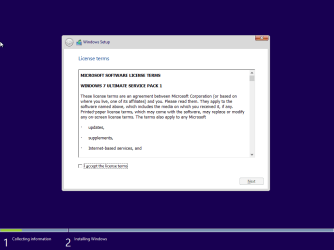
Install 7.png
 
Last edited:

My Computer My Computer

At a glance

Windows 7 Ultimate x64
Computer type
PC/Desktop
OS
Windows 7 Ultimate x64
Thank you!! This is awesome!
 

My Computer My Computer

At a glance

Windows 8.1 Professional x64AMD A1012GB DDR3AMD Radeon HD 8650G + 8750M Dual Graphics
Computer type
Laptop
Computer Manufacturer/Model Number
HP
OS
Windows 8.1 Professional x64
CPU
AMD A10
Motherboard
AMD A55/ A60
Memory
12GB DDR3
Graphics Card(s)
AMD Radeon HD 8650G + 8750M Dual Graphics
Screen Resolution
1920x1080
Hard Drives
1TB Seagate Sata-III 6GB/s
Antivirus
Norton Secuirty Suite
Browser
Google Chrome
3. Copy your customized "Windows 7" install image ( Install.wim") to the "Sources" folder. Then open notepad and copy the below text exactly and save it as "EI.CFG" file to the "Sources" folder.

Code:
[EditionID]
[Channel]
Retail
[VL]
0

I thought that they got rid of the retail vs VL editions since xp? I thought that it wasn't restricted any more meaning you could use a reatil key or VLK for install? Cause that was a pain working on peoples pcs and not having the right cd version like retail or vl for xp re-install.
 

My Computer My Computer

At a glance

Windows 8.1 Professional x64AMD A1012GB DDR3AMD Radeon HD 8650G + 8750M Dual Graphics
Computer type
Laptop
Computer Manufacturer/Model Number
HP
OS
Windows 8.1 Professional x64
CPU
AMD A10
Motherboard
AMD A55/ A60
Memory
12GB DDR3
Graphics Card(s)
AMD Radeon HD 8650G + 8750M Dual Graphics
Screen Resolution
1920x1080
Hard Drives
1TB Seagate Sata-III 6GB/s
Antivirus
Norton Secuirty Suite
Browser
Google Chrome
Back
Top