Installing 7x64 issue on 8.1 machine using Rufus UEFI bootable

base1268

New member
Local time
4:29 AM
Messages
9
Hey guys...

Been at this a while and need some help.

Got a new machine (Qosmio X70-B-102) which like most tries to force me to use Windows 8 platform preinstalled... no chance thankyou... my machine and I'll run it how I choose to.

So my plan has always been to do a clean install of 7 x 64 pro which I already own.

Initially I learn that the BIOS needs to be changed from UEFI to CSM... no prob that's easy... but the hybrid SSHD is set up with GPT partitions and my 7 wont install unless they are MBR.

At the advanced options screen I can delete all partitons and format but I end up with one single unallocated drive that remains as a GPT cos the advanced options don't offer the necessary conversion to MBR.

So... I do some reading and discover that in fact Windows 7 WILL install to GPT providing the installer I use can do that and as some will no doubt know the RUFUS installer allows us to select 'GPT partition scheme for UEFI computers'

Hmmm... brilliant I thought... I can keep using the UEFI firmware advantages by installing onto GPT partitions.

So I got Rufus and created my bootable windows 7 x64 Pro selecting the 'GPT partition scheme.....'

Only change I then make to the BIOS is to disable secure boot and boot order to USB.

Standard 'Windows loading' white progress bar on black screen.... then the recognisable logo begins to go thru it's motions of 'Starting Windows' and the 4 coloured squares fly around to form the logo.... only it never completes and it hangs !!

Question 1.... Are there enough benefits to keeping the UEFI and sticking with GPT partition and trying to pursue with installing this way OR should I just forget that and open a command window from the language screen with Shift + F10 and open DISKPART to clean and convert the new single partition to MBR...?

Question 2... Anyone got any idea why this installer is hanging at the point listed above...? And if so is it fixable?

I used the latest RUFUS available 1.4.12 (although I note there's a beta version 2.0 available and wondering if it may just address this issue..?)

All help greatly appreciated

Nick.... :)
 

My Computer My Computer

Computer type
Laptop
Computer Manufacturer/Model Number
Toshiba Qosmio X70-B-102
OS
Win 7 x64 HP + 8.1
CPU
4710
Motherboard
Intel HM86 chipset
Memory
16 gb
Graphics Card(s)
AMD R9 m265X
Make sure the Rufus settings are exactly as pictured in Option One of UEFI Bootable USB Flash Drive - Create in Windows and do not change once you load the ISO.

Where did you get the ISO. Check it's HASH to confirm it is intact, from Step 1 of Clean Reinstall Windows 7 .

Did you boot the installer as a UEFI device? It is not going to install to UEFI if not, and if it doesn't show up as a UEFI device after Rufus formatting, then it is either formatted incorrectly or the BIOS settings are not yet correct.

It may require Legacy BIOS settings if UEFI First to Boot is present. It may require some level of CSM, as long as you can boot the flash stick as a UEFI device.

If in doubt about settings, let us see the ones in BIOS related to Secure Boot, UEFI, Legacy BIOS, CSM and BIOS Boot Priority order. Attach camera pics using paper clip icon in reply box.

Use the BIOS Boot menu key to trigger flash stick with HD or Windows Boot Manager set first to boot.
 
Hey GregRocker... thanks for replying.

I'd have to say that I don't recall if I changed anything after loading the ISO.... However... if you follow the instructions it suggests loading the ISO first in the sequence so the possibility exists that one may make changes when working thru the rest of the sequence...?

I already went ahead and installed in CSM compatibility mode and then during install I deleted all partitions and used DISKPART to clean the single remaining volume and convert to MBR.

That said I really would like to use all the available spec of my new expensive laptop and run in UEFI mode. Brink over on the 8 forum suggests this :

If you wanted to, you could install 64-bit W7 with UEFI, but you would still need to set firmware to use UEFI instead of legacy, and wipe and convert the disk to MBR first.

Is there a simple way I can now do a re-install in UEFI...? where do I go to change settings in firmware..?

cheers,

Nick
 

My Computer My Computer

Computer type
Laptop
Computer Manufacturer/Model Number
Toshiba Qosmio X70-B-102
OS
Win 7 x64 HP + 8.1
CPU
4710
Motherboard
Intel HM86 chipset
Memory
16 gb
Graphics Card(s)
AMD R9 m265X
I'm sure it was just a mis-speak, but Shawn meant to convert to GPT for UEFI. That is usually done by deleting all partitions, but you can also run Diskpart Clean Command with the addition of Convert GPT, from the Win7 installer Command line in System Recovery Options

I just gave you specific things to check in BIOS setup and what to do if in doubt? Did you read all of my post?
 
Trying again with a brand new Samsung 850 pro SSD which will be transplanted into my brand new machine.

As soon as I select the ISO in Rufus it changes the setting from 'GPT partitions for UEFI' to 'MBR partitions for BIOS and UEFI'

Do I need a specific version of the Win 7 x64 Pro ISO to allow this to work ? or manipulate the boot files within the ISO maybe...?
 

My Computer My Computer

Computer type
Laptop
Computer Manufacturer/Model Number
Toshiba Qosmio X70-B-102
OS
Win 7 x64 HP + 8.1
CPU
4710
Motherboard
Intel HM86 chipset
Memory
16 gb
Graphics Card(s)
AMD R9 m265X
Just setup the usb stick as per Greg`s instructions and re install.

I don`t understand the big deal about UEFI, only with large drives.

What wouldn`t you be able to do using Legacy mode vs UEFI ?

10 things you should know about UEFI - TechRepublic

UEFI BIOS Advantages
When the option is available to choose between a Legacy BIOS boot mode or UEFI boot mode operating system installation, the advantages to choosing a UEFI boot mode installation include the following:

Avoids Legacy Option ROM address constraints. For more information, see Legacy BIOS Option ROM Allocation Considerations.

Supports operating system boot partitions greater than 2 terabytes (2 TB) in size. For more information about limitations for supported operating systems, refer to Sun Blade X3-2B (formerly Sun Blade X6270 M3) Product Notes.

PCIe device configuration utilities are integrated with Setup Utility menus. For more information, see BIOS Setup Utility Screen Reference .

Bootable operating system images will appear in the boot list as labeled entities, for example Windows boot manager label versus raw device labels.

Benefits of UEFI boot mode over Legacy BIOS boot mode include:

Support for hard drive partitions larger than 2 Tbytes

Support for more than four partitions on a drive

Fast booting

Efficient power and system management

Robust reliability and fault management
 
Last edited:

My Computer My Computer

Computer type
PC/Desktop
Computer Manufacturer/Model Number
Skylake Special #666
OS
Windows 10 Pro x64
CPU
Intel Core i7 6700K
Motherboard
Asus Sabertooth Z170 Mark 1
Memory
GSkill TridentZ RGB 16GB 3600 16-16-16-36
Graphics Card(s)
EVGA GTX 980 Ti SC x2
Sound Card
Realtek High Definition
Monitor(s) Displays
AOC G2460PG
Screen Resolution
1920 x 1080 144Hz
Hard Drives
Samsung 860 Pro 256GB, Seagate Barracuda 4TB x2
PSU
EVGA 1000 P2, EVGA White Custom Braided Cables
Case
Corsair Vengeance C70 Gunmetal Black
Cooling
Corsair H100i v2, Corsair ML120 x2, Thermal Grizzly Kryonaut
Keyboard
Logitech G910 Orion Spectrum
Mouse
Logitech G700s
Internet Speed
Verizon Fios Quantum Gateway 75/75
Antivirus
Windows Defender, Malwarebytes Free 3.8.3
Browser
Chrome
Other Info
Corsair SP120 x4, LG Blu-ray Drive, Durabrand HT-395 100 Watt Dolby Digital Amp, Corsair H2100 Wireless 7.1 Headset
Unfortunately writing stuff down often suffers from mis-interpretation.

This is a straightforward issue with following Greg's instructions to the letter in exact sequence. The installer does not show in the Boot menu as UEFI Bootable USB Flash Drive.

It hangs at the 'Starting Windows' screen as described initially in this thread.

Rufus log attached... hopefully someone can spot a problem.

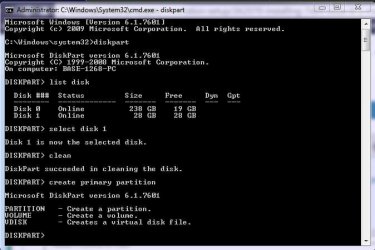
Also... I thought I'd try Greg's option 2... and I get stuck at 'create primary partition' and get the attached reply.
 

Attachments

  • rufus.log
    rufus.log
    62.9 KB · Views: 0
  • Diskpart log.JPG
    Diskpart log.JPG
    42.7 KB · Views: 16

My Computer My Computer

Computer type
Laptop
Computer Manufacturer/Model Number
Toshiba Qosmio X70-B-102
OS
Win 7 x64 HP + 8.1
CPU
4710
Motherboard
Intel HM86 chipset
Memory
16 gb
Graphics Card(s)
AMD R9 m265X
The command is create partition primary, not create primary partition, try again :)

select disk #
clean
create partition primary
format fs=fat32 quick
active
assign
list volume
exit
 

My Computer My Computer

Computer type
PC/Desktop
Computer Manufacturer/Model Number
Skylake Special #666
OS
Windows 10 Pro x64
CPU
Intel Core i7 6700K
Motherboard
Asus Sabertooth Z170 Mark 1
Memory
GSkill TridentZ RGB 16GB 3600 16-16-16-36
Graphics Card(s)
EVGA GTX 980 Ti SC x2
Sound Card
Realtek High Definition
Monitor(s) Displays
AOC G2460PG
Screen Resolution
1920 x 1080 144Hz
Hard Drives
Samsung 860 Pro 256GB, Seagate Barracuda 4TB x2
PSU
EVGA 1000 P2, EVGA White Custom Braided Cables
Case
Corsair Vengeance C70 Gunmetal Black
Cooling
Corsair H100i v2, Corsair ML120 x2, Thermal Grizzly Kryonaut
Keyboard
Logitech G910 Orion Spectrum
Mouse
Logitech G700s
Internet Speed
Verizon Fios Quantum Gateway 75/75
Antivirus
Windows Defender, Malwarebytes Free 3.8.3
Browser
Chrome
Other Info
Corsair SP120 x4, LG Blu-ray Drive, Durabrand HT-395 100 Watt Dolby Digital Amp, Corsair H2100 Wireless 7.1 Headset
DOH !!!.... bloody computer syntax.... anyone would think Yoda wrote the script.... 'Create partition primary he does'... :p

Any chance someone can check the Rufus log to see why I'm possibly ripping my hair out with frustration and can see if it notes there's an issue I don't see.... or should I contact the programmer direct for analysis of the log file?
 

My Computer My Computer

Computer type
Laptop
Computer Manufacturer/Model Number
Toshiba Qosmio X70-B-102
OS
Win 7 x64 HP + 8.1
CPU
4710
Motherboard
Intel HM86 chipset
Memory
16 gb
Graphics Card(s)
AMD R9 m265X
Just type it as it`s written, and no problem, you shall have :)
 
Last edited:

My Computer My Computer

Computer type
PC/Desktop
Computer Manufacturer/Model Number
Skylake Special #666
OS
Windows 10 Pro x64
CPU
Intel Core i7 6700K
Motherboard
Asus Sabertooth Z170 Mark 1
Memory
GSkill TridentZ RGB 16GB 3600 16-16-16-36
Graphics Card(s)
EVGA GTX 980 Ti SC x2
Sound Card
Realtek High Definition
Monitor(s) Displays
AOC G2460PG
Screen Resolution
1920 x 1080 144Hz
Hard Drives
Samsung 860 Pro 256GB, Seagate Barracuda 4TB x2
PSU
EVGA 1000 P2, EVGA White Custom Braided Cables
Case
Corsair Vengeance C70 Gunmetal Black
Cooling
Corsair H100i v2, Corsair ML120 x2, Thermal Grizzly Kryonaut
Keyboard
Logitech G910 Orion Spectrum
Mouse
Logitech G700s
Internet Speed
Verizon Fios Quantum Gateway 75/75
Antivirus
Windows Defender, Malwarebytes Free 3.8.3
Browser
Chrome
Other Info
Corsair SP120 x4, LG Blu-ray Drive, Durabrand HT-395 100 Watt Dolby Digital Amp, Corsair H2100 Wireless 7.1 Headset
Back
Top