How to move files to[wards] end of hard drive

leuce

New member
Member
Local time
5:08 AM
Messages
63
Location
Netherlands
Hello everyone

Do you know of an easy-to-use utility (or a web site with good explanations) for moving specific files to or towards the end of the hard drive. In particular I'd like to move files from near the start of the drive towards the end of the drive, to fee up space near the start of the drive so that I can copy files onto the drive faster.

Some defrag utilities have this feature, but only for defragmented files, or only for "large" files or files of a certain file type, and not for specific files or files in a specific location (e.g. "near the start of the drive").

The drive in question is an external drive used for films. Sometimes I'm not in a hurry when copying films to the drive (or moving files around), but sometimes I want the films to copy as fast as possible, and for that I would like to create large gaps near the start of the drive.

Of course, a simple, manual way of doing this is to simply make copies of files on the drive itself, and then deleting the old versions, which will create gaps nearer to the start of the drive, but then I would need a utility that can tell me which files are closer to the start of the hard drive (so that I can make copies of those files). I know I can use Defraggler for that, but I can only view the files from one block at the time in Defraggler (you can't select multiple blocks to see what files are in those blocks).

Any ideas?
Thanks
Samuel
 

My Computer My Computer

At a glance

Windows 7 Home Premium 64 bitAMD A6 36204 x 4 GBAMD Radeon HD 6530D
Computer type
PC/Desktop
Computer Manufacturer/Model Number
Acer Aspire X3470
OS
Windows 7 Home Premium 64 bit
CPU
AMD A6 3620
Memory
4 x 4 GB
Graphics Card(s)
AMD Radeon HD 6530D
Sound Card
AMD, Realtek
Monitor(s) Displays
iiyama ProLite B2209HDS full HD in portrait mode
Screen Resolution
1920x1080 or 1080x1920
Hard Drives
SSD 250 GB
WD Green 2 TB 5400 rpm
Antivirus
Avast
Browser
Opera (Blink)
Lets assume you have free space on the beginning of the drive so the write is faster than it wold be if the space were on the end.
Then you will spend much longer time to move the file, cluster by cluster, to the end to make free space for the next write
It doesn't make sense. You're going to spent more than twice the time (one to write and more than one to move).

Don't use external disks to store data you can't loose. External disks are the piece of hardware that fails most.
 

My Computers My Computers

  • At a glance

    Windows 7 HP 64i5 6600K - 800MHz to 4200MHz4+4G GSkill DDR4 3000IG - Intel 530
    Computer type
    PC/Desktop
    Computer Manufacturer/Model Number
    custom build
    OS
    Windows 7 HP 64
    CPU
    i5 6600K - 800MHz to 4200MHz
    Motherboard
    GA-Z170-HD3P
    Memory
    4+4G GSkill DDR4 3000
    Graphics Card(s)
    IG - Intel 530
    Monitor(s) Displays
    Samsung 226BW
    Screen Resolution
    1680x1050
    Hard Drives
    (1) -1 SM951 – 128GB M.2 AHCI PCIe SSD drive for Windows 7 and Lubuntu
    (2) -1 WD SATA 3 - 1T for Data
    (3) -1 WD SATA 3 - 1T for backup
    PSU
    Thermaltake 450W TR2 gold
    Keyboard
    Old and good Chicony mechanical keyboard
    Mouse
    Logitech mX performance - 9 buttons (had to disable some)
    Internet Speed
    500Mb/s
    Browser
    Firefox 64
    Other Info
    TinyWall firewall
  • At a glance

    Windows 7 Proi7-4500U 800MHz to 3.0GHz(4+4)G DDR3 1600IG intel 4400 + NVIDIA GeForce GT 745M
    Computer type
    Laptop
    System Manufacturer/Model Number
    Asus Q550LF
    OS
    Windows 7 Pro
    CPU
    i7-4500U 800MHz to 3.0GHz
    Motherboard
    Asus Q550LF
    Memory
    (4+4)G DDR3 1600
    Graphics Card(s)
    IG intel 4400 + NVIDIA GeForce GT 745M
    Sound Card
    Realtek
    Monitor(s) Displays
    LG Display LP156WF4-SPH1
    Screen Resolution
    1920 x 1080
    Hard Drives
    BX500 120G SSD for Windows and programs +
    1T HDD for data
    Internet Speed
    500 Mb/s
    Browser
    Firefox
    Other Info
    TinyWall firewall
Then you will spend much longer time to move the file ... to the end to make free space for the next write. It doesn't make sense. You're going to spent more than twice the time (one to write and more than one to move).

Yes, but not all time spent copying files are of equal value. There are times when it doesn't matter if a file takes 1 hour to copy, and there are times when it is preferable that the file takes no longer than 10 minutes to copy.

I'm not talking about backups. I use this drive to give my television access to my downloaded movies (because it's too much trouble to set up a NAS). If I have a new movie on my computer and I want to watch it on the television immediately (or shortly after), then I would want that file to copy to the external drive as quickly as possible. If I don't want to watch the movie immediately, then it doesn't matter how long it takes to copy the file.
 

My Computer My Computer

At a glance

Windows 7 Home Premium 64 bitAMD A6 36204 x 4 GBAMD Radeon HD 6530D
Computer type
PC/Desktop
Computer Manufacturer/Model Number
Acer Aspire X3470
OS
Windows 7 Home Premium 64 bit
CPU
AMD A6 3620
Memory
4 x 4 GB
Graphics Card(s)
AMD Radeon HD 6530D
Sound Card
AMD, Realtek
Monitor(s) Displays
iiyama ProLite B2209HDS full HD in portrait mode
Screen Resolution
1920x1080 or 1080x1920
Hard Drives
SSD 250 GB
WD Green 2 TB 5400 rpm
Antivirus
Avast
Browser
Opera (Blink)
1. The only way I can think of to achieve this, is to Partition the drive into two. You could keep the smaller partition near the front (lower order of GB), and larger Partition near the rear (next to the other partition).

Example, assume you have disk with 465GB free space. You could create a Partition of size 30 GB at front of disk, and then you would still have 435 GB remaining for a second partition for your bigger files.

2. Only the above does not work so well on modern disk drives. Modern disk drives often have more than one disk platter that can be accessed simultaneously. You would need divide the disk capacity by the number of platters to find where the "front" of each platter lies.

3. Consider purchasing a hybrid (SSHD) drive. These have HDD platters, and they also have a large Solid State Write Cache. The performance is much improved over normal HDD, yet they are not as expensive as SSD's. With one of these SSHDs, you would not notice the difference between writing to the beginning, middle or end of a platter.

These are my ideas, anyhow.
 

My Computer My Computer

At a glance

Windows 7 x64, Vista x64, 8.1 smartphoneIntel E8400 65W 64-bitDDR2 2 x 2GB, 1GB x 2XFX Radeon HD5750
Computer type
PC/Desktop
OS
Windows 7 x64, Vista x64, 8.1 smartphone
CPU
Intel E8400 65W 64-bit
Motherboard
Gigabyte EP45-UD3LR
Memory
DDR2 2 x 2GB, 1GB x 2
Graphics Card(s)
XFX Radeon HD5750
Sound Card
AMD High Definition Audio; Realtek High Definition Audio
Monitor(s) Displays
iiyama prolite X2377HDS
Screen Resolution
1920 x 1080
Hard Drives
500GB 7200 rpm Seagate ST3500413AS 16MB, 500GB 5400 rpm Toshiba MQ02ABF050H 32MB, 200GB 7200 rpm Seagate ST3200820AS 8MB, 2TB 7200 rpm Western Digital WD20EZRX 64MB
PSU
Enermax Liberty Modular
Case
Antec P193 Midi Tower
Keyboard
Mionix ZIBAL 60
Mouse
Razer USB 2.0 Diamondback Mouse or Huion Graphics Tablet
Browser
Internet Explorer, Lunascape, Firefox, Opera, Avast Safezone
Good solution Iko.
External disks are normally very slow, much slower than the 60MB/sec of a USB2.0.
I would buy a 32G ultra fast USB flash disk to replace the external HDD.
 

My Computers My Computers

  • At a glance

    Windows 7 HP 64i5 6600K - 800MHz to 4200MHz4+4G GSkill DDR4 3000IG - Intel 530
    Computer type
    PC/Desktop
    Computer Manufacturer/Model Number
    custom build
    OS
    Windows 7 HP 64
    CPU
    i5 6600K - 800MHz to 4200MHz
    Motherboard
    GA-Z170-HD3P
    Memory
    4+4G GSkill DDR4 3000
    Graphics Card(s)
    IG - Intel 530
    Monitor(s) Displays
    Samsung 226BW
    Screen Resolution
    1680x1050
    Hard Drives
    (1) -1 SM951 – 128GB M.2 AHCI PCIe SSD drive for Windows 7 and Lubuntu
    (2) -1 WD SATA 3 - 1T for Data
    (3) -1 WD SATA 3 - 1T for backup
    PSU
    Thermaltake 450W TR2 gold
    Keyboard
    Old and good Chicony mechanical keyboard
    Mouse
    Logitech mX performance - 9 buttons (had to disable some)
    Internet Speed
    500Mb/s
    Browser
    Firefox 64
    Other Info
    TinyWall firewall
  • At a glance

    Windows 7 Proi7-4500U 800MHz to 3.0GHz(4+4)G DDR3 1600IG intel 4400 + NVIDIA GeForce GT 745M
    Computer type
    Laptop
    System Manufacturer/Model Number
    Asus Q550LF
    OS
    Windows 7 Pro
    CPU
    i7-4500U 800MHz to 3.0GHz
    Motherboard
    Asus Q550LF
    Memory
    (4+4)G DDR3 1600
    Graphics Card(s)
    IG intel 4400 + NVIDIA GeForce GT 745M
    Sound Card
    Realtek
    Monitor(s) Displays
    LG Display LP156WF4-SPH1
    Screen Resolution
    1920 x 1080
    Hard Drives
    BX500 120G SSD for Windows and programs +
    1T HDD for data
    Internet Speed
    500 Mb/s
    Browser
    Firefox
    Other Info
    TinyWall firewall
Once the disk head has got into position if the file isn't fragmented the speed isn't noticeable if it's front or back
 

My Computer My Computer

At a glance

win 8 32 bit
Computer type
PC/Desktop
OS
win 8 32 bit
Once the disk head has got into position if the file isn't fragmented the speed isn't noticeable if it's front or back

I'm not a disk expert, but don't think so.
A track on the beginning of the disk has more clusters as it's longer (π.D) than at the end. On one rotation more clusters will be read than closer to the center where the diameter is smaller and has less clusters.
 

My Computers My Computers

  • At a glance

    Windows 7 HP 64i5 6600K - 800MHz to 4200MHz4+4G GSkill DDR4 3000IG - Intel 530
    Computer type
    PC/Desktop
    Computer Manufacturer/Model Number
    custom build
    OS
    Windows 7 HP 64
    CPU
    i5 6600K - 800MHz to 4200MHz
    Motherboard
    GA-Z170-HD3P
    Memory
    4+4G GSkill DDR4 3000
    Graphics Card(s)
    IG - Intel 530
    Monitor(s) Displays
    Samsung 226BW
    Screen Resolution
    1680x1050
    Hard Drives
    (1) -1 SM951 – 128GB M.2 AHCI PCIe SSD drive for Windows 7 and Lubuntu
    (2) -1 WD SATA 3 - 1T for Data
    (3) -1 WD SATA 3 - 1T for backup
    PSU
    Thermaltake 450W TR2 gold
    Keyboard
    Old and good Chicony mechanical keyboard
    Mouse
    Logitech mX performance - 9 buttons (had to disable some)
    Internet Speed
    500Mb/s
    Browser
    Firefox 64
    Other Info
    TinyWall firewall
  • At a glance

    Windows 7 Proi7-4500U 800MHz to 3.0GHz(4+4)G DDR3 1600IG intel 4400 + NVIDIA GeForce GT 745M
    Computer type
    Laptop
    System Manufacturer/Model Number
    Asus Q550LF
    OS
    Windows 7 Pro
    CPU
    i7-4500U 800MHz to 3.0GHz
    Motherboard
    Asus Q550LF
    Memory
    (4+4)G DDR3 1600
    Graphics Card(s)
    IG intel 4400 + NVIDIA GeForce GT 745M
    Sound Card
    Realtek
    Monitor(s) Displays
    LG Display LP156WF4-SPH1
    Screen Resolution
    1920 x 1080
    Hard Drives
    BX500 120G SSD for Windows and programs +
    1T HDD for data
    Internet Speed
    500 Mb/s
    Browser
    Firefox
    Other Info
    TinyWall firewall
It probably depends on where the head is in relation to the disc tracks when it receives the command to move, so I doubt if much would be gained by moving the files.

As an example, let's say the reading head was right at the inner track when it received the command & it then has to move to the outer track, which is probably equal to the reverse happening.
 

My Computer My Computer

At a glance

Windows 7 Home Premium 64 bit sp1Intel i5 3570 3.4Ghz Ivy Bridge SKT 1155 quad...G-Skill Rip Jaws 16Gb (8x2) DDR3 -1600 PC3 12...Gigabyte NVIDIA GT610 1Gb DDR3 810/1200 PCI-E...
Computer type
PC/Desktop
Computer Manufacturer/Model Number
Self built using existing case
OS
Windows 7 Home Premium 64 bit sp1
CPU
Intel i5 3570 3.4Ghz Ivy Bridge SKT 1155 quad core
Motherboard
Gigabyte Z77-HD3 SKT 1155 2xSata 3, 4x USB 3.0
Memory
G-Skill Rip Jaws 16Gb (8x2) DDR3 -1600 PC3 12800 CL 10 red
Graphics Card(s)
Gigabyte NVIDIA GT610 1Gb DDR3 810/1200 PCI-E 2.0 Silent
Sound Card
NVIDIA High Definition & Realtech High Definition Audio
Monitor(s) Displays
2 x Philips 226V4L 16:9 aspect ratio
Screen Resolution
1920 x 1080 HD
Hard Drives
Samsung 840 Pro 256gb SSD, SATA 3.
Hitachi Touro Portable 1tb, USB 3.0 HDD used for image b/ups.
PSU
Corsair VS450
Case
Codeng
Cooling
PSU fan & CPU fan
Keyboard
Logitech
Mouse
Logitech Wireless trackball M570
Internet Speed
Wireless 3G. 3mg down & 550kb up.
Antivirus
Bitdefender Internet Security 2020
Browser
Opera (Current Version) & Firefox
Other Info
MS Office 2013 Pro. Davis weather station software. MGE Nova 600 avr UPS.
Interleave will effect it but gains you could get are not worth problem as you keep having to do it
 

My Computer My Computer

At a glance

win 8 32 bit
Computer type
PC/Desktop
OS
win 8 32 bit
Interleave will effect it but gains you could get are not worth problem as you keep having to do it

I agree. I think that the time difference of writing to the beginning or to the end don't justify the effort. But this is up to the OP to decide.
 

My Computers My Computers

  • At a glance

    Windows 7 HP 64i5 6600K - 800MHz to 4200MHz4+4G GSkill DDR4 3000IG - Intel 530
    Computer type
    PC/Desktop
    Computer Manufacturer/Model Number
    custom build
    OS
    Windows 7 HP 64
    CPU
    i5 6600K - 800MHz to 4200MHz
    Motherboard
    GA-Z170-HD3P
    Memory
    4+4G GSkill DDR4 3000
    Graphics Card(s)
    IG - Intel 530
    Monitor(s) Displays
    Samsung 226BW
    Screen Resolution
    1680x1050
    Hard Drives
    (1) -1 SM951 – 128GB M.2 AHCI PCIe SSD drive for Windows 7 and Lubuntu
    (2) -1 WD SATA 3 - 1T for Data
    (3) -1 WD SATA 3 - 1T for backup
    PSU
    Thermaltake 450W TR2 gold
    Keyboard
    Old and good Chicony mechanical keyboard
    Mouse
    Logitech mX performance - 9 buttons (had to disable some)
    Internet Speed
    500Mb/s
    Browser
    Firefox 64
    Other Info
    TinyWall firewall
  • At a glance

    Windows 7 Proi7-4500U 800MHz to 3.0GHz(4+4)G DDR3 1600IG intel 4400 + NVIDIA GeForce GT 745M
    Computer type
    Laptop
    System Manufacturer/Model Number
    Asus Q550LF
    OS
    Windows 7 Pro
    CPU
    i7-4500U 800MHz to 3.0GHz
    Motherboard
    Asus Q550LF
    Memory
    (4+4)G DDR3 1600
    Graphics Card(s)
    IG intel 4400 + NVIDIA GeForce GT 745M
    Sound Card
    Realtek
    Monitor(s) Displays
    LG Display LP156WF4-SPH1
    Screen Resolution
    1920 x 1080
    Hard Drives
    BX500 120G SSD for Windows and programs +
    1T HDD for data
    Internet Speed
    500 Mb/s
    Browser
    Firefox
    Other Info
    TinyWall firewall
For one thing location is determined by the OS. Secondly IMO the time it takes to move the files wouldn't save you any time even if there is a time savings in copy time. It's not like the files would be instantly moved. You would have to wait for the time it takes for the OS to read the file and then write it back to the disk. Thirdly the bulk of the time lost isn't in drive write time but the time it takes to transfer it over the external connection since that is so much slower than the drive can handle. If you are using USB 2.0 they maybe you should consider going with eSata or USB 3.
 

My Computers My Computers

  • At a glance

    Windows 7 pro/Windows 10 ProIntel i7 860 Quad core 2.8 ghz8 gbATI Radeon HD 5770 1 gb ram
    Computer type
    PC/Desktop
    Computer Manufacturer/Model Number
    HP Pavillion Elite HPE-250f
    OS
    Windows 7 pro/Windows 10 Pro
    CPU
    Intel i7 860 Quad core 2.8 ghz
    Memory
    8 gb
    Graphics Card(s)
    ATI Radeon HD 5770 1 gb ram
    Monitor(s) Displays
    Alienware 25 AW2521HF & Viewsonic
    Screen Resolution
    1920 x1080 & 1680x1050
    Hard Drives
    WD blue 1 tb & 500 gb.
    Browser
    FF of course.
    Other Info
    https://www.bestbuy.com/site/hp-pavilion-elite-desktop-intel-core-i7-processor-8gb-memory-1tb-hard-drive/9921493.p?skuId=9921493
  • At a glance

    Windows 2012 R2 Data center/Linux Minti3 9100 3.6GHz, 8M cache, 4C/4T8GB 2666MT/s DDR4 ECC UDIMM
    Computer type
    PC/Desktop
    System Manufacturer/Model Number
    Dell Poweredge T140
    OS
    Windows 2012 R2 Data center/Linux Mint
    CPU
    i3 9100 3.6GHz, 8M cache, 4C/4T
    Memory
    8GB 2666MT/s DDR4 ECC UDIMM
    Monitor(s) Displays
    Viewsonic
    Screen Resolution
    1680x1050
    Hard Drives
    1 TB & 750 GB
    Other Info
    https://www.dell.com/en-us/work/shop/productdetailstxn/poweredge-t140?~ck=bt
In this order, my connection choices would be USB 3.1, USB 3.0.

All three standards are much, much faster than USB 2.0, which tops out at 480Mbps. eSATA can deliver 6Gbps (older versions deliver 1.5Gbps or 3Gbps), USB 3.0 runs at up to 5Gbps and USB 3.1 should do 10Gbps. Thunderbolt can do 20Gbps.

OP is mistaken if belief is a file is written sequentially to drive, IT IS NOT!

The data is stored in a very orderly pattern on each platter. Bits of data are arranged in concentric, circular paths called tracks. Each track is broken up into smaller areas called sectors. Part of the hard drive stores a map of sectors that have already been used up and others that are still free. (The File Allocation Table or FAT) When the computer wants to store new information, it takes a look at the map to find some free sectors. Then it instructs the read-write head to move across the platter to exactly the right location and store the data there. To read information, the same process runs in reverse.

OP could purchase an External SSD if worried about speed!

About HDD write speed

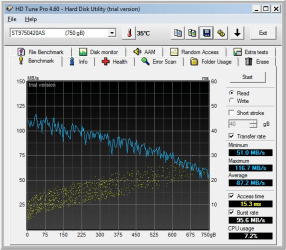
The farther away from the inside of the disk platters you go, the higher the velocity of the head relative to the platter is. Therefore you can see peak sequential transfer speeds of up to 2X when comparing the outermost area of a hard drive platter to the innermost. This can be verified with a utility such as HDTune.

Sd6gA.png

To take advantage of this, those seeking the highest performance from platter drives will often partition only the start of the drive, therefore formatting the drive to a lower capacity, utilizing the faster part of the hard drive. This process is called 'short-stroking'.
 

My Computer My Computer

At a glance

Win 10 x64, Linux Lite, Win 7 x64, BlackArch,...
Computer type
PC/Desktop
Computer Manufacturer/Model Number
HP Desktop & Compaq Laptop
OS
Win 10 x64, Linux Lite, Win 7 x64, BlackArch, & Kali
Hard Drives
Samsung 850 Pro 256Gb,
Hitachi HDD 1Tb,
Crucial MX SSD 250Gb
Segate 3Tb USB 3.0 Ext. Backup HDD
Internet Speed
150Mbps dn, 20Mbps up
Antivirus
Avast Free, Malwarebytes Anti-Exploit & Anti-Ransomware
Browser
Firefox, Chrome, Opera, & VPN
Back
Top