How to Overclock an AMD CPU using BIOS

ay0xb

New member
Local time
9:55 PM
Messages
1
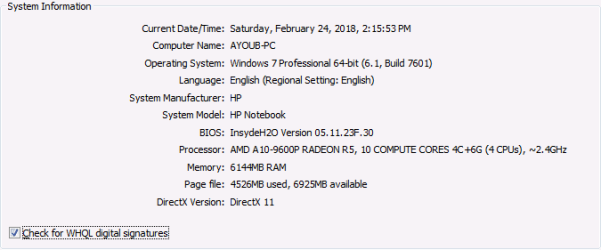
Hi I want to Overclock my CPU using BIOS so here is my System information :
attachment.php


BIOS Version and Date : Insyde F.30, 11/1/2017
SMBIOS Version:2.8.

Is it possible to do that ?
 

Attachments

  • SYSTEM INFO.png
    SYSTEM INFO.png
    7.3 KB · Views: 23

My Computer My Computer

At a glance

windows 7 64AMD a108 GB
Computer type
Laptop
Computer Manufacturer/Model Number
HP
OS
windows 7 64
CPU
AMD a10
Memory
8 GB
Overclocking an OEM computer, and Notebooks in particular, is almost always a bad idea. These systems lack just about everything necessary for safe and effective overclocking. Overclocking means more heat and in the confined space of a Notebook it is very difficult to dissipate. Manufacturers are well aware of this and usually omit the necessary settings from the BIOS.

Overclocking such a system may be possible but but the risks are high and the results rarely satisfactory. It is a job for an expert looking for a challenge and willing to accept the considerable risks.

Overclocking is best confined to custom built computers where you control the quality and specifications of the components.
 

My Computer My Computer

At a glance

Windows 7 Pro 64 bitXeon W35208 GBNvidia Geforce 210
Computer type
PC/Desktop
Computer Manufacturer/Model Number
HP
OS
Windows 7 Pro 64 bit
CPU
Xeon W3520
Memory
8 GB
Graphics Card(s)
Nvidia Geforce 210
Overclocking might void your warranty. Also you probably will barely even notice a difference.
 

My Computers My Computers

  • At a glance

    Windows 7 pro/Windows 10 ProIntel i7 860 Quad core 2.8 ghz8 gbATI Radeon HD 5770 1 gb ram
    Computer type
    PC/Desktop
    Computer Manufacturer/Model Number
    HP Pavillion Elite HPE-250f
    OS
    Windows 7 pro/Windows 10 Pro
    CPU
    Intel i7 860 Quad core 2.8 ghz
    Memory
    8 gb
    Graphics Card(s)
    ATI Radeon HD 5770 1 gb ram
    Monitor(s) Displays
    Alienware 25 AW2521HF & Viewsonic
    Screen Resolution
    1920 x1080 & 1680x1050
    Hard Drives
    WD blue 1 tb & 500 gb.
    Browser
    FF of course.
    Other Info
    https://www.bestbuy.com/site/hp-pavilion-elite-desktop-intel-core-i7-processor-8gb-memory-1tb-hard-drive/9921493.p?skuId=9921493
  • At a glance

    Windows 2012 R2 Data center/Linux Minti3 9100 3.6GHz, 8M cache, 4C/4T8GB 2666MT/s DDR4 ECC UDIMM
    Computer type
    PC/Desktop
    System Manufacturer/Model Number
    Dell Poweredge T140
    OS
    Windows 2012 R2 Data center/Linux Mint
    CPU
    i3 9100 3.6GHz, 8M cache, 4C/4T
    Memory
    8GB 2666MT/s DDR4 ECC UDIMM
    Monitor(s) Displays
    Viewsonic
    Screen Resolution
    1680x1050
    Hard Drives
    1 TB & 750 GB
    Other Info
    https://www.dell.com/en-us/work/shop/productdetailstxn/poweredge-t140?~ck=bt
It is usually not possible to overclock a laptop/notebook because you have no access to the clock multiplier, or base clock frequency in a laptop. So in that sense, there is really no way to do it.

This is actually a good thing, because it keeps you from frying the laptop by the extra heat generated in overclocking. You need serious cooling to do anything more than a token overclock. A laptop just can't cool the CPU enough as it is to keep it from wearing out prematurely, overclocking it would just kill it very quickly.

The short answer: No you can't overclock a laptop. It would fall under option #2 in my sig.

 

My Computer My Computer

At a glance

Win 7 Pro x64/Win 10 Pro x64 dual bootAMD FX 8350 Vishera @ 420016 GB Mushkin Blackline DDR3-2400 @ 1866 (9-1...XFX Radeon R9 280 Double D Black Edition
Computer type
PC/Desktop
Computer Manufacturer/Model Number
Mellon Labs (custom build)
OS
Win 7 Pro x64/Win 10 Pro x64 dual boot
CPU
AMD FX 8350 Vishera @ 4200
Motherboard
ASUS M5A97 R2.0
Memory
16 GB Mushkin Blackline DDR3-2400 @ 1866 (9-10-10-10-31)
Graphics Card(s)
XFX Radeon R9 280 Double D Black Edition
Sound Card
Realtek HD Audio on MB. Sounds great.
Monitor(s) Displays
Acer 24", Acer 22"
Screen Resolution
3840 x 1080
Hard Drives
1 x Mushkin Chronos 120 GB SSD (Win 10)
1 x Samsung 850 EVO 250 GB SSD (Win 7)
1 x WD 1TB SATA Blue
1 x WD 1TB SATA Green
PSU
Corsair TX-750
Case
CoolerMaster HAF 912+
Cooling
Coolermaster Seidon 240M Liquid AIO. 6 case fans
Keyboard
Logitech G710+
Mouse
Logitech G500s
Internet Speed
Much better since I got fiber, but still way overpriced.
Antivirus
MSE, Malware Bytes for scanning
Browser
Firefox
Other Info
Corsair VOID USB headphones.

A Mellon Labs X-1 - LCD Smartie driven system status display.

Brought to you by the letter E
Back
Top