
How to permanently remove US English language from Win 7?

ithehappy

New member
Local time
7:38 PM
Messages
6
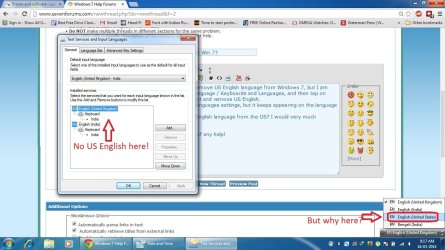
Hi, I need to know one thing. I have been trying to remove US English language from Windows 7, but I am unable to do so. When I use this path, Region and Language / Keyboards and Languages, and then tap on Install / uninstall languages, there's no option to select and remove US English.
I have removed it from the Text services and Input languages settings, but it keeps appearing on the language bar, which is at very least irritating :(
Is there any way I can permanently remove the US English language from the OS? I would very much appreciate a response in this matter.

Have a look at the attached screen-shot, if it's of any help!

Saurav.
 

Attachments
  • Win 7 lang.jpg
    Win 7 lang.jpg
    131.3 KB · Views: 7

My Computer My Computer

At a glance

Windows XP SP3 and Windows 7Intel C2D 1.86 GHz2048 MBXFX 9800 GT 256MB
OS
Windows XP SP3 and Windows 7
CPU
Intel C2D 1.86 GHz
Motherboard
D946GZIS
Memory
2048 MB
Graphics Card(s)
XFX 9800 GT 256MB
Sound Card
Creative SB Live
Monitor(s) Displays
Dell 22''
Hard Drives
Seagate
1- 160 GB SATA
2- 500 GB SATA
It might be because Microsoft is a US company and the de facto language of Windows is US English.

Not that that solves your problem, but that might be an explanation as to why you can't get rid of it.
 

My Computer My Computer

At a glance

Win 7 Pro x64/Win 10 Pro x64 dual bootAMD FX 8350 Vishera @ 420016 GB Mushkin Blackline DDR3-2400 @ 1866 (9-1...XFX Radeon R9 280 Double D Black Edition
Computer type
PC/Desktop
Computer Manufacturer/Model Number
Mellon Labs (custom build)
OS
Win 7 Pro x64/Win 10 Pro x64 dual boot
CPU
AMD FX 8350 Vishera @ 4200
Motherboard
ASUS M5A97 R2.0
Memory
16 GB Mushkin Blackline DDR3-2400 @ 1866 (9-10-10-10-31)
Graphics Card(s)
XFX Radeon R9 280 Double D Black Edition
Sound Card
Realtek HD Audio on MB. Sounds great.
Monitor(s) Displays
Acer 24", Acer 22"
Screen Resolution
3840 x 1080
Hard Drives
1 x Mushkin Chronos 120 GB SSD (Win 10)
1 x Samsung 850 EVO 250 GB SSD (Win 7)
1 x WD 1TB SATA Blue
1 x WD 1TB SATA Green
PSU
Corsair TX-750
Case
CoolerMaster HAF 912+
Cooling
Coolermaster Seidon 240M Liquid AIO. 6 case fans
Keyboard
Logitech G710+
Mouse
Logitech G500s
Internet Speed
Much better since I got fiber, but still way overpriced.
Antivirus
MSE, Malware Bytes for scanning
Browser
Firefox
Other Info
Corsair VOID USB headphones.

A Mellon Labs X-1 - LCD Smartie driven system status display.

Brought to you by the letter E
Hi, I need to know one thing. I have been trying to remove US English language from Windows 7, but I am unable to do so. When I use this path, Region and Language / Keyboards and Languages, and then tap on Install / uninstall languages, there's no option to select and remove US English.
I have removed it from the Text services and Input languages settings, but it keeps appearing on the language bar, which is at very least irritating :(
Is there any way I can permanently remove the US English language from the OS? I would very much appreciate a response in this matter.

Have a look at the attached screen-shot, if it's of any help!

Saurav.

See if this works; Add English US by clicking the Add button and then make sure it is not at the top of the list (move it down to the bottom) and then delete it. It will then be removed from your language bar.

HTH
 

My Computer My Computer

At a glance

Windows 7 Professional x64Intel i5 quad processor16 GBRadeon HD 5770
Computer type
PC/Desktop
Computer Manufacturer/Model Number
Custom Built
OS
Windows 7 Professional x64
CPU
Intel i5 quad processor
Motherboard
DP67BG
Memory
16 GB
Graphics Card(s)
Radeon HD 5770
Sound Card
Realtek High Definition Audio
Monitor(s) Displays
Samsung SyncMaster
Screen Resolution
1920X1080
Hard Drives
WD 2TB (SATA Internal)
WD 1TB (USB External)
PSU
Corsair GS800
Case
Tower (Generic)
Cooling
3 Internal Fans
Keyboard
MS Wireless
Mouse
MS Optical Wired
Internet Speed
54 mbps
Antivirus
Emsisoft
Browser
IE-Version 9, Palemoon-Version 24.2.0
Hi, I need to know one thing. I have been trying to remove US English language from Windows 7, but I am unable to do so. When I use this path, Region and Language / Keyboards and Languages, and then tap on Install / uninstall languages, there's no option to select and remove US English.
I have removed it from the Text services and Input languages settings, but it keeps appearing on the language bar, which is at very least irritating :(
Is there any way I can permanently remove the US English language from the OS? I would very much appreciate a response in this matter.

Have a look at the attached screen-shot, if it's of any help!

Saurav.

See if this works; Add English US by clicking the Add button and then make sure it is not at the top of the list (move it down to the bottom) and then delete it. It will then be removed from your language bar.

HTH
I did this sir, and it solves the problem, but temporarily. When I reboot the PC it comes back! Well...!
The language is somewhere in the OS right, anyone knows the path where they are located?
 

My Computer My Computer

At a glance

Windows XP SP3 and Windows 7Intel C2D 1.86 GHz2048 MBXFX 9800 GT 256MB
OS
Windows XP SP3 and Windows 7
CPU
Intel C2D 1.86 GHz
Motherboard
D946GZIS
Memory
2048 MB
Graphics Card(s)
XFX 9800 GT 256MB
Sound Card
Creative SB Live
Monitor(s) Displays
Dell 22''
Hard Drives
Seagate
1- 160 GB SATA
2- 500 GB SATA
It might be because Microsoft is a US company and the de facto language of Windows is US English.

Not that that solves your problem, but that might be an explanation as to why you can't get rid of it.
That's what I think too, but with that theory my A4 should have had everything mentioned in German :p
If MS did that purposefully then it's really awkward :(
 

My Computer My Computer

At a glance

Windows XP SP3 and Windows 7Intel C2D 1.86 GHz2048 MBXFX 9800 GT 256MB
OS
Windows XP SP3 and Windows 7
CPU
Intel C2D 1.86 GHz
Motherboard
D946GZIS
Memory
2048 MB
Graphics Card(s)
XFX 9800 GT 256MB
Sound Card
Creative SB Live
Monitor(s) Displays
Dell 22''
Hard Drives
Seagate
1- 160 GB SATA
2- 500 GB SATA
Back
Top