Gunniz ARSENAL LONDON Member VIP Local time 8:15 AM Messages 101 Aug 10, 2012 #1 I Need Print My Any Pictures From Photoshop to A4 Paper. Can Anyone Help Me ? My Computer My Computer At a glance Windows 7 Professional x64 Service Pack 1OSWindows 7 Professional x64 Service Pack 1
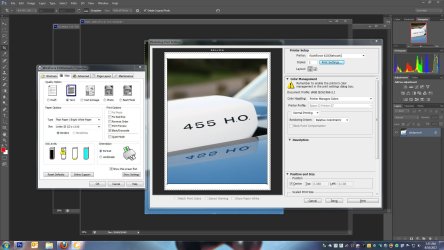
Zepher New member Guru Gold Member VIP Local time 9:15 PM Messages 2,161 Location Norfolk, VA Aug 10, 2012 #2 Make your layout in the A4 size, then print the picture using A4 paper in your printer. Attachments printing photoshop.jpg 198.9 KB · Views: 8 My Computer My Computer At a glance Windows 7 Ultimate 64bitIntel i7 3770K16GB DDR3 1333 Corsair XMS3XFX HD6950 2GB EyeFinityComputer Manufacturer/Model NumberHAL-9000OSWindows 7 Ultimate 64bitCPUIntel i7 3770KMotherboardAsus Sabertooth Z77Memory16GB DDR3 1333 Corsair XMS3Graphics Card(s)XFX HD6950 2GB EyeFinitySound CardLogitech G35 & Sennheiser PC135 & VIA HDMonitor(s) Displays23" HP 2310e, 23" Samsung B2230, 21.5" ViewsonicScreen Resolution5760x1080Hard Drives16TB of Storage 128GB & 256GB Crucial M4 SSD's, 2X 1TB WD Black, 3x 2TB WD, 3x 2TB Samsung F4, 1.5TB Seagate, WD 500GB,PSUAntec True Power New 650wattCaseCooler Master HAF-932CoolingCorsair H60 Hydro Cooler, 3x 230mm Fans, 2x120mm FanKeyboardLogitech G15 and G13MouseLogitech G700 Gaming MouseInternet Speed50/10 MbitOther InfoSpeakers : Alesis M1 Active Mk2 Studio Monitors , APC RS 1200 UPS, HP 4500DN Color Laser, HP P1006 mono Laser, Kodak 8500 Dye-Sub, Epson 1280 inkjet, Epson Worforce 610 MFC
Gunniz ARSENAL LONDON Member VIP Thread Starter Local time 8:15 AM Messages 101 Aug 10, 2012 #3 Zepher said: Make your layout in the A4 size, then print the picture using A4 paper in your printer. Click to expand... Work Wih HP Photosmart C3180 ? My Computer My Computer At a glance Windows 7 Professional x64 Service Pack 1OSWindows 7 Professional x64 Service Pack 1
Zepher said: Make your layout in the A4 size, then print the picture using A4 paper in your printer. Click to expand... Work Wih HP Photosmart C3180 ?
Zepher New member Guru Gold Member VIP Local time 9:15 PM Messages 2,161 Location Norfolk, VA Aug 10, 2012 #4 I don't see why not. I can choose a4 in my printer settings, so you should be able to as well. My Computer My Computer At a glance Windows 7 Ultimate 64bitIntel i7 3770K16GB DDR3 1333 Corsair XMS3XFX HD6950 2GB EyeFinityComputer Manufacturer/Model NumberHAL-9000OSWindows 7 Ultimate 64bitCPUIntel i7 3770KMotherboardAsus Sabertooth Z77Memory16GB DDR3 1333 Corsair XMS3Graphics Card(s)XFX HD6950 2GB EyeFinitySound CardLogitech G35 & Sennheiser PC135 & VIA HDMonitor(s) Displays23" HP 2310e, 23" Samsung B2230, 21.5" ViewsonicScreen Resolution5760x1080Hard Drives16TB of Storage 128GB & 256GB Crucial M4 SSD's, 2X 1TB WD Black, 3x 2TB WD, 3x 2TB Samsung F4, 1.5TB Seagate, WD 500GB,PSUAntec True Power New 650wattCaseCooler Master HAF-932CoolingCorsair H60 Hydro Cooler, 3x 230mm Fans, 2x120mm FanKeyboardLogitech G15 and G13MouseLogitech G700 Gaming MouseInternet Speed50/10 MbitOther InfoSpeakers : Alesis M1 Active Mk2 Studio Monitors , APC RS 1200 UPS, HP 4500DN Color Laser, HP P1006 mono Laser, Kodak 8500 Dye-Sub, Epson 1280 inkjet, Epson Worforce 610 MFC