How to print pictures the way I want

roostaamir

New member
Local time
4:34 PM
Messages
24
Hi again
when I try to print a picture fitting the whole paper,some of the picture on the picture will be missing.
There is a fit to frame option in the printing menu.But as I said,it won't fit the image correctly and some of the picture won't be printed.I mean it will keep the ratio of the picture
The question i wanna ask is that how can I fit the pictures the way and want and how can I disable this ratio keeping thing?

Thanks in advance
 

My Computer My Computer

At a glance

windows 7
OS
windows 7
I'm assuming you're using the windows picture viewer. Check to see if the paper size is set correctly.

That failing, you could try printing them from Paint or another program of your choosing. If using another program yields the same results, make sure you have the correct printer drivers and perhaps try reinstalling them.
 

My Computer My Computer

At a glance

Win 7 32 Home Premium, Win 7 64 Pro, Win 8.1,...Intel Core 2 Duo 2.93GHzNot much with my ADHDATI Radeon HD 4350
Computer type
PC/Desktop
Computer Manufacturer/Model Number
Dell Hell oh Well
OS
Win 7 32 Home Premium, Win 7 64 Pro, Win 8.1, Win 10
CPU
Intel Core 2 Duo 2.93GHz
Memory
Not much with my ADHD
Graphics Card(s)
ATI Radeon HD 4350
Monitor(s) Displays
24" HDTV/Monitor
Screen Resolution
Blurry after a Scotch or 2
Hard Drives
1 HDD 250 GB, 1 HDD 1 TB, 3 - 1 TB Externals
Case
Don't get on my case...man :D
Cooling
I have an Air Conditioner & Diet Pepsi
Keyboard
Saitek Cyborg
Mouse
10 yr old MS optical mouse that still works
Internet Speed
Never fast enough
Antivirus
Various
Browser
Various
It is a function of your printer. Go to Control Panel, open Devices and Printers, click on your default printer (the one with the green check mark) and see its settings for printing photos.
 

My Computer My Computer

At a glance

Windows 7 Home Premium 64 bitIntel Pentium E5700640GB HDDIntegrated Graphics
Computer Manufacturer/Model Number
Acer Aspire AX3910-U3012 PT
OS
Windows 7 Home Premium 64 bit
CPU
Intel Pentium E5700
Memory
640GB HDD
Graphics Card(s)
Integrated Graphics
Sound Card
Integrated Audio
Monitor(s) Displays
Acer
Thanks
And which program do you suggest me to use for printing?(except paint ofcourse)
Thanks again
 

My Computer My Computer

At a glance

windows 7
OS
windows 7
For printing, IMHO, the easiest and most intuitive is Picassa, but it really depends on your own preferences. I tend to use either my own printer's software or IrfanView (which has a very complicated printing interface for the novice.)

Stick to the simple first and when you feel more confident, go with something more sophisticated.
 

My Computer My Computer

At a glance

Windows 7 Home Premium 64 bitIntel Pentium E5700640GB HDDIntegrated Graphics
Computer Manufacturer/Model Number
Acer Aspire AX3910-U3012 PT
OS
Windows 7 Home Premium 64 bit
CPU
Intel Pentium E5700
Memory
640GB HDD
Graphics Card(s)
Integrated Graphics
Sound Card
Integrated Audio
Monitor(s) Displays
Acer

My Computer My Computer

At a glance

Win 7 32 Home Premium, Win 7 64 Pro, Win 8.1,...Intel Core 2 Duo 2.93GHzNot much with my ADHDATI Radeon HD 4350
Computer type
PC/Desktop
Computer Manufacturer/Model Number
Dell Hell oh Well
OS
Win 7 32 Home Premium, Win 7 64 Pro, Win 8.1, Win 10
CPU
Intel Core 2 Duo 2.93GHz
Memory
Not much with my ADHD
Graphics Card(s)
ATI Radeon HD 4350
Monitor(s) Displays
24" HDTV/Monitor
Screen Resolution
Blurry after a Scotch or 2
Hard Drives
1 HDD 250 GB, 1 HDD 1 TB, 3 - 1 TB Externals
Case
Don't get on my case...man :D
Cooling
I have an Air Conditioner & Diet Pepsi
Keyboard
Saitek Cyborg
Mouse
10 yr old MS optical mouse that still works
Internet Speed
Never fast enough
Antivirus
Various
Browser
Various
I think the OP is trying to fit a picture into an A4 sheet, filling the entire sheet without loosing any parts of the picture. This is easy to do in something like Adobe Elements. Open the image, Go to Image, Resize, Image Resize, Uncheck the "Restrain Proportions" box and set the image size to 29.7cm x 21.0cm Click OK. Then go to print and if your printer support it click "Borderless Printing" . Select paper and quality etc and "Print". \
\\\\don't know if any of the freebie programs support this but Elements and Corel Photo Shop do. They are not free though
 

My Computer My Computer

At a glance

Microsoft Windows 7 Home Premium 64-bit 7601 ...Intel(R) Core(TM) i7-3770 CPU @ 3.40GHz8.00 GBIntel(R) HD Graphics 4000
Computer type
PC/Desktop
OS
Microsoft Windows 7 Home Premium 64-bit 7601 Multiprocessor Free Service Pack 1
CPU
Intel(R) Core(TM) i7-3770 CPU @ 3.40GHz
Motherboard
ASUSTeK COMPUTER INC. P8H77-M
Memory
8.00 GB
Graphics Card(s)
Intel(R) HD Graphics 4000
Sound Card
On Board
Monitor(s) Displays
Dell 24"
Screen Resolution
1920 x 1080
Hard Drives
(1) INTEL SSDSC2CT180A3 ATA Device (2) ST500DM002-1BD142 ATA Device (3) WDC WD3200AAKS-75L9A0 ATA Device (4) Generic- Compact Flash USB Device (5) Generic- MS/MS-Pro USB Device (6) Generic- SD/MMC USB Device (7) Generic- SM/xD-Picture USB
PSU
500w Corsair
Case
Cooler Master
Cooling
3 Fans
Keyboard
Logitech MK300
Mouse
Logitech WOM
Internet Speed
75Mb
Antivirus
Norton 360
Browser
Firefox, Opera, IE
If you're using MS Office, you can use Microsoft Office Picture Manager to print your photos.(It's already on your system + is a GREAT photo editing app.) It has several automatic settings that not only select the printed photo size for you, but also ensures that the entire photo will be in the printed picture.
 

My Computer My Computer

At a glance

Vista 64 bit and 32 bit (SP2)Intel(R) Core(TM)2 Duo Processor T9400 (2.53 GHz4GB DDR2 System Memory (2 Dimm)512 MB NVIDIA GeForce 9600M GT
Computer Manufacturer/Model Number
HP Pavillion dv5t (generation 1)
OS
Vista 64 bit and 32 bit (SP2)
CPU
Intel(R) Core(TM)2 Duo Processor T9400 (2.53 GHz
Memory
4GB DDR2 System Memory (2 Dimm)
Graphics Card(s)
512 MB NVIDIA GeForce 9600M GT
Monitor(s) Displays
15.4" diagonal WSXGA+ High-Definition HP BrightView Widescre
Screen Resolution
1680 x 1050
Hard Drives
320GB 5400RPM SATA Hard Drive with HP ProtectSmart Hard Drive Protection
Keyboard
Built-in HP
Mouse
Built in - Synaptics TouchPad V6.5 on PS/2 Port
Internet Speed
Max
Other Info
~ Intel Next-Gen Wireless-N Mini-card w/Bluetooth ~ Blu-Ray ROM DVD+/-R/RW ~ Integ. HDTV Hybrid Tuner ~ 12 Cell Battery ~ MS Office (Home Premium) 2007 ~
Hi Sue
I don't use Office but would this not crop some parts of the photo? If the aspect ratio of the picture is different from the aspect ratio of a piece of A4 picture then when you make the long side fill the paper then the short side must be either too big or too small. Too big and it will crop the extra off. Too small and you will get margins top and bottom! You must have a program that will "distort" the original to fit and that means the prog. is capable of using the "Constrain Proportions" in the off position!In video work it is called "non-square pixel editing". You literally stretch the individual pixels. Quite painful on a cold day:)
EDIt
Have just seen that you can turn off the aspect ratio in Office. Sorry my mistake :o
 

My Computer My Computer

At a glance

Microsoft Windows 7 Home Premium 64-bit 7601 ...Intel(R) Core(TM) i7-3770 CPU @ 3.40GHz8.00 GBIntel(R) HD Graphics 4000
Computer type
PC/Desktop
OS
Microsoft Windows 7 Home Premium 64-bit 7601 Multiprocessor Free Service Pack 1
CPU
Intel(R) Core(TM) i7-3770 CPU @ 3.40GHz
Motherboard
ASUSTeK COMPUTER INC. P8H77-M
Memory
8.00 GB
Graphics Card(s)
Intel(R) HD Graphics 4000
Sound Card
On Board
Monitor(s) Displays
Dell 24"
Screen Resolution
1920 x 1080
Hard Drives
(1) INTEL SSDSC2CT180A3 ATA Device (2) ST500DM002-1BD142 ATA Device (3) WDC WD3200AAKS-75L9A0 ATA Device (4) Generic- Compact Flash USB Device (5) Generic- MS/MS-Pro USB Device (6) Generic- SD/MMC USB Device (7) Generic- SM/xD-Picture USB
PSU
500w Corsair
Case
Cooler Master
Cooling
3 Fans
Keyboard
Logitech MK300
Mouse
Logitech WOM
Internet Speed
75Mb
Antivirus
Norton 360
Browser
Firefox, Opera, IE
If you turn off the "Keep Aspect Ratio" option then your image will be either stretched (horizontal image) or squashed (Vertical image) when printed.
 

My Computer My Computer

At a glance

Windows 7 Ultimate 64bitIntel i7 3770K16GB DDR3 1333 Corsair XMS3XFX HD6950 2GB EyeFinity
Computer Manufacturer/Model Number
HAL-9000
OS
Windows 7 Ultimate 64bit
CPU
Intel i7 3770K
Motherboard
Asus Sabertooth Z77
Memory
16GB DDR3 1333 Corsair XMS3
Graphics Card(s)
XFX HD6950 2GB EyeFinity
Sound Card
Logitech G35 & Sennheiser PC135 & VIA HD
Monitor(s) Displays
23" HP 2310e, 23" Samsung B2230, 21.5" Viewsonic
Screen Resolution
5760x1080
Hard Drives
16TB of Storage
128GB & 256GB Crucial M4 SSD's, 2X 1TB WD Black, 3x 2TB WD, 3x 2TB Samsung F4, 1.5TB Seagate, WD 500GB,
PSU
Antec True Power New 650watt
Case
Cooler Master HAF-932
Cooling
Corsair H60 Hydro Cooler, 3x 230mm Fans, 2x120mm Fan
Keyboard
Logitech G15 and G13
Mouse
Logitech G700 Gaming Mouse
Internet Speed
50/10 Mbit
Other Info
Speakers : Alesis M1 Active Mk2 Studio Monitors , APC RS 1200 UPS, HP 4500DN Color Laser, HP P1006 mono Laser, Kodak 8500 Dye-Sub, Epson 1280 inkjet, Epson Worforce 610 MFC
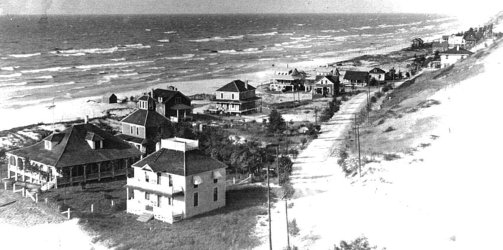
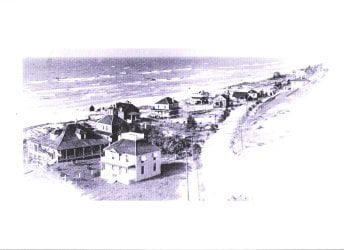
Actually, you can print an image either way, because MS Picture Manager provides a box that you can click that says "Fit picture to frame." So you can experiment with which is better, fitting the picture to the frame or not. I printed an old black and white image for you as an example. The 1st image is the original photo which is very wide, and when I printed it I UNchecked the "Fit picture to frame" box. So, the entire image was printed. The aspect ratio was not changed, but it printed in a "letter box" format --- similar to the way very wide screen movies are shown on a tv screen. (By the way, the photo is too light because I set it that way --- that has nothing to do with the printing software.)
 

Attachments

  • 08a-Lake Shore Dr.jpg
    08a-Lake Shore Dr.jpg
    143.6 KB · Views: 0
  • Whole Image 001.jpg
    Whole Image 001.jpg
    334.9 KB · Views: 0

My Computer My Computer

At a glance

Vista 64 bit and 32 bit (SP2)Intel(R) Core(TM)2 Duo Processor T9400 (2.53 GHz4GB DDR2 System Memory (2 Dimm)512 MB NVIDIA GeForce 9600M GT
Computer Manufacturer/Model Number
HP Pavillion dv5t (generation 1)
OS
Vista 64 bit and 32 bit (SP2)
CPU
Intel(R) Core(TM)2 Duo Processor T9400 (2.53 GHz
Memory
4GB DDR2 System Memory (2 Dimm)
Graphics Card(s)
512 MB NVIDIA GeForce 9600M GT
Monitor(s) Displays
15.4" diagonal WSXGA+ High-Definition HP BrightView Widescre
Screen Resolution
1680 x 1050
Hard Drives
320GB 5400RPM SATA Hard Drive with HP ProtectSmart Hard Drive Protection
Keyboard
Built-in HP
Mouse
Built in - Synaptics TouchPad V6.5 on PS/2 Port
Internet Speed
Max
Other Info
~ Intel Next-Gen Wireless-N Mini-card w/Bluetooth ~ Blu-Ray ROM DVD+/-R/RW ~ Integ. HDTV Hybrid Tuner ~ 12 Cell Battery ~ MS Office (Home Premium) 2007 ~
Precisely what I said, when you print this way you get a border top and bottom which is what the OP didn't want!
 

My Computer My Computer

At a glance

Microsoft Windows 7 Home Premium 64-bit 7601 ...Intel(R) Core(TM) i7-3770 CPU @ 3.40GHz8.00 GBIntel(R) HD Graphics 4000
Computer type
PC/Desktop
OS
Microsoft Windows 7 Home Premium 64-bit 7601 Multiprocessor Free Service Pack 1
CPU
Intel(R) Core(TM) i7-3770 CPU @ 3.40GHz
Motherboard
ASUSTeK COMPUTER INC. P8H77-M
Memory
8.00 GB
Graphics Card(s)
Intel(R) HD Graphics 4000
Sound Card
On Board
Monitor(s) Displays
Dell 24"
Screen Resolution
1920 x 1080
Hard Drives
(1) INTEL SSDSC2CT180A3 ATA Device (2) ST500DM002-1BD142 ATA Device (3) WDC WD3200AAKS-75L9A0 ATA Device (4) Generic- Compact Flash USB Device (5) Generic- MS/MS-Pro USB Device (6) Generic- SD/MMC USB Device (7) Generic- SM/xD-Picture USB
PSU
500w Corsair
Case
Cooler Master
Cooling
3 Fans
Keyboard
Logitech MK300
Mouse
Logitech WOM
Internet Speed
75Mb
Antivirus
Norton 360
Browser
Firefox, Opera, IE
HP Printer dialogs have a function for "borderless" prints. If you own an HP Printer, from the printer dialog select "Preferences", (or "Properties," depending on your situation). Another dialog appears. Under 'Size" click on "other" which will show you options for printing borderless photos of various sizes.

These same dialogs (or variations) are also present with Canon and Lexmark printers.

The print layout of photos is really more a function of the printer than of the photo software.
 

My Computer My Computer

At a glance

Windows 7 Home Premium 64 bitIntel Pentium E5700640GB HDDIntegrated Graphics
Computer Manufacturer/Model Number
Acer Aspire AX3910-U3012 PT
OS
Windows 7 Home Premium 64 bit
CPU
Intel Pentium E5700
Memory
640GB HDD
Graphics Card(s)
Integrated Graphics
Sound Card
Integrated Audio
Monitor(s) Displays
Acer
Back
Top