Solved How to re-create the special object in User Profile of Windows 7???

laidbacktokyo

New member
Member
VIP
Local time
8:04 AM
Messages
112
howdy all, :D

i'd much appreciate any kind advice regarding this very small but not-easy-to-solve tech issue as follows:

well... there is a number of similar objects of every User Profile of Win7 like Recent, PrintHood, NetHood, SendTo, etc - always living in 'C:\Users\.... user name....\' folder.

all these objects look like folders but with shortcut mark on their icons, so those are neither the standard Windows folders nor the standard Windows shortcuts... well it's like a folder with shortcut i.e. link function actually, which always links to the same name full size folder located in another place of User Profile.

so now I'm keen interested on how to create back such special object named 'Recent' that was first damaged by a not good cleaning software and then manually deleted by mistake.

Note #1: of course i know that the full size folder connected to this special object has a default location as C:\Users\...user name...\AppData\Roaming\Microsoft\Windows\Recent. and there is no any problem with this folder in my case. it's alive and ok.

Note #2: also I keep an understanding that it's not so difficult to repair my current User Profile by a creation of a new user profile (and this special shell object will be likely created along with other default components of this new profile) and then copy my curent profile files into the new profile, and finally delete the old one.


well... although i believe the technique of Note #2 as pretty complicated for such small and not critical issue, and hope that IT pros will kindly advise me a better way to solve this because i like the function of this particular shell object (or maybe it's better say Windows shell link?) and wanna get it back.

i hope to hearing something soon.

thank you.

kind regards,


p.s. i happened to partly restore this object by copying the 'Recent' object from Default User Profile but in this case after copying this object becomes the full size Windows folder, which comes out to be a full copy of its genuine alter ego C:\Users\...user name...\AppData\Roaming\Microsoft\Windows\Recent but only for the moment of its creation i.e. without self-updating (only my recent items listed in genuine folder at the moment of creation of this new Recent folder are listed there, plus along with all useless contents of this genuine folder as 'AutomaticDestinations' and 'CustomDestinations' system service folders). and this is surely very inconvenient and absolutely not same as it was with my original 'Recent' object, which was showing all recent items including all recent files & folders with real time updaing of their list but without system service folders.

p.p.s. btw, does anybody know what's the official MS name for such object in-between folder and shortcut (= .lnk)?


p.p.p.s. please help!!!! :cry: i've posted the same question at MS TechNet yesterday How to re-create the special object in User Profile of Windows 7 but there is no any comment... :shock: yet...
 

My Computer My Computer

At a glance

Windows 7 Ultimate x64 SP1u OEM Dell & OEM AsusIntel Core 2 T9500 2.60GHz & Core 2 Duo E7500...DDR2 - 2x4GB Hyundai SODIMM 800Mhz & 2x2GB Ge...nVIDIA Quadro FX360M & Mobo Integrated Intel4500
Computer type
Laptop
Computer Manufacturer/Model Number
Dell Laptop & Asus Desktop
OS
Windows 7 Ultimate x64 SP1u OEM Dell & OEM Asus
CPU
Intel Core 2 T9500 2.60GHz & Core 2 Duo E7500 @ 2.93GHz
Motherboard
DELL PRECISION M4300 & ASUS P5Q-EM
Memory
DDR2 - 2x4GB Hyundai SODIMM 800Mhz & 2x2GB GeIL DIMM 1066MHz
Graphics Card(s)
nVIDIA Quadro FX360M & Mobo Integrated Intel4500
Sound Card
Mobos' Integrated SigmaTel & RealTek ALC1200 8Ch HD Audio
Monitor(s) Displays
Samsung 15.4" LCD & Samsung SyncMaster 245B+ Monitor
Screen Resolution
1920x1200 both
Hard Drives
SSDs Kingston, HDDs WDC & HGST - many
PSU
DELL & Some PSU of 450W
Case
DELL & IRBIS
Cooling
Dell & Cooler Master
Keyboard
Dell & Logitech
Mouse
Logitech & Genuis
Internet Speed
100Mbps
Antivirus
N360 + MalwareBytes on both
Browser
IE11 + latest Chrome on both
Last edited:

My Computer My Computer

At a glance

64-bit Windows 11 Pro for WorkstationsIntel i7-8700K OC'd to 5 GHz64 GB (4x16GB) G.SKILL TridentZ RGB DDR4 3600...ASUS ROG-STRIX-GTX1080TI-O11G-GAMING
Computer type
PC/Desktop
Computer Manufacturer/Model Number
Self built custom
OS
64-bit Windows 11 Pro for Workstations
CPU
Intel i7-8700K OC'd to 5 GHz
Motherboard
ASUS ROG Maximus XI Formula Z390
Memory
64 GB (4x16GB) G.SKILL TridentZ RGB DDR4 3600 MHz
Graphics Card(s)
ASUS ROG-STRIX-GTX1080TI-O11G-GAMING
Sound Card
Integrated
Monitor(s) Displays
2 x Samsung Odyssey G7 27"
Screen Resolution
2560x1440
Hard Drives
1TB Samsung 990 PRO M.2,
4TB Samsung 990 PRO PRO M.2,
TerraMaster F8 SSD Plus NAS
PSU
Seasonic Prime Titanium 850W
Case
Thermaltake Core P3
Cooling
Corsair Hydro H115i
Keyboard
Logitech wireless K800
Mouse
Logitech MX Master 4
Internet Speed
2 Gb/s Download and 100 Mb/s Upload
Antivirus
Malwarebyte Anti-Malware Premium
Browser
Google Chrome
Other Info
Logitech Z625 speaker system,
Logitech BRIO 4K Pro webcam,
HP Color LaserJet Pro MFP M477fdn,
APC SMART-UPS RT 1000 XL - SURT1000XLI,
Galaxy S23 Plus phone
Hello laidbacktokyo,

Actual your Recent folder should be named Recent Items instead.

For this Recent Items folder, you might see if the blue Note box at the top of the tutorial below may be able to help with this.

Hope this helps, :)
Shawn

howdy Shawn,

appreciate ur kind post. at least it's something...:p

well, but u got me in a bit wrong way... z mentioned by u "Recent Items" is a link/shortcut in win7 main start menu... it's also alive & ok in my case... and this link/shortcut from z win7 start menu is directly connected 2 the main win7 "Recent" folder with z default location here:
C:\Users\...user name...\AppData\Roaming\Microsoft\Windows\Recent as mentined by me earlier.
it's also ok & works well...

however there is a tiny but important difference between z above pair of "Recent Items" link in win7 main menu + main "Recent" folder and this extra object "Recent" with default location here: C:\Users\.... user name....\ = folder with a link function, which is also linked to the main win7 "Recent" folder... pls click an icon of ur User Profile to see z difference... there is a number of "normal" folders... along with a number of these special objects... and if u delete any of these objects for any reason, there must be a way to create it back... isn't it?


anyhow i don't have any problem with an above pair but wanna know z official MS name for such special object along with any simple way to re-create these MS special objects of User Profile beyond a way of z creation of new user profile.


unfortunately i didn't have any win7 restore point 2 return 2 at z moment of getting into this issue.:mad:

thanx!

p.s. i understand that i'm asking for help regarding z very special issue of z small practical importance... but i assume any help here as twice appreciated.;)


UPDATE!!! well... thanx again... z kindly advised by u tutorial here http://www.sevenforums.com/tutorials/18530-user-folder-create-your-own-special-folders.html is interesting....

and DOS command like:

C:\Users\username>mklink /d Recent C:\Users\username\AppData\Roaming\Microsoft\Windows\Recent
symbolic link created for Recent <<===>> C:\Users\username\AppData\Roaming\Microsoft\Windows\Recent
C:\Users\username>

creates z nice working folder (with shortcut mark on its icon! good!) linked to full contents of z main "Recent" folder of win7.

however thare are two main differences of this creation comparing 2 my lost object(!):

1) it's z full size Windows folder(!) even when there is a shortcut mark on its icon;
2) it shows z full contents of z main win7 "Recent" folder including z mentioned by me earlier service folders like 'AutomaticDestinations' & 'CustomDestinations' but z lost object was populating only my personal recently opened files & folders.


EVEN LATER UPDATE!!!!


OK! z another option of same DOS command gave me almost same 'Recent' object as it was.

Sample:

C:\Users\username>mklink /j Recent C:\Users\username\AppData\Roaming\Microsoft\Windows\Recent
Junction created for Recent <<===>> C:\Users\username\AppData\Roaming\Microsoft\Windows\Recent
C:\Users\username>

1) When I open z Properties of this newly created folder object, there are yet too many standard Windows folder sub-menus as General, Security, Sharing etc, while z genuine 'Recent' object has only General menu in its Properties.

2) it's same problem as in my 1st update item 2).
absolutely!


any precious advice?
 
Last edited:

My Computer My Computer

At a glance

Windows 7 Ultimate x64 SP1u OEM Dell & OEM AsusIntel Core 2 T9500 2.60GHz & Core 2 Duo E7500...DDR2 - 2x4GB Hyundai SODIMM 800Mhz & 2x2GB Ge...nVIDIA Quadro FX360M & Mobo Integrated Intel4500
Computer type
Laptop
Computer Manufacturer/Model Number
Dell Laptop & Asus Desktop
OS
Windows 7 Ultimate x64 SP1u OEM Dell & OEM Asus
CPU
Intel Core 2 T9500 2.60GHz & Core 2 Duo E7500 @ 2.93GHz
Motherboard
DELL PRECISION M4300 & ASUS P5Q-EM
Memory
DDR2 - 2x4GB Hyundai SODIMM 800Mhz & 2x2GB GeIL DIMM 1066MHz
Graphics Card(s)
nVIDIA Quadro FX360M & Mobo Integrated Intel4500
Sound Card
Mobos' Integrated SigmaTel & RealTek ALC1200 8Ch HD Audio
Monitor(s) Displays
Samsung 15.4" LCD & Samsung SyncMaster 245B+ Monitor
Screen Resolution
1920x1200 both
Hard Drives
SSDs Kingston, HDDs WDC & HGST - many
PSU
DELL & Some PSU of 450W
Case
DELL & IRBIS
Cooling
Dell & Cooler Master
Keyboard
Dell & Logitech
Mouse
Logitech & Genuis
Internet Speed
100Mbps
Antivirus
N360 + MalwareBytes on both
Browser
IE11 + latest Chrome on both
No problem.

Your C:\Users\(user name)\AppData\Roaming\Microsoft\Windows\Recent folder is supposed to be named this below instead.
C:\Users\(user name)\AppData\Roaming\Microsoft\Windows\Recent Items
Doing what I posted above will fix this folder. It's a junction point tied to all recent items including the one on the Start Menu.

Deleting the "Recent" folder will not hurt anything since there's only file references in it and not any actual files.
 

My Computer My Computer

At a glance

64-bit Windows 11 Pro for WorkstationsIntel i7-8700K OC'd to 5 GHz64 GB (4x16GB) G.SKILL TridentZ RGB DDR4 3600...ASUS ROG-STRIX-GTX1080TI-O11G-GAMING
Computer type
PC/Desktop
Computer Manufacturer/Model Number
Self built custom
OS
64-bit Windows 11 Pro for Workstations
CPU
Intel i7-8700K OC'd to 5 GHz
Motherboard
ASUS ROG Maximus XI Formula Z390
Memory
64 GB (4x16GB) G.SKILL TridentZ RGB DDR4 3600 MHz
Graphics Card(s)
ASUS ROG-STRIX-GTX1080TI-O11G-GAMING
Sound Card
Integrated
Monitor(s) Displays
2 x Samsung Odyssey G7 27"
Screen Resolution
2560x1440
Hard Drives
1TB Samsung 990 PRO M.2,
4TB Samsung 990 PRO PRO M.2,
TerraMaster F8 SSD Plus NAS
PSU
Seasonic Prime Titanium 850W
Case
Thermaltake Core P3
Cooling
Corsair Hydro H115i
Keyboard
Logitech wireless K800
Mouse
Logitech MX Master 4
Internet Speed
2 Gb/s Download and 100 Mb/s Upload
Antivirus
Malwarebyte Anti-Malware Premium
Browser
Google Chrome
Other Info
Logitech Z625 speaker system,
Logitech BRIO 4K Pro webcam,
HP Color LaserJet Pro MFP M477fdn,
APC SMART-UPS RT 1000 XL - SURT1000XLI,
Galaxy S23 Plus phone
No problem.

Your C:\Users\(user name)\AppData\Roaming\Microsoft\Windows\Recent folder is supposed to be named this below instead.
C:\Users\(user name)\AppData\Roaming\Microsoft\Windows\Recent Items
Doing what I posted above will fix this folder. It's a junction point tied to all recent items including the one on the Start Menu.

Deleting the "Recent" folder will not hurt anything since there's only file references in it and not any actual files.

oops... but what's z idea finally?

to rename C:\Users\(user name)\AppData\Roaming\Microsoft\Windows\Recent to Recent Items


or 2 delete Recent folder and then create Recent Items folder instead?

thanx

p.s. well... i guess that in my current configuration of this matter even if i'll rename z main Recent folder of Win7 to Recent Items one, when i open my newly created object Recent it will again show up all contents of this time Recent Items folder including z said system service folders, and therefore z problem 2) of updates 1 & 2 remains same. right?
 
Last edited:

My Computer My Computer

At a glance

Windows 7 Ultimate x64 SP1u OEM Dell & OEM AsusIntel Core 2 T9500 2.60GHz & Core 2 Duo E7500...DDR2 - 2x4GB Hyundai SODIMM 800Mhz & 2x2GB Ge...nVIDIA Quadro FX360M & Mobo Integrated Intel4500
Computer type
Laptop
Computer Manufacturer/Model Number
Dell Laptop & Asus Desktop
OS
Windows 7 Ultimate x64 SP1u OEM Dell & OEM Asus
CPU
Intel Core 2 T9500 2.60GHz & Core 2 Duo E7500 @ 2.93GHz
Motherboard
DELL PRECISION M4300 & ASUS P5Q-EM
Memory
DDR2 - 2x4GB Hyundai SODIMM 800Mhz & 2x2GB GeIL DIMM 1066MHz
Graphics Card(s)
nVIDIA Quadro FX360M & Mobo Integrated Intel4500
Sound Card
Mobos' Integrated SigmaTel & RealTek ALC1200 8Ch HD Audio
Monitor(s) Displays
Samsung 15.4" LCD & Samsung SyncMaster 245B+ Monitor
Screen Resolution
1920x1200 both
Hard Drives
SSDs Kingston, HDDs WDC & HGST - many
PSU
DELL & Some PSU of 450W
Case
DELL & IRBIS
Cooling
Dell & Cooler Master
Keyboard
Dell & Logitech
Mouse
Logitech & Genuis
Internet Speed
100Mbps
Antivirus
N360 + MalwareBytes on both
Browser
IE11 + latest Chrome on both
You would only want to do what's in the Note box at the top of the tutorial I posted above. :)

Unfortunately, this will clear current recent items, but they will repopulate as you open files.
 

My Computer My Computer

At a glance

64-bit Windows 11 Pro for WorkstationsIntel i7-8700K OC'd to 5 GHz64 GB (4x16GB) G.SKILL TridentZ RGB DDR4 3600...ASUS ROG-STRIX-GTX1080TI-O11G-GAMING
Computer type
PC/Desktop
Computer Manufacturer/Model Number
Self built custom
OS
64-bit Windows 11 Pro for Workstations
CPU
Intel i7-8700K OC'd to 5 GHz
Motherboard
ASUS ROG Maximus XI Formula Z390
Memory
64 GB (4x16GB) G.SKILL TridentZ RGB DDR4 3600 MHz
Graphics Card(s)
ASUS ROG-STRIX-GTX1080TI-O11G-GAMING
Sound Card
Integrated
Monitor(s) Displays
2 x Samsung Odyssey G7 27"
Screen Resolution
2560x1440
Hard Drives
1TB Samsung 990 PRO M.2,
4TB Samsung 990 PRO PRO M.2,
TerraMaster F8 SSD Plus NAS
PSU
Seasonic Prime Titanium 850W
Case
Thermaltake Core P3
Cooling
Corsair Hydro H115i
Keyboard
Logitech wireless K800
Mouse
Logitech MX Master 4
Internet Speed
2 Gb/s Download and 100 Mb/s Upload
Antivirus
Malwarebyte Anti-Malware Premium
Browser
Google Chrome
Other Info
Logitech Z625 speaker system,
Logitech BRIO 4K Pro webcam,
HP Color LaserJet Pro MFP M477fdn,
APC SMART-UPS RT 1000 XL - SURT1000XLI,
Galaxy S23 Plus phone
You would only want to do what's in the Note box at the top of the tutorial I posted above. :)

shame on me! :mad: i can't get ur repeated kind advice about z Note box of ur tutorial rightly.... :cry:

ur personal contribution 2 this forum is enormous :D including tutorials...:p
so which one u r talking about?

could u pls just grant 2 me z direct link 2 that particular tutorial 2 study.:o

THANX!

Unfortunately, this will clear current recent items, but they will repopulate as you open files.

no problem here.
 

My Computer My Computer

At a glance

Windows 7 Ultimate x64 SP1u OEM Dell & OEM AsusIntel Core 2 T9500 2.60GHz & Core 2 Duo E7500...DDR2 - 2x4GB Hyundai SODIMM 800Mhz & 2x2GB Ge...nVIDIA Quadro FX360M & Mobo Integrated Intel4500
Computer type
Laptop
Computer Manufacturer/Model Number
Dell Laptop & Asus Desktop
OS
Windows 7 Ultimate x64 SP1u OEM Dell & OEM Asus
CPU
Intel Core 2 T9500 2.60GHz & Core 2 Duo E7500 @ 2.93GHz
Motherboard
DELL PRECISION M4300 & ASUS P5Q-EM
Memory
DDR2 - 2x4GB Hyundai SODIMM 800Mhz & 2x2GB GeIL DIMM 1066MHz
Graphics Card(s)
nVIDIA Quadro FX360M & Mobo Integrated Intel4500
Sound Card
Mobos' Integrated SigmaTel & RealTek ALC1200 8Ch HD Audio
Monitor(s) Displays
Samsung 15.4" LCD & Samsung SyncMaster 245B+ Monitor
Screen Resolution
1920x1200 both
Hard Drives
SSDs Kingston, HDDs WDC & HGST - many
PSU
DELL & Some PSU of 450W
Case
DELL & IRBIS
Cooling
Dell & Cooler Master
Keyboard
Dell & Logitech
Mouse
Logitech & Genuis
Internet Speed
100Mbps
Antivirus
N360 + MalwareBytes on both
Browser
IE11 + latest Chrome on both

My Computer My Computer

At a glance

64-bit Windows 11 Pro for WorkstationsIntel i7-8700K OC'd to 5 GHz64 GB (4x16GB) G.SKILL TridentZ RGB DDR4 3600...ASUS ROG-STRIX-GTX1080TI-O11G-GAMING
Computer type
PC/Desktop
Computer Manufacturer/Model Number
Self built custom
OS
64-bit Windows 11 Pro for Workstations
CPU
Intel i7-8700K OC'd to 5 GHz
Motherboard
ASUS ROG Maximus XI Formula Z390
Memory
64 GB (4x16GB) G.SKILL TridentZ RGB DDR4 3600 MHz
Graphics Card(s)
ASUS ROG-STRIX-GTX1080TI-O11G-GAMING
Sound Card
Integrated
Monitor(s) Displays
2 x Samsung Odyssey G7 27"
Screen Resolution
2560x1440
Hard Drives
1TB Samsung 990 PRO M.2,
4TB Samsung 990 PRO PRO M.2,
TerraMaster F8 SSD Plus NAS
PSU
Seasonic Prime Titanium 850W
Case
Thermaltake Core P3
Cooling
Corsair Hydro H115i
Keyboard
Logitech wireless K800
Mouse
Logitech MX Master 4
Internet Speed
2 Gb/s Download and 100 Mb/s Upload
Antivirus
Malwarebyte Anti-Malware Premium
Browser
Google Chrome
Other Info
Logitech Z625 speaker system,
Logitech BRIO 4K Pro webcam,
HP Color LaserJet Pro MFP M477fdn,
APC SMART-UPS RT 1000 XL - SURT1000XLI,
Galaxy S23 Plus phone
Ooops, I thought I posted the link, but I didn't. Sorry about that. :o

Here's the tutorial link with the details in the blue Note box at the top.

http://www.sevenforums.com/tutorials/2013-recent-items-turn-off.html

Morning Shawn,


hahahahaha... it's a fun... :D well, here i'm talking about both my question and issue itself but not about that manual of yours... z manual is nice but maybe not exactly useful in my funny case... ok, one by one:


1. actually it's not z first time when i'm experiencing z issue of my initial question. unfortunately. and now i bet that i've carefully read this manual a couple of years ago... and as far as i remember that time i failed to find any good solution for same issue with win7 (w/o sp1u that time) and just rebuilt my user profile.

2. well what do i have now after ur kind reply 2 my initial question and following general guidance over my attempts 2 find z wanted solution:

a) my main win7 Recent folder located (as it exactly should be) in C:\Users\(UserName)\AppData\Roaming\Microsoft\Windows\Recent looks alive & well working. and it was alive, ok and undamadged all z time. it's just named Recent instead of expecting by u name Recent Items. of course it has a proper icon (not just yellow color). btw, i surely remember that this folder was named exactly Recent in same my case a couple of years ago as well.

b) my win7 main menu item named Recent Items is (and was) also ok and properly configued as tied directly 2 z above Recent folder, and populating a list of my personal recently used files only!

c) both involved registry entries mentioned in ur manual thread (plus a link from blue Note box) seem to be ok as well:

HKEY_CURRENT_USER\Software\Microsoft\Windows\CurrentVersion\Explorer\Shell Folders
z needed string named Recent seems ok with a value below:
C:\Users\(UserName)\AppData\Roaming\Microsoft\Windows\Recent

HKEY_CURRENT_USER\Software\Microsoft\Windows\CurrentVersion\Explorer\User Shell Folders
z needed string named Recent seems ok with a value below:
%APPDATA%\Microsoft\Windows\Recent


NOTE #1: so z above pair looks OK and well working as i've duly reported 2 u. so do u think there is any sense 2 follow ur Note box advice and delete z undamaged Recent folder?:cry: of course it will be rebuilt upon win7 restart... but what effect do u expect?:p


3) however there was another instance of z same win7 recent items function with z default location C:\Users\(UserName) also named Recent, which i was initially asking about and naming this folder/shortcut as a special (Windows shell) object. well, fortunately while searching this forum for ur manual i was lucky 2 found that thread by a Dutch guy with a sample of using mklink DOS command and even later found that /j option of this command suites my needs better than /d one.

NOTE #2: so now i've already created almost same object as needed. i'm again saying ALMOST SAME because there is difference in its Properties outlook comparing 2 z genuine shell object as i've reported 2 u in my earlier post. pls refer 2 pics attached:

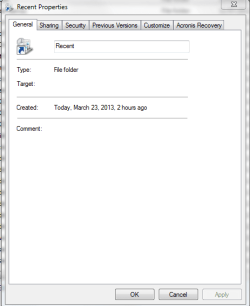
A. newly created by me substitute of Recent object (all standard sub-menus!)

1.NewlyCreatedRecentShellObject_Properties_Capture.PNG

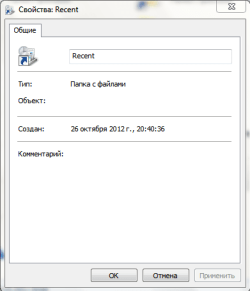
B. default Recent object (sorry it's taken from another pc with win7 + Russian LP. but meaning is same as i've reported - here is General sub-menu only!)

2.RecentShellObjectProperties_Default_Capture.PNG


4) well, as u might easily guess i don't care much of z properties of this object ;) but z 2nd mentioned by me earlier problem of this substitute object is quite annoying.

i don't need 2 c in z populated list of my recent items here any of win7 service folders, etc from my main win7 Recent folder. i need here just z recet files & folders used by me personally, i.e. as it was before this issue.;)


any ideas?


thanx:D
 
Last edited:

My Computer My Computer

At a glance

Windows 7 Ultimate x64 SP1u OEM Dell & OEM AsusIntel Core 2 T9500 2.60GHz & Core 2 Duo E7500...DDR2 - 2x4GB Hyundai SODIMM 800Mhz & 2x2GB Ge...nVIDIA Quadro FX360M & Mobo Integrated Intel4500
Computer type
Laptop
Computer Manufacturer/Model Number
Dell Laptop & Asus Desktop
OS
Windows 7 Ultimate x64 SP1u OEM Dell & OEM Asus
CPU
Intel Core 2 T9500 2.60GHz & Core 2 Duo E7500 @ 2.93GHz
Motherboard
DELL PRECISION M4300 & ASUS P5Q-EM
Memory
DDR2 - 2x4GB Hyundai SODIMM 800Mhz & 2x2GB GeIL DIMM 1066MHz
Graphics Card(s)
nVIDIA Quadro FX360M & Mobo Integrated Intel4500
Sound Card
Mobos' Integrated SigmaTel & RealTek ALC1200 8Ch HD Audio
Monitor(s) Displays
Samsung 15.4" LCD & Samsung SyncMaster 245B+ Monitor
Screen Resolution
1920x1200 both
Hard Drives
SSDs Kingston, HDDs WDC & HGST - many
PSU
DELL & Some PSU of 450W
Case
DELL & IRBIS
Cooling
Dell & Cooler Master
Keyboard
Dell & Logitech
Mouse
Logitech & Genuis
Internet Speed
100Mbps
Antivirus
N360 + MalwareBytes on both
Browser
IE11 + latest Chrome on both
If able, the quickest way to undo this would be to do a system restore using a restore point dated before it happened.
 

My Computer My Computer

At a glance

64-bit Windows 11 Pro for WorkstationsIntel i7-8700K OC'd to 5 GHz64 GB (4x16GB) G.SKILL TridentZ RGB DDR4 3600...ASUS ROG-STRIX-GTX1080TI-O11G-GAMING
Computer type
PC/Desktop
Computer Manufacturer/Model Number
Self built custom
OS
64-bit Windows 11 Pro for Workstations
CPU
Intel i7-8700K OC'd to 5 GHz
Motherboard
ASUS ROG Maximus XI Formula Z390
Memory
64 GB (4x16GB) G.SKILL TridentZ RGB DDR4 3600 MHz
Graphics Card(s)
ASUS ROG-STRIX-GTX1080TI-O11G-GAMING
Sound Card
Integrated
Monitor(s) Displays
2 x Samsung Odyssey G7 27"
Screen Resolution
2560x1440
Hard Drives
1TB Samsung 990 PRO M.2,
4TB Samsung 990 PRO PRO M.2,
TerraMaster F8 SSD Plus NAS
PSU
Seasonic Prime Titanium 850W
Case
Thermaltake Core P3
Cooling
Corsair Hydro H115i
Keyboard
Logitech wireless K800
Mouse
Logitech MX Master 4
Internet Speed
2 Gb/s Download and 100 Mb/s Upload
Antivirus
Malwarebyte Anti-Malware Premium
Browser
Google Chrome
Other Info
Logitech Z625 speaker system,
Logitech BRIO 4K Pro webcam,
HP Color LaserJet Pro MFP M477fdn,
APC SMART-UPS RT 1000 XL - SURT1000XLI,
Galaxy S23 Plus phone
If able, the quickest way to undo this would be to do a system restore using a restore point dated before it happened.

yep. surely. it's z easiest way #1.:D

it's not available. pls refer 2 my post #2 above:

unfortunately i didn't have any Windows 7 restore point 2 return 2 at z moment of getting into this issue.:mad:

2nd known option is to re-create z whole User profile. and this is not a problem but headache...

any other ideas/options?:cry:


thanx a lot!
 

My Computer My Computer

At a glance

Windows 7 Ultimate x64 SP1u OEM Dell & OEM AsusIntel Core 2 T9500 2.60GHz & Core 2 Duo E7500...DDR2 - 2x4GB Hyundai SODIMM 800Mhz & 2x2GB Ge...nVIDIA Quadro FX360M & Mobo Integrated Intel4500
Computer type
Laptop
Computer Manufacturer/Model Number
Dell Laptop & Asus Desktop
OS
Windows 7 Ultimate x64 SP1u OEM Dell & OEM Asus
CPU
Intel Core 2 T9500 2.60GHz & Core 2 Duo E7500 @ 2.93GHz
Motherboard
DELL PRECISION M4300 & ASUS P5Q-EM
Memory
DDR2 - 2x4GB Hyundai SODIMM 800Mhz & 2x2GB GeIL DIMM 1066MHz
Graphics Card(s)
nVIDIA Quadro FX360M & Mobo Integrated Intel4500
Sound Card
Mobos' Integrated SigmaTel & RealTek ALC1200 8Ch HD Audio
Monitor(s) Displays
Samsung 15.4" LCD & Samsung SyncMaster 245B+ Monitor
Screen Resolution
1920x1200 both
Hard Drives
SSDs Kingston, HDDs WDC & HGST - many
PSU
DELL & Some PSU of 450W
Case
DELL & IRBIS
Cooling
Dell & Cooler Master
Keyboard
Dell & Logitech
Mouse
Logitech & Genuis
Internet Speed
100Mbps
Antivirus
N360 + MalwareBytes on both
Browser
IE11 + latest Chrome on both
Other than creating a new user profile to use instead, I'm afraid not. :(
 

My Computer My Computer

At a glance

64-bit Windows 11 Pro for WorkstationsIntel i7-8700K OC'd to 5 GHz64 GB (4x16GB) G.SKILL TridentZ RGB DDR4 3600...ASUS ROG-STRIX-GTX1080TI-O11G-GAMING
Computer type
PC/Desktop
Computer Manufacturer/Model Number
Self built custom
OS
64-bit Windows 11 Pro for Workstations
CPU
Intel i7-8700K OC'd to 5 GHz
Motherboard
ASUS ROG Maximus XI Formula Z390
Memory
64 GB (4x16GB) G.SKILL TridentZ RGB DDR4 3600 MHz
Graphics Card(s)
ASUS ROG-STRIX-GTX1080TI-O11G-GAMING
Sound Card
Integrated
Monitor(s) Displays
2 x Samsung Odyssey G7 27"
Screen Resolution
2560x1440
Hard Drives
1TB Samsung 990 PRO M.2,
4TB Samsung 990 PRO PRO M.2,
TerraMaster F8 SSD Plus NAS
PSU
Seasonic Prime Titanium 850W
Case
Thermaltake Core P3
Cooling
Corsair Hydro H115i
Keyboard
Logitech wireless K800
Mouse
Logitech MX Master 4
Internet Speed
2 Gb/s Download and 100 Mb/s Upload
Antivirus
Malwarebyte Anti-Malware Premium
Browser
Google Chrome
Other Info
Logitech Z625 speaker system,
Logitech BRIO 4K Pro webcam,
HP Color LaserJet Pro MFP M477fdn,
APC SMART-UPS RT 1000 XL - SURT1000XLI,
Galaxy S23 Plus phone
Other than creating a new user profile to use instead, I'm afraid not. :(

oops... :cry::cry::cry::cry::cry::cry:

well, well, well.... if z pro like u is saying 'sorry i don't know' then this small issue is like triple interesting...:p

also frankly speaking i hate 2 repair User Profiles:devil:

there must be some simple way:mad:

and there is an obvious idea:

as u might remember i've created that almost equal substitute 4 my genuine Recent object by use of DOS mklink /j, and since i got almost wanted result then i EITHER used an undue DOS command OR pointed this junction to z wrong source object.

agree?;)


so do u happen 2 know:

1) other DOS commands of z similar purpose/function as mklink but a bit dfferent or with other options maybe?

and/or

2) is there any way 2 point this junction directly 2 z shortcut 'Recent Items' in Win7 main menu? or any other object beyond
C:\Users\(UserName)\AppData\Roaming\Microsoft\Windows\Recent

Note: actually i've already tried 2 point this junction 2 both:
C:\Users\(UserName)\AppData\Roaming\Microsoft\Windows\Recent and
%APPDATA%\Microsoft\Windows\Recent - with same result:confused:
naturally i understand that it's z same thing but i'm considering all tricks because z solution might be somewhere around here


THANX!
 
Last edited:

My Computer My Computer

At a glance

Windows 7 Ultimate x64 SP1u OEM Dell & OEM AsusIntel Core 2 T9500 2.60GHz & Core 2 Duo E7500...DDR2 - 2x4GB Hyundai SODIMM 800Mhz & 2x2GB Ge...nVIDIA Quadro FX360M & Mobo Integrated Intel4500
Computer type
Laptop
Computer Manufacturer/Model Number
Dell Laptop & Asus Desktop
OS
Windows 7 Ultimate x64 SP1u OEM Dell & OEM Asus
CPU
Intel Core 2 T9500 2.60GHz & Core 2 Duo E7500 @ 2.93GHz
Motherboard
DELL PRECISION M4300 & ASUS P5Q-EM
Memory
DDR2 - 2x4GB Hyundai SODIMM 800Mhz & 2x2GB GeIL DIMM 1066MHz
Graphics Card(s)
nVIDIA Quadro FX360M & Mobo Integrated Intel4500
Sound Card
Mobos' Integrated SigmaTel & RealTek ALC1200 8Ch HD Audio
Monitor(s) Displays
Samsung 15.4" LCD & Samsung SyncMaster 245B+ Monitor
Screen Resolution
1920x1200 both
Hard Drives
SSDs Kingston, HDDs WDC & HGST - many
PSU
DELL & Some PSU of 450W
Case
DELL & IRBIS
Cooling
Dell & Cooler Master
Keyboard
Dell & Logitech
Mouse
Logitech & Genuis
Internet Speed
100Mbps
Antivirus
N360 + MalwareBytes on both
Browser
IE11 + latest Chrome on both
MAJOR UPDATE: WOW, BINGO! THE ISSUE IS SOLVED!

a lucky combination of z blue Note box of ur manual and z mentioned DOS command (OR maybe just z blue Note box of ur manual) has settled z issue!:D

FINAL TECHNIQUE:

A) z initial issue was described in very details in my earlier post #9 items 2) & 3).
and in short everything was fine with z recent items function of win7, including z registry, except z one special Windows shell object aka another instance of z same Windows 7 recent items function with z default location C:\Users\(UserName) also named Recent that was damaged and deleted.

B) howto:

1. re-create this object in User Profile as Recent (or Recent Items - up 2 u!) by use of DOS command mklink /j as below:

C:\Users\(UserName)>mklink /j Recent
C:\Users\(UserName)\AppData\Roaming\Microsoft\Windows\Recent
Junction created for Recent <<===>>
C:\Users\(UserName)\AppData\Roaming\Microsoft\Windows\Recent
C:\Users\username>

2. change a simple yellow folder icon of this newly created folder object manually 2 z default appropriate icon thru z Properties of this folder object.
u can refer 2 z proper icon of z main Win7 recent folder here:
C:\Users\(UserName)\AppData\Roaming\Microsoft\Windows\Recent
either it named Recent or Recent Items. z icon must be same and not just yellow.

3. now pls follow z magic blue Note box ;) at z top of here:
http://www.sevenforums.com/tutorials/2013-recent-items-turn-off.html
that is:
* make a Win7 restore point for safety;
* delete z aforesaid main Win7 recent folder manually;
* execute shell:recent in the white line (Start Search) area of the Start Menu

Note: this came out with an error popup message. it's naturally ok while z target isn't exist anymore;

* restart Win7

Note: at z first moment after OS restart there is no any surprise. just neither main Recent folder nor z Recent Items shortcut in main Win7 menu exist anymore. and z created by u in items 1 & 2 above Recent object lost its proper icon and become yellow again.

* goto z Taskbar > Properties > Start Menu sub-window and uncheck z bottom option in Privacy > Apply > check same option back 2 enable this function > Apply > OK.
* goto z Taskbar > Properties > Start Menu sub-window > Customize > Recent Items and uncheck this option > Apply > check same option back 2 enable this function > Apply > OK.

DONE. now u got back z default Win7 configuration of this function again as follows:

A. z main recent folder object of Win7 with a proper icon here
C:\Users\(UserName)\AppData\Roaming\Microsoft\Windows\Recent Items
is OK but now named Recent items;

B. z Recent Items shortcut in main Win7 menu got back exactly as it was before this issue;

C. z special Windows shell object aka another instance of z same Windows 7 recent items function with z default location C:\Users\(UserName) named Recent in my case is also back 2 its known defaut status.

z outlook of Properties window of all these 3 folder + shortcut + object become same normal i.e. with just General sub-window as below:

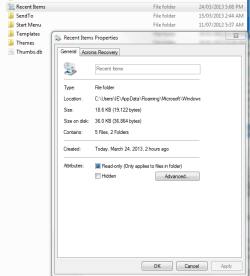
folder A pic:

3.Repaired_Now RecentItems_Folder_Capture.PNG


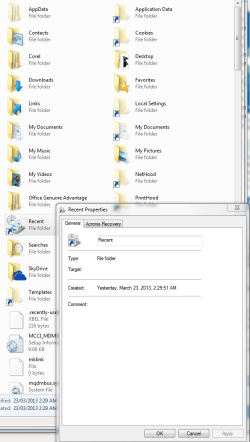
object C pic:

4.Repaired_Recent_ShellObject_Capture.PNG


shortcut B is naturally same as A as far it hasn't its own properties and tied directly & solely 2 C:\Users\(UserName)\AppData\Roaming\Microsoft\Windows\Recent Items


well and there r no those annoying win7 service folders listed in A & C instances of Win7 recent items function. only z recently used by user files & folders.

although it should be mentioned that some of those Windows service folders 'AutomaticDestinations' & 'CustomDestinations' r visible 2 yet appearing but then quickly disappering in a chaotic way. so this is acceptable.


THANX A LOT!:D

my very best!:)

p.s. in my case all hidded & system files & folders r switched 2 b shown by default.

p.p.s. b careful 2 use Notron Utilities 15 & 16 but only in part of its Privacy cleaner. or at least make Win7 restore point before cleaning.
 
Last edited:

My Computer My Computer

At a glance

Windows 7 Ultimate x64 SP1u OEM Dell & OEM AsusIntel Core 2 T9500 2.60GHz & Core 2 Duo E7500...DDR2 - 2x4GB Hyundai SODIMM 800Mhz & 2x2GB Ge...nVIDIA Quadro FX360M & Mobo Integrated Intel4500
Computer type
Laptop
Computer Manufacturer/Model Number
Dell Laptop & Asus Desktop
OS
Windows 7 Ultimate x64 SP1u OEM Dell & OEM Asus
CPU
Intel Core 2 T9500 2.60GHz & Core 2 Duo E7500 @ 2.93GHz
Motherboard
DELL PRECISION M4300 & ASUS P5Q-EM
Memory
DDR2 - 2x4GB Hyundai SODIMM 800Mhz & 2x2GB GeIL DIMM 1066MHz
Graphics Card(s)
nVIDIA Quadro FX360M & Mobo Integrated Intel4500
Sound Card
Mobos' Integrated SigmaTel & RealTek ALC1200 8Ch HD Audio
Monitor(s) Displays
Samsung 15.4" LCD & Samsung SyncMaster 245B+ Monitor
Screen Resolution
1920x1200 both
Hard Drives
SSDs Kingston, HDDs WDC & HGST - many
PSU
DELL & Some PSU of 450W
Case
DELL & IRBIS
Cooling
Dell & Cooler Master
Keyboard
Dell & Logitech
Mouse
Logitech & Genuis
Internet Speed
100Mbps
Antivirus
N360 + MalwareBytes on both
Browser
IE11 + latest Chrome on both
Great news. :party:
 

My Computer My Computer

At a glance

64-bit Windows 11 Pro for WorkstationsIntel i7-8700K OC'd to 5 GHz64 GB (4x16GB) G.SKILL TridentZ RGB DDR4 3600...ASUS ROG-STRIX-GTX1080TI-O11G-GAMING
Computer type
PC/Desktop
Computer Manufacturer/Model Number
Self built custom
OS
64-bit Windows 11 Pro for Workstations
CPU
Intel i7-8700K OC'd to 5 GHz
Motherboard
ASUS ROG Maximus XI Formula Z390
Memory
64 GB (4x16GB) G.SKILL TridentZ RGB DDR4 3600 MHz
Graphics Card(s)
ASUS ROG-STRIX-GTX1080TI-O11G-GAMING
Sound Card
Integrated
Monitor(s) Displays
2 x Samsung Odyssey G7 27"
Screen Resolution
2560x1440
Hard Drives
1TB Samsung 990 PRO M.2,
4TB Samsung 990 PRO PRO M.2,
TerraMaster F8 SSD Plus NAS
PSU
Seasonic Prime Titanium 850W
Case
Thermaltake Core P3
Cooling
Corsair Hydro H115i
Keyboard
Logitech wireless K800
Mouse
Logitech MX Master 4
Internet Speed
2 Gb/s Download and 100 Mb/s Upload
Antivirus
Malwarebyte Anti-Malware Premium
Browser
Google Chrome
Other Info
Logitech Z625 speaker system,
Logitech BRIO 4K Pro webcam,
HP Color LaserJet Pro MFP M477fdn,
APC SMART-UPS RT 1000 XL - SURT1000XLI,
Galaxy S23 Plus phone
Back
Top