How to reboot laptop when it is stuck on x:/windows/system32/cmd.exe

@kaktusoft
I wrote down what my laptop does one by one when i first turn it on
I see Asus
down on the left it says press (esc) or (f2) for other setups or sth...
then second screen I see
loading bar stating windows is loading files
third screen Starting windows
and then comes the grey screen
with a smaller black window, where in the "task bar" says x:/windows/system32/cmd.exe
and then I cannot do anythign anymore

If I turn it off and turn it on again and I press f9 to go to boot manager
I select then windows setup (ems enabled)
and I have the same screen again: then comes the grey screen
with a smaller black window, where in the "task bar" says x:/windows/system32/cmd.exe
and then I cannot do anythign anymore

if i turn it on or off again and press this time f8 the whole time
I get specify an advance option
either way that i press
safe way, or "network, or "command prompt
or enable boot logging
or last knows good cojnfiguration
or direct service restore mode
or debug mode
or disable auto restart on system failure or disable driver sign enforcement
or start window normally
I will always get the grey screen
with a smaller black window, where in the "task bar" says x:/windows/system32/cmd.exe
and then I cannot do anythign anymore

hope you see what i am facing as an issue
because literalyl nothign I push in f8 or f9 reacts
 

My Computer My Computer

At a glance

windows 7 64 bit home premiumn/an/an/a
Computer Manufacturer/Model Number
asus u43f - model of july 2010
OS
windows 7 64 bit home premium
CPU
n/a
Motherboard
n/a
Memory
n/a
Graphics Card(s)
n/a
Sound Card
n/a
Monitor(s) Displays
n/a
Hard Drives
n/a
PSU
n/a
Case
n/a
Cooling
n/a
and I can not type anythign either in that last screen with grey background and samller black box were it says x:/windows/system32/cmd.exe
so typing this :
diskpart
list disk
did not work at all
 

My Computer My Computer

At a glance

windows 7 64 bit home premiumn/an/an/a
Computer Manufacturer/Model Number
asus u43f - model of july 2010
OS
windows 7 64 bit home premium
CPU
n/a
Motherboard
n/a
Memory
n/a
Graphics Card(s)
n/a
Sound Card
n/a
Monitor(s) Displays
n/a
Hard Drives
n/a
PSU
n/a
Case
n/a
Cooling
n/a
If I turn it off and turn it on again and I press f9 to go to boot manager
I select then windows setup (ems enabled)

Is F9 the BIOS key to select boot device like DVD, DISK,USB? If so, what do you selct there? Do you select "windows setup" there? Don't do that ... although you did already. Can you post a screenshot of F9 screen (take a picture by camera)

I think you meant f8 instead of f9?? Are you sure you didn't boot from dvd? Remove dvd and alsay check BIOS (F2) settings for boot order or boot sequence.
   Note
Windows Setup [EMS Enabled]
If you see this as a startup option when booting from the DVD then it probably means you pressed the space bar or the enter key more than once when instructed to “press any key to boot from the DVD”. Another thing that can trigger its appearance is if the DVD setup detects an unbootable previous install of Vista somewhere on the hard drive. If you just press Enter then setup will continue as normal. The letters EMS mean in this instance Emergency Management Services and it is a function for use with Windows server.

=> same for windows 7 I assume
 

My Computer My Computer

At a glance

Microsoft Windows 7 Home Premium 64-bits 7601...Intel(R) Core(TM) i3 CPU M 370 @ 2.40GHz4,00 GBATI Mobility Radeon HD 5400 Series
Computer type
Laptop
Computer Manufacturer/Model Number
ACER ASPIRE 5742G
OS
Microsoft Windows 7 Home Premium 64-bits 7601 Multiprocessor Free Service Pack 1
CPU
Intel(R) Core(TM) i3 CPU M 370 @ 2.40GHz
Motherboard
Acer Aspire 5742G
Memory
4,00 GB
Graphics Card(s)
ATI Mobility Radeon HD 5400 Series
Sound Card
(1) AMD High Definition Audio Device (2) Realtek High Defi
Screen Resolution
1366 x 768 x 32 bits (4294967296 colors) @ 60 Hz
Hard Drives
WDC WD5000BEVT-22ZAT0
You are always running some kind of "windows pre enivronment". something like windows setup or repair disk. But those two don't enter command prompt (cmd) automatically.

  • Remove any DVD from DVD-drive. Maybe it's starting from there accidentally?
  • Remove any external usb sticks and drives as well
Now try to reboot. Same problem?
  • Do you have a windows repairdisk (herstelschijf in dutch) or windowsinstallation dvd? If not ... do you have another computer that can burn and do you have a writable CD or DVD?
 

My Computer My Computer

At a glance

Microsoft Windows 7 Home Premium 64-bits 7601...Intel(R) Core(TM) i3 CPU M 370 @ 2.40GHz4,00 GBATI Mobility Radeon HD 5400 Series
Computer type
Laptop
Computer Manufacturer/Model Number
ACER ASPIRE 5742G
OS
Microsoft Windows 7 Home Premium 64-bits 7601 Multiprocessor Free Service Pack 1
CPU
Intel(R) Core(TM) i3 CPU M 370 @ 2.40GHz
Motherboard
Acer Aspire 5742G
Memory
4,00 GB
Graphics Card(s)
ATI Mobility Radeon HD 5400 Series
Sound Card
(1) AMD High Definition Audio Device (2) Realtek High Defi
Screen Resolution
1366 x 768 x 32 bits (4294967296 colors) @ 60 Hz
Hard Drives
WDC WD5000BEVT-22ZAT0

My Computer My Computer

At a glance

Microsoft Windows 7 Home Premium 64-bits 7601...Intel(R) Core(TM) i3 CPU M 370 @ 2.40GHz4,00 GBATI Mobility Radeon HD 5400 Series
Computer type
Laptop
Computer Manufacturer/Model Number
ACER ASPIRE 5742G
OS
Microsoft Windows 7 Home Premium 64-bits 7601 Multiprocessor Free Service Pack 1
CPU
Intel(R) Core(TM) i3 CPU M 370 @ 2.40GHz
Motherboard
Acer Aspire 5742G
Memory
4,00 GB
Graphics Card(s)
ATI Mobility Radeon HD 5400 Series
Sound Card
(1) AMD High Definition Audio Device (2) Realtek High Defi
Screen Resolution
1366 x 768 x 32 bits (4294967296 colors) @ 60 Hz
Hard Drives
WDC WD5000BEVT-22ZAT0
@kaktussoft

f9 after clicking windows setup (ems enabled), normally it will go to reboot entire hardisk, partition, or divide in two partition reboot sth like that
(i had to do f9 last week because windows did not want boot already, and it did work the rebooting that time but now the thrid time it does not work.)

I havent added had anything conencted to or in the laptop since it became a "vegetable"

i will make the screen shot tomorrow and check with my brother laptop for x64 windows 7 repairdisk and make one for my computer.

question: how do you configure the thign you are talking about on f2
I do not understand "Remove dvd and all say check BIOS (F2) settings for boot order or boot sequence."
hwo does it look like if i change the configuration, which enable or disable
can you maybe tell me or maybe do a screen shott of what should be cahnged in f2 mode?
 

My Computer My Computer

At a glance

windows 7 64 bit home premiumn/an/an/a
Computer Manufacturer/Model Number
asus u43f - model of july 2010
OS
windows 7 64 bit home premium
CPU
n/a
Motherboard
n/a
Memory
n/a
Graphics Card(s)
n/a
Sound Card
n/a
Monitor(s) Displays
n/a
Hard Drives
n/a
PSU
n/a
Case
n/a
Cooling
n/a
f9 after clicking windows setup (ems enabled), normally it will go to reboot entire hardisk, partition, or divide in two partition reboot sth like that
(i had to do f9 last week because windows did not want boot already, and it did work the rebooting that time but now the thrid time it does not work.)

When you were in F9 last week, Did you make the OEM manufacturer's Recovery Disks?

   Information
We always assume you have made your Recovery Disks using the OEM manufacturer's Recovery Media Creator app the first day you had your new PC.
& made the Startup Repair CD.
startup repair disc-create


Before you start make your Recovery disk.
Disable Boot Booster in BIOS setup before you perform system recovery from USB flash disk, external optical drive or hidden partition.

1. Press <F9> during bootup.
Ensure to press <F9> only once during bootup.
2. Select the language you use and click to continue.

4. Connect a USB storage device to your Eee PC and click Backup in the Recovery System dialog box to start the recovery files backup.
The size of the connected USB storage device should be larger than 16GB.
Memory cards are not supported for this function.
A dialog box appears as a reminder if you have not connected the USB storage device for system recovery backup to your Eee PC.
5. Select a desired USB storage device if more than one USB storage device is connected to your Eee PC and click Continue.
6. All the data on the selected USB storage device will be cleared. Click Continue to start the backup or click Back to backup your important data.
You will lose all your data on the selected USB storage device. Ensure to back up your important data beforehand
7. The system backup starts and click OK when done.
 

My Computer My Computer

At a glance

ME/XP/Vista/Win7
OS
ME/XP/Vista/Win7
@kaktussoft

question: how do you configure the thign you are talking about on f2
I do not understand "Remove dvd and all say check BIOS (F2) settings for boot order or boot sequence."
hwo does it look like if i change the configuration, which enable or disable
can you maybe tell me or maybe do a screen shott of what should be cahnged in f2 mode?

F2 not needed anymore. I wanted you to change boot order. Like "first try to start from disk, otherwise dvd, otherwise usb"

I want to be sure it doesn't boot from dvd. But you are sure now, so not necessary anymore.
 

My Computer My Computer

At a glance

Microsoft Windows 7 Home Premium 64-bits 7601...Intel(R) Core(TM) i3 CPU M 370 @ 2.40GHz4,00 GBATI Mobility Radeon HD 5400 Series
Computer type
Laptop
Computer Manufacturer/Model Number
ACER ASPIRE 5742G
OS
Microsoft Windows 7 Home Premium 64-bits 7601 Multiprocessor Free Service Pack 1
CPU
Intel(R) Core(TM) i3 CPU M 370 @ 2.40GHz
Motherboard
Acer Aspire 5742G
Memory
4,00 GB
Graphics Card(s)
ATI Mobility Radeon HD 5400 Series
Sound Card
(1) AMD High Definition Audio Device (2) Realtek High Defi
Screen Resolution
1366 x 768 x 32 bits (4294967296 colors) @ 60 Hz
Hard Drives
WDC WD5000BEVT-22ZAT0
F9 is for starting from recovery partition!! I hope you did never recover to "factory defaults" or something like that. Or "full system restore". Did you perform such action? Are did you just try that ... and it ended in cmd.exe?
 

My Computer My Computer

At a glance

Microsoft Windows 7 Home Premium 64-bits 7601...Intel(R) Core(TM) i3 CPU M 370 @ 2.40GHz4,00 GBATI Mobility Radeon HD 5400 Series
Computer type
Laptop
Computer Manufacturer/Model Number
ACER ASPIRE 5742G
OS
Microsoft Windows 7 Home Premium 64-bits 7601 Multiprocessor Free Service Pack 1
CPU
Intel(R) Core(TM) i3 CPU M 370 @ 2.40GHz
Motherboard
Acer Aspire 5742G
Memory
4,00 GB
Graphics Card(s)
ATI Mobility Radeon HD 5400 Series
Sound Card
(1) AMD High Definition Audio Device (2) Realtek High Defi
Screen Resolution
1366 x 768 x 32 bits (4294967296 colors) @ 60 Hz
Hard Drives
WDC WD5000BEVT-22ZAT0
Windows 7 ISO x86 and x64 Official Direct Download Links (Ultimate, Professional and Home Premium) « My Digital Life

There you can download iso files (english but language doesn't matter. Don't install from it, just "repair your computer") take a X64 ISO!! and burn it to DVD. Start from DVD and enter recovery environment http://www.sevenforums.com/tutorials/668-system-recovery-options.html option 2. Enter command prompt http://www.sevenforums.com/tutorials/682-command-prompt-startup.html

Now in commandprompt:

diskpart
list disks (how many? I assume only 1)
sel disk 0
list partition (how many?)
sel part 0
det part
sel part 1
det part
sel part 2
det part
sel part 3
det part
--------
which partition is "active"
what's the type of that partition?
det part will tell you
 

My Computer My Computer

At a glance

Microsoft Windows 7 Home Premium 64-bits 7601...Intel(R) Core(TM) i3 CPU M 370 @ 2.40GHz4,00 GBATI Mobility Radeon HD 5400 Series
Computer type
Laptop
Computer Manufacturer/Model Number
ACER ASPIRE 5742G
OS
Microsoft Windows 7 Home Premium 64-bits 7601 Multiprocessor Free Service Pack 1
CPU
Intel(R) Core(TM) i3 CPU M 370 @ 2.40GHz
Motherboard
Acer Aspire 5742G
Memory
4,00 GB
Graphics Card(s)
ATI Mobility Radeon HD 5400 Series
Sound Card
(1) AMD High Definition Audio Device (2) Realtek High Defi
Screen Resolution
1366 x 768 x 32 bits (4294967296 colors) @ 60 Hz
Hard Drives
WDC WD5000BEVT-22ZAT0
Very good for doing a "upgrade install" thanx! Even my language (dutch) is listed!

But we were talking about recovery environment (later maybe startup repair) here. That can als be done by a non-SP1 repair disk or a non-SP1 installation DVD as well afaik.

Did that many times without an issue. Correct me if I'm wrong.

But an installation DVD is always usefull!
 

My Computer My Computer

At a glance

Microsoft Windows 7 Home Premium 64-bits 7601...Intel(R) Core(TM) i3 CPU M 370 @ 2.40GHz4,00 GBATI Mobility Radeon HD 5400 Series
Computer type
Laptop
Computer Manufacturer/Model Number
ACER ASPIRE 5742G
OS
Microsoft Windows 7 Home Premium 64-bits 7601 Multiprocessor Free Service Pack 1
CPU
Intel(R) Core(TM) i3 CPU M 370 @ 2.40GHz
Motherboard
Acer Aspire 5742G
Memory
4,00 GB
Graphics Card(s)
ATI Mobility Radeon HD 5400 Series
Sound Card
(1) AMD High Definition Audio Device (2) Realtek High Defi
Screen Resolution
1366 x 768 x 32 bits (4294967296 colors) @ 60 Hz
Hard Drives
WDC WD5000BEVT-22ZAT0

My Computer My Computer

At a glance

Microsoft Windows 7 Home Premium 64-bits 7601...Intel(R) Core(TM) i3 CPU M 370 @ 2.40GHz4,00 GBATI Mobility Radeon HD 5400 Series
Computer type
Laptop
Computer Manufacturer/Model Number
ACER ASPIRE 5742G
OS
Microsoft Windows 7 Home Premium 64-bits 7601 Multiprocessor Free Service Pack 1
CPU
Intel(R) Core(TM) i3 CPU M 370 @ 2.40GHz
Motherboard
Acer Aspire 5742G
Memory
4,00 GB
Graphics Card(s)
ATI Mobility Radeon HD 5400 Series
Sound Card
(1) AMD High Definition Audio Device (2) Realtek High Defi
Screen Resolution
1366 x 768 x 32 bits (4294967296 colors) @ 60 Hz
Hard Drives
WDC WD5000BEVT-22ZAT0
Download the liveCD & Run, this is a free tool from MS:
A liveCD is bootable, no need to start windows.

I tried to use the scan sweeper but it does not react to it at all my system(i installed it on a dvd-r) and nothing is happening
 

My Computer My Computer

At a glance

windows 7 64 bit home premiumn/an/an/a
Computer Manufacturer/Model Number
asus u43f - model of july 2010
OS
windows 7 64 bit home premium
CPU
n/a
Motherboard
n/a
Memory
n/a
Graphics Card(s)
n/a
Sound Card
n/a
Monitor(s) Displays
n/a
Hard Drives
n/a
PSU
n/a
Case
n/a
Cooling
n/a
Windows 7 ISO x86 and x64 Official Direct Download Links (Ultimate, Professional and Home Premium) « My Digital Life

There you can download iso files (english but language doesn't matter. Don't install from it, just "repair your computer") take a X64 ISO!! and burn it to DVD. Start from DVD and enter recovery environment http://www.sevenforums.com/tutorials/668-system-recovery-options.html option 2. Enter command prompt http://www.sevenforums.com/tutorials/682-command-prompt-startup.html

Now in commandprompt:

diskpart
list disks (how many? I assume only 1)
sel disk 0
list partition (how many?)
sel part 0
det part
sel part 1
det part
sel part 2
det part
sel part 3
det part
--------
which partition is "active"
what's the type of that partition?
det part will tell you


a bit lost but does not matter i did what was asked to do
screenshots

before the pc brokedown this is what i did through f9
and i was on this page, it is the link:
view;_ylt=A0PDoX5DEtlOEz0A7PKJzbkF;_ylu=X3oDMTBlMTQ4cGxyBHNlYwNzcgRzbGsDaW1n


i chose the second option


now that it is broken
and i press on f9
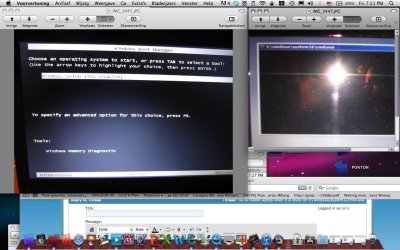
it will go to this page
image 3445 on left

and the page gets stuck on this image 3447 on right

hope that helps out
what i have here so far

by the way i have to mention that i do not have anything special that i want to keep
i would just like to have my windows7 to work again if possible
 

Attachments

  • Afbeelding 3.jpg
    Afbeelding 3.jpg
    120 KB · Views: 113
Last edited:

My Computer My Computer

At a glance

windows 7 64 bit home premiumn/an/an/a
Computer Manufacturer/Model Number
asus u43f - model of july 2010
OS
windows 7 64 bit home premium
CPU
n/a
Motherboard
n/a
Memory
n/a
Graphics Card(s)
n/a
Sound Card
n/a
Monitor(s) Displays
n/a
Hard Drives
n/a
PSU
n/a
Case
n/a
Cooling
n/a

My Computer My Computer

At a glance

windows 7 64 bit home premiumn/an/an/a
Computer Manufacturer/Model Number
asus u43f - model of july 2010
OS
windows 7 64 bit home premium
CPU
n/a
Motherboard
n/a
Memory
n/a
Graphics Card(s)
n/a
Sound Card
n/a
Monitor(s) Displays
n/a
Hard Drives
n/a
PSU
n/a
Case
n/a
Cooling
n/a
Download the liveCD & Run, this is a free tool from MS:
A liveCD is bootable, no need to start windows.

I tried to use the scan sweeper but it does not react to it at all my system(i installed it on a dvd-r) and nothing is happening

Make sure you are booting from your CD/DVD Drive.
 

My Computer My Computer

At a glance

ME/XP/Vista/Win7
OS
ME/XP/Vista/Win7

My Computer My Computer

At a glance

windows 7 64 bit home premiumn/an/an/a
Computer Manufacturer/Model Number
asus u43f - model of july 2010
OS
windows 7 64 bit home premium
CPU
n/a
Motherboard
n/a
Memory
n/a
Graphics Card(s)
n/a
Sound Card
n/a
Monitor(s) Displays
n/a
Hard Drives
n/a
PSU
n/a
Case
n/a
Cooling
n/a
still waiting for diskpart results!
 

My Computer My Computer

At a glance

Microsoft Windows 7 Home Premium 64-bits 7601...Intel(R) Core(TM) i3 CPU M 370 @ 2.40GHz4,00 GBATI Mobility Radeon HD 5400 Series
Computer type
Laptop
Computer Manufacturer/Model Number
ACER ASPIRE 5742G
OS
Microsoft Windows 7 Home Premium 64-bits 7601 Multiprocessor Free Service Pack 1
CPU
Intel(R) Core(TM) i3 CPU M 370 @ 2.40GHz
Motherboard
Acer Aspire 5742G
Memory
4,00 GB
Graphics Card(s)
ATI Mobility Radeon HD 5400 Series
Sound Card
(1) AMD High Definition Audio Device (2) Realtek High Defi
Screen Resolution
1366 x 768 x 32 bits (4294967296 colors) @ 60 Hz
Hard Drives
WDC WD5000BEVT-22ZAT0
still waiting for diskpart results!

ok i will not have my laptop for a few weeks
my uncle is trying to look into it
but if it does not work i will try this way your suggesting and definitely update you
meanwhile i will study for my exams (at the same time its gd it broke down then i do not get too distracted XD anyway thx for the help so far and i ll be definitely in touch if laptop is still broken)
 

My Computer My Computer

At a glance

windows 7 64 bit home premiumn/an/an/a
Computer Manufacturer/Model Number
asus u43f - model of july 2010
OS
windows 7 64 bit home premium
CPU
n/a
Motherboard
n/a
Memory
n/a
Graphics Card(s)
n/a
Sound Card
n/a
Monitor(s) Displays
n/a
Hard Drives
n/a
PSU
n/a
Case
n/a
Cooling
n/a
Back
Top