
How to recover my data,encrypted by Bitlocker?(with this condition)

torshizi

New member
Local time
7:14 PM
Messages
13
Location
Mashhad
To install another operating system, I forced to resize my partitions.
I had a drive that was encrypted with bitlocker. After changing the drive and restart I noticed there were only two of the drives that on them Windows installed and another drives changed to free space.
Bitlocker encrypted drive was 100G and another drive 244G. Drives I converted to a drive then format it to restore my data. All the information was not encrypted, was returned but encrypted data was not returned even one bit. I changed the size of D to 200 GB again and after a lot of searching I found the repair-bde command.
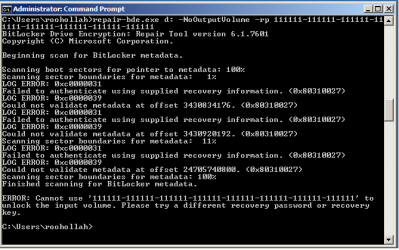
bde.png
this was result.
is there any solution to back my data?
please help
 

My Computer My Computer

At a glance

Windows 7 Ultimate x64Core i5 2.50 GHZ6G
Computer type
Laptop
Computer Manufacturer/Model Number
Dell n5110
OS
Windows 7 Ultimate x64
CPU
Core i5 2.50 GHZ
Memory
6G
Screen Resolution
1366x768
Antivirus
Eset Smart Security 7
Browser
google chrome

My Computer My Computer

At a glance

Windows 7 Ultimate SP1 64-BitIntel Core i7 870 @ 2.93GHz8Gb Dual-Channel DDR3 @ 664MHznVidia GeForce GTX 460 1024MB dedicated RAM
Computer Manufacturer/Model Number
HP Pavilion Elite 495UK
OS
Windows 7 Ultimate SP1 64-Bit
CPU
Intel Core i7 870 @ 2.93GHz
Motherboard
MSI 2A9C (CPU1)
Memory
8Gb Dual-Channel DDR3 @ 664MHz
Graphics Card(s)
nVidia GeForce GTX 460 1024MB dedicated RAM
Sound Card
Realtek HD Audio
Monitor(s) Displays
HP2310i
Screen Resolution
1920 x 1080
Hard Drives
1x1954GB Hitachi HDS22020ALA 330 (RAID), 1x1954GB Hitachi External for backup and storage
PSU
460W
Case
HP Elite
Cooling
Air cooled
Keyboard
Logitech K750 solar-powered keyboard
Mouse
Logitech Wireless M180 mouse
Internet Speed
2Mb
Other Info
Pure Avanti Flow Internet Radio with iPod Dock, 64Gb iPod, HP USB Speakers, Sony MDR-V500 Headphones, Sony Vaio F-Series Laptop
tanks for reply
but this solution tells how we can provide the recoverykey , while this is not my question.
 

My Computer My Computer

At a glance

Windows 7 Ultimate x64Core i5 2.50 GHZ6G
Computer type
Laptop
Computer Manufacturer/Model Number
Dell n5110
OS
Windows 7 Ultimate x64
CPU
Core i5 2.50 GHZ
Memory
6G
Screen Resolution
1366x768
Antivirus
Eset Smart Security 7
Browser
google chrome
Partition Wizard POSSIBLY may help.
Free downloads of this for use under Windows, and also a Recover Boot CD from
Free Partition Magic alternative. Free Partition Manager Software for Windows 7/VISTA/XP/2000 and Windows Server 2003/2008/2000.

Perhaps if you add or change the label of Drive D:\ you can use P.W. to then delete D:\
Then use its Partition Recovery Wizard to scan the relevant area and it will show the boundaries of deleted/shrunk/shifted partitions that are no longer present.
You may then see that you have very close together a pair of old 200 GB partitions, one with the new label you created before deleting it.
Just possibly you can choose the other boundaries and resurrect the exact previous partition.

My guess is that Bitlocker Encryption cannot be decrypted if your existing 200 GB partition was not exactly the old size and location as it was when last used.

That is my guess.

It might be wise to first make an partition image.
 

My Computer My Computer

At a glance

Windows 7 Ultimate 64 bit SP1 x64AMD Phenom X4 95008 GBATI Radeon HD 4600 Series
Computer Manufacturer/Model Number
ASUSTeK Computer INC. M3A32-MVP DELUXE (CPU 1)
OS
Windows 7 Ultimate 64 bit SP1 x64
CPU
AMD Phenom X4 9500
Motherboard
ASUSTeK M3A32-MVP Deluxe (CPU 1)
Memory
8 GB
Graphics Card(s)
ATI Radeon HD 4600 Series
Sound Card
AMD High Definition Audio Device
Monitor(s) Displays
SyncMaster (1680x1050@60Hz)
Hard Drives
59GB OCZ-VERTEX2 ATA Device
+
977GB SAMSUNG HD103SJ ATA Device
+
625GB WDC WD6401AALS-00L3B2 ATA Device
thanks
this solution recovered other partition that i lost it.but for drive (encrypted by bitlocker) does not work.
I think it is better to get out.
But I would welcome any other solutions.
 

My Computer My Computer

At a glance

Windows 7 Ultimate x64Core i5 2.50 GHZ6G
Computer type
Laptop
Computer Manufacturer/Model Number
Dell n5110
OS
Windows 7 Ultimate x64
CPU
Core i5 2.50 GHZ
Memory
6G
Screen Resolution
1366x768
Antivirus
Eset Smart Security 7
Browser
google chrome
Try
MiniTool

That is the parent of Partition Wizard and they have more powerful recovery tools,
some free and some not.

I only use their free products, but even so my technical question emails get answered the next day.
[email protected]

They can probably guide you on what is best in your situation.
 

My Computer My Computer

At a glance

Windows 7 Ultimate 64 bit SP1 x64AMD Phenom X4 95008 GBATI Radeon HD 4600 Series
Computer Manufacturer/Model Number
ASUSTeK Computer INC. M3A32-MVP DELUXE (CPU 1)
OS
Windows 7 Ultimate 64 bit SP1 x64
CPU
AMD Phenom X4 9500
Motherboard
ASUSTeK M3A32-MVP Deluxe (CPU 1)
Memory
8 GB
Graphics Card(s)
ATI Radeon HD 4600 Series
Sound Card
AMD High Definition Audio Device
Monitor(s) Displays
SyncMaster (1680x1050@60Hz)
Hard Drives
59GB OCZ-VERTEX2 ATA Device
+
977GB SAMSUNG HD103SJ ATA Device
+
625GB WDC WD6401AALS-00L3B2 ATA Device
From: Support Center [email protected]
To: Kashif Aziz Awan <**REMOVED**>
Date: 01/05/2012 01:00 AM
Subject: Re: solution needed about deleted partation!!

We afraid our software can't help since you encrypted your partition.

Support Team
MiniTool Solution Ltd
Http://www.minitool.ca

On 2012-01-04, at 9:11, "Kashif Aziz Awan" <**REMOVED**> wrote:

>
> i have quick formated my bit loacker enabled partation and lost my all data in it.
> i tried some tools to recover my data like "Recuva" etc...
> is there any solution about...??
>
> Kashif Aziz Awan
> R&D
> **REMOVED**
>
>
 

My Computer My Computer

At a glance

Windows 7 Ultimate
OS
Windows 7 Ultimate
Back
Top