
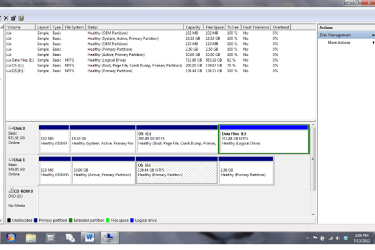
I have a hard disk that the Disk Management diagram shows 4 partitions left to right:
110mb Healthy (OEM Partition) / 10GB Healthy Active Primary / OS (F) 136.44GB (Healthy
Primary Partition / 2.50 GB (Healthy Primary Partition)
(see screenshot)
I tried reformatting it but the reformat window would only allow the reformat of the OS partition
How do I reformat this disk to use its total 150 GB of space instead of the 136GB of storage it currently allows?
Thanks for your help
110mb Healthy (OEM Partition) / 10GB Healthy Active Primary / OS (F) 136.44GB (Healthy
Primary Partition / 2.50 GB (Healthy Primary Partition)
(see screenshot)
I tried reformatting it but the reformat window would only allow the reformat of the OS partition
How do I reformat this disk to use its total 150 GB of space instead of the 136GB of storage it currently allows?
Thanks for your help
Attachments
My Computer
At a glance
w7
- OS
- w7


