How to remove babylon search bar in firefox

jhenzk26

New member
Local time
4:27 AM
Messages
35
I download something and it installs babylon and it sucks.
I uninstall it from control panel and change the homepage but whenever I open a new tab it opens with babylon and not the homepage i set..
I am really desperate to remove it. It is not located in the ad ons and I can't find a solution to this. I think I completely remove the program but it's just that whenever I open a new tab. I think its just like setting it a new page but I cant find where it is. Please help.
ThANKS :)
 

My Computer My Computer

At a glance

Windows 7 Home Premuim 64-bit (6.1, Build 7600)Intel Core i33072MB RAMATI Mobility Radeon HD 545v
Computer type
Laptop
Computer Manufacturer/Model Number
Samsung R440
OS
Windows 7 Home Premuim 64-bit (6.1, Build 7600)
CPU
Intel Core i3
Memory
3072MB RAM
Graphics Card(s)
ATI Mobility Radeon HD 545v
Sound Card
Speakers (2-Realtek High Definition Audio)
Monitor(s) Displays
Generic PnP Monitor
Screen Resolution
1280 x 720 (32bit) (60Hz)
Hm, what browser do you have exactly? I suggest either downloading a new browser, or try changing your homepage to Google, then disabling all features from Babylon when the notice comes up and give those full rights over to Google. But that's peculiar. I was going to suggest uninstall it, but you've already done so.

Maybe you could try system restore to before you ever downloaded the program?
 

My Computer My Computer

At a glance

Windows 7 Home Premium x64 Service Pack 1Intel(R) Core(TM) i3-2350 CPU @ 2.30 GHZ (4 C...6.00GB UsableIntel(R) HD Graphics Family
Computer Manufacturer/Model Number
HP Pavilon g7 Notebook PC
OS
Windows 7 Home Premium x64 Service Pack 1
CPU
Intel(R) Core(TM) i3-2350 CPU @ 2.30 GHZ (4 CPUs) ~ 2.3GHZ
Motherboard
Hewlwtt-Packard
Memory
6.00GB Usable
Graphics Card(s)
Intel(R) HD Graphics Family
Sound Card
(1)IDT High Definition Audio CODEC (2)Intel(R) Display Audio
Monitor(s) Displays
Generic PnP Monitor
Screen Resolution
1600 x 900 x 32-bits @ 60 Hz
Hard Drives
Local Disk (C:)
Recovery (D:)
Local Disk (Q:)
Seagate GoFlex 1TB Desktop Hardrive (External)
Other Info
Logitech m325 Blue Wireless mouse.
i remove firefox and install firefox 13 if im not mistaken but now I cant watch videos I dunno if its from youtube only or what. But it says that "An error occured. Please try again later." I read some forum and say that I just disable the shockwave flash but after i remove it and restart firefox and then another error comes up with "This video is currently not available. Please help :(
 

My Computer My Computer

At a glance

Windows 7 Home Premuim 64-bit (6.1, Build 7600)Intel Core i33072MB RAMATI Mobility Radeon HD 545v
Computer type
Laptop
Computer Manufacturer/Model Number
Samsung R440
OS
Windows 7 Home Premuim 64-bit (6.1, Build 7600)
CPU
Intel Core i3
Memory
3072MB RAM
Graphics Card(s)
ATI Mobility Radeon HD 545v
Sound Card
Speakers (2-Realtek High Definition Audio)
Monitor(s) Displays
Generic PnP Monitor
Screen Resolution
1280 x 720 (32bit) (60Hz)
Try this, it will set user preferences to default. Suggest backing up FF in case you want to restore. I use FEBE for this purpose:

https://addons.mozilla.org/en-US/firefox/addon/febe/

There are others, such as MozBackup

MozBackup - Backup tool for Firefox and Thunderbird

Now, open FF

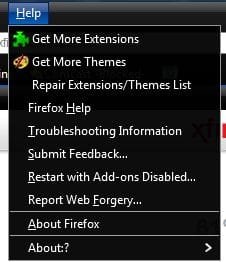
On menu choose Help> Restart with Add-ons Disabled

Disabled.jpg

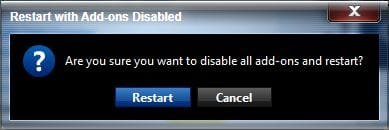
Confirm

Are you sure.jpg

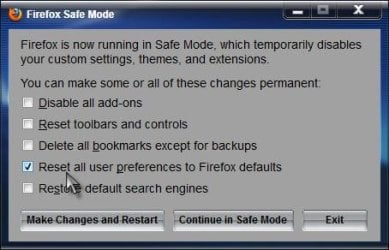
When the dialog appears, put a check mark next to Reset all user preferences to Firefox defaults

Reset.jpg

Click on Make Changes and Restart

Firefox will restart with default settings. See if that has fixed it. A Guy
 

My Computer My Computer

At a glance

Windows 10 Home x64INTEL Core i5-750 Quad-Core 3.37GHzHyperX Fury Black Series 8GB (2 x 4GB) 1866MhzEVGA GeForce GTX 750 Superclocked 1GB 128-Bit...
Computer type
PC/Desktop
OS
Windows 10 Home x64
CPU
INTEL Core i5-750 Quad-Core 3.37GHz
Motherboard
ASUS P7P55D
Memory
HyperX Fury Black Series 8GB (2 x 4GB) 1866Mhz
Graphics Card(s)
EVGA GeForce GTX 750 Superclocked 1GB 128-Bit GDDR5
Monitor(s) Displays
LG 32MA68HY 32" IPS
Screen Resolution
1920 x 1080
Hard Drives
Samsung 840 Evo 120GB, SEAGATE 500GB Barracuda® 7200.12, SATA 3 Gb/s, 7200 RPM, 16MB cache
PSU
ANTEC TruePower New TP-550, 80 PLUS, 550W
Case
ANTEC Three Hundred Illusion
Cooling
COOLER MASTER Hyper 212 Plus, 4 x 120mm 1 x 140mm Noctua's
Internet Speed
85 + Mbps
Antivirus
Avast
Browser
Vivaldi
Back
Top