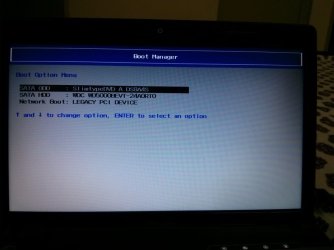
You're actually booting from SATA HDD. "Slimtype" is your DVD Drive. I always leave the DVD as the first boot device in case I want to boot off a CD/DVD. This screen is from your system BIOS. Are you seeing this screen everytime you boot, without pressing a key??
Yes, everytime it cmes without pressing any key.
On switching power button ON first Lenovo screen come then after this screen comes without pressing any key.
I did some googling and came up with jack. Perhaps this is a job for Lenovo support. Have you looked in the BIOS settings to see if anything pertains to your problem?
It's better to keep the HDD set first to boot in BIOS setup, then if you need to boot a disk use the one-time BIOS Boot Menu key given on first screen to trigger DVD drive.
While in BIOS setup check for a setting that has it showing the Boot Menu at every boot. If none take note of SATA controller setting (AHCI, IDE, SATA, etc) then reset the BIOS to optimal defaults. Clear CMOS - 3 Ways to Clear the CMOS - Reset BIOS