
You are using an out of date browser. It may not display this or other websites correctly.
You should upgrade or use an alternative browser.
You should upgrade or use an alternative browser.
How To remove installed themes ...?
- Thread starter mayurx
- Start date
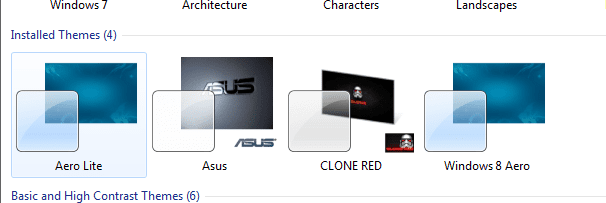

they are located here C:\windows\resources\themes
not sure if you can just delete them or if the themes had an uninstaller with them.
i dont bother getting rid of my old ones they dont take up much room
not sure if you can just delete them or if the themes had an uninstaller with them.
i dont bother getting rid of my old ones they dont take up much room
My Computer
- Computer Manufacturer/Model Number
- Hewlett packard/p6512uk
- OS
- Microsoft Windows 7 Home Premium 64-bit 7600
- CPU
- IIx4 amd athelon 635 processor
- Motherboard
- FOXCONN 2AA9
- Memory
- 2x2gb
- Graphics Card(s)
- ati radeon HD 5450
- Sound Card
- (1) Realtek High Definition Audio (2) AMD High Definition
- Monitor(s) Displays
- samsung lcd tv 32"
- Screen Resolution
- 1360x 768
- Hard Drives
- (1) WDC WD10 01FAES-60Z2A0 SATA Disk Device (2) Maxtor OneTouch USB Device (3) ST310003 33AS USB Device (4) WD My Book 1111 USB Device
- PSU
- ?
- Cooling
- air!
- Keyboard
- wireless hp
- Mouse
- wireless Hp,optical
- Internet Speed
- 1.10mb/s
- Antivirus
- MSE
- Browser
- Firefox

- Local time
- 10:45 AM
- Messages
- 35,002
In the folder C:\windows\resources\themes as boohbah suggested, you are to delete two items. One is the theme folder, and the other is the windows theme file, both for the theme you want to delete.
My Computer
- Computer type
- PC/Desktop
- Computer Manufacturer/Model Number
- Self Assembled
- OS
- Microsoft Windows 10 Pro Insider Preview 64-bit
- CPU
- Intel(R) Core(TM) i3-4130 CPU @ 3.40GHz
- Motherboard
- Gigabyte Technology Co., Ltd. B85M-D3H
- Memory
- Corsair Vengence 4GB x2 (8.00GB Dual-Channel DDR3 @ 798MHz)
- Graphics Card(s)
- 2047MB GeForce GTS 450 (ZOTAC International)
- Sound Card
- Onboard (Realtek High Definition Audio)
- Monitor(s) Displays
- LG Flatron E2040T
- Screen Resolution
- 1600x900
- Hard Drives
- Western Digital 1 TB
Seagate 500 GB
- PSU
- Corsair VS550
- Case
- Cooler Master K380
- Cooling
- Cooler Master Seidon 120V Plus
- Keyboard
- Logitech MK260r
- Mouse
- Logitech MK260r
- Internet Speed
- PMPL Broadband
- Antivirus
- Windows Defender + MBAM
- Browser
- Firefox
- Other Info
- Dell Studio 15" Laptop

Why not simply delete them from the selection screen (the one you showed in your pic)?
Right click on the Theme you don't want anymore and click "Delete Theme"
That obviously doesn't work with the active theme, so if you want that gone make another one active first.
-DG
Right click on the Theme you don't want anymore and click "Delete Theme"
That obviously doesn't work with the active theme, so if you want that gone make another one active first.
-DG
My Computer
- Computer Manufacturer/Model Number
- HP m8000n
- OS
- Windows 7 Ultimate x86
- CPU
- DualCore AMD Athlon 64 X2, 2600 MHz 5200+
- Motherboard
- Asus M2N68-LA (Narra)
- Memory
- Samsung 2GB DDR2
- Graphics Card(s)
- Onboard NVIDIA GeForce 6150SE nForce 430
- Sound Card
- Onboard nVIDIA nForce 6100-430 (MCP61P)
- Monitor(s) Displays
- Westinghouse 19" LED
- Screen Resolution
- 1280x1024
- Hard Drives
- SATA II Seagate Barracuda 500GB
USB II WD Elements 500GB
USB II WD My Book 1TB
USB II WD My Book 2TB
- PSU
- Stock (HP)
- Case
- Stock (HP)
- Cooling
- Stock
- Keyboard
- Logitech Classic KB 200
- Mouse
- Standard HP opticle USB mouse
- Local time
- 10:45 AM
- Messages
- 35,002
David, as I have experienced, this action deletes the Windows theme file only, but not the folder that contains the visual style file, languages files, etc.
My Computer
- Computer type
- PC/Desktop
- Computer Manufacturer/Model Number
- Self Assembled
- OS
- Microsoft Windows 10 Pro Insider Preview 64-bit
- CPU
- Intel(R) Core(TM) i3-4130 CPU @ 3.40GHz
- Motherboard
- Gigabyte Technology Co., Ltd. B85M-D3H
- Memory
- Corsair Vengence 4GB x2 (8.00GB Dual-Channel DDR3 @ 798MHz)
- Graphics Card(s)
- 2047MB GeForce GTS 450 (ZOTAC International)
- Sound Card
- Onboard (Realtek High Definition Audio)
- Monitor(s) Displays
- LG Flatron E2040T
- Screen Resolution
- 1600x900
- Hard Drives
- Western Digital 1 TB
Seagate 500 GB
- PSU
- Corsair VS550
- Case
- Cooler Master K380
- Cooling
- Cooler Master Seidon 120V Plus
- Keyboard
- Logitech MK260r
- Mouse
- Logitech MK260r
- Internet Speed
- PMPL Broadband
- Antivirus
- Windows Defender + MBAM
- Browser
- Firefox
- Other Info
- Dell Studio 15" Laptop

Change to a different theme and then right click > delete. You can delete the files for the theme in C:\Windows\Resources\Themes
My Computer
- Computer type
- PC/Desktop
- Computer Manufacturer/Model Number
- HP
- OS
- Windows 7 Ultimate
- CPU
- DualCore Intel Pentium D 930, 3000 MHz (15 x 200)
- Motherboard
- Asus P5LP-LE (Emery)
- Memory
- 3x512mb 1x1GB
- Graphics Card(s)
- NVIDIA GeForce 7800 GTX
- Sound Card
- Realtek ALC882/D/M @ Intel 82801GB ICH7
- Monitor(s) Displays
- Iiyama ProLite E2407HDS
- Screen Resolution
- 1920 x 1080 70 Hz
- Hard Drives
- 1TB WD10EARS-00Y5B1 ATA Device
- Keyboard
- Hewlett Packard Wireless Ergo
- Mouse
- Logitech USB Wheel Mouse
- Internet Speed
- 20mbps Download - 2mbps Upload
- Antivirus
- Windows Defender - Malwarebytes Anti Malware
- Browser
- Google Chrome
Archie, I must confess that I never checked if really all files are deleted by that method. The left overs don't really hurt me or my disk space So yeah in that case it's better to "pull the carped under window's feet" and delete those files in ..\Resources\. But make sure you delete the correct files! For inexperienced users my method is simply the safer one.
-DG
So yeah in that case it's better to "pull the carped under window's feet" and delete those files in ..\Resources\. But make sure you delete the correct files! For inexperienced users my method is simply the safer one.-DG
My Computer
- Computer Manufacturer/Model Number
- HP m8000n
- OS
- Windows 7 Ultimate x86
- CPU
- DualCore AMD Athlon 64 X2, 2600 MHz 5200+
- Motherboard
- Asus M2N68-LA (Narra)
- Memory
- Samsung 2GB DDR2
- Graphics Card(s)
- Onboard NVIDIA GeForce 6150SE nForce 430
- Sound Card
- Onboard nVIDIA nForce 6100-430 (MCP61P)
- Monitor(s) Displays
- Westinghouse 19" LED
- Screen Resolution
- 1280x1024
- Hard Drives
- SATA II Seagate Barracuda 500GB
USB II WD Elements 500GB
USB II WD My Book 1TB
USB II WD My Book 2TB
- PSU
- Stock (HP)
- Case
- Stock (HP)
- Cooling
- Stock
- Keyboard
- Logitech Classic KB 200
- Mouse
- Standard HP opticle USB mouse
- Local time
- 10:45 AM
- Messages
- 35,002
You are absolutely right, my friend. Usually the theme files are tiny  And leftovers dont hamper anything. moreover, if you delete wrong files, your installed themes will be in trouble.
So, rightclicking and deleting is not a bad option at all. But it doesnt delete it completely.
And leftovers dont hamper anything. moreover, if you delete wrong files, your installed themes will be in trouble. So, rightclicking and deleting is not a bad option at all. But it doesnt delete it completely.
My Computer
- Computer type
- PC/Desktop
- Computer Manufacturer/Model Number
- Self Assembled
- OS
- Microsoft Windows 10 Pro Insider Preview 64-bit
- CPU
- Intel(R) Core(TM) i3-4130 CPU @ 3.40GHz
- Motherboard
- Gigabyte Technology Co., Ltd. B85M-D3H
- Memory
- Corsair Vengence 4GB x2 (8.00GB Dual-Channel DDR3 @ 798MHz)
- Graphics Card(s)
- 2047MB GeForce GTS 450 (ZOTAC International)
- Sound Card
- Onboard (Realtek High Definition Audio)
- Monitor(s) Displays
- LG Flatron E2040T
- Screen Resolution
- 1600x900
- Hard Drives
- Western Digital 1 TB
Seagate 500 GB
- PSU
- Corsair VS550
- Case
- Cooler Master K380
- Cooling
- Cooler Master Seidon 120V Plus
- Keyboard
- Logitech MK260r
- Mouse
- Logitech MK260r
- Internet Speed
- PMPL Broadband
- Antivirus
- Windows Defender + MBAM
- Browser
- Firefox
- Other Info
- Dell Studio 15" Laptop
no problem, glad to help. 
My Computer
- Computer Manufacturer/Model Number
- Hewlett packard/p6512uk
- OS
- Microsoft Windows 7 Home Premium 64-bit 7600
- CPU
- IIx4 amd athelon 635 processor
- Motherboard
- FOXCONN 2AA9
- Memory
- 2x2gb
- Graphics Card(s)
- ati radeon HD 5450
- Sound Card
- (1) Realtek High Definition Audio (2) AMD High Definition
- Monitor(s) Displays
- samsung lcd tv 32"
- Screen Resolution
- 1360x 768
- Hard Drives
- (1) WDC WD10 01FAES-60Z2A0 SATA Disk Device (2) Maxtor OneTouch USB Device (3) ST310003 33AS USB Device (4) WD My Book 1111 USB Device
- PSU
- ?
- Cooling
- air!
- Keyboard
- wireless hp
- Mouse
- wireless Hp,optical
- Internet Speed
- 1.10mb/s
- Antivirus
- MSE
- Browser
- Firefox
Similar threads
- Replies
- 1
- Views
- 840

- Replies
- 1
- Views
- 519

- Replies
- 6
- Views
- 4K

- Replies
- 2
- Views
- 4K