How to remove "safety remove" button from taskbar?

SHUTRcz

New member
Local time
11:16 PM
Messages
14
Location
Czech republic
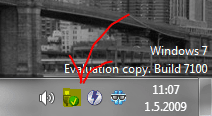
Hi, after I instaled Deamon Tools, Windows starth show safety remove button in taskbar. Its possible hide this button?
 

Attachments

  • Capture.PNG
    Capture.PNG
    14.4 KB · Views: 1,813

My Computer

OS
Windows Seven build 7231
CPU
AMD Athlon X2 3800+
Motherboard
Gigabyte M61P-S3
Memory
2 GB DDR II
Graphics Card(s)
ATi 4850
Monitor(s) Displays
Samsung 223BW
Screen Resolution
1680x1050x32
Hard Drives
Samsung SpinPoint F1 3.5" 750GB | WD6400AAKS | Seagate Barracuda 160GB | WD 80 GB
PSU
Seasonic SS-500ET 500W
Case
NoName
Internet Speed
5 MB/s
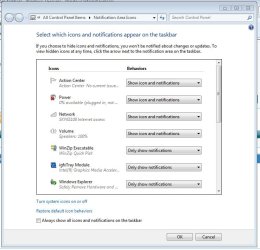
If you click the '^' icon on the notification area and select 'Customize...' you can choose how each icon is displayed.

Show icon and notifications: will show icon at all times
Hide icon and notifications: will hide icon at all times
Only show notifications: will only show icon for a short time

Hope this helps :)


Jeff
 

Attachments

  • Capture.JPG
    Capture.JPG
    59.9 KB · Views: 160

My Computer

Computer Manufacturer/Model Number
Compaq Desktop
OS
Windows 7 Ultimate x64
CPU
AMD Sempron Dual Core
Memory
3GB
Graphics Card(s)
NVIDIA GeForce 6150SE nForce 430
Screen Resolution
1024x768
Hard Drives
150GB Sata
Back
Top