How to remove single OS from dual boot - Windows 7 and Win Server 2008

antispam246

New member
Local time
11:04 PM
Messages
14
Tried tackling this one single-handedly to begin with and failed.

I have Windows 7 and Windows Server 2008 R2 installed as a dual boot, different partitions single HDD.

I want to remove the Windows 7 partition and keep the Win 2008. I do NOT want to lose anything from the Win 2008 partition.

Taken from Disk Management.

Disk 3 with 5 partitions
1st - Healthy, Primary partition 73MB. (I thought this was system reserve but its not, leftover space from a previous partition change). It's currently mounted and completely empty.
2nd - Unallocated space 500mb
3rd - Windows 7 OS (Healthy - system, active, primary partition)
4th - Windows 2008 Server OS (Healthy - boot, page file, crash dump, primary partition)
5th - Unallocated space 8mb'ish

I haven't been using Windows 7 for years and want to clean this drives partitions up because it's messy and wasting space. I just need windows server 2008 as it's been used as a server for years and that's all I need it for now.

I want to safely remove the windows 7 installation and merge that partition along with the 1st and unallocated spaces back into a single partition where windows 2008 server resides.

Now I've tried tackling this myself and failed. I stupidly made the windows server 2008 partition as active which killed my boot and took me forever to repair with zero loss fortunately. Sadly it was as simple as using diskpart in a command prompt from win 2008 boot disk to make win 7 partition active again.

So, how do I do this? The boot manager must be on the win 7 partition as removing active killed it. The windows 7 boot (during startup) is long removed, system boots directly to windows 2008.
 

My Computer My Computer

At a glance

64
OS
64
boot into win7 and move the bootmgr to the win 2008 partition. It will mark that partition active as well.
http://www.sevenforums.com/tutorials/209885-bootmgr-move-c-easybcd.html

now reboot into win 2008 and situation will be:
3rd - Windows 7 OS (Healthy - primary partition)
4th - Windows 2008 Server OS (Healthy - system,boot, page file, crash dump, active, primary partition)

Correct? If so .. now you can remove the win7 partition. And of course update the bootmenu so win7 is not in list anymore
 

My Computer My Computer

At a glance

Microsoft Windows 7 Home Premium 64-bits 7601...Intel(R) Core(TM) i3 CPU M 370 @ 2.40GHz4,00 GBATI Mobility Radeon HD 5400 Series
Computer type
Laptop
Computer Manufacturer/Model Number
ACER ASPIRE 5742G
OS
Microsoft Windows 7 Home Premium 64-bits 7601 Multiprocessor Free Service Pack 1
CPU
Intel(R) Core(TM) i3 CPU M 370 @ 2.40GHz
Motherboard
Acer Aspire 5742G
Memory
4,00 GB
Graphics Card(s)
ATI Mobility Radeon HD 5400 Series
Sound Card
(1) AMD High Definition Audio Device (2) Realtek High Defi
Screen Resolution
1366 x 768 x 32 bits (4294967296 colors) @ 60 Hz
Hard Drives
WDC WD5000BEVT-22ZAT0
Thank you. Sorry for late reply, just finally got round to doing this, coupled with further issues to get your solution up and running.

I couldn't even boot into windows 7 due to forgetting the login password, managed to reset it without a reset disk using hirens boot cd, so after finalyl getting into win 7, i then remebered I was running a trial edition of a really old build, so guess what! It's didn't even work. So, after reinstalling a full edition of windows 7 freshly over the top of the old, I got it working. I won't even mention the fact that win 7 original boot would not for the love of god recognize any of my usb keyboards in any port, which is a reknown issue with NO solution...

So after all that here's where I'm upto. I got into win 7 and followed the easybcd method of moving the boot partition (copying), was simple. I'm now back in windows 2008 and I'm seeing pretty much as you mentioned.

win 7 3rd part - Healthy - Primary
win 2008 4th part - Healthy - System, boot, page file, Active, Crash Dump, Primary partition.

So now all to do is remove win 7 partition and remove win from boot menu. Fingers crossed, brb
 

My Computer My Computer

At a glance

64
OS
64
Hasn't worked. I've rebooted and have received this:

Windows failed to start. A recent hardware or software change might be the cause. To fix the problem:

1. Insert windows installation disc and restart your computer.
2. Choose your language settings, and then click "Next".
3. Click "Repair your computer".

File: \Boot\BCD

Status 0x0000098

Info: The windows Boot Configuration Data file does not contain a valid OS entry.

Had a brief lookup on issue and seems to be various ways to tackle it. I'm guessing the best approach would be to do as it's stating.

Anyway i'll check in on this tomorrow after work.
 

My Computer My Computer

At a glance

64
OS
64
Why not follow the steps given countless times here to remove such a Dual Boot which test and repair every single parameter of the boot including rewriting the WinRE System Recovery Options link to F8 Advanced Boot Options which EasyBCD does not do?

These steps always work unless a previous attempt has somehow corrupted the boot files beyond repair.

1) Mark Win7 partition Active. Partition - Mark as Active (Method Two)

2) Run Startup Repair - Run up to 3 Separate Times until Win7 starts and holds the System Active boot flags.

3) Once you know the Win7 partition can boot itself, if desired delete the old OS partitions and resize Win7 into its space using Partition Wizard Resize Partition - Video Help. Use only the Partition Wizard boot disk which will not fail whereas all others except Disk Mgmt can and will fail with data loss.
 
Hasn't worked. I've rebooted and have received this:

Windows failed to start. A recent hardware or software change might be the cause. To fix the problem:

1. Insert windows installation disc and restart your computer.
2. Choose your language settings, and then click "Next".
3. Click "Repair your computer".

File: \Boot\BCD

Status 0x0000098

Info: The windows Boot Configuration Data file does not contain a valid OS entry.

Had a brief lookup on issue and seems to be various ways to tackle it. I'm guessing the best approach would be to do as it's stating.

Anyway i'll check in on this tomorrow after work.

win 7 3rd part - Healthy - Primary
win 2008 4th part - Healthy - System, boot, page file, Active, Crash Dump, Primary partition.

So it was booted into win2008 and win7 partition isn't used at all (4th partition is System, so active and has th bootmgr and bootmenu).

Why did you reinstall win7 if you want to remove it anyway?
 

My Computer My Computer

At a glance

Microsoft Windows 7 Home Premium 64-bits 7601...Intel(R) Core(TM) i3 CPU M 370 @ 2.40GHz4,00 GBATI Mobility Radeon HD 5400 Series
Computer type
Laptop
Computer Manufacturer/Model Number
ACER ASPIRE 5742G
OS
Microsoft Windows 7 Home Premium 64-bits 7601 Multiprocessor Free Service Pack 1
CPU
Intel(R) Core(TM) i3 CPU M 370 @ 2.40GHz
Motherboard
Acer Aspire 5742G
Memory
4,00 GB
Graphics Card(s)
ATI Mobility Radeon HD 5400 Series
Sound Card
(1) AMD High Definition Audio Device (2) Realtek High Defi
Screen Resolution
1366 x 768 x 32 bits (4294967296 colors) @ 60 Hz
Hard Drives
WDC WD5000BEVT-22ZAT0
Why not follow the steps given countless times here to remove such a Dual Boot which test and repair every single parameter of the boot including rewriting the WinRE System Recovery Options link to F8 Advanced Boot Options which EasyBCD does not do?

These steps always work unless a previous attempt has somehow corrupted the boot files beyond repair.

1) Mark Win7 partition Active. Partition - Mark as Active (Method Two)

2) Run Startup Repair - Run up to 3 Separate Times until Win7 starts and holds the System Active boot flags.

3) Once you know the Win7 partition can boot itself, if desired delete the old OS partitions and resize Win7 into its space using Partition Wizard Resize Partition - Video Help. Use only the Partition Wizard boot disk which will not fail whereas all others except Disk Mgmt can and will fail with data loss.
Greg...I know that. But he tries to remove win7 not win2008!
 

My Computer My Computer

At a glance

Microsoft Windows 7 Home Premium 64-bits 7601...Intel(R) Core(TM) i3 CPU M 370 @ 2.40GHz4,00 GBATI Mobility Radeon HD 5400 Series
Computer type
Laptop
Computer Manufacturer/Model Number
ACER ASPIRE 5742G
OS
Microsoft Windows 7 Home Premium 64-bits 7601 Multiprocessor Free Service Pack 1
CPU
Intel(R) Core(TM) i3 CPU M 370 @ 2.40GHz
Motherboard
Acer Aspire 5742G
Memory
4,00 GB
Graphics Card(s)
ATI Mobility Radeon HD 5400 Series
Sound Card
(1) AMD High Definition Audio Device (2) Realtek High Defi
Screen Resolution
1366 x 768 x 32 bits (4294967296 colors) @ 60 Hz
Hard Drives
WDC WD5000BEVT-22ZAT0
Hasn't worked. I've rebooted and have received this:

Windows failed to start. A recent hardware or software change might be the cause. To fix the problem:

1. Insert windows installation disc and restart your computer.
2. Choose your language settings, and then click "Next".
3. Click "Repair your computer".

File: \Boot\BCD

Status 0x0000098

Info: The windows Boot Configuration Data file does not contain a valid OS entry.

Had a brief lookup on issue and seems to be various ways to tackle it. I'm guessing the best approach would be to do as it's stating.

Anyway i'll check in on this tomorrow after work.
Can you boot from win7 installation dvd and enter command prompt.
http://www.sevenforums.com/tutorials/682-command-prompt-startup.html
In command prompt:
Code:
bcdedit/enum {default}
post output
 

My Computer My Computer

At a glance

Microsoft Windows 7 Home Premium 64-bits 7601...Intel(R) Core(TM) i3 CPU M 370 @ 2.40GHz4,00 GBATI Mobility Radeon HD 5400 Series
Computer type
Laptop
Computer Manufacturer/Model Number
ACER ASPIRE 5742G
OS
Microsoft Windows 7 Home Premium 64-bits 7601 Multiprocessor Free Service Pack 1
CPU
Intel(R) Core(TM) i3 CPU M 370 @ 2.40GHz
Motherboard
Acer Aspire 5742G
Memory
4,00 GB
Graphics Card(s)
ATI Mobility Radeon HD 5400 Series
Sound Card
(1) AMD High Definition Audio Device (2) Realtek High Defi
Screen Resolution
1366 x 768 x 32 bits (4294967296 colors) @ 60 Hz
Hard Drives
WDC WD5000BEVT-22ZAT0
I reinstalled windows 7 following the initial advice, I've tried and followed many things so I'm literally following advice to a T. My windows 7 installation was knackered completely and was under the impression that I would need to get back into a working windows 7 install to appropriately move the boot files to my windows 2008 installation, as suggested above.

Anyway, I'm booting via win 7 dvd and following the requested command prompt output above I get (couldn't see an entry for default)

Windows Boot Loader
identifier (d2cf6938-5add-11df-a351-a5ef340d8f1c)

Windows Boot Loader
identifier (d2cf693c-5add-11df-a351-a5ef340d8f1c)
device ramdisk=[F:]\Recovery\d2cf693c-5add-11df-a351-a5ef340d8f1c\Winre.wim,(d2cf693d-5add-11df-a351-a5ef340d8f1c)
path \windows\system32\winload.exe
description Windows Recovery Enviroment
inherit (bootloadersettings)
osdevice ramdisk=[F:]\Recovery\d2cf693c-5add-11df-a351-a5ef340d8f1c\Winre.wim,(d2cf693d-5add-11df-a351-a5ef340d8f1c)
systemroot \windows
nx OptIn
winpre Yes

Windows Boot Loader
identifier (d2cf693f-5add-11df-a351-a5ef340d8f1c)

Windows Boot Loader
identifier (d2cf6943-5add-11df-a351-a5ef340d8f1c)

Windows Memory Tester
identifier (memdiag)
device boot
path \Boot\memtest.exe
description Windows Memory Diagnostic
locale en-US
inherit (globalsettings)
badmemoryaccess Yes

Thats all I get from running that command. What next?

Should I try running repair windows a few times and should I do it from win 7 install disk or win 2008?
 

My Computer My Computer

At a glance

64
OS
64
Why the heck did you reinstall.... pfff
Listen carefully..

Indeed there's no default now.
Code:
bcdedit/default  {d2cf693c-5add-11df-a351-a5ef340d8f1c}
bcdedit/displayorder  {d2cf693c-5add-11df-a351-a5ef340d8f1c} /addlast
boot normally afterwards. Works?
Post output of diskmanagement
 

My Computer My Computer

At a glance

Microsoft Windows 7 Home Premium 64-bits 7601...Intel(R) Core(TM) i3 CPU M 370 @ 2.40GHz4,00 GBATI Mobility Radeon HD 5400 Series
Computer type
Laptop
Computer Manufacturer/Model Number
ACER ASPIRE 5742G
OS
Microsoft Windows 7 Home Premium 64-bits 7601 Multiprocessor Free Service Pack 1
CPU
Intel(R) Core(TM) i3 CPU M 370 @ 2.40GHz
Motherboard
Acer Aspire 5742G
Memory
4,00 GB
Graphics Card(s)
ATI Mobility Radeon HD 5400 Series
Sound Card
(1) AMD High Definition Audio Device (2) Realtek High Defi
Screen Resolution
1366 x 768 x 32 bits (4294967296 colors) @ 60 Hz
Hard Drives
WDC WD5000BEVT-22ZAT0
Easiest way to fix is:
  • mark win 2008 partition active
  • Boot from win 2008 install dvd and do a startup repair 3 times
  • now boot normally
 

My Computer My Computer

At a glance

Microsoft Windows 7 Home Premium 64-bits 7601...Intel(R) Core(TM) i3 CPU M 370 @ 2.40GHz4,00 GBATI Mobility Radeon HD 5400 Series
Computer type
Laptop
Computer Manufacturer/Model Number
ACER ASPIRE 5742G
OS
Microsoft Windows 7 Home Premium 64-bits 7601 Multiprocessor Free Service Pack 1
CPU
Intel(R) Core(TM) i3 CPU M 370 @ 2.40GHz
Motherboard
Acer Aspire 5742G
Memory
4,00 GB
Graphics Card(s)
ATI Mobility Radeon HD 5400 Series
Sound Card
(1) AMD High Definition Audio Device (2) Realtek High Defi
Screen Resolution
1366 x 768 x 32 bits (4294967296 colors) @ 60 Hz
Hard Drives
WDC WD5000BEVT-22ZAT0
Did as you said, rebooted and it entered system recovery state, searched for issues and found the win 2008 installation, made amendments and rebooted again. Boot menu had 2 options, ramdisk and win 2008. Booted into win 2008.

Disk management shows

1st Partition 4xxGB Unallocated
2nd Partition Windows Server 2008 OS (System, boot, Page File, Active, Crash Dump, Primary Partition)
3rd Partition 8GB Unallocated

Firstly, thank you so much for resolving the major issue. I really appreciate your help.
Judging the current state of affairs, what would you suggest the best approach for merging the unallocated partitions into the OS partition?

Computer management will only allow me to shrink the OS partition, can't expand it onto the 8GB I assume that's because the 1st partition is also unallocated so I'd have to use a 3rd party software to regain this?

Edit: I assume I can remove the ramdisk entry from the boot startup?
 

My Computer My Computer

At a glance

64
OS
64
in elevated command prompt http://www.sevenforums.com/tutorials/783-elevated-command-prompt.html
Code:
bcdedit/enum all>bcdoutput.txt
and post bcdoutput.txt
You can delete it afterwards

Concering to unallocated space isue...install partition wizard free Free download Magic Partition Manager Software, partition magic alternative, free partition magic, partition magic Windows 7 and server partition software - Partition Wizard Online take the HOME version
then resize the win2008 partition
To increase partition size for Windows 7, you may as well employ partition software.
 

My Computer My Computer

At a glance

Microsoft Windows 7 Home Premium 64-bits 7601...Intel(R) Core(TM) i3 CPU M 370 @ 2.40GHz4,00 GBATI Mobility Radeon HD 5400 Series
Computer type
Laptop
Computer Manufacturer/Model Number
ACER ASPIRE 5742G
OS
Microsoft Windows 7 Home Premium 64-bits 7601 Multiprocessor Free Service Pack 1
CPU
Intel(R) Core(TM) i3 CPU M 370 @ 2.40GHz
Motherboard
Acer Aspire 5742G
Memory
4,00 GB
Graphics Card(s)
ATI Mobility Radeon HD 5400 Series
Sound Card
(1) AMD High Definition Audio Device (2) Realtek High Defi
Screen Resolution
1366 x 768 x 32 bits (4294967296 colors) @ 60 Hz
Hard Drives
WDC WD5000BEVT-22ZAT0
in elevated command prompt http://www.sevenforums.com/tutorials/783-elevated-command-prompt.html
Code:
bcdedit/enum all>bcdoutput.txt
and post bcdoutput.txt
You can delete it afterwards

Concering to unallocated space isue...install partition wizard free Free download Magic Partition Manager Software, partition magic alternative, free partition magic, partition magic Windows 7 and server partition software - Partition Wizard Online take the HOME version
then resize the win2008 partition
To increase partition size for Windows 7, you may as well employ partition software.

Output is

Windows Boot Manager
--------------------
identifier {bootmgr}
device partition=S:
path \bootmgr
description Windows Boot Manager
locale en-US
inherit {globalsettings}
default {default}
resumeobject {d2cf6941-5add-11df-a351-a5ef340d8f1c}
displayorder {default}
{current}
toolsdisplayorder {memdiag}
timeout 30
displaybootmenu No

Windows Boot Loader
-------------------
identifier {current}
device partition=S:
path \Windows\system32\winload.exe
description Windows Server 2008 R2 Enterprise (recovered)
locale en-US
osdevice partition=S:
systemroot \Windows
resumeobject {7b98dac8-2f45-11e2-b8e3-806e6f6e6963}

Windows Boot Loader
-------------------
identifier {d2cf6938-5add-11df-a351-a5ef340d8f1c}

Windows Boot Loader
-------------------
identifier {default}
device ramdisk=[S:]\Recovery\d2cf693c-5add-11df-a351-a5ef340d8f1c\Winre.wim,{d2cf693d-5add-11df-a351-a5ef340d8f1c}
path \windows\system32\winload.exe
description Windows Recovery Environment
inherit {bootloadersettings}
osdevice ramdisk=[S:]\Recovery\d2cf693c-5add-11df-a351-a5ef340d8f1c\Winre.wim,{d2cf693d-5add-11df-a351-a5ef340d8f1c}
systemroot \windows
nx OptIn
winpe Yes

Windows Boot Loader
-------------------
identifier {d2cf693f-5add-11df-a351-a5ef340d8f1c}

Windows Boot Loader
-------------------
identifier {d2cf6943-5add-11df-a351-a5ef340d8f1c}

Resume from Hibernate
---------------------
identifier {7b98dac8-2f45-11e2-b8e3-806e6f6e6963}
device partition=S:
path \Windows\system32\winresume.exe
description Windows Server 2008 R2 Enterprise (recovered)
locale en-US
inherit {resumeloadersettings}
filedevice partition=S:
filepath \hiberfil.sys
debugoptionenabled No

Windows Memory Tester
---------------------
identifier {memdiag}
device partition=S:
path \boot\memtest.exe
description Windows Memory Diagnostic
locale en-US
inherit {globalsettings}
badmemoryaccess Yes

EMS Settings
------------
identifier {emssettings}
bootems Yes

Debugger Settings
-----------------
identifier {dbgsettings}
debugtype Serial
debugport 1
baudrate 115200

RAM Defects
-----------
identifier {badmemory}

Global Settings
---------------
identifier {globalsettings}
inherit {dbgsettings}
{emssettings}
{badmemory}

Boot Loader Settings
--------------------
identifier {bootloadersettings}
inherit {globalsettings}
{hypervisorsettings}

Hypervisor Settings
-------------------
identifier {hypervisorsettings}
hypervisordebugtype Serial
hypervisordebugport 1
hypervisorbaudrate 115200

Resume Loader Settings
----------------------
identifier {resumeloadersettings}
inherit {globalsettings}

Device options
--------------
identifier {d2cf6939-5add-11df-a351-a5ef340d8f1c}
description Ramdisk Options
ramdisksdidevice unknown
ramdisksdipath \Recovery\d2cf6938-5add-11df-a351-a5ef340d8f1c\boot.sdi

Device options
--------------
identifier {d2cf693d-5add-11df-a351-a5ef340d8f1c}
description Ramdisk Options
ramdisksdidevice partition=S:
ramdisksdipath \Recovery\d2cf693c-5add-11df-a351-a5ef340d8f1c\boot.sdi


Edit: Will the HOME version of that partition manager work on Server 2008?
 

My Computer My Computer

At a glance

64
OS
64
Yes! I think It's done. I had to use EASEUS server partition manager as that's what I have. The resizing has worked perfectly, rebooted to check everything in order, still working. Disk management is as it should look now with nothing unallocated, one single full partition for the OS.

I removed the ramdisk boot entry from msconfig and made it boot straight to the recovered windows 2008 OS. Rebooted again to check it worked and hey presto!

Thank you Kaktussoft you've been extremely helpful and I appreciate it. Just restructuring my system backup and WHS backup and I'm done (:

RESOLVED
 

My Computer My Computer

At a glance

64
OS
64
d2cf6938-5add-11df-a351-a5ef340d8f1c no info
d2cf693f-5add-11df-a351-a5ef340d8f1c no info
d2cf6943-5add-11df-a351-a5ef340d8f1c no info
d2cf6939-5add-11df-a351-a5ef340d8f1c has ramdisksdidevice unknown
They can be deleted!

Code:
bcdedit/delete {d2cf6938-5add-11df-a351-a5ef340d8f1c}
bcdedit/delete {d2cf693f-5add-11df-a351-a5ef340d8f1c}
bcdedit/delete {d2cf6943-5add-11df-a351-a5ef340d8f1c}
bcdedit/delete {d2cf6939-5add-11df-a351-a5ef340d8f1c}

Also do
Code:
bcdedit/set {bootmgr} resumeobject {7b98dac8-2f45-11e2-b8e3-806e6f6e6963}
Do this last command because it was pointing to an unknown entry. It should point to same resumeobject as win2008. And is used to resume from hibernation.

Post bcdedit output later
 

My Computer My Computer

At a glance

Microsoft Windows 7 Home Premium 64-bits 7601...Intel(R) Core(TM) i3 CPU M 370 @ 2.40GHz4,00 GBATI Mobility Radeon HD 5400 Series
Computer type
Laptop
Computer Manufacturer/Model Number
ACER ASPIRE 5742G
OS
Microsoft Windows 7 Home Premium 64-bits 7601 Multiprocessor Free Service Pack 1
CPU
Intel(R) Core(TM) i3 CPU M 370 @ 2.40GHz
Motherboard
Acer Aspire 5742G
Memory
4,00 GB
Graphics Card(s)
ATI Mobility Radeon HD 5400 Series
Sound Card
(1) AMD High Definition Audio Device (2) Realtek High Defi
Screen Resolution
1366 x 768 x 32 bits (4294967296 colors) @ 60 Hz
Hard Drives
WDC WD5000BEVT-22ZAT0
BTW you didn't remove ramdisk from the bootmenu! You removed "description Windows Recovery Environment".
Good thing to remove it from bootmenu. But now it's better to enable automatic recovery in case windows fails to boot.
Do this in elevated command prompt:
Code:
reagentc/disable
reagentc/enable
enable command succeeds succesfully?
Now post bcd output again
 

My Computer My Computer

At a glance

Microsoft Windows 7 Home Premium 64-bits 7601...Intel(R) Core(TM) i3 CPU M 370 @ 2.40GHz4,00 GBATI Mobility Radeon HD 5400 Series
Computer type
Laptop
Computer Manufacturer/Model Number
ACER ASPIRE 5742G
OS
Microsoft Windows 7 Home Premium 64-bits 7601 Multiprocessor Free Service Pack 1
CPU
Intel(R) Core(TM) i3 CPU M 370 @ 2.40GHz
Motherboard
Acer Aspire 5742G
Memory
4,00 GB
Graphics Card(s)
ATI Mobility Radeon HD 5400 Series
Sound Card
(1) AMD High Definition Audio Device (2) Realtek High Defi
Screen Resolution
1366 x 768 x 32 bits (4294967296 colors) @ 60 Hz
Hard Drives
WDC WD5000BEVT-22ZAT0
Edit: Will the HOME version of that partition manager work on Server 2008?
Sure it does. Most safe to use is the bootable CD version. That can move/resize, delete etc ntfs partitions. If you do it from bootable CD it's safer because win2008 isn't loaded. No faulty drivers, malware, crashes.

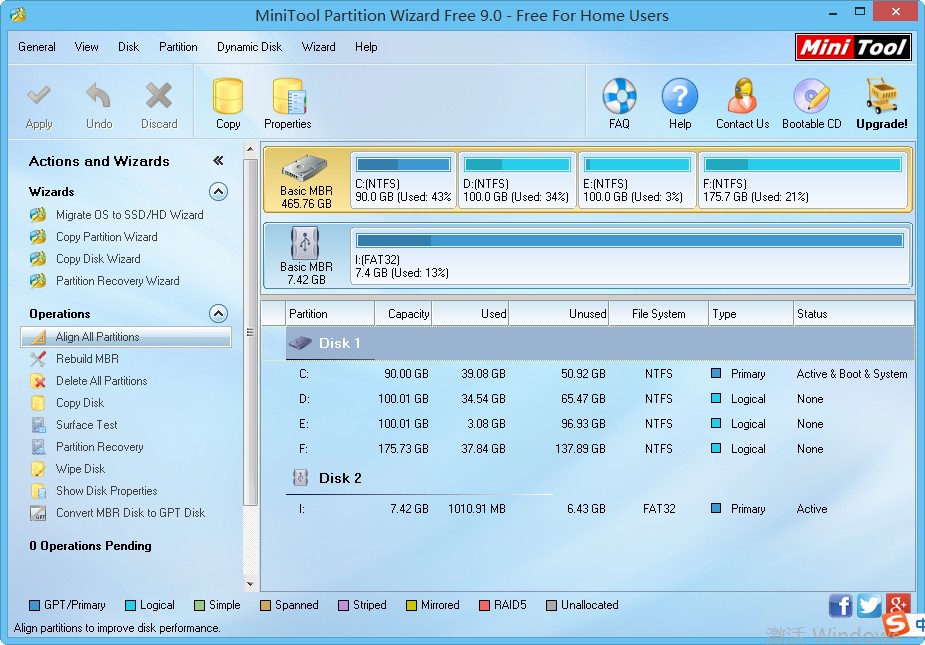
About Magic Partition Software - MiniTool® Partition Wizard 7.6
gif-0246.png


[SIZE=+0]Click image to enlarge[/SIZE]MiniTool Partition Wizard is a Windows based server partition manager software. Our server partition software supports both MBR and GUID partition table (GPT) on 32/64 bits Operating System including Windows XP, Vista, Windows Server 2000/2003/2008/2008-R2/2012, Windows SBS, Windows 7 and Windows 8. Our magic partition software supports all hard disks including IDE, SATA, SCSI, USB external disks, Fire wire disks and all level RAID configurations.
 

My Computer My Computer

At a glance

Microsoft Windows 7 Home Premium 64-bits 7601...Intel(R) Core(TM) i3 CPU M 370 @ 2.40GHz4,00 GBATI Mobility Radeon HD 5400 Series
Computer type
Laptop
Computer Manufacturer/Model Number
ACER ASPIRE 5742G
OS
Microsoft Windows 7 Home Premium 64-bits 7601 Multiprocessor Free Service Pack 1
CPU
Intel(R) Core(TM) i3 CPU M 370 @ 2.40GHz
Motherboard
Acer Aspire 5742G
Memory
4,00 GB
Graphics Card(s)
ATI Mobility Radeon HD 5400 Series
Sound Card
(1) AMD High Definition Audio Device (2) Realtek High Defi
Screen Resolution
1366 x 768 x 32 bits (4294967296 colors) @ 60 Hz
Hard Drives
WDC WD5000BEVT-22ZAT0
Thanks for follow up. Here's output after changes


Windows Boot Manager
--------------------
identifier {bootmgr}
device partition=S:
path \bootmgr
description Windows Boot Manager
locale en-US
inherit {globalsettings}
default {current}
resumeobject {7b98dac8-2f45-11e2-b8e3-806e6f6e6963}
displayorder {current}
toolsdisplayorder {memdiag}
timeout 3
displaybootmenu No

Windows Boot Loader
-------------------
identifier {current}
device partition=S:
path \Windows\system32\winload.exe
description Windows Server 2008 R2 Enterprise (recovered)
locale en-US
recoverysequence {125e6202-2f88-11e2-ae05-8001c48a42d0}
recoveryenabled Yes
osdevice partition=S:
systemroot \Windows
resumeobject {7b98dac8-2f45-11e2-b8e3-806e6f6e6963}

Windows Boot Loader
-------------------
identifier {125e6202-2f88-11e2-ae05-8001c48a42d0}
device ramdisk=[S:]\Recovery\125e6202-2f88-11e2-ae05-8001c48a42d0\Winre.wim,{125e6203-2f88-11e2-ae05-8001c48a42d0}
path \windows\system32\winload.exe
description Windows Recovery Environment
inherit {bootloadersettings}
osdevice ramdisk=[S:]\Recovery\125e6202-2f88-11e2-ae05-8001c48a42d0\Winre.wim,{125e6203-2f88-11e2-ae05-8001c48a42d0}
systemroot \windows
nx OptIn
winpe Yes

Resume from Hibernate
---------------------
identifier {7b98dac8-2f45-11e2-b8e3-806e6f6e6963}
device partition=S:
path \Windows\system32\winresume.exe
description Windows Server 2008 R2 Enterprise (recovered)
locale en-US
inherit {resumeloadersettings}
filedevice partition=S:
filepath \hiberfil.sys
debugoptionenabled No

Windows Memory Tester
---------------------
identifier {memdiag}
device partition=S:
path \boot\memtest.exe
description Windows Memory Diagnostic
locale en-US
inherit {globalsettings}
badmemoryaccess Yes

EMS Settings
------------
identifier {emssettings}
bootems Yes

Debugger Settings
-----------------
identifier {dbgsettings}
debugtype Serial
debugport 1
baudrate 115200

RAM Defects
-----------
identifier {badmemory}

Global Settings
---------------
identifier {globalsettings}
inherit {dbgsettings}
{emssettings}
{badmemory}

Boot Loader Settings
--------------------
identifier {bootloadersettings}
inherit {globalsettings}
{hypervisorsettings}

Hypervisor Settings
-------------------
identifier {hypervisorsettings}
hypervisordebugtype Serial
hypervisordebugport 1
hypervisorbaudrate 115200

Resume Loader Settings
----------------------
identifier {resumeloadersettings}
inherit {globalsettings}

Device options
--------------
identifier {125e6203-2f88-11e2-ae05-8001c48a42d0}
description Ramdisk Options
ramdisksdidevice partition=S:
ramdisksdipath \Recovery\125e6202-2f88-11e2-ae05-8001c48a42d0\boot.sdi

Device options
--------------
identifier {d2cf693d-5add-11df-a351-a5ef340d8f1c}
description Ramdisk Options
ramdisksdidevice partition=S:
ramdisksdipath \Recovery\d2cf693c-5add-11df-a351-a5ef340d8f1c\boot.sdi

It wouldn't let me run the software in GUI so I'm guessing it just works on boot.
 

My Computer My Computer

At a glance

64
OS
64
Windows Boot Loader
-------------------
identifier {current}
device partition=S:
path \Windows\system32\winload.exe
description Windows Server 2008 R2 Enterprise (recovered)
locale en-US
recoverysequence {125e6202-2f88-11e2-ae05-8001c48a42d0}
recoveryenabled Yes

osdevice partition=S:
systemroot \Windows
resumeobject {7b98dac8-2f45-11e2-b8e3-806e6f6e6963}

Windows Boot Loader
-------------------
identifier {125e6202-2f88-11e2-ae05-8001c48a42d0}
device ramdisk=[S:]\Recovery\125e6202-2f88-11e2-ae05-8001c48a42d0\Winre.wim,{125e6203-2f88-11e2-ae05-8001c48a42d0}

Well done. But now {d2cf693d-5add-11df-a351-a5ef340d8f1c} is useless
Code:
bcdedit/delete {d2cf693d-5add-11df-a351-a5ef340d8f1c}

And rename the description of win2008
Code:
bcdedit/set {current} description "Windows Server 2008 R2 Enterprise"
 

My Computer My Computer

At a glance

Microsoft Windows 7 Home Premium 64-bits 7601...Intel(R) Core(TM) i3 CPU M 370 @ 2.40GHz4,00 GBATI Mobility Radeon HD 5400 Series
Computer type
Laptop
Computer Manufacturer/Model Number
ACER ASPIRE 5742G
OS
Microsoft Windows 7 Home Premium 64-bits 7601 Multiprocessor Free Service Pack 1
CPU
Intel(R) Core(TM) i3 CPU M 370 @ 2.40GHz
Motherboard
Acer Aspire 5742G
Memory
4,00 GB
Graphics Card(s)
ATI Mobility Radeon HD 5400 Series
Sound Card
(1) AMD High Definition Audio Device (2) Realtek High Defi
Screen Resolution
1366 x 768 x 32 bits (4294967296 colors) @ 60 Hz
Hard Drives
WDC WD5000BEVT-22ZAT0
Back
Top