
How to remove the properties options

DarkSlay3r

Banned
Local time
5:17 AM
Messages
51
As the tittle says,I want to remove the properties feature because the feature isn't something I want to install.

Perhaps is caused by rootkit,however my ESET doesn't detect anything.

Look at screen-shot below,the properties option that I highlighted is what I want to remove,but I dunno the way to remove properties option.
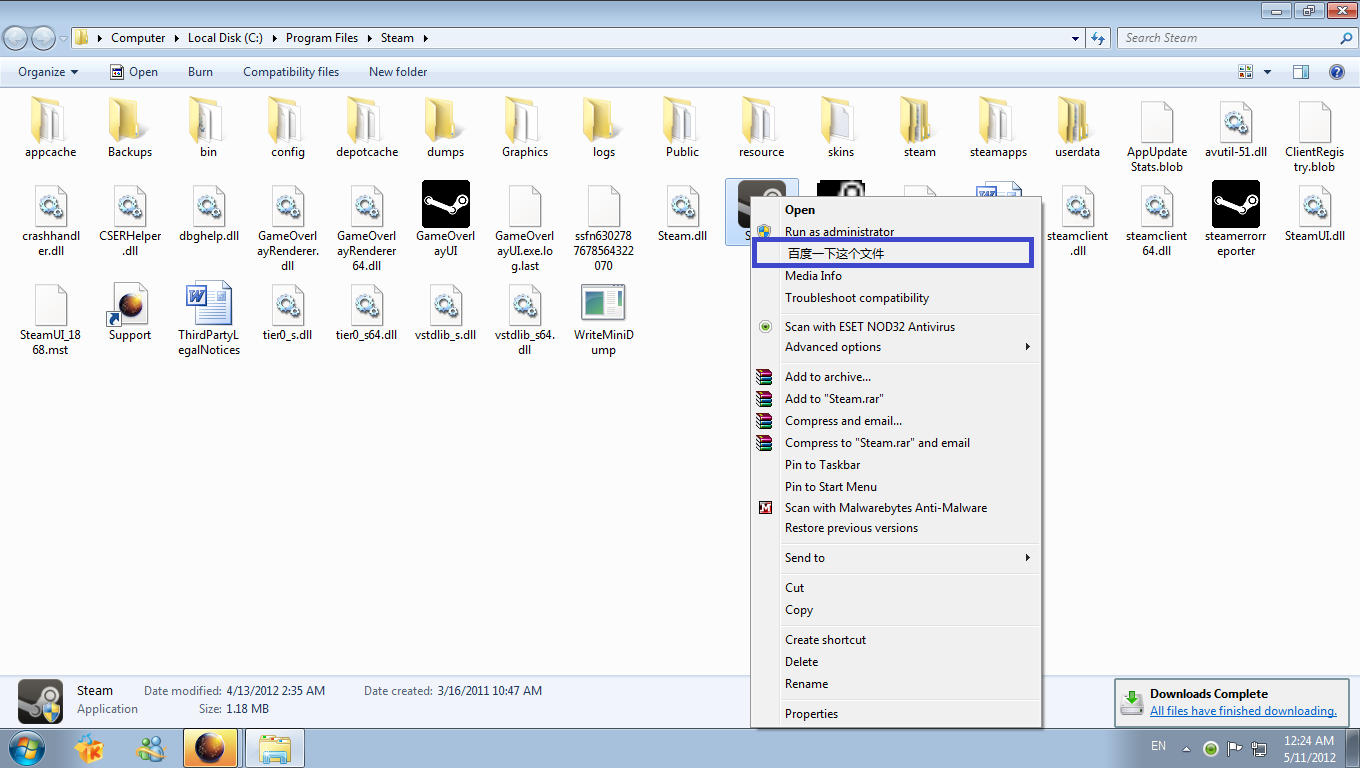
gtnrA.png

Please tell me the location where the properties feature located then I want to remove it as soon as possible.

P.S : Please don't advice I try other AV because I just want to remove the option manually.
 

My Computer

Computer Manufacturer/Model Number
G31T-M7
OS
Window 7 Starter x32
CPU
Intel Pentium E5400 @ 2.70GHz
Motherboard
ECS G31T-M7
Memory
2.00 GB Single-Channel DDR2
Graphics Card(s)
ATI Radeon HD 4600 Series
Monitor(s) Displays
1360x768
Screen Resolution
1360x768
Hard Drives
488GB Western Digital WDC WD5000AADS-00S9B0 ATA Device
Hi Dark,

From your screenshot it looks like you are right-clicking a .exe? If so I might have a solution.

Run "regedit" (Start>search for "regedit"), then expand "HKEY_CLASSES_ROOT". Scroll down to a folder named "exefile" and expand it then expand the folder named "shell". Hopefully that Chinese lettered option will be there. If it is, try to delete it and see if that solves your problem.
 

My Computer

OS
Windows 7 Home Premium x64
EDIT : Solved,for those anyone who have this problem,please follow my solution step that I used to solve it.

Run>Regedit.exe>HKEY_CLASSES_ROOT>*>shell>(Delete the letter contains the chinese letter)
After that go to HKEY_CLASSES_ROOT>Directory>Shell>(Delete the letter contains the chinese letter)
 

My Computer

Computer Manufacturer/Model Number
G31T-M7
OS
Window 7 Starter x32
CPU
Intel Pentium E5400 @ 2.70GHz
Motherboard
ECS G31T-M7
Memory
2.00 GB Single-Channel DDR2
Graphics Card(s)
ATI Radeon HD 4600 Series
Monitor(s) Displays
1360x768
Screen Resolution
1360x768
Hard Drives
488GB Western Digital WDC WD5000AADS-00S9B0 ATA Device
a 3rd party software might fix this easier:

ShellExView - Shell Extension Manager For Windows
Shell Extensions are in-process COM objects which extends the abilities of Windows operating system. Most shell extensions are automatically installed by the operating system, but there are also many other applications that install additional shell extension components. For example: If you install WinZip on your computer, you'll see a special WinZip menu when you right-click on a Zip file. This menu is created by adding a shell extension to the system.

The ShellExView utility displays the details of shell extensions installed on your computer, and allows you to easily disable and enable each shell extension.
(You should be able to uninstall this after and keep the change made to the context menu)
 
Last edited:

My Computer

Computer type
Laptop
Computer Manufacturer/Model Number
ASUS G60-RBBX05
OS
Win7 Home Premium 64x
CPU
Intel Core 2 Duo P7450 / 2.13 GHz (2.29 with Extreme Turbo)
Memory
4 GB PC-6400 Hyundai (2X2) at 800Mhz
Graphics Card(s)
NVIDIA GeForce GTX 260M 1GB DDR3 VRAM
Monitor(s) Displays
16" LED Backlit
Screen Resolution
1366 x 768 on laptop 1600x1050 max res on 22" external mon
Hard Drives
OCZ Agility 3 60GB SSD / 320 GB - Serial ATA-150 - 7200 rpm
PSU
6-cell Lithium ion { lasts 1.5 hours }
Case
ASUS G60 Laptop
Keyboard
Chicklet type back-lit (white light) keyboard
Mouse
Logitech G9 Laser Mouse 3200dpi and 1000 reports per minute
Internet Speed
Comcast 8.60mb/s up - 3.11mb/s down
Antivirus
MSE
Browser
Firefox
Other Info
General mid-budget gaming Comp. Low batterylife - High FrameRates - currently overheating problems :(

2nd Rig: Case: Rosewill BLACKHAWK Gaming ATX Mid Tower Computer Case

Mobo: GIGABYTE GA-990FXA-UD3
CPU: AMD FX-6200 Zambezi 3.8GHz (4.1GHz Turbo)
Heatsink: COOLER MASTER V8 CPU Cooler
RAM: Patriot Viper 3 8GB (2 x 4GB) 240-Pin DDR3 SDRAM 1866 (PC3 15000)
GPU: SAPPHIRE Radeon HD 6850 1GB 2
Back
Top