Solved how to remove USB wifi adaptor?

Attachments

  • erfgher.jpg
    erfgher.jpg
    41.8 KB · Views: 0

My Computer My Computer

At a glance

Windows 7 Ultimate x64
Computer type
PC/Desktop
OS
Windows 7 Ultimate x64
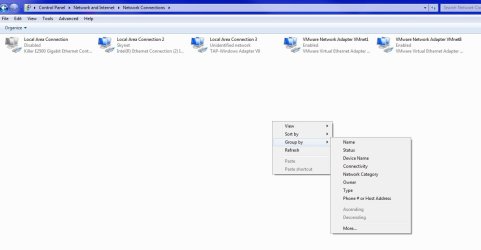
Ah, thank you. That does indeed show my network hardware, and it tells me who is connected and even if my ethernet is unplugged. Now, "Network Connections" isn't that easy to get to. If I go to "Control Panel>Network and Internet, I can't obviously get there from there. But if you search for it, you can find it. They hide it well.

Now, does that "Network Connections" window actually allow me to choose which connection I want? That is, if I have my ethernet attached AND a wifi dongle, does this window let me select which one to connect to my network? I guess if I select a device, I can "Connect to". Is that how you do it?
 

My Computer My Computer

At a glance

Windows 7
OS
Windows 7
So lets make this easier since it seems you'll want to access the network adapters all the time. Lets create a shortcut to the desktop for the network adapters. This is super easy.

First go back into Network Connections and then drag the icon there in the address bar to your desktop. If the Network Connections window is maximized just resize it so you can drag the icon to the desktop. See attached image.


Now if you want to use one adapter over the other and vice versa, you'll have to enable or disable the adapter. To do that just right click the adapter and chose enable or disable. Once you enable an adapter it may take a few seconds to acquire an IP address from the router/modem.

If both adapters are on at the same time, only one will work. It's due to that metric thing I was talking about. By default all adapters have an automatic metric. How Windows chooses which has higher priority I don't know. I'm thinking even if you kill the router WIFI and you're primary adapter is the WIFI adapter, the adapter will still be engaged. Unless Windows falls back to the other metric for your Ethernet adapter or another adapter. Now that I think of this I should put it to the test and see what I find out.

I'm pretty sure there is software that can do all this stuff, but the functionality is already right there in Windows. So occupying more hard drive space and what not to do what Windows already does is pointless. Back in my XP days I ran a piece of software that used profiles for certain network settings. I mostly used it to change the DNS with a click of a button using different profiles.
 

Attachments

  • fdbgfd.jpg
    fdbgfd.jpg
    44.3 KB · Views: 0

My Computer My Computer

At a glance

Windows 7 Ultimate x64
Computer type
PC/Desktop
OS
Windows 7 Ultimate x64
Yowza. Good stuff. Thank you very much for your expert help, and also your patience. I very much appreciate it! I call this issue solved.
 

My Computer My Computer

At a glance

Windows 7
OS
Windows 7
Cool.
 

My Computer My Computer

At a glance

Windows 7 Ultimate x64
Computer type
PC/Desktop
OS
Windows 7 Ultimate x64
Back
Top