How to remove Windows 10 upgrade updates in Windows 7 and 8

My test is that I've been using my MS account to sign into Windows 10 since October and never seen the slightest evidence of it being used or purloined for any other purpose at all.

Meanwhile if I accidentally sign into Google or Youtube or install any of their programs, within minutes a comment I make in an email will spray related ads everywhere I go. :shock:

Google is the company that promised to "do no evil." So why are they given a pass while imaginary threats from MS abound even though they haven't the slightest record of spying and go out of their way to protect consumer rights?
 
My test is that I've been using my MS account to sign into Windows 10 since October and never seen the slightest evidence of it being used or purloined for any other purpose at all.

Meanwhile if I accidentally sign into Google or Youtube or install any of their programs, within minutes a comment I make in an email will spray related ads everywhere I go. :shock:

Google is the company that promised to "do no evil." So why are they given a pass while imaginary threats from MS abound even though they haven't the slightest record of spying and go out of their way to protect consumer rights?

Source?
 

My Computer My Computer

At a glance

W10 32 bit, XUbuntu 18.xx 64 bitIntel(R) Celeron(R) CPU G1620T @ 2.40GHz, 240...4GBIntel HD graphics
Computer type
PC/Desktop
Computer Manufacturer/Model Number
Dell All in one Inspiron 2020
OS
W10 32 bit, XUbuntu 18.xx 64 bit
CPU
Intel(R) Celeron(R) CPU G1620T @ 2.40GHz, 2400 Mhz
Motherboard
Dell
Memory
4GB
Graphics Card(s)
Intel HD graphics
Sound Card
High Definition Audio Device
Monitor(s) Displays
20 inch Screen
Screen Resolution
W7=1280 x 720 & Linux Mint Xfce=1360 x 768
Hard Drives
500 GB hard drive
Keyboard
Usb
Mouse
Usb
Internet Speed
High-Speed
Antivirus
MSE
Browser
Main Browser Firefox
Other Info
I have done a clean install of Windows 7 using Dell re-installation disk (Dell sent me one). I also use Free Macrium reflect backup and restore.
It has nothing to do with what google does verses M$ = for me anyway,
It has to do with the way windows has always been used = as a os without any connect M$ services/ apps.
 

My Computer My Computer

At a glance

Win-7-Pro64bit 7-H-Prem-64biti7-5930K 2nd i9-9940x both water blocked VRM'...Trident-z 3200C14 2nd Trident-z 3600C16EVGA 1080ti ftw3 2nd Titan Xp both water blocked
Computer type
PC/Desktop
Computer Manufacturer/Model Number
Custom assembled by me :}
OS
Win-7-Pro64bit 7-H-Prem-64bit
CPU
i7-5930K 2nd i9-9940x both water blocked VRM's too
Motherboard
ASUS SABERTOOTH X99 2nd ASUS x299 Apex
Memory
Trident-z 3200C14 2nd Trident-z 3600C16
Graphics Card(s)
EVGA 1080ti ftw3 2nd Titan Xp both water blocked
Sound Card
Built-in Realtek
Monitor(s) Displays
1-AOC G2460PG 24"G-Sync 144Hz/ 2nd 1-ASUS VG248QE 24" 144Hz
Screen Resolution
1920 x 1080 144Hz
Hard Drives
2-Samsung M.2 Evo & Evo Plus
2-Samsung 850 EVO 500GB SSD's/ 3-2.5 W.D. Black 1tb-&3-1tb/3-3.5 WD Black 1tb hdd's
PSU
EVGA SuperNOVA 1000-P2 2nd 1200-P2
Case
2-Corsair Obsidian Series 450D Black ATX Mid Tower
Cooling
Custom water loops
Keyboard
Logitech G710+/ 2nd Logitech G910
Mouse
2-RedDragon M901 Perdition 16400 dpi Gaming mouse = wired
Internet Speed
Comcast Ping 19ms 89.31mbps download speed 6.12mbps upload
Antivirus
Malwarebytes Pro/ Superantispyware Pro
Browser
FireFox & Pale moon
Other Info
2nd ASUS X299 Apex/Intel i9-9940x with Custom water loop/7H-Prem-x64/Corsair 450D case/Ram Trident-z 3600C16 4x8gb / Samsung970Evo plus 500gb SSD/Dual ssd EZ swap evo/PSU EVGA SuperNova 1200w-P2 80+Platinum/GPU Titan Xp /8-ML-140 on push-pull on 2-280GTX rads
My test is that I've been using my MS account to sign into Windows 10 since October and never seen the slightest evidence of it being used or purloined for any other purpose at all.

Meanwhile if I accidentally sign into Google or Youtube or install any of their programs, within minutes a comment I make in an email will spray related ads everywhere I go. :shock:

Google is the company that promised to "do no evil." So why are they given a pass while imaginary threats from MS abound even though they haven't the slightest record of spying and go out of their way to protect consumer rights?

Source?

I'm the source. I've been here 6-8 hours every day since before Windows 7 was released and have never seen any sign of MS spying in any way. If I had I would have blown the whistle just like I did on the Windows 8 debacle where I was warned I was risking my MVP. Instead MS called me and the other top forums producers into a focus group with their top execs where we gave our view of how badly they had messed up, and this was completely corrected for Windows 10. So my credibility as a MS critic is not in question, but on privacy issues I have never seen any reason to criticize.

You may not trust me as such a source, but there are millions of others on the web who do because they run a better install of Win7 with my help than they could ever pay money for. I only suggest you see for yourself instead of spreading rumours that I believe are unfounded.
 
My test is that I've been using my MS account to sign into Windows 10 since October and never seen the slightest evidence of it being used or purloined for any other purpose at all.

Meanwhile if I accidentally sign into Google or Youtube or install any of their programs, within minutes a comment I make in an email will spray related ads everywhere I go. :shock:

Google is the company that promised to "do no evil." So why are they given a pass while imaginary threats from MS abound even though they haven't the slightest record of spying and go out of their way to protect consumer rights?

I certainly do not give Google a pass. The only Google function I use is Maps and that is only occasionally. I also do not have an account with them.
 

My Computer My Computer

At a glance

Win 7 Ultimate 64 bitIntel i7-3930KKingston HyperX Genesis 32GB Kit (8x4GB Modul...MSI R7850 Twin Frozr 2GD5/OC Radeon HD 7850 2...
Computer type
PC/Desktop
Computer Manufacturer/Model Number
Custom Build
OS
Win 7 Ultimate 64 bit
CPU
Intel i7-3930K
Motherboard
ASUS P9X79 WS
Memory
Kingston HyperX Genesis 32GB Kit (8x4GB Modules) 1600MHz DDR
Graphics Card(s)
MSI R7850 Twin Frozr 2GD5/OC Radeon HD 7850 2GB 256-bit GDDR
Sound Card
Asus Xonar Essence STX
Monitor(s) Displays
3x Asus VG248QE 24", Vizio 32" TV
Screen Resolution
1920 x 1080, ?
Hard Drives
Samsung 128GB 840 Pro SSD (1),
Samsung 4TB 850 EVO SSDs (4)
Samsung 4TB 850 EVO SSDs (16) external backup drives used in 2.5" hot swap bays in the computer.
PSU
Corsair HX750w
Case
Antec Two Hundred v2 (modified)
Cooling
Cooler Master GeminII S524 120mm (fan replaced with a 140mm)
Keyboard
Logitech G510s
Mouse
Logitech M525 (two in use)
Internet Speed
=< 32Mbps down, 8Mbps up
Antivirus
AVAST!, MBAM, SAS, Spybot S&D (all but MBAM free) Glary Util
Browser
IE11
Other Info
LSI 9211-8i HBA card (8 SATA III ports), 2.5" & 3.5" Hot Swap Bays, HooToo HT-CR001 PCI-E to USB 3.0 Internal Hub + 6 Slot Card Reader, and LG Model CH12LS28 BD-ROM Optical Drive. Also, ScanSnap S1500 ADF duplexing scanner, Canon 9000F flat bed scanner, Corsair SP2500 2.1 speakers, Samsung CLP 415nw laser color printer, Cyberpower PP2200SW UPS
Also hopping that a local account creation during install is still there slightly hidden of course as it's always been during clean installs during testing iso builds :/
You should be able to force a Local Account by installing whilst your network is physically disconnected from your PC.
It worked for me with the W10TP clean installs.

Obviously MS could remove that option at any time, or restrict it to the Enterprise version.

I certainly do not give Google a pass. The only Google function I use is Maps and that is only occasionally. I also do not have an account with them.
I was forced to create a Google Account as part of my IT courses. :mad:
 

My Computer My Computer

At a glance

W7 Ultimate SP1, LM19.2 MATE, W10 Home 1703, ...AMD Phenom II x6 1100T, 3.3 GHz12GB DDR3 1333 G-Skill (4GB x 2), G-Skill (2G...NVIDIA GeForce GTX 660
Computer type
PC/Desktop
Computer Manufacturer/Model Number
n/a
OS
W7 Ultimate SP1, LM19.2 MATE, W10 Home 1703, W10 Pro 1703 VM, #All 64 bit
CPU
AMD Phenom II x6 1100T, 3.3 GHz
Motherboard
ASUS M4A88T-M/USB3 (AM3)
Memory
12GB DDR3 1333 G-Skill (4GB x 2), G-Skill (2GB x 2)
Graphics Card(s)
NVIDIA GeForce GTX 660
Sound Card
Realtek?
Monitor(s) Displays
Samsung S23B350
Screen Resolution
1920x1080
Hard Drives
WD Green 2TB (SATA), WD Green 3TB (SATA), WD Blue 4TB (SATA), WD Blue 6TB (SATA)
PSU
Cooler Master
Case
Antec GX300 Tower
Cooling
3x Antec TRICOOL 120mm Fans
Mouse
Wired Optical
Internet Speed
DSL
Antivirus
Avast
Browser
Pale Moon (64 bit)
Other Info
2018-12-27 Upgraded HDDs
2015-12-10 Upgraded case, graphics card, storage
2015-08-15 Upgraded motherboard & RAM
2015-07-15 Upgraded LM17.1 to LM17.2
Last edited:

My Computer My Computer

At a glance

W10 32 bit, XUbuntu 18.xx 64 bitIntel(R) Celeron(R) CPU G1620T @ 2.40GHz, 240...4GBIntel HD graphics
Computer type
PC/Desktop
Computer Manufacturer/Model Number
Dell All in one Inspiron 2020
OS
W10 32 bit, XUbuntu 18.xx 64 bit
CPU
Intel(R) Celeron(R) CPU G1620T @ 2.40GHz, 2400 Mhz
Motherboard
Dell
Memory
4GB
Graphics Card(s)
Intel HD graphics
Sound Card
High Definition Audio Device
Monitor(s) Displays
20 inch Screen
Screen Resolution
W7=1280 x 720 & Linux Mint Xfce=1360 x 768
Hard Drives
500 GB hard drive
Keyboard
Usb
Mouse
Usb
Internet Speed
High-Speed
Antivirus
MSE
Browser
Main Browser Firefox
Other Info
I have done a clean install of Windows 7 using Dell re-installation disk (Dell sent me one). I also use Free Macrium reflect backup and restore.
Ouch.
 

My Computer My Computer

At a glance

Win10 Pro 64-bitAMD Ryzen 7 3800X32 GB Kingston DDR4-2666MSI nVidia GT 710 (2GB)
Computer type
PC/Desktop
Computer Manufacturer/Model Number
Self-Built
OS
Win10 Pro 64-bit
CPU
AMD Ryzen 7 3800X
Motherboard
Gigabyte X570 UD
Memory
32 GB Kingston DDR4-2666
Graphics Card(s)
MSI nVidia GT 710 (2GB)
Sound Card
Creative Audigy FX 5.1
Monitor(s) Displays
ViewSonic VG2439Smh 24"
Screen Resolution
1920x1080
Hard Drives
3xWD1TB; 1xSeagate 1TB... all spinning rust
PSU
EVGA 100-W1-0500-KR (500w)
Case
SilverStone PS10 (modified)
Cooling
CPU:AMD Wraith Prism. Case:3x Noctua 120mm
Keyboard
Compaq Professional PS/2
Mouse
Microsoft Basic Optical Mouse 2.0
Internet Speed
Fiber 1Gbit/sec down/up
Antivirus
Avast Free
Browser
FF, Chrome
Other Info
2x LG GH24NSC0 DVD burners, Mackie CR3 monitor speakers
I couldn't get in. It's giving me a message saying I've hit my five free article limit this month which is b.s. because this is only the second time I've ever been to their *&^%! site. What really happened is I blocked their %$#@! cookie but the moron(s) who designed the website either didn't take or flunked Error Trapping 101, something that is all too common, and makes me wonder what other website blunders the eejit(s) may have committed, any one of which my compromise my security. I will not go to a website that requires me to accept a cookie or get an account just to look at the ^%$#. There is only one reason to require that I accept a cookie just to view a website and that is to snoop on me. The Divil take them!

Rant over. You are now being returned to your regularly scheduled thread.
 

My Computer My Computer

At a glance

Win 7 Ultimate 64 bitIntel i7-3930KKingston HyperX Genesis 32GB Kit (8x4GB Modul...MSI R7850 Twin Frozr 2GD5/OC Radeon HD 7850 2...
Computer type
PC/Desktop
Computer Manufacturer/Model Number
Custom Build
OS
Win 7 Ultimate 64 bit
CPU
Intel i7-3930K
Motherboard
ASUS P9X79 WS
Memory
Kingston HyperX Genesis 32GB Kit (8x4GB Modules) 1600MHz DDR
Graphics Card(s)
MSI R7850 Twin Frozr 2GD5/OC Radeon HD 7850 2GB 256-bit GDDR
Sound Card
Asus Xonar Essence STX
Monitor(s) Displays
3x Asus VG248QE 24", Vizio 32" TV
Screen Resolution
1920 x 1080, ?
Hard Drives
Samsung 128GB 840 Pro SSD (1),
Samsung 4TB 850 EVO SSDs (4)
Samsung 4TB 850 EVO SSDs (16) external backup drives used in 2.5" hot swap bays in the computer.
PSU
Corsair HX750w
Case
Antec Two Hundred v2 (modified)
Cooling
Cooler Master GeminII S524 120mm (fan replaced with a 140mm)
Keyboard
Logitech G510s
Mouse
Logitech M525 (two in use)
Internet Speed
=< 32Mbps down, 8Mbps up
Antivirus
AVAST!, MBAM, SAS, Spybot S&D (all but MBAM free) Glary Util
Browser
IE11
Other Info
LSI 9211-8i HBA card (8 SATA III ports), 2.5" & 3.5" Hot Swap Bays, HooToo HT-CR001 PCI-E to USB 3.0 Internal Hub + 6 Slot Card Reader, and LG Model CH12LS28 BD-ROM Optical Drive. Also, ScanSnap S1500 ADF duplexing scanner, Canon 9000F flat bed scanner, Corsair SP2500 2.1 speakers, Samsung CLP 415nw laser color printer, Cyberpower PP2200SW UPS
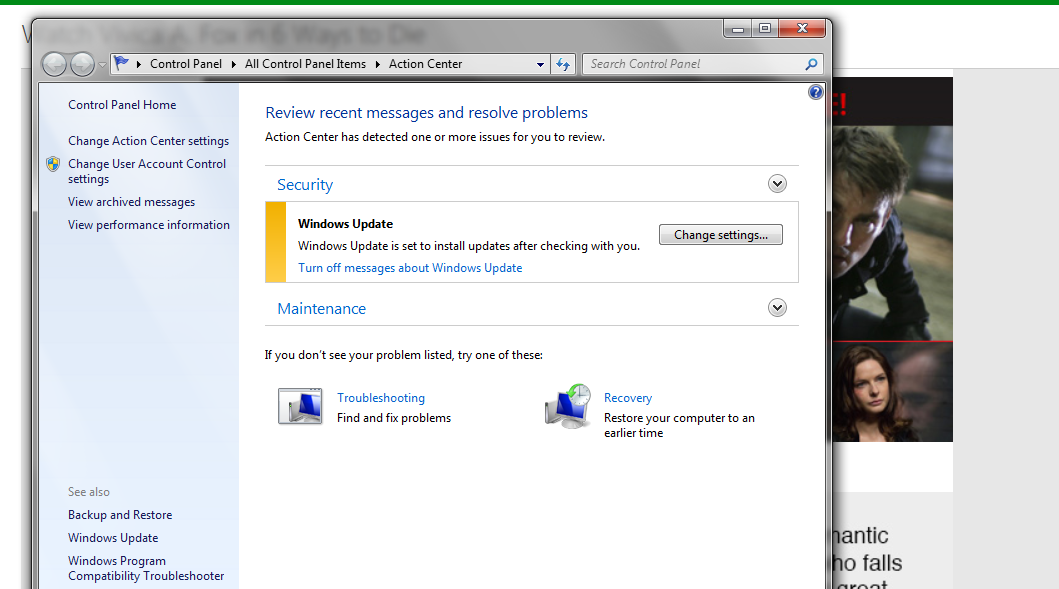
So I'm sorry to keep beating on this but as long as I have Windows Update Settings set to "Download updates but let me choose whether to install them" this msg is in my action center:

T0EMsBwazMaynQwGRxHmAXiLK7rveoVEPi0Xe02J2sU=w1059-h589-no


The only way to make it go away is apparently to turn off Windows Update in the Action Center Settings & that doesn't seem like the appropriate way to solve:

u31nq6LcbgAsQkrvcfa_A8euofe1n5uhfMiBo6XIvJs=w1032-h652-no


Do not remember this being an issue before. I want the Action Center to read No Issues. Without turning off Windows Update in the Action Center Settings.

Is a Windows Update responsible for that?

& speaking of Windows Updates KB2952664 snuck in there again, even tho Updates are set to "Download updates but let me choose whether to install them". Perhaps all the messing with this Action Center Alert. I have attempted to uninstall KB2952664 twice today & while it indicates success it still shows up under "Installed Updates"?

I am perfectly happy with Windows 7 & plan on using as long as there is support. Why is MS pushing 10 so hard?

thank you
 

My Computer My Computer

At a glance

Windows 7 Ultimate x64Intel Core i7-950Elpida DDR3 12 Gb 1066EVGA nVidia GeForce GTX 760 2GB GDDR5
Computer type
PC/Desktop
Computer Manufacturer/Model Number
Dell XPS 435MT
OS
Windows 7 Ultimate x64
CPU
Intel Core i7-950
Motherboard
Dell 0R849J
Memory
Elpida DDR3 12 Gb 1066
Graphics Card(s)
EVGA nVidia GeForce GTX 760 2GB GDDR5
Sound Card
Syba PCI-e VIA VT1723 Envy24DT
Monitor(s) Displays
Dell 3007WFP-HC, Nixeus Vue 30
Screen Resolution
1920 x 1200
Hard Drives
Crucial M500 240GB
1TB Seagate Barracuda
PSU
Corsair CX500M
Keyboard
Logitech MX 5500 combo
Mouse
Logitech MX 5500
Internet Speed
300Mbps
Antivirus
MSE
Browser
IE11 & Chrome
Other Info
MBAM Premium
I changed the Update Settings to "Never check for updates", uninstalled KB2952664 again. It disappeared but after restart there it is showing up as installed? It looks as if it is reinstalling right away. Can that be possible with Update settings set to Never?
 

My Computer My Computer

At a glance

Windows 7 Ultimate x64Intel Core i7-950Elpida DDR3 12 Gb 1066EVGA nVidia GeForce GTX 760 2GB GDDR5
Computer type
PC/Desktop
Computer Manufacturer/Model Number
Dell XPS 435MT
OS
Windows 7 Ultimate x64
CPU
Intel Core i7-950
Motherboard
Dell 0R849J
Memory
Elpida DDR3 12 Gb 1066
Graphics Card(s)
EVGA nVidia GeForce GTX 760 2GB GDDR5
Sound Card
Syba PCI-e VIA VT1723 Envy24DT
Monitor(s) Displays
Dell 3007WFP-HC, Nixeus Vue 30
Screen Resolution
1920 x 1200
Hard Drives
Crucial M500 240GB
1TB Seagate Barracuda
PSU
Corsair CX500M
Keyboard
Logitech MX 5500 combo
Mouse
Logitech MX 5500
Internet Speed
300Mbps
Antivirus
MSE
Browser
IE11 & Chrome
Other Info
MBAM Premium
I changes the Update Settings to "Never check for updates", uninstalled KB2952664 again. It disappeared but after restart there it is showing up as installed? It looks as if it is reinstalling right away. Can that be possible with Update settings set to Never?

That's weird, I had no problem uninstalling that update months ago. It worked first time. I know there have been a few revisions to that update. How many times have you tried uninstalling it?
 

My Computer My Computer

At a glance

Win 7 Ultimate, Win 8.1 Pro, Linux Mint 19 Ci...Intel i5 4690KCorsair Vengeance LP 32GB DDR3MSI GTX 1060 GAMING X 6GB
Computer type
PC/Desktop
Computer Manufacturer/Model Number
Custom Build
OS
Win 7 Ultimate, Win 8.1 Pro, Linux Mint 19 Cinnamon (All 64-Bit)
CPU
Intel i5 4690K
Motherboard
Gigabyte Z97X-UD3H
Memory
Corsair Vengeance LP 32GB DDR3
Graphics Card(s)
MSI GTX 1060 GAMING X 6GB
Sound Card
Onboard
Hard Drives
Samsung 850 EVO 250GB SSD (x2)
Samsung 860 EVO 1TB SSD (x2)
Crucial MX300 525GB SSD
WD Blue 2TB 5400rpm Intellipark Disabled (x2)
PSU
Corsair HX750i
Case
Phanteks Enthoo Pro
Cooling
CM Hyper 212 EVO on CPU, Noctua Redux NF-P14S 1500rpm (x6)
Keyboard
Corsair K70 RGB LUX
Mouse
Corsair Sabre RGB
Antivirus
Avast Free, MalwareBytes, SAS & CryptoPrevent
Browser
Chrome
Other Info
StarTech PEXESAT322I 2 Port PCI-E SATA Card
ASUS PCE-AC56 Dual-band AC1300 Wireless Card
Akasa FC.Six Manual Fan Controller
And a Partridge in a Pear Tree!
That's weird, I had no problem uninstalling that update months ago. It worked first time. I know there have been a few revisions to that update. How many times have you tried uninstalling it?
Three times today. Can't get it out of there.
 

My Computer My Computer

At a glance

Windows 7 Ultimate x64Intel Core i7-950Elpida DDR3 12 Gb 1066EVGA nVidia GeForce GTX 760 2GB GDDR5
Computer type
PC/Desktop
Computer Manufacturer/Model Number
Dell XPS 435MT
OS
Windows 7 Ultimate x64
CPU
Intel Core i7-950
Motherboard
Dell 0R849J
Memory
Elpida DDR3 12 Gb 1066
Graphics Card(s)
EVGA nVidia GeForce GTX 760 2GB GDDR5
Sound Card
Syba PCI-e VIA VT1723 Envy24DT
Monitor(s) Displays
Dell 3007WFP-HC, Nixeus Vue 30
Screen Resolution
1920 x 1200
Hard Drives
Crucial M500 240GB
1TB Seagate Barracuda
PSU
Corsair CX500M
Keyboard
Logitech MX 5500 combo
Mouse
Logitech MX 5500
Internet Speed
300Mbps
Antivirus
MSE
Browser
IE11 & Chrome
Other Info
MBAM Premium
That's weird, I had no problem uninstalling that update months ago. It worked first time. I know there have been a few revisions to that update. How many times have you tried uninstalling it?
Three times today. Can't get it out of there.

Wow, that's one persistent little bugger. Really can't understand why it's not uninstalling. Have you excluded the other updates on this list? Maybe there's another one preventing it being uninstalled?
 

My Computer My Computer

At a glance

Win 7 Ultimate, Win 8.1 Pro, Linux Mint 19 Ci...Intel i5 4690KCorsair Vengeance LP 32GB DDR3MSI GTX 1060 GAMING X 6GB
Computer type
PC/Desktop
Computer Manufacturer/Model Number
Custom Build
OS
Win 7 Ultimate, Win 8.1 Pro, Linux Mint 19 Cinnamon (All 64-Bit)
CPU
Intel i5 4690K
Motherboard
Gigabyte Z97X-UD3H
Memory
Corsair Vengeance LP 32GB DDR3
Graphics Card(s)
MSI GTX 1060 GAMING X 6GB
Sound Card
Onboard
Hard Drives
Samsung 850 EVO 250GB SSD (x2)
Samsung 860 EVO 1TB SSD (x2)
Crucial MX300 525GB SSD
WD Blue 2TB 5400rpm Intellipark Disabled (x2)
PSU
Corsair HX750i
Case
Phanteks Enthoo Pro
Cooling
CM Hyper 212 EVO on CPU, Noctua Redux NF-P14S 1500rpm (x6)
Keyboard
Corsair K70 RGB LUX
Mouse
Corsair Sabre RGB
Antivirus
Avast Free, MalwareBytes, SAS & CryptoPrevent
Browser
Chrome
Other Info
StarTech PEXESAT322I 2 Port PCI-E SATA Card
ASUS PCE-AC56 Dual-band AC1300 Wireless Card
Akasa FC.Six Manual Fan Controller
And a Partridge in a Pear Tree!
Never check for updates = should never actually be used you have MSE ;)

But regardless Ask before downloading and installing updates is harmless
So is unchecking Give me recommended updates the same as Important updates.

It sounds like your user account is not the only one on this machine ?
That update is only one of several win-10 preparations updates.
 

My Computer My Computer

At a glance

Win-7-Pro64bit 7-H-Prem-64biti7-5930K 2nd i9-9940x both water blocked VRM'...Trident-z 3200C14 2nd Trident-z 3600C16EVGA 1080ti ftw3 2nd Titan Xp both water blocked
Computer type
PC/Desktop
Computer Manufacturer/Model Number
Custom assembled by me :}
OS
Win-7-Pro64bit 7-H-Prem-64bit
CPU
i7-5930K 2nd i9-9940x both water blocked VRM's too
Motherboard
ASUS SABERTOOTH X99 2nd ASUS x299 Apex
Memory
Trident-z 3200C14 2nd Trident-z 3600C16
Graphics Card(s)
EVGA 1080ti ftw3 2nd Titan Xp both water blocked
Sound Card
Built-in Realtek
Monitor(s) Displays
1-AOC G2460PG 24"G-Sync 144Hz/ 2nd 1-ASUS VG248QE 24" 144Hz
Screen Resolution
1920 x 1080 144Hz
Hard Drives
2-Samsung M.2 Evo & Evo Plus
2-Samsung 850 EVO 500GB SSD's/ 3-2.5 W.D. Black 1tb-&3-1tb/3-3.5 WD Black 1tb hdd's
PSU
EVGA SuperNOVA 1000-P2 2nd 1200-P2
Case
2-Corsair Obsidian Series 450D Black ATX Mid Tower
Cooling
Custom water loops
Keyboard
Logitech G710+/ 2nd Logitech G910
Mouse
2-RedDragon M901 Perdition 16400 dpi Gaming mouse = wired
Internet Speed
Comcast Ping 19ms 89.31mbps download speed 6.12mbps upload
Antivirus
Malwarebytes Pro/ Superantispyware Pro
Browser
FireFox & Pale moon
Other Info
2nd ASUS X299 Apex/Intel i9-9940x with Custom water loop/7H-Prem-x64/Corsair 450D case/Ram Trident-z 3600C16 4x8gb / Samsung970Evo plus 500gb SSD/Dual ssd EZ swap evo/PSU EVGA SuperNova 1200w-P2 80+Platinum/GPU Titan Xp /8-ML-140 on push-pull on 2-280GTX rads
Never check for updates = should never actually be used you have MSE ;)

But regardless Ask before downloading and installing updates is harmless
So is unchecking Give me recommended updates the same as Important updates.

It sounds like your user account is not the only one on this machine ?
That update is only one of several win-10 preparations updates.

I set it back to "Download updates & let me choose", the Never was just to try & keep KB2952664 off. "Give me recommended updates the same as Important updates" is unchecked.
This is my laptop & only has one user account. But the same Action Center msg is on the desktop. Something has changed recently.

Still concerned that am unable to remove KB2952664. Believe I have hidden this update on several occasions, there must be several iterations of KB2952664.

edit:
Have also hidden KB3035583, KB3068708
 

My Computer My Computer

At a glance

Windows 7 Ultimate x64Intel Core i7-950Elpida DDR3 12 Gb 1066EVGA nVidia GeForce GTX 760 2GB GDDR5
Computer type
PC/Desktop
Computer Manufacturer/Model Number
Dell XPS 435MT
OS
Windows 7 Ultimate x64
CPU
Intel Core i7-950
Motherboard
Dell 0R849J
Memory
Elpida DDR3 12 Gb 1066
Graphics Card(s)
EVGA nVidia GeForce GTX 760 2GB GDDR5
Sound Card
Syba PCI-e VIA VT1723 Envy24DT
Monitor(s) Displays
Dell 3007WFP-HC, Nixeus Vue 30
Screen Resolution
1920 x 1200
Hard Drives
Crucial M500 240GB
1TB Seagate Barracuda
PSU
Corsair CX500M
Keyboard
Logitech MX 5500 combo
Mouse
Logitech MX 5500
Internet Speed
300Mbps
Antivirus
MSE
Browser
IE11 & Chrome
Other Info
MBAM Premium

My Computer My Computer

At a glance

Windows 7 Ultimate x64 SP1AMD Phenom 2 1090T2x8GB Kingston HyperX Fury Black 1600Mhz Unga...MSI GTX 970 Gaming 4G
Computer type
PC/Desktop
Computer Manufacturer/Model Number
Custom Build
OS
Windows 7 Ultimate x64 SP1
CPU
AMD Phenom 2 1090T
Motherboard
Gigabyte GA-890FXA-UD5
Memory
2x8GB Kingston HyperX Fury Black 1600Mhz Unganged
Graphics Card(s)
MSI GTX 970 Gaming 4G
Sound Card
Realtek On-Board HD 7.1 Audio / Logitech G35
Monitor(s) Displays
3xAcer GD245HQ
Screen Resolution
1920x1080
Hard Drives
Samsung 850 Pro 512GB SSD - OS /
WD Caviar Black SATA 3 - 1 TBx2 - Dynamic RAID 0 /
WD Caviar Green SATA 2 - 640GBx2 - Dynamic RAID 0 /
WD Caviar Green SATA 2 - 640GB - Internal Backup /
Seagate Barracude SATA 3 - 3TB - External Backup/ Sync
PSU
HighPower 1000W
Case
Cooler Master HAF 932
Cooling
Noctua NH-D14
Keyboard
Logitech G19
Mouse
Logitech G500
Internet Speed
100/4 Mbit Cable (100GB quota)
Antivirus
ZoneAlarm Extreme Security / MBAM Pro / MBAE Free / SAS Free
Browser
IE 11 - Firefox - Chrome
Other Info
Logitech F710/ G27/ G940/ Z5500 // TrackIR 5 // Nvidia 3D Surround Vision
Well I don't know what's going on, KB2952664 does show up under Hidden Updates but also shows up in Installed Updates with today's date.
I give up. Going to go do something easier like build a photon accelerator in my garage.

Edit:
Same on desktop - KB2952664 shows installed on 7/29 but is also Hidden.
 

My Computer My Computer

At a glance

Windows 7 Ultimate x64Intel Core i7-950Elpida DDR3 12 Gb 1066EVGA nVidia GeForce GTX 760 2GB GDDR5
Computer type
PC/Desktop
Computer Manufacturer/Model Number
Dell XPS 435MT
OS
Windows 7 Ultimate x64
CPU
Intel Core i7-950
Motherboard
Dell 0R849J
Memory
Elpida DDR3 12 Gb 1066
Graphics Card(s)
EVGA nVidia GeForce GTX 760 2GB GDDR5
Sound Card
Syba PCI-e VIA VT1723 Envy24DT
Monitor(s) Displays
Dell 3007WFP-HC, Nixeus Vue 30
Screen Resolution
1920 x 1200
Hard Drives
Crucial M500 240GB
1TB Seagate Barracuda
PSU
Corsair CX500M
Keyboard
Logitech MX 5500 combo
Mouse
Logitech MX 5500
Internet Speed
300Mbps
Antivirus
MSE
Browser
IE11 & Chrome
Other Info
MBAM Premium
How it has bugged other people, couldn't see a solution though, writer caved in and let it install :p

Maybe that's the best thing to do & just set updates to auto, then all is fixed :confused:

Edit:
I unhid KB2952664, installed again & set Updates to Auto (Action Center all good this way). "Give me recommended updates the same as Important updates" is unchecked. If this is the way MS wants to run things OK. The Linux operating system I donated $16 to Canonical for just runs. Never a problem :sarc:
 
Last edited:

My Computer My Computer

At a glance

Windows 7 Ultimate x64Intel Core i7-950Elpida DDR3 12 Gb 1066EVGA nVidia GeForce GTX 760 2GB GDDR5
Computer type
PC/Desktop
Computer Manufacturer/Model Number
Dell XPS 435MT
OS
Windows 7 Ultimate x64
CPU
Intel Core i7-950
Motherboard
Dell 0R849J
Memory
Elpida DDR3 12 Gb 1066
Graphics Card(s)
EVGA nVidia GeForce GTX 760 2GB GDDR5
Sound Card
Syba PCI-e VIA VT1723 Envy24DT
Monitor(s) Displays
Dell 3007WFP-HC, Nixeus Vue 30
Screen Resolution
1920 x 1200
Hard Drives
Crucial M500 240GB
1TB Seagate Barracuda
PSU
Corsair CX500M
Keyboard
Logitech MX 5500 combo
Mouse
Logitech MX 5500
Internet Speed
300Mbps
Antivirus
MSE
Browser
IE11 & Chrome
Other Info
MBAM Premium
...
I am perfectly happy with Windows 7 & plan on using as long as there is support. Why is MS pushing 10 so hard?

thank you

Because MS is afraid of another Win 8 debacle and is using every trick it can think of to ensure the installation figures for Win 10 look as good as possible and avoid having it appear to be another embarrassing flop like Win 8 was. It also wants to gain as much control over how you compute as possible, the hell with what anyone may actually want, much like Apple has done.
 

My Computer My Computer

At a glance

Win 7 Ultimate 64 bitIntel i7-3930KKingston HyperX Genesis 32GB Kit (8x4GB Modul...MSI R7850 Twin Frozr 2GD5/OC Radeon HD 7850 2...
Computer type
PC/Desktop
Computer Manufacturer/Model Number
Custom Build
OS
Win 7 Ultimate 64 bit
CPU
Intel i7-3930K
Motherboard
ASUS P9X79 WS
Memory
Kingston HyperX Genesis 32GB Kit (8x4GB Modules) 1600MHz DDR
Graphics Card(s)
MSI R7850 Twin Frozr 2GD5/OC Radeon HD 7850 2GB 256-bit GDDR
Sound Card
Asus Xonar Essence STX
Monitor(s) Displays
3x Asus VG248QE 24", Vizio 32" TV
Screen Resolution
1920 x 1080, ?
Hard Drives
Samsung 128GB 840 Pro SSD (1),
Samsung 4TB 850 EVO SSDs (4)
Samsung 4TB 850 EVO SSDs (16) external backup drives used in 2.5" hot swap bays in the computer.
PSU
Corsair HX750w
Case
Antec Two Hundred v2 (modified)
Cooling
Cooler Master GeminII S524 120mm (fan replaced with a 140mm)
Keyboard
Logitech G510s
Mouse
Logitech M525 (two in use)
Internet Speed
=< 32Mbps down, 8Mbps up
Antivirus
AVAST!, MBAM, SAS, Spybot S&D (all but MBAM free) Glary Util
Browser
IE11
Other Info
LSI 9211-8i HBA card (8 SATA III ports), 2.5" & 3.5" Hot Swap Bays, HooToo HT-CR001 PCI-E to USB 3.0 Internal Hub + 6 Slot Card Reader, and LG Model CH12LS28 BD-ROM Optical Drive. Also, ScanSnap S1500 ADF duplexing scanner, Canon 9000F flat bed scanner, Corsair SP2500 2.1 speakers, Samsung CLP 415nw laser color printer, Cyberpower PP2200SW UPS
Back
Top