How to remove Windows 10 upgrade updates in Windows 7 and 8

...
I am perfectly happy with Windows 7 & plan on using as long as there is support. Why is MS pushing 10 so hard?

thank you

Because MS is afraid of another Win 8 debacle and is using every trick it can think of to ensure the installation figures for Win 10 look as good as possible and avoid having it appear to be another embarrassing flop like Win 8 was. It also wants to gain as much control over how you compute as possible, the hell with what anyone may actually want, much like Apple has done.

I don't know if 10 will be a success. Microsoft needs to make some improvements and be clearer on what they mean in the E.U.L.A. I think Microsoft might come out with a statement this week or next to address the critics but we still don't know if Microsoft will do anything. Time will tell.

For the record I do like 10 but for some the cost may be to high.

Windows 10 may not be h.i.p.a.a compliant even the Enterprise version-unconfirmed at the moment.
 

My Computer My Computer

At a glance

W10 32 bit, XUbuntu 18.xx 64 bitIntel(R) Celeron(R) CPU G1620T @ 2.40GHz, 240...4GBIntel HD graphics
Computer type
PC/Desktop
Computer Manufacturer/Model Number
Dell All in one Inspiron 2020
OS
W10 32 bit, XUbuntu 18.xx 64 bit
CPU
Intel(R) Celeron(R) CPU G1620T @ 2.40GHz, 2400 Mhz
Motherboard
Dell
Memory
4GB
Graphics Card(s)
Intel HD graphics
Sound Card
High Definition Audio Device
Monitor(s) Displays
20 inch Screen
Screen Resolution
W7=1280 x 720 & Linux Mint Xfce=1360 x 768
Hard Drives
500 GB hard drive
Keyboard
Usb
Mouse
Usb
Internet Speed
High-Speed
Antivirus
MSE
Browser
Main Browser Firefox
Other Info
I have done a clean install of Windows 7 using Dell re-installation disk (Dell sent me one). I also use Free Macrium reflect backup and restore.
Never check for updates = should never actually be used you have MSE ;)

But regardless Ask before downloading and installing updates is harmless
So is unchecking Give me recommended updates the same as Important updates.

It sounds like your user account is not the only one on this machine ?
That update is only one of several win-10 preparations updates.

I set it back to "Download updates & let me choose", the Never was just to try & keep KB2952664 off. "Give me recommended updates the same as Important updates" is unchecked.
This is my laptop & only has one user account. But the same Action Center msg is on the desktop. Something has changed recently.

Still concerned that am unable to remove KB2952664. Believe I have hidden this update on several occasions, there must be several iterations of KB2952664.

edit:
Have also hidden KB3035583, KB3068708

In last months Dr. Windows update pack that update was on v10 so there's been quite a few different versions of that file. That thing is going nowhere near my system again as it's the update that caused my hard disk to thrash regularly. Have had no issues since I got rid of it.
I've always had the Action Center set to not warn me about Windows Updates as I install them around a week after they've been out and after I've made a system image.
 

My Computer My Computer

At a glance

Win 7 Ultimate, Win 8.1 Pro, Linux Mint 19 Ci...Intel i5 4690KCorsair Vengeance LP 32GB DDR3MSI GTX 1060 GAMING X 6GB
Computer type
PC/Desktop
Computer Manufacturer/Model Number
Custom Build
OS
Win 7 Ultimate, Win 8.1 Pro, Linux Mint 19 Cinnamon (All 64-Bit)
CPU
Intel i5 4690K
Motherboard
Gigabyte Z97X-UD3H
Memory
Corsair Vengeance LP 32GB DDR3
Graphics Card(s)
MSI GTX 1060 GAMING X 6GB
Sound Card
Onboard
Hard Drives
Samsung 850 EVO 250GB SSD (x2)
Samsung 860 EVO 1TB SSD (x2)
Crucial MX300 525GB SSD
WD Blue 2TB 5400rpm Intellipark Disabled (x2)
PSU
Corsair HX750i
Case
Phanteks Enthoo Pro
Cooling
CM Hyper 212 EVO on CPU, Noctua Redux NF-P14S 1500rpm (x6)
Keyboard
Corsair K70 RGB LUX
Mouse
Corsair Sabre RGB
Antivirus
Avast Free, MalwareBytes, SAS & CryptoPrevent
Browser
Chrome
Other Info
StarTech PEXESAT322I 2 Port PCI-E SATA Card
ASUS PCE-AC56 Dual-band AC1300 Wireless Card
Akasa FC.Six Manual Fan Controller
And a Partridge in a Pear Tree!
In last months Dr. Windows update pack that update was on v10 so there's been quite a few different versions of that file. That thing is going nowhere near my system again as it's the update that caused my hard disk to thrash regularly. Have had no issues since I got rid of it.
I've always had the Action Center set to not warn me about Windows Updates as I install them around a week after they've been out and after I've made a system image.

So it's possible to have one v of KB2952664 installed while another is hidden?
I'll keep an eye on HD's but as far as I know no adverse affect yet.

Thanks for that.

On another note:
I bought the desktop in 2009 - it came with Vista. I did not install Win 7 until a couple years later. So I have had this PC for 6 years & in that time could have installed now 5 different OS's, including Win 10. Vista, Win 7, Win 8, Win 8.1 & Win 10. Not knowing anything about Win 8 or 8.1 I assume 8.1 is not like a service pack update to Win 8 but instead an actual upgrade?
That's an upgrade almost every year. How often does MS think we want to upgrade our machines? I don't want to offend the Geeks here (Geek being a good thing) but for some of us it's just too much.

Many of my friends & family members are dropping their Android phones in favor of iPhones just because they aren't willing to keep up with the tech. The iPhones are apparently very easy to use. I won't touch Apple products, to me that's like buying a $50,000 car when a $20,000 car will do the same thing - more in some cases. My Pantech Burst $120 on eBay, unlocked. $10/month phone plan with budget carrier. Hard to beat that :D
I think these tech giants (MS & Google) are chasing customers off by over complicating.

Think I just hit 100 posts :shock:
 

My Computer My Computer

At a glance

Windows 7 Ultimate x64Intel Core i7-950Elpida DDR3 12 Gb 1066EVGA nVidia GeForce GTX 760 2GB GDDR5
Computer type
PC/Desktop
Computer Manufacturer/Model Number
Dell XPS 435MT
OS
Windows 7 Ultimate x64
CPU
Intel Core i7-950
Motherboard
Dell 0R849J
Memory
Elpida DDR3 12 Gb 1066
Graphics Card(s)
EVGA nVidia GeForce GTX 760 2GB GDDR5
Sound Card
Syba PCI-e VIA VT1723 Envy24DT
Monitor(s) Displays
Dell 3007WFP-HC, Nixeus Vue 30
Screen Resolution
1920 x 1200
Hard Drives
Crucial M500 240GB
1TB Seagate Barracuda
PSU
Corsair CX500M
Keyboard
Logitech MX 5500 combo
Mouse
Logitech MX 5500
Internet Speed
300Mbps
Antivirus
MSE
Browser
IE11 & Chrome
Other Info
MBAM Premium
Never check for updates = should never actually be used you have MSE ;)

But regardless Ask before downloading and installing updates is harmless
So is unchecking Give me recommended updates the same as Important updates.

It sounds like your user account is not the only one on this machine ?
That update is only one of several win-10 preparations updates.

I set it back to "Download updates & let me choose", the Never was just to try & keep KB2952664 off. "Give me recommended updates the same as Important updates" is unchecked.
This is my laptop & only has one user account. But the same Action Center msg is on the desktop. Something has changed recently.

Still concerned that am unable to remove KB2952664. Believe I have hidden this update on several occasions, there must be several iterations of KB2952664.

edit:
Have also hidden KB3035583, KB3068708

caused my hard disk to thrash regularly. .
I didn't do anything :p

On a serious note I just did a clean install on my new assembly and those updates have not installed
I avoided most of the ones in post 1 plus a few others so I don't know what is going on with your system ?
I sure don't have any get 10 doodah
I'll buy it outright or not at all.
Weird to say the least though
System restore or uninstalling it clearly does not work for some people :/
 

My Computer My Computer

At a glance

Win-7-Pro64bit 7-H-Prem-64biti7-5930K 2nd i9-9940x both water blocked VRM'...Trident-z 3200C14 2nd Trident-z 3600C16EVGA 1080ti ftw3 2nd Titan Xp both water blocked
Computer type
PC/Desktop
Computer Manufacturer/Model Number
Custom assembled by me :}
OS
Win-7-Pro64bit 7-H-Prem-64bit
CPU
i7-5930K 2nd i9-9940x both water blocked VRM's too
Motherboard
ASUS SABERTOOTH X99 2nd ASUS x299 Apex
Memory
Trident-z 3200C14 2nd Trident-z 3600C16
Graphics Card(s)
EVGA 1080ti ftw3 2nd Titan Xp both water blocked
Sound Card
Built-in Realtek
Monitor(s) Displays
1-AOC G2460PG 24"G-Sync 144Hz/ 2nd 1-ASUS VG248QE 24" 144Hz
Screen Resolution
1920 x 1080 144Hz
Hard Drives
2-Samsung M.2 Evo & Evo Plus
2-Samsung 850 EVO 500GB SSD's/ 3-2.5 W.D. Black 1tb-&3-1tb/3-3.5 WD Black 1tb hdd's
PSU
EVGA SuperNOVA 1000-P2 2nd 1200-P2
Case
2-Corsair Obsidian Series 450D Black ATX Mid Tower
Cooling
Custom water loops
Keyboard
Logitech G710+/ 2nd Logitech G910
Mouse
2-RedDragon M901 Perdition 16400 dpi Gaming mouse = wired
Internet Speed
Comcast Ping 19ms 89.31mbps download speed 6.12mbps upload
Antivirus
Malwarebytes Pro/ Superantispyware Pro
Browser
FireFox & Pale moon
Other Info
2nd ASUS X299 Apex/Intel i9-9940x with Custom water loop/7H-Prem-x64/Corsair 450D case/Ram Trident-z 3600C16 4x8gb / Samsung970Evo plus 500gb SSD/Dual ssd EZ swap evo/PSU EVGA SuperNova 1200w-P2 80+Platinum/GPU Titan Xp /8-ML-140 on push-pull on 2-280GTX rads
I didn't do anything :p

On a serious note I just did a clean install on my new assembly and those updates have not installed
I avoided most of the ones in post 1 plus a few others so I don't know what is going on with your system ?
I sure don't have any get 10 doodah
I'll buy it outright or not at all.
Weird to say the least though
System restore or uninstalling it clearly does not work for some people :/

There goes my nice round 100 ;)

Was not having a problem with KB2952664 until just recently, have had it hidden since I started following this thread. As I have most, if not all, the other updates identified to be Win 10 related. My first encounter with the Win 10 stuff came around the middle of May when sfc scan found corrupted files = Corrupt "utc.app.json" & "telemetry.ASM-WindowsDefault.json" A result of KB3022345 = Windows 7 update (KB3022345) causing corrupt files

So yes I didn't do it. As far as I'm concerned this Microsoft breaking my machine & I want them to stop doing it.

Windows update updating is new but I'll just leave updates in auto since that appears to be what MS wants. If only Important updates get installed guess that's OK.

System restore out of the question, computers running well. Now that all KB2952664 installed & Action Center alert gone all is good.


Edit:
After reread that comment may have been a bit snide :zip:
So yes I didn't do it. As far as I'm concerned this Microsoft breaking my machine & I want them to stop doing it.

Perhaps gregrocker hit it. I'll just install all I hid pertaining to Win 10 & let MS do it's thing.

Set Updates to Automatic. Hide Bing. The others are fine. .

Hope there's nothing wrong with Windows Update. That both Win 7 machines affected at same time doesn't lend itself to my mistake, in my opinion.
 
Last edited:

My Computer My Computer

At a glance

Windows 7 Ultimate x64Intel Core i7-950Elpida DDR3 12 Gb 1066EVGA nVidia GeForce GTX 760 2GB GDDR5
Computer type
PC/Desktop
Computer Manufacturer/Model Number
Dell XPS 435MT
OS
Windows 7 Ultimate x64
CPU
Intel Core i7-950
Motherboard
Dell 0R849J
Memory
Elpida DDR3 12 Gb 1066
Graphics Card(s)
EVGA nVidia GeForce GTX 760 2GB GDDR5
Sound Card
Syba PCI-e VIA VT1723 Envy24DT
Monitor(s) Displays
Dell 3007WFP-HC, Nixeus Vue 30
Screen Resolution
1920 x 1200
Hard Drives
Crucial M500 240GB
1TB Seagate Barracuda
PSU
Corsair CX500M
Keyboard
Logitech MX 5500 combo
Mouse
Logitech MX 5500
Internet Speed
300Mbps
Antivirus
MSE
Browser
IE11 & Chrome
Other Info
MBAM Premium
It's all good it's a touchy subject :)
I don't hate 10 I just don't want to replace 7
There is a difference ;)
 

My Computer My Computer

At a glance

Win-7-Pro64bit 7-H-Prem-64biti7-5930K 2nd i9-9940x both water blocked VRM'...Trident-z 3200C14 2nd Trident-z 3600C16EVGA 1080ti ftw3 2nd Titan Xp both water blocked
Computer type
PC/Desktop
Computer Manufacturer/Model Number
Custom assembled by me :}
OS
Win-7-Pro64bit 7-H-Prem-64bit
CPU
i7-5930K 2nd i9-9940x both water blocked VRM's too
Motherboard
ASUS SABERTOOTH X99 2nd ASUS x299 Apex
Memory
Trident-z 3200C14 2nd Trident-z 3600C16
Graphics Card(s)
EVGA 1080ti ftw3 2nd Titan Xp both water blocked
Sound Card
Built-in Realtek
Monitor(s) Displays
1-AOC G2460PG 24"G-Sync 144Hz/ 2nd 1-ASUS VG248QE 24" 144Hz
Screen Resolution
1920 x 1080 144Hz
Hard Drives
2-Samsung M.2 Evo & Evo Plus
2-Samsung 850 EVO 500GB SSD's/ 3-2.5 W.D. Black 1tb-&3-1tb/3-3.5 WD Black 1tb hdd's
PSU
EVGA SuperNOVA 1000-P2 2nd 1200-P2
Case
2-Corsair Obsidian Series 450D Black ATX Mid Tower
Cooling
Custom water loops
Keyboard
Logitech G710+/ 2nd Logitech G910
Mouse
2-RedDragon M901 Perdition 16400 dpi Gaming mouse = wired
Internet Speed
Comcast Ping 19ms 89.31mbps download speed 6.12mbps upload
Antivirus
Malwarebytes Pro/ Superantispyware Pro
Browser
FireFox & Pale moon
Other Info
2nd ASUS X299 Apex/Intel i9-9940x with Custom water loop/7H-Prem-x64/Corsair 450D case/Ram Trident-z 3600C16 4x8gb / Samsung970Evo plus 500gb SSD/Dual ssd EZ swap evo/PSU EVGA SuperNova 1200w-P2 80+Platinum/GPU Titan Xp /8-ML-140 on push-pull on 2-280GTX rads
I set it back to "Download updates & let me choose", the Never was just to try & keep KB2952664 off. "Give me recommended updates the same as Important updates" is unchecked.
This is my laptop & only has one user account. But the same Action Center msg is on the desktop. Something has changed recently.

Still concerned that am unable to remove KB2952664. Believe I have hidden this update on several occasions, there must be several iterations of KB2952664.

edit:
Have also hidden KB3035583, KB3068708

caused my hard disk to thrash regularly. .
I didn't do anything :p

On a serious note I just did a clean install on my new assembly and those updates have not installed
I avoided most of the ones in post 1 plus a few others so I don't know what is going on with your system ?
I sure don't have any get 10 doodah
I'll buy it outright or not at all.
Weird to say the least though
System restore or uninstalling it clearly does not work for some people :/

:D it's your fault Thrash!

Newpgm one thing you could do if you REALLY want those updates gone for good, it's a last resort but you could do a Repair Install (not clean), that will keep all your files, programs and accounts but completely flush out all the Windows updates. You'd have to install them all again and obviously miss out all the ones listed in this thread but it'll get rid of them.
I've done two repair installs since I installed 7 in 2009, it fixes any issues. You'd have to setup a couple things again but it's pretty painless and easy to do.

http://www.sevenforums.com/tutorials/3413-repair-install.html
 

My Computer My Computer

At a glance

Win 7 Ultimate, Win 8.1 Pro, Linux Mint 19 Ci...Intel i5 4690KCorsair Vengeance LP 32GB DDR3MSI GTX 1060 GAMING X 6GB
Computer type
PC/Desktop
Computer Manufacturer/Model Number
Custom Build
OS
Win 7 Ultimate, Win 8.1 Pro, Linux Mint 19 Cinnamon (All 64-Bit)
CPU
Intel i5 4690K
Motherboard
Gigabyte Z97X-UD3H
Memory
Corsair Vengeance LP 32GB DDR3
Graphics Card(s)
MSI GTX 1060 GAMING X 6GB
Sound Card
Onboard
Hard Drives
Samsung 850 EVO 250GB SSD (x2)
Samsung 860 EVO 1TB SSD (x2)
Crucial MX300 525GB SSD
WD Blue 2TB 5400rpm Intellipark Disabled (x2)
PSU
Corsair HX750i
Case
Phanteks Enthoo Pro
Cooling
CM Hyper 212 EVO on CPU, Noctua Redux NF-P14S 1500rpm (x6)
Keyboard
Corsair K70 RGB LUX
Mouse
Corsair Sabre RGB
Antivirus
Avast Free, MalwareBytes, SAS & CryptoPrevent
Browser
Chrome
Other Info
StarTech PEXESAT322I 2 Port PCI-E SATA Card
ASUS PCE-AC56 Dual-band AC1300 Wireless Card
Akasa FC.Six Manual Fan Controller
And a Partridge in a Pear Tree!
I'll look into it. Think I'll wait to see if anyone else experiences same = KB2952664 hidden but also installed.
Should that be happening? I had hid KB2952664 (several times actually) & messing around with the Action Center Issue I'm sure I set Windows Update back to Auto & thus KB2952664 installed a couple days ago - but it was already hidden?

& it's on both Win 7 machines. Could I have broken Windows Update on both in the same fashion at the same time? Aside from that the machines are running well.
 

My Computer My Computer

At a glance

Windows 7 Ultimate x64Intel Core i7-950Elpida DDR3 12 Gb 1066EVGA nVidia GeForce GTX 760 2GB GDDR5
Computer type
PC/Desktop
Computer Manufacturer/Model Number
Dell XPS 435MT
OS
Windows 7 Ultimate x64
CPU
Intel Core i7-950
Motherboard
Dell 0R849J
Memory
Elpida DDR3 12 Gb 1066
Graphics Card(s)
EVGA nVidia GeForce GTX 760 2GB GDDR5
Sound Card
Syba PCI-e VIA VT1723 Envy24DT
Monitor(s) Displays
Dell 3007WFP-HC, Nixeus Vue 30
Screen Resolution
1920 x 1200
Hard Drives
Crucial M500 240GB
1TB Seagate Barracuda
PSU
Corsair CX500M
Keyboard
Logitech MX 5500 combo
Mouse
Logitech MX 5500
Internet Speed
300Mbps
Antivirus
MSE
Browser
IE11 & Chrome
Other Info
MBAM Premium
I'll look into it. Think I'll wait to see if anyone else experiences same = KB2952664 hidden but also installed.
Should that be happening? I had hid KB2952664 (several times actually) & messing around with the Action Center Issue I'm sure I set Windows Update back to Auto & thus KB2952664 installed a couple days ago - but it was already hidden?

& it's on both Win 7 machines. Could I have broken Windows Update on both in the same fashion at the same time? Aside from that the machines are running well.

You haven't broken Windows update, but for some reason that update just won't uninstall. If it isn't causing you any problems though you can just leave it installed.

I just don't want any of those latest telemetry updates on my system. Leave that nonsense for Windows 10 :D
 

My Computer My Computer

At a glance

Win 7 Ultimate, Win 8.1 Pro, Linux Mint 19 Ci...Intel i5 4690KCorsair Vengeance LP 32GB DDR3MSI GTX 1060 GAMING X 6GB
Computer type
PC/Desktop
Computer Manufacturer/Model Number
Custom Build
OS
Win 7 Ultimate, Win 8.1 Pro, Linux Mint 19 Cinnamon (All 64-Bit)
CPU
Intel i5 4690K
Motherboard
Gigabyte Z97X-UD3H
Memory
Corsair Vengeance LP 32GB DDR3
Graphics Card(s)
MSI GTX 1060 GAMING X 6GB
Sound Card
Onboard
Hard Drives
Samsung 850 EVO 250GB SSD (x2)
Samsung 860 EVO 1TB SSD (x2)
Crucial MX300 525GB SSD
WD Blue 2TB 5400rpm Intellipark Disabled (x2)
PSU
Corsair HX750i
Case
Phanteks Enthoo Pro
Cooling
CM Hyper 212 EVO on CPU, Noctua Redux NF-P14S 1500rpm (x6)
Keyboard
Corsair K70 RGB LUX
Mouse
Corsair Sabre RGB
Antivirus
Avast Free, MalwareBytes, SAS & CryptoPrevent
Browser
Chrome
Other Info
StarTech PEXESAT322I 2 Port PCI-E SATA Card
ASUS PCE-AC56 Dual-band AC1300 Wireless Card
Akasa FC.Six Manual Fan Controller
And a Partridge in a Pear Tree!
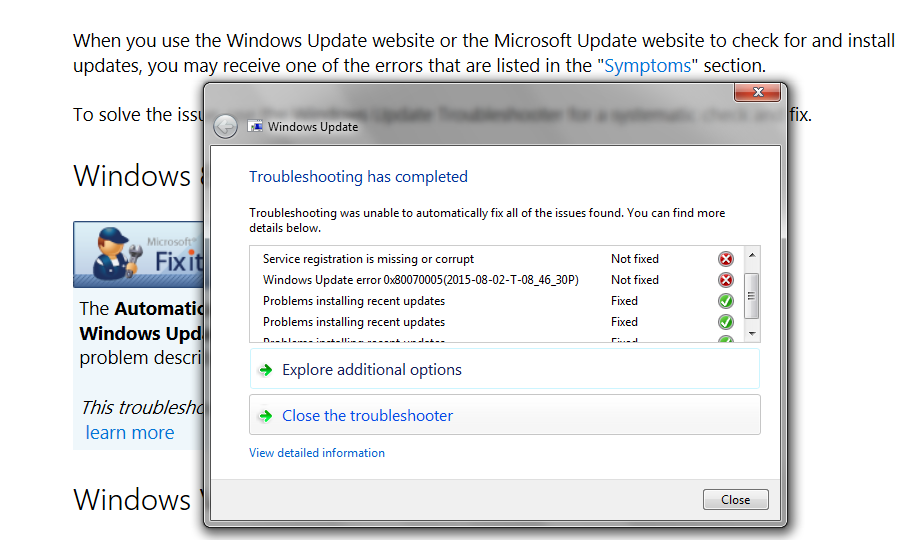
Hmm... I ran Fixit for Windows Update & here is what it said:
BFlmU6JnzpfWF1ODlNEZ9QmENGqeRvQwRZ3KeaFw_w8=w915-h540-no


Stupid me didn't realize I wasn't getting the notification "Windows Installed New Updates", as soon as Fixit finished it popped for the KB2952664 install from earlier. So maybe Windows Update is fragged? Perhaps I should open a thread on this in the appropriate forum. At least for the two issues that were not fixed.

Thanks

So yes I didn't do it. As far as I'm concerned this Microsoft breaking my machine & I want them to stop doing it.
Guess I did break it :o
 
Last edited:

My Computer My Computer

At a glance

Windows 7 Ultimate x64Intel Core i7-950Elpida DDR3 12 Gb 1066EVGA nVidia GeForce GTX 760 2GB GDDR5
Computer type
PC/Desktop
Computer Manufacturer/Model Number
Dell XPS 435MT
OS
Windows 7 Ultimate x64
CPU
Intel Core i7-950
Motherboard
Dell 0R849J
Memory
Elpida DDR3 12 Gb 1066
Graphics Card(s)
EVGA nVidia GeForce GTX 760 2GB GDDR5
Sound Card
Syba PCI-e VIA VT1723 Envy24DT
Monitor(s) Displays
Dell 3007WFP-HC, Nixeus Vue 30
Screen Resolution
1920 x 1200
Hard Drives
Crucial M500 240GB
1TB Seagate Barracuda
PSU
Corsair CX500M
Keyboard
Logitech MX 5500 combo
Mouse
Logitech MX 5500
Internet Speed
300Mbps
Antivirus
MSE
Browser
IE11 & Chrome
Other Info
MBAM Premium
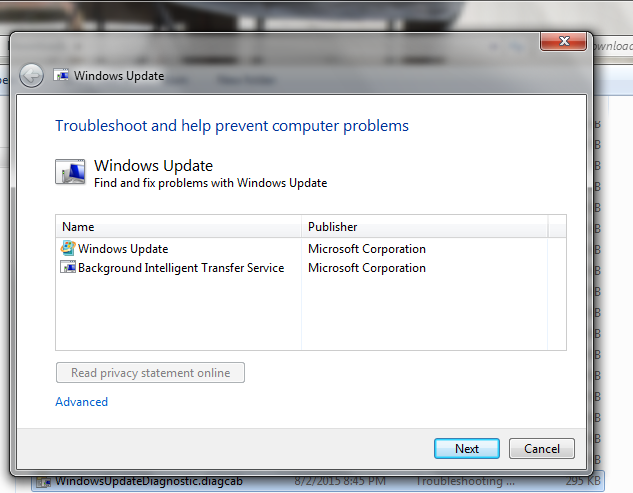
So I ran Fixit for Windows Update again:

svpnsi_vQacYY4jHRnAniRyHtfZs1GZykAeeHFMMjDs=w633-h493-no


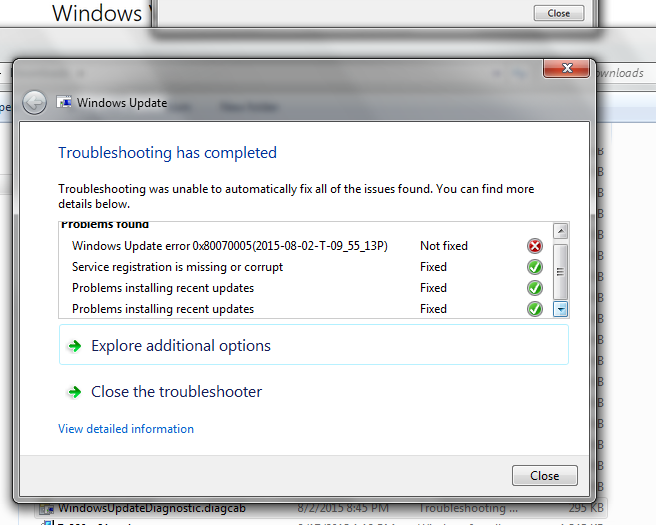
& selected only Windows Update, not knowing what Background Intelligent Transfer Service is & the results are getting better:

YuGRINhk4zgZSIqWATed5Rnn8VTW2hAAJTt4FXvX12o=w656-h525-no


Wonder if I run it one more time?

Found a MS Answers forum thread on this = Windows update Error 0x80070005 - Need a fix? Click here.

The error code 0x80070005 is also described as ACCESS DENIED.

Please follow these instructions if you are encountering this error code when checking or installing updates via Windows Udpate.
To correct the problem, you can try the steps below. Keep in mind that these steps are still experimental. I look forward to your feedback and results. For the long term, we hope that we can create an automated solution for all.

Note the highlighted.

I'm not actually encountering this error, only see it in the Troubleshooting results. Any thoughts from the folks here much appreciated. :)
 
Last edited:

My Computer My Computer

At a glance

Windows 7 Ultimate x64Intel Core i7-950Elpida DDR3 12 Gb 1066EVGA nVidia GeForce GTX 760 2GB GDDR5
Computer type
PC/Desktop
Computer Manufacturer/Model Number
Dell XPS 435MT
OS
Windows 7 Ultimate x64
CPU
Intel Core i7-950
Motherboard
Dell 0R849J
Memory
Elpida DDR3 12 Gb 1066
Graphics Card(s)
EVGA nVidia GeForce GTX 760 2GB GDDR5
Sound Card
Syba PCI-e VIA VT1723 Envy24DT
Monitor(s) Displays
Dell 3007WFP-HC, Nixeus Vue 30
Screen Resolution
1920 x 1200
Hard Drives
Crucial M500 240GB
1TB Seagate Barracuda
PSU
Corsair CX500M
Keyboard
Logitech MX 5500 combo
Mouse
Logitech MX 5500
Internet Speed
300Mbps
Antivirus
MSE
Browser
IE11 & Chrome
Other Info
MBAM Premium
Re-Hidden

I had to roll my PC back to my February Backup Image to get rid of KB2952664.
I then hid it.

It has reappeared in my "to be installed list" for the last 2 months.
I've had to re-hide it twice

It has not automatically installed itself though.
 

My Computer My Computer

At a glance

W7 Ultimate SP1, LM19.2 MATE, W10 Home 1703, ...AMD Phenom II x6 1100T, 3.3 GHz12GB DDR3 1333 G-Skill (4GB x 2), G-Skill (2G...NVIDIA GeForce GTX 660
Computer type
PC/Desktop
Computer Manufacturer/Model Number
n/a
OS
W7 Ultimate SP1, LM19.2 MATE, W10 Home 1703, W10 Pro 1703 VM, #All 64 bit
CPU
AMD Phenom II x6 1100T, 3.3 GHz
Motherboard
ASUS M4A88T-M/USB3 (AM3)
Memory
12GB DDR3 1333 G-Skill (4GB x 2), G-Skill (2GB x 2)
Graphics Card(s)
NVIDIA GeForce GTX 660
Sound Card
Realtek?
Monitor(s) Displays
Samsung S23B350
Screen Resolution
1920x1080
Hard Drives
WD Green 2TB (SATA), WD Green 3TB (SATA), WD Blue 4TB (SATA), WD Blue 6TB (SATA)
PSU
Cooler Master
Case
Antec GX300 Tower
Cooling
3x Antec TRICOOL 120mm Fans
Mouse
Wired Optical
Internet Speed
DSL
Antivirus
Avast
Browser
Pale Moon (64 bit)
Other Info
2018-12-27 Upgraded HDDs
2015-12-10 Upgraded case, graphics card, storage
2015-08-15 Upgraded motherboard & RAM
2015-07-15 Upgraded LM17.1 to LM17.2
Yep I believe we all start researching updates before downloading and installing them at some point,
My awakening was windows live essentials 2011
Been reviewing all updates first every since ;)
 

My Computer My Computer

At a glance

Win-7-Pro64bit 7-H-Prem-64biti7-5930K 2nd i9-9940x both water blocked VRM'...Trident-z 3200C14 2nd Trident-z 3600C16EVGA 1080ti ftw3 2nd Titan Xp both water blocked
Computer type
PC/Desktop
Computer Manufacturer/Model Number
Custom assembled by me :}
OS
Win-7-Pro64bit 7-H-Prem-64bit
CPU
i7-5930K 2nd i9-9940x both water blocked VRM's too
Motherboard
ASUS SABERTOOTH X99 2nd ASUS x299 Apex
Memory
Trident-z 3200C14 2nd Trident-z 3600C16
Graphics Card(s)
EVGA 1080ti ftw3 2nd Titan Xp both water blocked
Sound Card
Built-in Realtek
Monitor(s) Displays
1-AOC G2460PG 24"G-Sync 144Hz/ 2nd 1-ASUS VG248QE 24" 144Hz
Screen Resolution
1920 x 1080 144Hz
Hard Drives
2-Samsung M.2 Evo & Evo Plus
2-Samsung 850 EVO 500GB SSD's/ 3-2.5 W.D. Black 1tb-&3-1tb/3-3.5 WD Black 1tb hdd's
PSU
EVGA SuperNOVA 1000-P2 2nd 1200-P2
Case
2-Corsair Obsidian Series 450D Black ATX Mid Tower
Cooling
Custom water loops
Keyboard
Logitech G710+/ 2nd Logitech G910
Mouse
2-RedDragon M901 Perdition 16400 dpi Gaming mouse = wired
Internet Speed
Comcast Ping 19ms 89.31mbps download speed 6.12mbps upload
Antivirus
Malwarebytes Pro/ Superantispyware Pro
Browser
FireFox & Pale moon
Other Info
2nd ASUS X299 Apex/Intel i9-9940x with Custom water loop/7H-Prem-x64/Corsair 450D case/Ram Trident-z 3600C16 4x8gb / Samsung970Evo plus 500gb SSD/Dual ssd EZ swap evo/PSU EVGA SuperNova 1200w-P2 80+Platinum/GPU Titan Xp /8-ML-140 on push-pull on 2-280GTX rads
The list is updated ? Of the latest patches, which are for the W10 or cause errors?

I think these are missing from what I read on another topic :

KB2819745
KB3022345
KB3050265
KB3068708
KB3065987
 

My Computer My Computer

At a glance

64-bit Windows 7 ProfessionalIntel i5-3450 3.1 Ghz8 GB (2x4) Corsair Vengeance Red DDR3 1600MhzASUS HD 7770 DC 1.5GB
Computer type
PC/Desktop
Computer Manufacturer/Model Number
Assembled PC
OS
64-bit Windows 7 Professional
CPU
Intel i5-3450 3.1 Ghz
Motherboard
ASUS P8H77-M PRO
Memory
8 GB (2x4) Corsair Vengeance Red DDR3 1600Mhz
Graphics Card(s)
ASUS HD 7770 DC 1.5GB
Sound Card
Realtek HD Audio / Headphones Asus Orion Pro
Monitor(s) Displays
20" Samsung S20B300N
Screen Resolution
1600x900
Hard Drives
500GB SEAGATE HDD SATA
PSU
Corsair GS600 80PLUS Bronze Gaming
Case
Cooler Master Storm Enforcer
Cooling
Cooler Master Hyper 212 EVO
Keyboard
Logitech K200 USB
Mouse
Logitech M100 USB / Logitech G500 Gaming Mouse
Antivirus
ESET
Browser
Internet Explorer
Other Info
All the hardware selected by myself. I never imagined upgrade my PC :)
Hmm... I ran Fixit for Windows Update & here is what it said:
BFlmU6JnzpfWF1ODlNEZ9QmENGqeRvQwRZ3KeaFw_w8=w915-h540-no


Stupid me didn't realize I wasn't getting the notification "Windows Installed New Updates", as soon as Fixit finished it popped for the KB2952664 install from earlier. So maybe Windows Update is fragged? Perhaps I should open a thread on this in the appropriate forum. At least for the two issues that were not fixed.

Thanks

So yes I didn't do it. As far as I'm concerned this Microsoft breaking my machine & I want them to stop doing it.
Guess I did break it :o

Newpgm, with regards to KB2952664, that's actually now shown up twice in my list of hidden updates. One is classed as Recommended and the other as Optional.
So, yes it is possible to have that show up more than once.

A truly ANNOYING update MS is trying to push.
 

My Computer My Computer

At a glance

Win 7 Ultimate, Win 8.1 Pro, Linux Mint 19 Ci...Intel i5 4690KCorsair Vengeance LP 32GB DDR3MSI GTX 1060 GAMING X 6GB
Computer type
PC/Desktop
Computer Manufacturer/Model Number
Custom Build
OS
Win 7 Ultimate, Win 8.1 Pro, Linux Mint 19 Cinnamon (All 64-Bit)
CPU
Intel i5 4690K
Motherboard
Gigabyte Z97X-UD3H
Memory
Corsair Vengeance LP 32GB DDR3
Graphics Card(s)
MSI GTX 1060 GAMING X 6GB
Sound Card
Onboard
Hard Drives
Samsung 850 EVO 250GB SSD (x2)
Samsung 860 EVO 1TB SSD (x2)
Crucial MX300 525GB SSD
WD Blue 2TB 5400rpm Intellipark Disabled (x2)
PSU
Corsair HX750i
Case
Phanteks Enthoo Pro
Cooling
CM Hyper 212 EVO on CPU, Noctua Redux NF-P14S 1500rpm (x6)
Keyboard
Corsair K70 RGB LUX
Mouse
Corsair Sabre RGB
Antivirus
Avast Free, MalwareBytes, SAS & CryptoPrevent
Browser
Chrome
Other Info
StarTech PEXESAT322I 2 Port PCI-E SATA Card
ASUS PCE-AC56 Dual-band AC1300 Wireless Card
Akasa FC.Six Manual Fan Controller
And a Partridge in a Pear Tree!
Newpgm, with regards to KB2952664, that's actually now shown up twice in my list of hidden updates. One is classed as Recommended and the other as Optional.
So, yes it is possible to have that show up more than once. .

Yep.

KB2952664TWO.png


I have decided to just go ahead with the upgrade to WX. If WX truly is that last version of Windows going forward might as well get it over with - be trouble free & happy :sarc:


I unhid & installed all the WX prep updates (KB2952664 multiple times).

Fix It Quick Fix, Fix It 50202 WU Reinstall (aggressive mode) corrected issues with WU :0)

thanks.. for all the help & maybe see on tenforums down the road
 
Last edited:

My Computer My Computer

At a glance

Windows 7 Ultimate x64Intel Core i7-950Elpida DDR3 12 Gb 1066EVGA nVidia GeForce GTX 760 2GB GDDR5
Computer type
PC/Desktop
Computer Manufacturer/Model Number
Dell XPS 435MT
OS
Windows 7 Ultimate x64
CPU
Intel Core i7-950
Motherboard
Dell 0R849J
Memory
Elpida DDR3 12 Gb 1066
Graphics Card(s)
EVGA nVidia GeForce GTX 760 2GB GDDR5
Sound Card
Syba PCI-e VIA VT1723 Envy24DT
Monitor(s) Displays
Dell 3007WFP-HC, Nixeus Vue 30
Screen Resolution
1920 x 1200
Hard Drives
Crucial M500 240GB
1TB Seagate Barracuda
PSU
Corsair CX500M
Keyboard
Logitech MX 5500 combo
Mouse
Logitech MX 5500
Internet Speed
300Mbps
Antivirus
MSE
Browser
IE11 & Chrome
Other Info
MBAM Premium
Annoying being the polite term. Despicable comes closer. I would go further but Mama told me not to use those words plus I don't want to get banned.
 

My Computer My Computer

At a glance

Win 7 Ultimate 64 bitIntel i7-3930KKingston HyperX Genesis 32GB Kit (8x4GB Modul...MSI R7850 Twin Frozr 2GD5/OC Radeon HD 7850 2...
Computer type
PC/Desktop
Computer Manufacturer/Model Number
Custom Build
OS
Win 7 Ultimate 64 bit
CPU
Intel i7-3930K
Motherboard
ASUS P9X79 WS
Memory
Kingston HyperX Genesis 32GB Kit (8x4GB Modules) 1600MHz DDR
Graphics Card(s)
MSI R7850 Twin Frozr 2GD5/OC Radeon HD 7850 2GB 256-bit GDDR
Sound Card
Asus Xonar Essence STX
Monitor(s) Displays
3x Asus VG248QE 24", Vizio 32" TV
Screen Resolution
1920 x 1080, ?
Hard Drives
Samsung 128GB 840 Pro SSD (1),
Samsung 4TB 850 EVO SSDs (4)
Samsung 4TB 850 EVO SSDs (16) external backup drives used in 2.5" hot swap bays in the computer.
PSU
Corsair HX750w
Case
Antec Two Hundred v2 (modified)
Cooling
Cooler Master GeminII S524 120mm (fan replaced with a 140mm)
Keyboard
Logitech G510s
Mouse
Logitech M525 (two in use)
Internet Speed
=< 32Mbps down, 8Mbps up
Antivirus
AVAST!, MBAM, SAS, Spybot S&D (all but MBAM free) Glary Util
Browser
IE11
Other Info
LSI 9211-8i HBA card (8 SATA III ports), 2.5" & 3.5" Hot Swap Bays, HooToo HT-CR001 PCI-E to USB 3.0 Internal Hub + 6 Slot Card Reader, and LG Model CH12LS28 BD-ROM Optical Drive. Also, ScanSnap S1500 ADF duplexing scanner, Canon 9000F flat bed scanner, Corsair SP2500 2.1 speakers, Samsung CLP 415nw laser color printer, Cyberpower PP2200SW UPS
Annoying being the polite term. Despicable comes closer. I would go further but Mama told me not to use those words plus I don't want to get banned.

100% agree Lady F.
Wouldn't be so bad if it actually added something to the pc. Telemetry is not something I consider worthwhile. Especially as I have zero intention of installing W10 yet.
 

My Computer My Computer

At a glance

Win 7 Ultimate, Win 8.1 Pro, Linux Mint 19 Ci...Intel i5 4690KCorsair Vengeance LP 32GB DDR3MSI GTX 1060 GAMING X 6GB
Computer type
PC/Desktop
Computer Manufacturer/Model Number
Custom Build
OS
Win 7 Ultimate, Win 8.1 Pro, Linux Mint 19 Cinnamon (All 64-Bit)
CPU
Intel i5 4690K
Motherboard
Gigabyte Z97X-UD3H
Memory
Corsair Vengeance LP 32GB DDR3
Graphics Card(s)
MSI GTX 1060 GAMING X 6GB
Sound Card
Onboard
Hard Drives
Samsung 850 EVO 250GB SSD (x2)
Samsung 860 EVO 1TB SSD (x2)
Crucial MX300 525GB SSD
WD Blue 2TB 5400rpm Intellipark Disabled (x2)
PSU
Corsair HX750i
Case
Phanteks Enthoo Pro
Cooling
CM Hyper 212 EVO on CPU, Noctua Redux NF-P14S 1500rpm (x6)
Keyboard
Corsair K70 RGB LUX
Mouse
Corsair Sabre RGB
Antivirus
Avast Free, MalwareBytes, SAS & CryptoPrevent
Browser
Chrome
Other Info
StarTech PEXESAT322I 2 Port PCI-E SATA Card
ASUS PCE-AC56 Dual-band AC1300 Wireless Card
Akasa FC.Six Manual Fan Controller
And a Partridge in a Pear Tree!
Annoying being the polite term. Despicable comes closer..

100% agree Lady F.
Wouldn't be so bad if it actually added something to the pc. Telemetry is not something I consider worthwhile. Especially as I have zero intention of installing W10 yet.

I am still going to use 10 but it will be limited tell there is more detail of the privacy issues. This will also change what type of computer if any-that I will get in the future if there are no changes.


There are privacy concerning windows 10. Search google news.


Does windows 10 did violate hipaa?

Would I violate hippa if I access my medical records using windows 10 using any browser?

Does Microsoft really log credit/debit card from an Amazon purchase on the Amazon website using any browser? Wouldn't that defeat the whole SSL thing?

What I would like to know is a clarification of this statement


We will access, disclose and preserve personal data, including your content (such as the content of your emails, other private communications or files in private folders), when we have a good faith belief that doing so is necessary to: 1.comply with applicable law or respond to valid legal process, including from law enforcement or other government agencies; 2.protect our customers, for example to prevent spam or attempts to defraud users of the services, or to help prevent the loss of life or serious injury of anyone; 3.operate and maintain the security of our services, including to prevent or stop an attack on our computer systems or networks; or 4.protect the rights or property of Microsoft, including enforcing the terms governing the use of the services – however, if we receive information indicating that someone is using our services to traffic in stolen intellectual or physical property of Microsoft, we will not inspect a customer’s private content ourselves, but we may refer the matter to law enforcement.
Emails, does that mean just Microsoft email or any email program you use even if it doesn't access outlook.com (live.com) servers?

Private folder-What private folders?, your whole hard drive?

Private Communication-What communication? Would the include open source programs as well, would this violate GPL?


Mod, if anything here is posted is against the rules please let me know, so I won't do it again.
 

My Computer My Computer

At a glance

W10 32 bit, XUbuntu 18.xx 64 bitIntel(R) Celeron(R) CPU G1620T @ 2.40GHz, 240...4GBIntel HD graphics
Computer type
PC/Desktop
Computer Manufacturer/Model Number
Dell All in one Inspiron 2020
OS
W10 32 bit, XUbuntu 18.xx 64 bit
CPU
Intel(R) Celeron(R) CPU G1620T @ 2.40GHz, 2400 Mhz
Motherboard
Dell
Memory
4GB
Graphics Card(s)
Intel HD graphics
Sound Card
High Definition Audio Device
Monitor(s) Displays
20 inch Screen
Screen Resolution
W7=1280 x 720 & Linux Mint Xfce=1360 x 768
Hard Drives
500 GB hard drive
Keyboard
Usb
Mouse
Usb
Internet Speed
High-Speed
Antivirus
MSE
Browser
Main Browser Firefox
Other Info
I have done a clean install of Windows 7 using Dell re-installation disk (Dell sent me one). I also use Free Macrium reflect backup and restore.
I'm pretty sure those terms apply to using all windows apps while using a M$ account only,

A local account would not be able to use windows apps not sure if you can still sign into apps separately or not ?

But I very much doubt those terms apply to the os in general except for telemetry usage stuff and that last I saw has a setting you can turn off.
Does that setting work = no telling I'm sure many third party fixes will stop that stuff too along with any other needed goodies like aero themes............ ;)
 

My Computer My Computer

At a glance

Win-7-Pro64bit 7-H-Prem-64biti7-5930K 2nd i9-9940x both water blocked VRM'...Trident-z 3200C14 2nd Trident-z 3600C16EVGA 1080ti ftw3 2nd Titan Xp both water blocked
Computer type
PC/Desktop
Computer Manufacturer/Model Number
Custom assembled by me :}
OS
Win-7-Pro64bit 7-H-Prem-64bit
CPU
i7-5930K 2nd i9-9940x both water blocked VRM's too
Motherboard
ASUS SABERTOOTH X99 2nd ASUS x299 Apex
Memory
Trident-z 3200C14 2nd Trident-z 3600C16
Graphics Card(s)
EVGA 1080ti ftw3 2nd Titan Xp both water blocked
Sound Card
Built-in Realtek
Monitor(s) Displays
1-AOC G2460PG 24"G-Sync 144Hz/ 2nd 1-ASUS VG248QE 24" 144Hz
Screen Resolution
1920 x 1080 144Hz
Hard Drives
2-Samsung M.2 Evo & Evo Plus
2-Samsung 850 EVO 500GB SSD's/ 3-2.5 W.D. Black 1tb-&3-1tb/3-3.5 WD Black 1tb hdd's
PSU
EVGA SuperNOVA 1000-P2 2nd 1200-P2
Case
2-Corsair Obsidian Series 450D Black ATX Mid Tower
Cooling
Custom water loops
Keyboard
Logitech G710+/ 2nd Logitech G910
Mouse
2-RedDragon M901 Perdition 16400 dpi Gaming mouse = wired
Internet Speed
Comcast Ping 19ms 89.31mbps download speed 6.12mbps upload
Antivirus
Malwarebytes Pro/ Superantispyware Pro
Browser
FireFox & Pale moon
Other Info
2nd ASUS X299 Apex/Intel i9-9940x with Custom water loop/7H-Prem-x64/Corsair 450D case/Ram Trident-z 3600C16 4x8gb / Samsung970Evo plus 500gb SSD/Dual ssd EZ swap evo/PSU EVGA SuperNova 1200w-P2 80+Platinum/GPU Titan Xp /8-ML-140 on push-pull on 2-280GTX rads
Back
Top