How to remove write-protection?

newbie87

New member
Local time
9:43 PM
Messages
17
I can not send my any files to my pen drive...
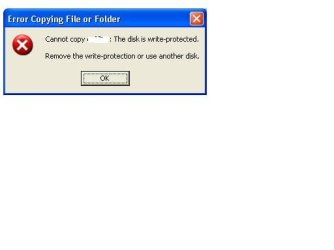
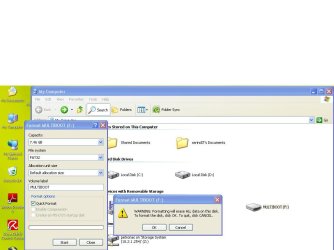
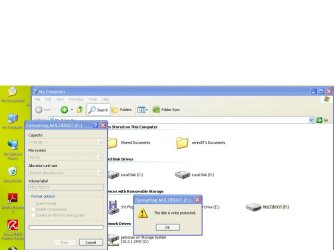
When i was sending a file or copying into my pen-drive i always got message "bla..bla..bla..write-protection" :mad: and i tried to format that pen drive i still can not do that.
any idea how to remove it?
 

My Computer

OS
windows 7 Ultimate 32-bit
I can not send my any files to my pen drive...
When i was sending a file or copying into my pen-drive i always got message "bla..bla..bla..write-protection" :mad: and i tried to format that pen drive i still can not do that.
any idea how to remove it?

Pen drive? could we get some more info on what kind (mfr) it is.
 

My Computer

Computer Manufacturer/Model Number
HP Pavillion dv-7 1005 Tx
OS
Win 8 Release candidate 8400
CPU
[email protected]
Memory
4 gigs
Graphics Card(s)
Nvidia 9600M
Sound Card
HD built-in
Monitor(s) Displays
17" Wxga
Screen Resolution
1440x900
Cooling
none
Internet Speed
45Mb down 5Mb up
A quick format would be to pop it in, try searching for files on it and quickly pull it out ;) But, definitely not advisable!!!


More information on the USB Thumb Drive would be appreciated, it will let us run a search to see if there are other known issues. My current OCZ Diesel 16gb Thumb Drive has never had any problems, including using it to boot up raid drivers.
 

My Computer

OS
Windows 7 Premium (OEM)
CPU
AMD Phenom x4 955 BE @ 3.2GHz
Motherboard
ASUS Crosshair III
Memory
8gigs (4x2gb) Mushkin DDR3
Graphics Card(s)
EVGA GeForce 260 GTX 216 core 896mb
Sound Card
SoundBlaster X-Fi Fatal1ty Pro
Monitor(s) Displays
26.5" Samsung ToC, 22" Samsung 226BW
Screen Resolution
1920x1200 & 1680x1050
Hard Drives
2x WD Caviar Black AAKS 500gigs (RAID 0)
2x WD Caviar Black AAKS 1TB
PSU
Thermaltake ToughPower 750w
Case
CoolerMaster Scout CMStorm Black Edition
Cooling
2x140mm Intake/Exhaust, 1x120mm Exhaust, 2x120mm Side Intake
Keyboard
Razer Tarantula
Mouse
Razer Imperator w/ Razer Goliathus Precision Mat
Internet Speed
5mb DSL (768k Download, 83k Upload)
Does the drive have a physical "lock" switch?
 

My Computer

Computer type
PC/Desktop
Computer Manufacturer/Model Number
Alienware Aurora ALX R4
OS
Windows 10 Pro (x64)
CPU
Intel Core i7-3930K (3.2GHz - 4.5GHz)
Motherboard
Alienware Aurora-R4 x79
Memory
4x Samsung 4GB PC3-12800 DDR3 (16GB 1600MHz)
Graphics Card(s)
Nvidia Geforce GTX 690
Sound Card
SteelSeries Siberia Elite
Monitor(s) Displays
Dell UltraSharp U3011
Screen Resolution
2560x1600
Hard Drives
Samsung 850 Pro 256 GB, Seagate 1TB Desktop Hybrid HDD, 2x Western Digital 4TB Green HDD
PSU
875W Some Dell PSU <.<
Case
Alienware Aurora ALX
Cooling
Custom Liquid Cooling (EK CPU & GPU blocks) dual EK 480RAD
Keyboard
Logitech G710+ Mechanical
Mouse
Logitech G700s
Internet Speed
Verizon Fios (50 mbps average)
Other Info
Server: Intel NUC D54250WYK: i5-4250U, 16GB, 256 GB mSATA, Windows Server 2012 R2
I am so sorry for that...
But now i have already update the information for you guys including with pictures, i hope this is information complete for you...!!!
When i tried to scan it with Microsoft Security Essentials i really got one virus... this virus's name is " PWS:Win32/Frethog.gen!H " when i then executed to remove this virus but Microsoft Security Essentials can't apply it.
 

Attachments

  • Error.JPG
    Error.JPG
    10.4 KB · Views: 281
  • error1.JPG
    error1.JPG
    59.5 KB · Views: 325
  • error2.JPG
    error2.JPG
    55.2 KB · Views: 264

My Computer

OS
windows 7 Ultimate 32-bit
Back
Top