How to replace missing or corrupt files

mals

New member
Local time
5:59 PM
Messages
7
For sometime now I have had the problem of adding programs to the startup folder in Windows 7. While searching the net I ran across an article "Easily Add Programs to Windows 7 Startup Folders". That caught eye immediately. The article shows you a easy way to add programs to the Windows startup folder for both the current user and all users of the computer . . . etc. I had followed the instructions until where I had come up to clicking the startup menu. There is no popup to select options. In my case, the clicking of the startup only gives a list of the programs included there. These are Microsoft Office, Say the Time, and Webshots. I note that all are programs that only open with Programs Files (86) - (32 bit). I note that one of the icons that is shown in the tray is not shown in startup. It`s called "Iconoid" and it opens with Program Files - (64 bit). So wonder if I have either missing or corrupted file(s) (one that gives to option of "users or all users"). I have had trouble also installing programs that require 32 bit with 64 bit startup.
So, can any tell me how to replace or missing or corrupt files in Windows 7. Or if there is a program that can remove corrupted files and replace with the files from the Windows 7 CD that came with it.
(I hope this makes sense. I am recovering from a stroke and it makes difficult to follow.)
 

My Computer

Computer Manufacturer/Model Number
Home built
OS
Windows 7 Ultimate x64

My Computer

Computer type
PC/Desktop
Computer Manufacturer/Model Number
Acer Aspire XC-704 x64 bit/ Asus K55A Notebook PC/HP Envy x360 Convertible 15-bq0xx
OS
Windows 10 64bit/Windows 10 64bit/Windows 10 64bit
CPU
Intel Pentium J3710 @ 60GHz/Intel B820,1.7GHz/AMD A9 Radeon
Motherboard
Acer Aspire XC-704 (SOCKET 0)/Asus/HP 8312 (Socket FP4)
Memory
8.00GB DDR3 @ 1599MHz/8GB 2 x 4GB DDR3/8.00GB Dual-Channel
Graphics Card(s)
Intel HD Graphics/Intel/512MB ATI AMD Radeon R5 Graphics (HP
Sound Card
Realtek High Definition Audio/Onboard/AMD High Definition Au
Monitor(s) Displays
Acer LCD K222HQL /Asus 15.6/Generic PnP Monitor (1920x1080@6
Screen Resolution
1920x1080@59Hz/1366 x 768/1920x1080@60Hz
Hard Drives
1863GBWesternn Digital WDC/Asus/119GB SanDisk SD8SN8U-128G-1006 (SSD)
931GB Hitachi HGST HTS721010A9E630 (SATA)
Keyboard
Microsoft Natural Ergonomic Keyboard 4000 (UK)/Inbuilt/Inbui
Mouse
Microsoft Optical Wheel Mouse/Same plus Touchpad/Same + Pad
Internet Speed
Infinity 2 up to 76 Mbps
Antivirus
MSE/MSE/MSE and all 3 have MalwareBytes Premium
Browser
Edge, Firefox/Edge, Firefox/Edge, Firefox, Chrome
Other Info
Seagate Expansion 500GB External Desktop Drive
Seagate Expansion Portable Drives 500GB and 1TB
Epson XP-332 Wireless Printer
Extract Files from Windows 7 Installation DVD

First, let me thank you for the fine Tutorials and help you and others Windows 7 Forums members have given me. Thanks again.
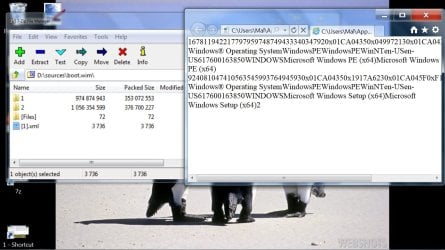
I`m trying to replace some corrupted files on my computer. I`ve gotten to the point where I`m going to have replace corrupted files by using the installation CD for Windows 7 Professional. I`m using your Tutorial as a guide. I`m hung up on D:\sources\install.wim\[1].xml. When I click [1].xml I get C:\Users\Mal\App...Right under that I have RoboForm tool bar. Then I have the all Windows information that`s supposed to be in [1].xml and no place to copy to the desktop. This is the reason I say my files are corrupted and I want to replace. Do think I could work around this anyway? Thanks.
 

My Computer

Computer Manufacturer/Model Number
Home built
OS
Windows 7 Ultimate x64
Hello Mals, and welcome to Seven Forums. :)

Could you post a screenshot of what you see when you open the 1.xml file?
 

My Computer

Computer type
PC/Desktop
Computer Manufacturer/Model Number
Self built custom
OS
64-bit Windows 11 Pro for Workstations
CPU
Intel i7-8700K OC'd to 5 GHz
Motherboard
ASUS ROG Maximus XI Formula Z390
Memory
64 GB (4x16GB) G.SKILL TridentZ RGB DDR4 3600 MHz
Graphics Card(s)
ASUS ROG-STRIX-GTX1080TI-O11G-GAMING
Sound Card
Integrated
Monitor(s) Displays
2 x Samsung Odyssey G7 27"
Screen Resolution
2560x1440
Hard Drives
1TB Samsung 990 PRO M.2,
4TB Samsung 990 PRO PRO M.2,
TerraMaster F8 SSD Plus NAS
PSU
Seasonic Prime Titanium 850W
Case
Thermaltake Core P3
Cooling
Corsair Hydro H115i
Keyboard
Logitech wireless K800
Mouse
Logitech MX Master 4
Internet Speed
2 Gb/s Download and 100 Mb/s Upload
Antivirus
Malwarebyte Anti-Malware Premium
Browser
Google Chrome
Other Info
Logitech Z625 speaker system,
Logitech BRIO 4K Pro webcam,
HP Color LaserJet Pro MFP M477fdn,
APC SMART-UPS RT 1000 XL - SURT1000XLI,
Galaxy S23 Plus phone
First, let me thank you for the fine Tutorials and help you and others Windows 7 Forums members have given me. Thanks again.
I`m trying to replace some corrupted files on my computer. I`ve gotten to the point where I`m going to have replace corrupted files by using the installation CD for Windows 7 Professional. I`m using your Tutorial as a guide. I`m hung up on D:\sources\install.wim\[1].xml. When I click [1].xml I get C:\Users\Mal\App...Right under that I have RoboForm tool bar. Then I have the all Windows information that`s supposed to be in [1].xml and no place to copy to the desktop. This is the reason I say my files are corrupted and I want to replace. Do think I could work around this anyway? Thanks.
You're welcome mals, I see you have the help of Brink now who is the master of the Tutorials so I'll leave you in his capable hands.

With his help you should get everything sorted out.

I'll just wish you a Happy New Year and welcome again to the forums.:D
 

My Computer

Computer type
PC/Desktop
Computer Manufacturer/Model Number
Acer Aspire XC-704 x64 bit/ Asus K55A Notebook PC/HP Envy x360 Convertible 15-bq0xx
OS
Windows 10 64bit/Windows 10 64bit/Windows 10 64bit
CPU
Intel Pentium J3710 @ 60GHz/Intel B820,1.7GHz/AMD A9 Radeon
Motherboard
Acer Aspire XC-704 (SOCKET 0)/Asus/HP 8312 (Socket FP4)
Memory
8.00GB DDR3 @ 1599MHz/8GB 2 x 4GB DDR3/8.00GB Dual-Channel
Graphics Card(s)
Intel HD Graphics/Intel/512MB ATI AMD Radeon R5 Graphics (HP
Sound Card
Realtek High Definition Audio/Onboard/AMD High Definition Au
Monitor(s) Displays
Acer LCD K222HQL /Asus 15.6/Generic PnP Monitor (1920x1080@6
Screen Resolution
1920x1080@59Hz/1366 x 768/1920x1080@60Hz
Hard Drives
1863GBWesternn Digital WDC/Asus/119GB SanDisk SD8SN8U-128G-1006 (SSD)
931GB Hitachi HGST HTS721010A9E630 (SATA)
Keyboard
Microsoft Natural Ergonomic Keyboard 4000 (UK)/Inbuilt/Inbui
Mouse
Microsoft Optical Wheel Mouse/Same plus Touchpad/Same + Pad
Internet Speed
Infinity 2 up to 76 Mbps
Antivirus
MSE/MSE/MSE and all 3 have MalwareBytes Premium
Browser
Edge, Firefox/Edge, Firefox/Edge, Firefox, Chrome
Other Info
Seagate Expansion 500GB External Desktop Drive
Seagate Expansion Portable Drives 500GB and 1TB
Epson XP-332 Wireless Printer
Extract Files from Windows 7 Installation DVD

I started to reply yesterday but I still did not know to how to transfer from paint. I found this morning after a good rest.
 

My Computer

Computer Manufacturer/Model Number
Home built
OS
Windows 7 Ultimate x64
http://www.sevenforums.com/general-discussion/134164-how-replace-missi

I think I will try again.
 

Attachments

  • 1.jpg
    1.jpg
    121.2 KB · Views: 392

My Computer

Computer Manufacturer/Model Number
Home built
OS
Windows 7 Ultimate x64
Mals,

That is not a "retail" Windows 7 installation DVD. It looks like some sort of modified or put together installation disk instead.

You might look in folder 1 or 2 to see if they may just happen to have the files that you could use to replace the corrupted ones with.
 

My Computer

Computer type
PC/Desktop
Computer Manufacturer/Model Number
Self built custom
OS
64-bit Windows 11 Pro for Workstations
CPU
Intel i7-8700K OC'd to 5 GHz
Motherboard
ASUS ROG Maximus XI Formula Z390
Memory
64 GB (4x16GB) G.SKILL TridentZ RGB DDR4 3600 MHz
Graphics Card(s)
ASUS ROG-STRIX-GTX1080TI-O11G-GAMING
Sound Card
Integrated
Monitor(s) Displays
2 x Samsung Odyssey G7 27"
Screen Resolution
2560x1440
Hard Drives
1TB Samsung 990 PRO M.2,
4TB Samsung 990 PRO PRO M.2,
TerraMaster F8 SSD Plus NAS
PSU
Seasonic Prime Titanium 850W
Case
Thermaltake Core P3
Cooling
Corsair Hydro H115i
Keyboard
Logitech wireless K800
Mouse
Logitech MX Master 4
Internet Speed
2 Gb/s Download and 100 Mb/s Upload
Antivirus
Malwarebyte Anti-Malware Premium
Browser
Google Chrome
Other Info
Logitech Z625 speaker system,
Logitech BRIO 4K Pro webcam,
HP Color LaserJet Pro MFP M477fdn,
APC SMART-UPS RT 1000 XL - SURT1000XLI,
Galaxy S23 Plus phone
missing files

I built my computer. The CD says "Licensed for distribution only with a new PC", which this is. Also, the installation disc came with "Windows 7 Professional" says "For product support, contact the manufacturer of your PC". I guess that would be me. I suppose that I have to supply support for myself. I hoped that you could be the support that the manufacturer, me, could to turn to for support. I paid for, as I recall, about $150 to purchase. I know that I can not get help from Microsoft , so I have some where else for support.
 

My Computer

Computer Manufacturer/Model Number
Home built
OS
Windows 7 Ultimate x64
Did you open the folders to see if they contained the files?
 

My Computer

Computer type
PC/Desktop
Computer Manufacturer/Model Number
Self built custom
OS
64-bit Windows 11 Pro for Workstations
CPU
Intel i7-8700K OC'd to 5 GHz
Motherboard
ASUS ROG Maximus XI Formula Z390
Memory
64 GB (4x16GB) G.SKILL TridentZ RGB DDR4 3600 MHz
Graphics Card(s)
ASUS ROG-STRIX-GTX1080TI-O11G-GAMING
Sound Card
Integrated
Monitor(s) Displays
2 x Samsung Odyssey G7 27"
Screen Resolution
2560x1440
Hard Drives
1TB Samsung 990 PRO M.2,
4TB Samsung 990 PRO PRO M.2,
TerraMaster F8 SSD Plus NAS
PSU
Seasonic Prime Titanium 850W
Case
Thermaltake Core P3
Cooling
Corsair Hydro H115i
Keyboard
Logitech wireless K800
Mouse
Logitech MX Master 4
Internet Speed
2 Gb/s Download and 100 Mb/s Upload
Antivirus
Malwarebyte Anti-Malware Premium
Browser
Google Chrome
Other Info
Logitech Z625 speaker system,
Logitech BRIO 4K Pro webcam,
HP Color LaserJet Pro MFP M477fdn,
APC SMART-UPS RT 1000 XL - SURT1000XLI,
Galaxy S23 Plus phone
Corruted Files

Yes, I mentioned earlier. When I click the [1].xml file I get: C:\Users\Mal\App..etc, with an Internet Explorer window that has the all Windows information that`s supposed to be in [1].xml and no place to copy to the desktop.
 

My Computer

Computer Manufacturer/Model Number
Home built
OS
Windows 7 Ultimate x64
In the left window in your screenshot below, what do you see when you open either folder 1 and 2?

128288d1293924586-how-replace-missing-corrupt-files-1.jpg
 

My Computer

Computer type
PC/Desktop
Computer Manufacturer/Model Number
Self built custom
OS
64-bit Windows 11 Pro for Workstations
CPU
Intel i7-8700K OC'd to 5 GHz
Motherboard
ASUS ROG Maximus XI Formula Z390
Memory
64 GB (4x16GB) G.SKILL TridentZ RGB DDR4 3600 MHz
Graphics Card(s)
ASUS ROG-STRIX-GTX1080TI-O11G-GAMING
Sound Card
Integrated
Monitor(s) Displays
2 x Samsung Odyssey G7 27"
Screen Resolution
2560x1440
Hard Drives
1TB Samsung 990 PRO M.2,
4TB Samsung 990 PRO PRO M.2,
TerraMaster F8 SSD Plus NAS
PSU
Seasonic Prime Titanium 850W
Case
Thermaltake Core P3
Cooling
Corsair Hydro H115i
Keyboard
Logitech wireless K800
Mouse
Logitech MX Master 4
Internet Speed
2 Gb/s Download and 100 Mb/s Upload
Antivirus
Malwarebyte Anti-Malware Premium
Browser
Google Chrome
Other Info
Logitech Z625 speaker system,
Logitech BRIO 4K Pro webcam,
HP Color LaserJet Pro MFP M477fdn,
APC SMART-UPS RT 1000 XL - SURT1000XLI,
Galaxy S23 Plus phone
Back
Top