How to restore to factory settings [W7]

shaniquaa

New member
Local time
8:13 AM
Messages
1
Hi really simple question here..

I need to restore my laptop back to it's factory settings. I've looked at guides on the net and gone through the control panel to the system recovery < advanced recovery methods however the options that I see in the guides and on my laptop presently differ.

Before it had an option to "return your computer to factory condition" however now it says "Re-install windows)

So how can I restore it to factory settings?

E: Laptop is a Dell Inspiron1545.
OS is W7 Home
 
Last edited:

My Computer My Computer

At a glance

W7
OS
W7
Hi, and welcome to seven forums.

If you want to restore the laptop completely to default as if the first time you switched it on, switch it on and on the black screen/dell logo/blue dell line (basically asoon as the screen shows something) press ctrl and f11 at the same time,rapidly pressing f11 while holding down ctrl will speed up the prosecc,and then just follow the instructions, this will revert your laptop to default.

Hope it helps
 

My Computer My Computer

At a glance

64bit Windows 10Intel i964g-8x8gig DDR4 3600Asus ROg Strix 1080ti
Computer type
PC/Desktop
Computer Manufacturer/Model Number
Custom built
OS
64bit Windows 10
CPU
Intel i9
Motherboard
MSI X299 Carbon pro
Memory
64g-8x8gig DDR4 3600
Graphics Card(s)
Asus ROg Strix 1080ti
Monitor(s) Displays
Samsung 49" Odyssey g9
Screen Resolution
5210x1440
Hard Drives
1 x 512GB m.2 OS Drive
2 x 512gb ssd
1 x 2tb

4x 1TB's
PSU
Corsair AX1200w
Case
Silverstone TJ11 B-W
Cooling
AIC
Keyboard
Asus Rog Claymore 2
Mouse
Asus Rog Apatha
Internet Speed
1gb Fibre
Hiyya shaniquaa and welcome too. Yep just as Alsisgevat says mate all prebuilt machines especially laptops have the default option viaa dedicated key my Toshibas have the 0 key (used many times) and I have learnt somehitng myself tonight I didn't know about the CTRL key trick thanks Alsisgevat:D

I got so fed up with it I slipped in a SSD and use a reasonable sized external for data and mate the difference is astonishing.

If you keep your original drive try the optimise tricks by Brink too mate there is a very noticeable decrease in speed re the machine running at boot and through the apps . http://www.sevenforums.com/tutorials/11728-optimize-windows-7-a.html?filter[2]=Performance Maintenance

Plus don't forget to look through the tutorials re getting rid of the bloat if you don't want they stick in your machine. You avoid this of course with the SSD and you can transfer the OS from the HDD to the SSD too -

http://www.sevenforums.com/tutorials/149969-ssd-install-transfer-operating-system.html
:D
 

My Computer My Computer

At a glance

Desk1 7 Home Prem / Desk2 10 Pro / Main lap A...Desk1 i5 3750K / Laptop i7 GTX 860M / Desk2 i...Desk1 8GB (1866) / Desk2 16GB (1333) / Laptop...Desk 1& 2NVidia GTX 650 & Laptops on board Intel
Computer type
PC/Desktop
Computer Manufacturer/Model Number
Own build (new) Desk1 / Asus ROG Win 7 / Desk2 1st build
OS
Desk1 7 Home Prem / Desk2 10 Pro / Main lap Asus ROG 10 Pro 2 laptop Toshiba 7 Pro Asus P2520 7 & 10
CPU
Desk1 i5 3750K / Laptop i7 GTX 860M / Desk2 i5 2500
Motherboard
Desk1 Asus P877-V / Desk2 Gigabyte H67 UD3H / Laptop ?
Memory
Desk1 8GB (1866) / Desk2 16GB (1333) / Laptop 8Gb DDR3
Graphics Card(s)
Desk 1& 2NVidia GTX 650 & Laptops on board Intel
Sound Card
Desk 1 & 2 -XONAR DG Realtek High Def audio Laptop
Monitor(s) Displays
Desk 1 Benq HD 2450 / Desk2 Philips 24" / Laptop 17.5"
Screen Resolution
1920x1080 D1 & D2 & Laptop 1
Hard Drives
Desk1 Samsung 120GB 830 SSD
Asus ROG 256GB 850 Pro SSD
Desk2 Samsung 840 256 SSD
Toshiba 120GB EVO
PSU
Desk 1 Corsair HX 1050/ Laptop ? / Desk 2 Corsair HX 650
Case
Desk 1 Cooler HAF XM ? Toshiba laptop / Desk2 Coolermaster
Cooling
Fans on all Desk1 -2 Desk2 - all Coolermasters 5 Laptop ?
Keyboard
Desk 1 MS Sidewinder X6 Desk 2 MS Sidewinder X 4
Mouse
Desk 1&2 - Gigabyte MS 900 gamer - laptop - Logitec wireless
Internet Speed
ADSL2+
Other Info
One other Desktop (tester) and spare Toshba laptop both with SSD's
Running Kaspersky 2016 ISS on all machines config'd identically
Logitec audio stereo systems on each machine (x3)
Canon MG5250MFC
Router/modem TP-Link running WPA2SK
Hi Shaniquaa,

Please find the link below for steps of doing a factory reset of the system without using a CD. Once you open the link please select the operating system which you are using and then follow the steps. During this process all the data would be lost so we suggest you to copy all the necessary files, photos, music etc to a USB drive or an external harddrive and procees with the factory image restore
http://dell.to/gB7c4b
Please revert for any clarifications
Thanks & Regards
Dell_Harish_R
Dell Social Media Responder
 

My Computer My Computer

At a glance

windows 7 home premium 64bit
OS
windows 7 home premium 64bit
Hello I'm needing help resetting my computer without even saving my files or anything I don't have the option to press F8 or any thing could someone help me please
 

My Computer My Computer

At a glance

windows 7 ulimate
Computer type
PC/Desktop
Computer Manufacturer/Model Number
dell
OS
windows 7 ulimate
Last edited:
Karlee if Gregs solution cannot help you out and all you want to do is retrieve data I have a little solution that can recover them quite easily.

BOOTABLEUBUNTU

Makea bootable Ubuntu disk http://www.ubuntu.com/download

Setthe BIOS to boot from the optical when the machine boots it will show you ascreen with TRY or INSTALL > select TRY. You can of course remove the hard drive and any otherdrives when doing this as if the optical alone is the only drive left in themachine then the BIOS will only find it to boot from.

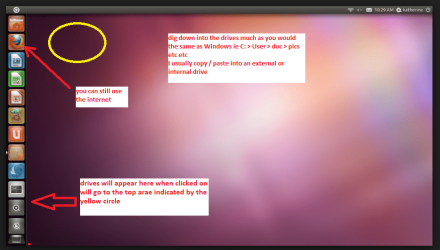
Whenit is finished - it takes very little time you will get a screen like in thepic .

Openthe drive you want > User and dig down until you get to the data / settingsyou may be able to copy / paste the material you want to an external source orother installed drive doing this.

Iam not sure if it will but I have recovered tons of data etc using this methodboth on "dead" or just plain drives that you cannot get data fromusing Windows.
But I am guessing Greg will be on track there as I said this is just an option and does not rely on Windows to do access data see pic.
If you have any problem with my ditty post back.
 

Attachments

  • UBUTUX.PNG
    UBUTUX.PNG
    128.9 KB · Views: 3

My Computer My Computer

At a glance

Desk1 7 Home Prem / Desk2 10 Pro / Main lap A...Desk1 i5 3750K / Laptop i7 GTX 860M / Desk2 i...Desk1 8GB (1866) / Desk2 16GB (1333) / Laptop...Desk 1& 2NVidia GTX 650 & Laptops on board Intel
Computer type
PC/Desktop
Computer Manufacturer/Model Number
Own build (new) Desk1 / Asus ROG Win 7 / Desk2 1st build
OS
Desk1 7 Home Prem / Desk2 10 Pro / Main lap Asus ROG 10 Pro 2 laptop Toshiba 7 Pro Asus P2520 7 & 10
CPU
Desk1 i5 3750K / Laptop i7 GTX 860M / Desk2 i5 2500
Motherboard
Desk1 Asus P877-V / Desk2 Gigabyte H67 UD3H / Laptop ?
Memory
Desk1 8GB (1866) / Desk2 16GB (1333) / Laptop 8Gb DDR3
Graphics Card(s)
Desk 1& 2NVidia GTX 650 & Laptops on board Intel
Sound Card
Desk 1 & 2 -XONAR DG Realtek High Def audio Laptop
Monitor(s) Displays
Desk 1 Benq HD 2450 / Desk2 Philips 24" / Laptop 17.5"
Screen Resolution
1920x1080 D1 & D2 & Laptop 1
Hard Drives
Desk1 Samsung 120GB 830 SSD
Asus ROG 256GB 850 Pro SSD
Desk2 Samsung 840 256 SSD
Toshiba 120GB EVO
PSU
Desk 1 Corsair HX 1050/ Laptop ? / Desk 2 Corsair HX 650
Case
Desk 1 Cooler HAF XM ? Toshiba laptop / Desk2 Coolermaster
Cooling
Fans on all Desk1 -2 Desk2 - all Coolermasters 5 Laptop ?
Keyboard
Desk 1 MS Sidewinder X6 Desk 2 MS Sidewinder X 4
Mouse
Desk 1&2 - Gigabyte MS 900 gamer - laptop - Logitec wireless
Internet Speed
ADSL2+
Other Info
One other Desktop (tester) and spare Toshba laptop both with SSD's
Running Kaspersky 2016 ISS on all machines config'd identically
Logitec audio stereo systems on each machine (x3)
Canon MG5250MFC
Router/modem TP-Link running WPA2SK
Hello I backed up my files on this windows xp pro disc after I deleted every thing off of it...I have been try for three days to factory reset pretty must wipe clean back to the way I got it and nothing has worked can someone help me
 

My Computer My Computer

At a glance

windows 7 ulimate
Computer type
PC/Desktop
Computer Manufacturer/Model Number
dell
OS
windows 7 ulimate

My Computer My Computer

At a glance

Windows 10 Pro X64Intel Quad Core i7-4770 @ 3.4Ghz16.0GB PC3-12800 DDR3 SDRAM 1600 MHzIntel Integrated HD Graphics
Computer type
PC/Desktop
Computer Manufacturer/Model Number
Lenovo IdeaCenter 450
OS
Windows 10 Pro X64
CPU
Intel Quad Core i7-4770 @ 3.4Ghz
Memory
16.0GB PC3-12800 DDR3 SDRAM 1600 MHz
Graphics Card(s)
Intel Integrated HD Graphics
Sound Card
Realtek HD Audio
Monitor(s) Displays
HP 22" LCD
Screen Resolution
1680 x 1050
Hard Drives
250GB Samsung EVO SATA-3 SSD
2TB Seagate ST2000DM001 SATA-2
1.5TB Seagate ST3150041AS SATA
Keyboard
Dell USB
Mouse
Lenovo USB
Internet Speed
Cable via Road Runner 3MB Upload, 30MB Download
Antivirus
Windows Defender, MBAM Pro, MBAE
Browser
Seamonkey
Other Info
UEFI/GPT
PLDS DVD-RW DH16AERSH
When you say you deleted everything did you also
Delete the Recovery partition? How have you tried to run Recovery?

Start by running the diagnostics to see if they will boot and run to test your hardware. Report back.
 
Back
Top