How to restrict write access to C: root?

22nampcar

New member
Local time
7:11 PM
Messages
3
I come from a linux background, where users by default have write access only in their home directories. In the Windows 7 default setup, however, I can create folders at will in the root of the C drive. Is there a way to restrict write access to the root directory?
 

My Computer My Computer

OS
Windows 7 Professional x64
Don't give users/applications administrative access. By that means you turn on UAC (full) or create a new user account that is standard. And only use your administrator account (the first account created) for when you need administrative power. Without administrative power, the user directory is the only place where a user has full control.
 

My Computer My Computer

Computer type
PC/Desktop
Computer Manufacturer/Model Number
Alienware Aurora ALX R4
OS
Windows 10 Pro (x64)
CPU
Intel Core i7-3930K (3.2GHz - 4.5GHz)
Motherboard
Alienware Aurora-R4 x79
Memory
4x Samsung 4GB PC3-12800 DDR3 (16GB 1600MHz)
Graphics Card(s)
Nvidia Geforce GTX 690
Sound Card
SteelSeries Siberia Elite
Monitor(s) Displays
Dell UltraSharp U3011
Screen Resolution
2560x1600
Hard Drives
Samsung 850 Pro 256 GB, Seagate 1TB Desktop Hybrid HDD, 2x Western Digital 4TB Green HDD
PSU
875W Some Dell PSU <.<
Case
Alienware Aurora ALX
Cooling
Custom Liquid Cooling (EK CPU & GPU blocks) dual EK 480RAD
Keyboard
Logitech G710+ Mechanical
Mouse
Logitech G700s
Internet Speed
Verizon Fios (50 mbps average)
Other Info
Server: Intel NUC D54250WYK: i5-4250U, 16GB, 256 GB mSATA, Windows Server 2012 R2
In addition, I should mention that in Windows C:\ is not the system root. Many computers have only one hard drive and often there is only one partition - definitely the case with old computers. Then users should be able to create their own data folders. I would be very annoyed if I were restricted to the standard "My Documents" folder for doing this. In fact, I never put any of my own data there at all. But since creating a folder C:\junk does not in any way interfere with anything, I see no reason why this should not be allowed.

However, if you are managing a computer with multiple users and want to restrict their privileges, then follow logicearth's advice and create standard accounts for them.

 

My Computer My Computer

Computer Manufacturer/Model Number
Dell Inspiron 530
OS
Windows 7 Ultimate (x64)
CPU
Q6600
Memory
8 GB
Graphics Card(s)
ATI Radeon HD 2600 XT
Monitor(s) Displays
Samsung Syncmaster P2450
Screen Resolution
1920x1080
Hard Drives
Samsung HD103UJ
Samsung HD501LJ
Internet Speed
25 Mb/s
Thanks to both replies. However, I should have mentioned in my original post that I'm operating as a standard user. In some directories like Program Files or Windows, I need to authenticate in order to create new subdirectories. In fact, there is a shield icon next to the 'New Folder" button when I right-click. But in C:\ itself I get no such prompt. How would I secure C:\ from standard users?

@unifex: Is C:\Windows the system root?
 

My Computer My Computer

OS
Windows 7 Professional x64
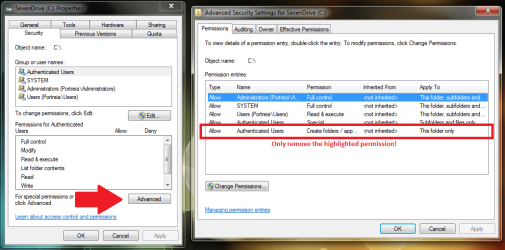
What I am about to show you is very sensitive, only remove what I have highlighted. Removing anything else can have very negative effects on your computer. Below I have attached an image of where you need to go and which permission you need to remove. When you hit "Ok", you will get a few error dialogs, click continue. (They are not affected but Windows will attempt update there inherited permissions just in case.)

Unless you know exactly what you are doing, messing with the ACLs is not a game. Doing the wrong thing can make things a PITA very quickly.
 

Attachments

  • Untitled.png
    Untitled.png
    43.4 KB · Views: 1,472

My Computer My Computer

Computer type
PC/Desktop
Computer Manufacturer/Model Number
Alienware Aurora ALX R4
OS
Windows 10 Pro (x64)
CPU
Intel Core i7-3930K (3.2GHz - 4.5GHz)
Motherboard
Alienware Aurora-R4 x79
Memory
4x Samsung 4GB PC3-12800 DDR3 (16GB 1600MHz)
Graphics Card(s)
Nvidia Geforce GTX 690
Sound Card
SteelSeries Siberia Elite
Monitor(s) Displays
Dell UltraSharp U3011
Screen Resolution
2560x1600
Hard Drives
Samsung 850 Pro 256 GB, Seagate 1TB Desktop Hybrid HDD, 2x Western Digital 4TB Green HDD
PSU
875W Some Dell PSU <.<
Case
Alienware Aurora ALX
Cooling
Custom Liquid Cooling (EK CPU & GPU blocks) dual EK 480RAD
Keyboard
Logitech G710+ Mechanical
Mouse
Logitech G700s
Internet Speed
Verizon Fios (50 mbps average)
Other Info
Server: Intel NUC D54250WYK: i5-4250U, 16GB, 256 GB mSATA, Windows Server 2012 R2
Oh wow, thanks! I should learn more about ACLs in Win7.
 

My Computer My Computer

OS
Windows 7 Professional x64
was this an upgrade install?
or do you have uac turned off?

by default, on a new format/install, you cant write to C: even as an admin without uac popping up
 

My Computer My Computer

OS
Windows 7 Ultimate x64
CPU
Core i7 960
Motherboard
ASUS P6TD Deluxe
Memory
Corsair XMS3 DDR3-1600 - 12 GB
Graphics Card(s)
eVGA GTX 275 1792 MB
Sound Card
Onboard HD etc
Monitor(s) Displays
Dell SP2208WFP
Hard Drives
Western Digital Caviar Black 1 TB x 2 (RAID-1)
PSU
BFG EX-1200
Case
CoolerMaster HAF 922
Cooling
Thermalright Ultra 120 Extreme with Noctua NH-12 Fan
Keyboard
MS Natural (you know, like the ones you find in nature...)
Mouse
MS Intellimouse Explorer
was this an upgrade install?
or do you have uac turned off?

by default, on a new format/install, you cant write to C: even as an admin without uac popping up

The specific permission I pointed out in the above image gives users the ability to create folders, then that user can create files in that folder. files cannot be written to the root of the C: drive without administrative power.
 

My Computer My Computer

Computer type
PC/Desktop
Computer Manufacturer/Model Number
Alienware Aurora ALX R4
OS
Windows 10 Pro (x64)
CPU
Intel Core i7-3930K (3.2GHz - 4.5GHz)
Motherboard
Alienware Aurora-R4 x79
Memory
4x Samsung 4GB PC3-12800 DDR3 (16GB 1600MHz)
Graphics Card(s)
Nvidia Geforce GTX 690
Sound Card
SteelSeries Siberia Elite
Monitor(s) Displays
Dell UltraSharp U3011
Screen Resolution
2560x1600
Hard Drives
Samsung 850 Pro 256 GB, Seagate 1TB Desktop Hybrid HDD, 2x Western Digital 4TB Green HDD
PSU
875W Some Dell PSU <.<
Case
Alienware Aurora ALX
Cooling
Custom Liquid Cooling (EK CPU & GPU blocks) dual EK 480RAD
Keyboard
Logitech G710+ Mechanical
Mouse
Logitech G700s
Internet Speed
Verizon Fios (50 mbps average)
Other Info
Server: Intel NUC D54250WYK: i5-4250U, 16GB, 256 GB mSATA, Windows Server 2012 R2
now i'm intrigued - thank you. i'll check this out tonight
 

My Computer My Computer

OS
Windows 7 Ultimate x64
CPU
Core i7 960
Motherboard
ASUS P6TD Deluxe
Memory
Corsair XMS3 DDR3-1600 - 12 GB
Graphics Card(s)
eVGA GTX 275 1792 MB
Sound Card
Onboard HD etc
Monitor(s) Displays
Dell SP2208WFP
Hard Drives
Western Digital Caviar Black 1 TB x 2 (RAID-1)
PSU
BFG EX-1200
Case
CoolerMaster HAF 922
Cooling
Thermalright Ultra 120 Extreme with Noctua NH-12 Fan
Keyboard
MS Natural (you know, like the ones you find in nature...)
Mouse
MS Intellimouse Explorer
amazing. i can create a folder by default in c:\ but not write a file without uac popping up.

intriguing... most intriguing
 

My Computer My Computer

OS
Windows 7 Ultimate x64
CPU
Core i7 960
Motherboard
ASUS P6TD Deluxe
Memory
Corsair XMS3 DDR3-1600 - 12 GB
Graphics Card(s)
eVGA GTX 275 1792 MB
Sound Card
Onboard HD etc
Monitor(s) Displays
Dell SP2208WFP
Hard Drives
Western Digital Caviar Black 1 TB x 2 (RAID-1)
PSU
BFG EX-1200
Case
CoolerMaster HAF 922
Cooling
Thermalright Ultra 120 Extreme with Noctua NH-12 Fan
Keyboard
MS Natural (you know, like the ones you find in nature...)
Mouse
MS Intellimouse Explorer
Back
Top