How to run a script using a simple keyboard shortcut

sanfranman

New member
Member
Local time
7:49 AM
Messages
39
Location
Australia
I have posted this earlier as a followup question http://www.sevenforums.com/customization/156452-shortcut-hide-unhide-folders-files.html

It might be best if I start a new thread with this query.

I've created the script that I asked about there and works just as I want, but is there some way to run this script using a simple keyboard shortcut that I could set up , something like Ctrl+Alt+H

Have done a Google search and things I have been advised to try just do not work or are very complicated and involve a deep understanding of programming.

Again , if someone could point me in the right direction would be very pleased.

SFM
 

My Computer

OS
Windows 7 Home Premium 64bit SP1
Create a regular shortcut for the file first (which has a little arrow on the bottom left of the icon) then on it make Right mouse click - Properties - Shortcut tab - click on the line Shortcut key - Press desired key combination - Apply.

(Limited to Ctrl+Alt+ one more key)

Windows-7-Keyboard-Shortcuts.png
 

My Computer

Computer type
PC/Desktop
OS
Windows 8.1 ; Windows 7 x86 (Dec2008-Jan2013)
Other Info
"The scale icon at the top right of a post or tutorial is how you can give rep to the member."
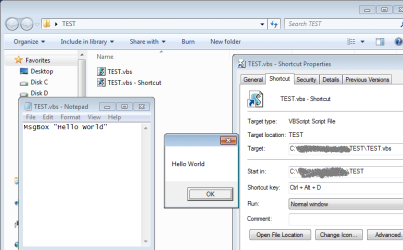
Thanks but I already tried that. It looks like you can not run a .vbs script using a keyboard shortcut after creating a shortcut , as in your post:-(

Nothing happens when you try the keyboard shortcut.

Obviously keyboard shortcuts work just fine with actual .exe programs , but do not work with a .vbs script. Thanks anyway.
 

My Computer

OS
Windows 7 Home Premium 64bit SP1

Attachments

  • test_vbs.png
    test_vbs.png
    40.5 KB · Views: 176

My Computer

Computer type
PC/Desktop
OS
Windows 8.1 ; Windows 7 x86 (Dec2008-Jan2013)
Other Info
"The scale icon at the top right of a post or tutorial is how you can give rep to the member."
Thanks, I tried your vbs and all works fine for me too using a keyboard shortcut.

My problem must be something to do with the script itself. I found it on a website when I asked about how to hide and unhide files and folders in W7 without having to go through the usual process.

I am not experienced with scripts but that script works fine, just that I can not get it to work with a keyboard shortcut that I put on the shortcut to the script.

Just for your interest , this is the script in question:

Hidden = "HKCU\Software\Microsoft\Windows\CurrentVersion\Explorer\Advanced\Hidden"

SHidden = "HKCU\Software\Microsoft\Windows\CurrentVersion\Explorer\Advanced\ShowSuperHidden"

Set Sh = WScript.CreateObject("WScript.Shell")

St = Sh.RegRead(Hidden)

If St = 2 Then

Sh.RegWrite Hidden, 1, "REG_DWORD"

Sh.RegWrite SHidden, 1, "REG_DWORD"

Else

Sh.RegWrite Hidden, 2, "REG_DWORD"

Sh.RegWrite SHidden, 0, "REG_DWORD"

End If

Sh.SendKeys("{F5}")
 

My Computer

OS
Windows 7 Home Premium 64bit SP1
I can not get it to work with a keyboard shortcut that I put on the shortcut to the script.

I have copied and pasted your script. And key shortcut of it's shortcut worked for me.
The only problem I have found is that F5 command at the end of the script does not work, because Explorer window becomes inactive, when script starts.

I had to manually press F5. Other than that, is all works just fine:
script alternates settings for hidden folders.
 

My Computer

Computer type
PC/Desktop
OS
Windows 8.1 ; Windows 7 x86 (Dec2008-Jan2013)
Other Info
"The scale icon at the top right of a post or tutorial is how you can give rep to the member."
Thanks for your time in looking into this . Tried exactly what you suggested , no luck. I'm really over it. I'll just click on the script file or shortcut and forget about the key shortcut.
 

My Computer

OS
Windows 7 Home Premium 64bit SP1
Try "The Wonderful Icon"

Just in case anyone else comes here, like me, to find ways of utilising keyboard shortcuts...

Try "The Wonderful Icon" - The Wonderful Icon

One of its features is that you can "start application" and specify almost any key combination to trigger it.

I'm using Ctrl+UP and Ctrl+DOWN to launch my "volume" script which alters the system volume according to a logarithmic scale (sound needs to double in volume for the ear to notice the change so the step from 1% to 2% sounds just the same difference as 50% to 100%) and all the volume controls I've come across use linear increments... this make the changes too coarse at low volume levels.

If you need help configuring The Wonderful Icon to use hotkeys, contact me at [email protected]
 

My Computer

Computer type
PC/Desktop
Computer Manufacturer/Model Number
Arbico/Quiet i7377
OS
Windows 7 Ultimate x64
CPU
3.40 gigahertz Intel Core i7-3770 Multi-core (4 total)
Motherboard
ASUSTeK COMPUTER INC. P8Z77-V LX Rev X.0x
Memory
16Gb
Graphics Card(s)
AMD Radeon HD 7700
Sound Card
AMD High Definition Audio Device
Monitor(s) Displays
Samsung 2443BW/Lenovo L2240pwD
Screen Resolution
1920x1200 1050x1680
Hard Drives
OCZ-VERTEX450 (256 GB)
ST31000524AS (1000.20 GB)
Drobo 5D 5-disk enclosure
Seagate USB 1Tb
ST1500DL 003-9VT16L 1500.30 GB
Case
Special noise-reducing case
Cooling
Quiet fans
Keyboard
Lenovo SK-8815 Multimedia keyboard
Mouse
Logitech MX
Internet Speed
~7mbps
Antivirus
Microsoft Security Essentials (and caution)
Browser
Chrome/Opera/Firefox/IE/Off-by-One
Other Info
Acoustic Energy AEGO-M Speakers - incredible sound, given their size.
Back
Top