How to set "check mail" times for Outlook 2010

srleslie

New member
Local time
4:21 PM
Messages
28
Want to set some accounts to check for new mail every ten minutes, others every 30 minutes, others not at all (only manually). Can't see how to do this. Even TBird can do that. What am I missing?
 

My Computer My Computer

At a glance

Windows 7 Home Premium 64bit
OS
Windows 7 Home Premium 64bit
It is quite easy, in fact. In Outlook you do this using so called Send / Receive Groups. A group can include just one or multiple mail accounts.

You can define Send / Receive Groups as you wish by following these simple steps:

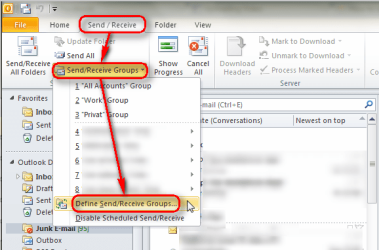
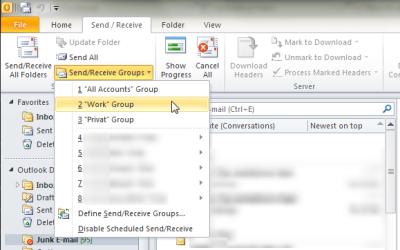
  • On ribbon, select Send / Receive > Send / Receive Groups > Define Send / Receive Groups:
    .
    Outlook_send_receive_groups_001.png
    .
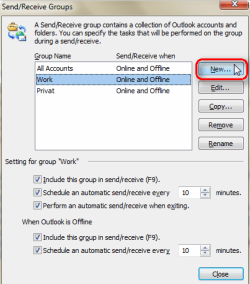
  • Click New to create a new Send / Receive Group:
    .
    Outlook_send_receive_groups_002.png
    .
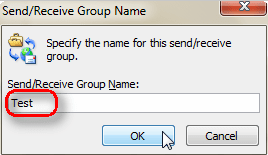
  • Give the group a name, click OK:
    .
    Outlook_send_receive_groups_003.png
    .
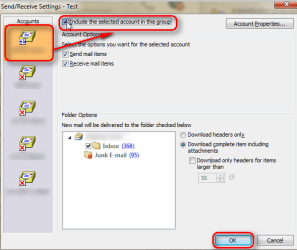
  • Select account you want to include in this group on the left pane, select Include the selected account in this group. Do this for each account you want to add in this group, finish by clicking OK:
    .
    Outlook_send_receive_groups_004.png
    .
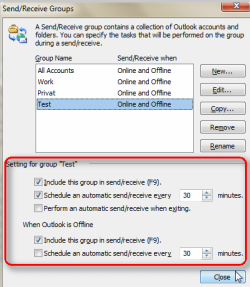
  • Set the online and offline send / receive values for each group:
    .
    Outlook_send_receive_groups_005.png
    .
  • Save settings by clicking Close button
That's it.

Notice that you can also send / receive each group manually:

Outlook_send_receive_groups_006.png

Kari
 
Last edited:

My Computer My Computer

At a glance

Windows 10 Pro x64 EN-GB1.6 GHz Intel Core i7-720QM Processor6 GBATI Mobility Radeon HD 5850 Graphics
Computer type
Laptop
Computer Manufacturer/Model Number
HP ENVY 17-1150eg
OS
Windows 10 Pro x64 EN-GB
CPU
1.6 GHz Intel Core i7-720QM Processor
Memory
6 GB
Graphics Card(s)
ATI Mobility Radeon HD 5850 Graphics
Sound Card
Beats sound system with integrated subwoofer
Monitor(s) Displays
17" laptop display, 22" LED and 32" Full HD TV through HDMI
Screen Resolution
1600*900 (1), 1920*1080 (2&3)
Hard Drives
Internal: 2 x 500 GB SATA Hard Disk Drive 7200 rpm
External: 2TB for backups, 3TB USB3 network drive for media
Cooling
As Envy runs a bit warm, I have it on a Cooler Master pad
Keyboard
Logitech diNovo Media Desktop Laser (bluetooth)
Mouse
Logitech Performance Mouse MX
Internet Speed
50/10 Mbps VDSL
Antivirus
Windows Defender 4.3.9431.0
Browser
Maxthon 3.5.2., IE11
Belated thanks...

...for the comprehensive and very helpful reply. I haven't been able to really implement Outlook yet, due to outside factors, but this will help me set it up when I do.
 

My Computer My Computer

At a glance

Windows 7 Home Premium 64bit
OS
Windows 7 Home Premium 64bit
Thanks for thanks :)
 

My Computer My Computer

At a glance

Windows 10 Pro x64 EN-GB1.6 GHz Intel Core i7-720QM Processor6 GBATI Mobility Radeon HD 5850 Graphics
Computer type
Laptop
Computer Manufacturer/Model Number
HP ENVY 17-1150eg
OS
Windows 10 Pro x64 EN-GB
CPU
1.6 GHz Intel Core i7-720QM Processor
Memory
6 GB
Graphics Card(s)
ATI Mobility Radeon HD 5850 Graphics
Sound Card
Beats sound system with integrated subwoofer
Monitor(s) Displays
17" laptop display, 22" LED and 32" Full HD TV through HDMI
Screen Resolution
1600*900 (1), 1920*1080 (2&3)
Hard Drives
Internal: 2 x 500 GB SATA Hard Disk Drive 7200 rpm
External: 2TB for backups, 3TB USB3 network drive for media
Cooling
As Envy runs a bit warm, I have it on a Cooler Master pad
Keyboard
Logitech diNovo Media Desktop Laser (bluetooth)
Mouse
Logitech Performance Mouse MX
Internet Speed
50/10 Mbps VDSL
Antivirus
Windows Defender 4.3.9431.0
Browser
Maxthon 3.5.2., IE11
Back
Top