How to setup RAID 0 with an Asus CG5290-BP007 and 2 Ve

RAYO

New member
Local time
2:41 PM
Messages
12
Guys,
How to setup RAID 0 with an Asus CG5290-BP007??????


I bought an Asus Desktop CG5290-BP007 at best buy, when I opened it says RAMPAGE II GENE/CG5290/DP MB

Asus CG5290
motherboard: Rampage II Gene Micro Atx
Processor: Intel I7 920 (2.66 Ghz)
Ram: 9GB
HD: Seagate 1TB 7200 RPM
Windows Vista Home Premium 64


If you want to see the link here it is: http://www.bestbuy.com/site/olspage.jsp?skuId=9366642&type=product&id=1218092150864

I removed the Seagate and I put 2 WD Velociraptors 300 GB each and 10,000 RPM, I have a concern, one it is on the port 1 and the other velociraptor is on port 3.
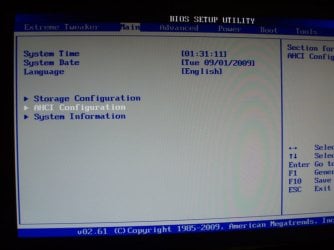
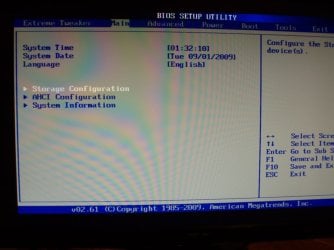
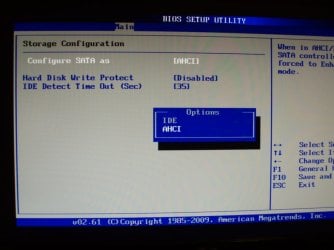
Does it affect in order to make appear the RAID option in the bios? Because it does not appear, it just appears these options: IDE and AHCI. How come it does not appear RAID in the bios options? What am I doing wrong? Or what do I have to do in order to setup in the bios as RAID?

I don’t know if this link below it is exactly my motherboard, it seems that my desktop came a little bit different than this motherboard or they designed specially just for best buy, I am not sure about it.
http://usa.asus.com/product.aspx?P_ID=6i86Hj0lGriFHfY9


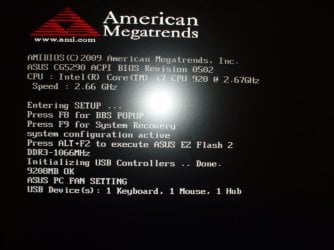
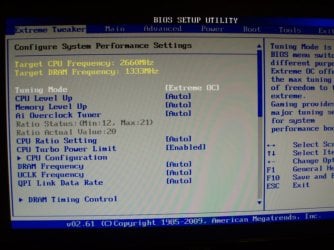
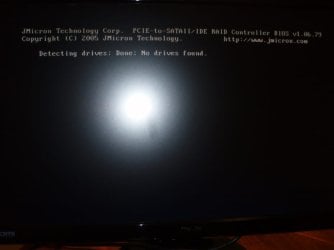
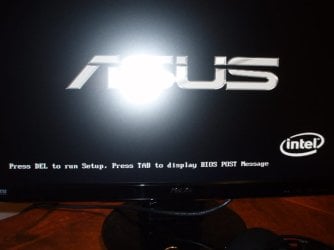
I took several pictures to show you what appears when I turn on the computer and when press <Del> to enter in the bios and when I just turn on the computer and I don’t do anything.

I went to Asus website and I downloaded the manual for Rampage II Gene Motherboard, I was reading it and It says that Intel Matrix Storage Manager option Rom utility will appear when I press CTRL + I , I tried it several times and nothing happens, is that option working in my Asus Desktop CG5290-BP007 ?

Please help me what to do, I would like to install Windows 7, my hard disks are not formatted I think so, because I just installed them and I am not able to see RAID in the bios options, Please tell what steps to follow in order to setup RAID 0 in this computer.

Thank you
:huh:
Thank you
 

Attachments
  • 1.JPG
    1.JPG
    53 KB · Views: 155
  • 2.JPG
    2.JPG
    75.6 KB · Views: 152
  • 3.JPG
    3.JPG
    91.2 KB · Views: 188
  • 4.JPG
    4.JPG
    102.6 KB · Views: 368
  • 5.JPG
    5.JPG
    75.4 KB · Views: 332
  • 5A.JPG
    5A.JPG
    101.6 KB · Views: 303
  • 6A.JPG
    6A.JPG
    78.1 KB · Views: 317
  • 6B.JPG
    6B.JPG
    74 KB · Views: 373
  • 7.JPG
    7.JPG
    41.3 KB · Views: 299
  • 7A.JPG
    7A.JPG
    85.2 KB · Views: 324
  • 7B.JPG
    7B.JPG
    46.8 KB · Views: 301
Last edited:

My Computer My Computer

At a glance

Windows 7 want to install
OS
Windows 7 want to install
Hello Rayo, and welcome to Windows Seven Forums! I am glad you asked about RAID. This is a very convenient option many motherboard manufacturers are offering. It adds another layer to one's backup strategy.

However, configuring a RAID to boot is not an easy thing to do. I have never done it as it has always been to much work for my needs. I don't think you can learn how to do it from a forum like this one. If I may, I would suggest to you that you use the Seagate drive to install your Windows 7. Then you can use the Windows software that came with your motherboard to create your RAID with the two WD drives. You can back-up your Windows 7 and save it to the RAID you created. After you have gained some experience creating and using RAID, it should be easier for you to configure a bootable RAID where you can install your OS.

Good luck to you!

Robert
 

My Computer My Computer

At a glance

...
OS
...
Rayo,

It looks like there are two SATA controllers in the MB. The one which you are selecting as AHCI, and to which your drives are currently connected, is the Intel controller which apparently does not have RAID capabilities. The JMicron controller does have RAID but the drives are not connected to it. You need to move your drives to the JMicron SATA connectors in the motherboard.

Note that this will require for you to load the JMicron driver before Windows can be installed.

Edit: Also note you will need to set the RAID disk you set up in the JMicron controller as the boot drive in the BIOS boot options, after the DVD/CD ROM drive.
 

My Computer My Computer

At a glance

Windows 7 RTM x64Core i7 980X @ 4.04GHz OC /// Core Duo L7500 ...12GB G. Skill @ DDR-1600 OC /// 4GBSaphire HD4870 Toxic 1GB /// Intel Mobile GMA...
Computer Manufacturer/Model Number
Custom workstation /// Lenovo X61t tablet notebook
OS
Windows 7 RTM x64
CPU
Core i7 980X @ 4.04GHz OC /// Core Duo L7500 @ 1.6GHz
Motherboard
Asus P6T6 WS Revolution ///
Memory
12GB G. Skill @ DDR-1600 OC /// 4GB
Graphics Card(s)
Saphire HD4870 Toxic 1GB /// Intel Mobile GMA X3100
Monitor(s) Displays
Dual Eizo 24" SX2461W /// 12"
Screen Resolution
1920x1200 /// 1400x1050
Hard Drives
Workstation:
5x 750GB Barracuda-11 on Areca ARC-1220;
4x 1.5TB Barracuda-11 on Intel ICH10R;
Volumes:
300GB RAID 0, 2.7TB RAID 10 on Intel;
100GB RAID 0, 1.4TB RAID 10 on Areca ///
Notebook: G.Skill Titan 256GB SSD
PSU
Tagan ITZ 1100
Case
GHS-1500 ///
Cooling
Thermalright IFX-14 + a slew of stealth fans ///
Keyboard
Logitech Edge ///
Mouse
Logitech Wireless Optical Trackball
Internet Speed
5Mbps down / 820Kbps up
Other Info
Main use: photography;
DVD Drive: L.G GGW-H20L Blu-Ray / DVD;
OC: QPI/DRAM @ 1.33v, CPU @ 1.293v, DRAM Bus @ 1.65v, CPU PLL @ 1.88v, CPU mult = 25x, BCLK = 160, DDR3-1604 @ 7-8-7-24
BIOS Update

If you also go to support for your model, there is a BIOS Update available. It is under the files for the CG5290.
 

My Computer My Computer

At a glance

Windows 7 Beta
OS
Windows 7 Beta
Raid On Rampage II

Your board supports Raid configs. Go to Asus and go to support and search for Rampage II Gene. It will list the latest ver files for you to download. The latest Bios was 0904. But I would check all of the available files to make sure you are up to date and ready for Win 7.


View attachment 29373

The above shows your internal Sata ports available on your board. It is from the manual which you can download.

View attachment 29374

This is a shot of your bios screen where you set the controller in raid mode.

You will need: Under the downloads You will find Sata --- Intel Matrix Storage Manager Driver V8.9.0.1023 Downlad this file and follow the instructions to make a floppy/USB stick for when you are loading Win 7

You Should get an F6 option during the load to load 3rd party drivers.

Down load from Others -- JMicron JMB36X Controller Driver V1.17.48.16 and do the same as for the Matrix Storage Manager.

But first load your new bios and set your controller to raid. On your first boot do a "Ctrl + I" and create your raid array. Now your ready to load Win 7.
 
Last edited:

My Computer My Computer

At a glance

win 7 X64 Ultimate SP1I3770KG Skill F3-14900CL9-4GBXL x 4NVIDIA GeForce GTX670 + Intel 4000
Computer Manufacturer/Model Number
BGC (Bob's Garage Crew)
OS
win 7 X64 Ultimate SP1
CPU
I3770K
Motherboard
Asus P8Z77-V Deluxe
Memory
G Skill F3-14900CL9-4GBXL x 4
Graphics Card(s)
NVIDIA GeForce GTX670 + Intel 4000
Sound Card
Realtek HD 5.1 (MOB)
Monitor(s) Displays
Asus VW224T (1)
Screen Resolution
1920 x 1080
Hard Drives
SATA Corsair Force GT 2.5" 180GB (System) Sata 3
OCZ Vertex3 120GB
OCZ Vertex 2 120GB 2.5" SATA II
ST31000524AS 1000.2GB
WD15EARS (External)
PSU
CoolerMaster 1000 Watt
Case
CoolerMaster HAF X
Cooling
CPU -- CoolerMaster 520N
Keyboard
MS Wireless 3000 V2
Mouse
MS Wireless 3000 V2
Internet Speed
Cable
Antivirus
Norton Internet Security
Browser
IE9
Other Info
AMI Bios 1805
OC'd 3%
Latest BIOS 0701

The latest board BIOS is 0701. Make sure you search for the BIOS for the CG-5290 (your model) and not the Rampage II Gene. If you try to install the BIOS for Rampage II Gene, it will NOT work. You must specifically search for the BIOS update by your Model, the CG-5290.
 

My Computer My Computer

At a glance

Windows 7 Beta
OS
Windows 7 Beta
CG-5290

CMRivera is probably correct I couldn't find anything when I done a search for CG-5290. So I went with the board.
 

My Computer My Computer

At a glance

win 7 X64 Ultimate SP1I3770KG Skill F3-14900CL9-4GBXL x 4NVIDIA GeForce GTX670 + Intel 4000
Computer Manufacturer/Model Number
BGC (Bob's Garage Crew)
OS
win 7 X64 Ultimate SP1
CPU
I3770K
Motherboard
Asus P8Z77-V Deluxe
Memory
G Skill F3-14900CL9-4GBXL x 4
Graphics Card(s)
NVIDIA GeForce GTX670 + Intel 4000
Sound Card
Realtek HD 5.1 (MOB)
Monitor(s) Displays
Asus VW224T (1)
Screen Resolution
1920 x 1080
Hard Drives
SATA Corsair Force GT 2.5" 180GB (System) Sata 3
OCZ Vertex3 120GB
OCZ Vertex 2 120GB 2.5" SATA II
ST31000524AS 1000.2GB
WD15EARS (External)
PSU
CoolerMaster 1000 Watt
Case
CoolerMaster HAF X
Cooling
CPU -- CoolerMaster 520N
Keyboard
MS Wireless 3000 V2
Mouse
MS Wireless 3000 V2
Internet Speed
Cable
Antivirus
Norton Internet Security
Browser
IE9
Other Info
AMI Bios 1805
OC'd 3%
Asus cg5290

Hey, I also bought the same system from Best buy. I opened my case and saw the motherboard and looked it on line with the ASUS RAMPAGE Gene II. I found out that the motherboard they showed on the website is different form ours. The difference is that the ASUS websire shows a lot of other option like that are mounted on the motherboard that is not mounted on ours. Things memory ok, extra sate plugs, usb plugs and other little things. I also contacted the asus support and they said the version we recieved in our desktop does not support Raid. Though i did a search and found that people that bought our setup were able to flash the bios with a certian bios was able to setup raid. If you search "Raid CG 5290" you could probably find something.
 

My Computer My Computer

At a glance

Windows Vista + Windows 7 upgradeIntel i7 920DDR3 9GB 1066Asus ENGTX 260
Computer Manufacturer/Model Number
Asus CG5290
OS
Windows Vista + Windows 7 upgrade
CPU
Intel i7 920
Motherboard
Rampage II Gene/CG5290
Memory
DDR3 9GB 1066
Graphics Card(s)
Asus ENGTX 260
Sound Card
Onboard will upgrade soon
Monitor(s) Displays
23IN ASUS HD
Hard Drives
(2) 1TB Hitachi SATA 3.0 Gb/s
(1) External WD 1TB
PSU
1000 Watt
Case
Standard ASUS case/ Will upgrade
Cooling
Standard Cooling/ Will upgrade
Woooowww guys :)
Thanks a lot for your suggestions, reponses and all the great answers, I really appreciate it, since I don't have the same experience like you have.

Thanks a lot ! I decided not to go with raid for several reasons, so thanks a lot, but still I will try to find if I can get to work this bios with raid :)

THANKSSSSSSSSS
 

My Computer My Computer

At a glance

Windows 7 want to install
OS
Windows 7 want to install
Guys,
It's been a while about this, just wondering if there is RAID available now with a new bios or hack?

I remember that it wasn't, but now there are some hacks for this bios on this machine, please let me know for any input. Thanks again !
 

My Computer My Computer

At a glance

Windows 7 want to install
OS
Windows 7 want to install
Back
Top