Solved How to share computer Internet connection as WiFi?

killer bee

New member
Power User
VIP
Local time
7:53 PM
Messages
406
Hi!
I have wire ADSL connection. I want share my internet connection with my phone (Android) using WiFi. I think its useless thing change my ADSL router. So are there any devise to distribute my Desktop computer internet connection via WiFi using USB port? Like Bluetooth dongle.

Thanks!
 

My Computer My Computer

At a glance

windows7 Ultimate SP1 x32bitIntelKinsgton 1GB an Transcend 2GBIntel- onboard
Computer Manufacturer/Model Number
Intel DG31PR (Intel Dual core 2.5 E5200 @ 2.5GHz)
OS
windows7 Ultimate SP1 x32bit
CPU
Intel
Motherboard
Intel DG31PR
Memory
Kinsgton 1GB an Transcend 2GB
Graphics Card(s)
Intel- onboard
Sound Card
Intel- onboard
Monitor(s) Displays
ViewSonic LCD Widescreen 19
Screen Resolution
1400x900
Hard Drives
Samsung 256GB
PSU
Legend
Case
Legend
Cooling
Intel
Keyboard
Seemo
Mouse
Prolink
Internet Speed
Download Speed-512Kbps, Upload Speed-128Kbps (ADSL wired)
Other Info
UPS- Prolink Pro650s
Router Prolink H5201
Sub Woofer - Creative 2.1
I'm doing exactly that right now :p I have a Realtek USB WiFi 'dongle' (it says Dynamode 11N USB Adapter on it, but it uses Realtek stuff). The internet gets to my computer via my old phone, tethered via USB. It then goes through the computer and out the USB wireless adapter to my newer phone and iPod as WiFi.
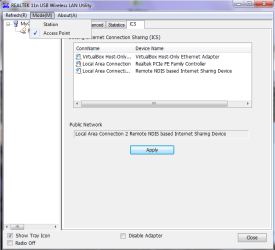
I'm afraid I don't know the exact model of mine, but it looks just like this. (In Devices and Printers it shows up as RTL8188S WLAN Adapter). I just installed the drivers and bit of software, then in the software clicked on the 'Mode' tab, wher I could switch it from 'Station' to 'Access Point'. I could then choose which internet connection into the PC that it shared, set up a WEP key etc. and then share the connection throughout the house.
hope I helped :)

(I'm pretty sure the one in the link is the one I have, as it looks identical and they don't list any other similar items)
 

Attachments

  • realtek.png
    realtek.png
    21.5 KB · Views: 72

My Computer My Computer

At a glance

Windows 7 Home Premium 64bitAMD Phenom II X6 1035T @2.6GHz (hexacore) (=1...6GB DDR3-1333 (running at 1066)NVIDIA/MSI GeForce GTX 770 (2GB)
Computer type
PC/Desktop
Computer Manufacturer/Model Number
HP Pavilion p6565uk
OS
Windows 7 Home Premium 64bit
CPU
AMD Phenom II X6 1035T @2.6GHz (hexacore) (=15.6GHz)
Motherboard
FOXCONN (2AA9)
Memory
6GB DDR3-1333 (running at 1066)
Graphics Card(s)
NVIDIA/MSI GeForce GTX 770 (2GB)
Sound Card
Realtek HD Audio (with 5.1 surround sound always on)
Monitor(s) Displays
HP 2311x (secondary-workspace), Sharp LL-T1620-H (primary)
Screen Resolution
1924x1080
Hard Drives
480GB Crucial M500 SSD
1TB internal WD Caviar Black
3TB Seagate Barracude 7200rpm (for media storage)
4TB Seagate Desktop drive (mirrored backup)
2TB Apple AirPort Time Capsule
1TB Seagate FreeAgent Desk
500GB Seagate External Desktop Drive
PSU
XCase Dolphin, 700W
Case
Stock HP one that came with it, mid-size ATX
Cooling
Stock fans, they're fairly quiet.
Keyboard
Microsoft Wireless Keyboard 2000+ HP Media Centre Remote
Mouse
Microsoft Wireless Mouse 2000
Internet Speed
20 Mbps down, 50 Mbps up
Antivirus
MSE
Browser
Chrome Beta
Other Info
Also:
- 13" Apple MacBook Air, 2013, i7 @ 1.7GHz, 8GB DDR3, 256GB SSD
- HP Deskjet 3050A
- Two HP ZV5000 laptops (the better of the two recently broke)
- A Compaq Evo D310 (has 2GB RAM and a 2.53GHz P4 but is curiously extremely slow)
- A desk fan - this weather is warm ;)
- A fair few retro consoles
- Too many cables behind the desk, probably a fire hazard.
I'm doing exactly that right now :p I have a Realtek USB WiFi 'dongle' (it says Dynamode 11N USB Adapter on it, but it uses Realtek stuff). The internet gets to my computer via my old phone, tethered via USB. It then goes through the computer and out the USB wireless adapter to my newer phone and iPod as WiFi.
I'm afraid I don't know the exact model of mine, but it looks just like this. (In Devices and Printers it shows up as RTL8188S WLAN Adapter). I just installed the drivers and bit of software, then in the software clicked on the 'Mode' tab, wher I could switch it from 'Station' to 'Access Point'. I could then choose which internet connection into the PC that it shared, set up a WEP key etc. and then share the connection throughout the house.
hope I helped :)

(I'm pretty sure the one in the link is the one I have, as it looks identical and they don't list any other similar items)

I met right person! Thanks friend. I want give try.
 

My Computer My Computer

At a glance

windows7 Ultimate SP1 x32bitIntelKinsgton 1GB an Transcend 2GBIntel- onboard
Computer Manufacturer/Model Number
Intel DG31PR (Intel Dual core 2.5 E5200 @ 2.5GHz)
OS
windows7 Ultimate SP1 x32bit
CPU
Intel
Motherboard
Intel DG31PR
Memory
Kinsgton 1GB an Transcend 2GB
Graphics Card(s)
Intel- onboard
Sound Card
Intel- onboard
Monitor(s) Displays
ViewSonic LCD Widescreen 19
Screen Resolution
1400x900
Hard Drives
Samsung 256GB
PSU
Legend
Case
Legend
Cooling
Intel
Keyboard
Seemo
Mouse
Prolink
Internet Speed
Download Speed-512Kbps, Upload Speed-128Kbps (ADSL wired)
Other Info
UPS- Prolink Pro650s
Router Prolink H5201
Sub Woofer - Creative 2.1
Back
Top