Solved How to stop updates appearing

lffoar

Harry
Member
VIP
Local time
3:40 PM
Messages
277
Location
Adelaide South Australia
Hi all,
I have windows update set to advise me so I can choose if/what to download.
Is there a way to stop particular unwanted updates from appearing?
Microsoft silverlight and other unwanted updates, eg a graphics card driver when I have the latest from nvidia, appear daily and it's annoying not being able to "delete" them......or can I??? I've done all the obvious things, uncheck and hide etc but back the little buggars come.
Thanks
 

My Computer

Computer type
PC/Desktop
Computer Manufacturer/Model Number
Self built
OS
Windows 7 home premium 64bit
CPU
intel Core i7 4790 3.6Ghz
Motherboard
Gigabyte H97-D3H
Memory
16Gb G.Skill Sniper
Graphics Card(s)
Nvidia GTX 760
Sound Card
Realtek ALC1150 115dB SNR HD Audio
Monitor(s) Displays
LG 32" TV as monitor
Screen Resolution
1920 x 1080
Hard Drives
Samsung 840 PRO series SATA3 256Gb SSD.
Western Digital Black SATA3 -1Tb.
Western Digital external HDD-1TB.

Pioneer DVD-RW.
PSU
Antec HCG 620w
Case
Thermaltake A41
Cooling
Stock fans x 3. After market Arctic Freezer i11 cpu cooler
Keyboard
Logitech M520r wireless
Mouse
Logitech M310t wireless
Internet Speed
Fair to middlin'
Antivirus
Avast free
Browser
Firefox
Other Info
MBAM Pro
SuperAntiSpyware free edition
AdwCleaner
Ccleaner
Revo uninstaller Pro
Right click, hide update...
 

My Computer

Computer Manufacturer/Model Number
XGS PII Dragon "Asus"
OS
windows 7 Pro x64
CPU
AMD Phenom II X4 955 Deneb 45nm Technology
Motherboard
ASUSTeK Computer INC. M4A78 PRO (AM2)
Memory
8.0GB Dual-Channel DDR2 @ 401MHz (5-5-5-18)
Graphics Card(s)
ATI Radeon HD 4800 Series (ATI
Sound Card
VIA High Definition Audio
Monitor(s) Displays
DELL 1908FP @ 1280x1024
Screen Resolution
1280x1024
Hard Drives
977GB SAMSUNG SAMSUNG HD103SI ATA Device (IDE)
Keyboard
HID Keyboard Device
Mouse
HID-compliant mouse
Internet Speed
2 Mb/s so far...

My Computer

Computer Manufacturer/Model Number
Hopalong/ Godzilla
OS
Windows7 Pro 64bit SP-1; Windows XP Pro 32bit
CPU
Intel Core i7-870 Lynnfield 2.93GHz LGA 1156 95W Quad-Core
Motherboard
ASUS P7P55D-E PRO
Memory
8GB@1400MHz Crucial Ballistix DDR3-1600 4x2GB
Graphics Card(s)
ASUS ENGTX460 DirectCU/2DI/1GD5 1GB 256-bit GDDR5
Sound Card
VIA Onboard
Monitor(s) Displays
Asus VS248H-P 24"; Samsung SyncMaster 941BW 19"ws
Screen Resolution
1920x1080; 1440x900
Hard Drives
Samsung 830 120GB SSD
Intel 320 120GB SSD
Western Digital Caviar Black WD7501AALS 750GB 7200 RPM SATA 3.0Gb/s
Western Digital Caviar Black WD6401AALS 640GB 7200 RPM SATA 3.0Gb/s
PSU
COOLER MASTER Silent Pro RS850-AMBAJ3-US 850W Modular
Case
COOLER MASTER HAF 932 RC-932-KKN5-GP Black
Cooling
Scythe "Mugen-2 Rev.B" (2 ScytheKaze-Jyuni PWM fans)
Keyboard
Logitech K-320
Mouse
Kensington
Antivirus
Avast Inernet Suite
Browser
IE 9 ; Chrome
Hi all,
I have windows update set to advise me so I can choose if/what to download.
Is there a way to stop particular unwanted updates from appearing?
Microsoft silverlight and other unwanted updates, eg a graphics card driver when I have the latest from nvidia, appear daily and it's annoying not being able to "delete" them......or can I??? I've done all the obvious things, uncheck and hide etc but back the little buggars come.
Thanks


Since you mentioned hiding already in your post, you could revert back to only having updates for Windows and not Optional MS products. That should take of the Silverlight update notifications.

But if you're not going to keep Silverlight up-to-date anyways (may contain security updates for it), then you might as well not even have Silverlight installed.

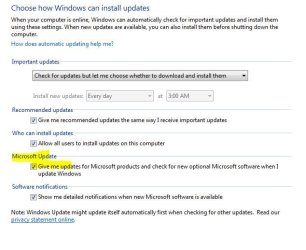
To revert, just go to Update settings and un-check this here -

Capture3.JPG

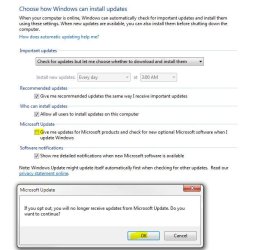
Then click OK

Capture4.JPG

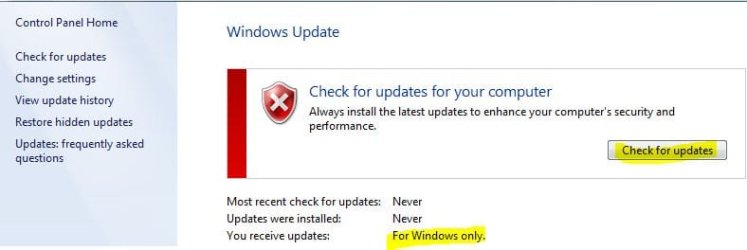
Then hit check for updates to turn updates back on for Windows only.

Capture5.JPG

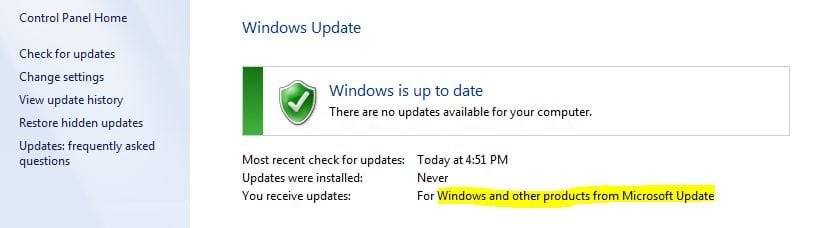
If you wanted to turn it back on ever, then just click that.

Capture2.JPG


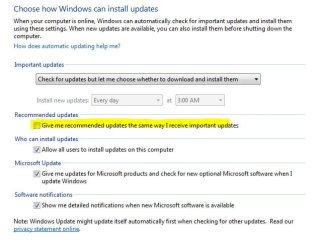
As for some other updates, you might just un-check Give me Recommended updates in the settings. Then you'll only get Important updates. That might take care of some you don't want too.

Capture7.JPG


I would suggest re-enabling them every month or so temporarily to see if there are any updates you would want.


As for the hiding, whenever I hide an update, it stays hidden permanently. Unless I restore my system from a Backup or maybe even system restore, then I get the updates back again and have to hide again. Or if they're separate, but similar updates (like a new driver version) I might get a new notification of it.

So don't know why you get them coming back all the time.
 

My Computer

Computer type
PC/Desktop
Computer Manufacturer/Model Number
Airbot 2.0
OS
Windows 7 Ultimate x64 SP1
CPU
Core i7 920 (D0) @ 4Ghz, *26c idle *65c full load on air
Motherboard
Asus P6X58D Premium - Sata 6Gb/s - USB 3.0
Memory
12GB DDR3 Corsair Dominator -CMD12GX3M6A1600C8 at 1600MHz
Graphics Card(s)
Zotac Geforce GTX 770
Sound Card
ASUS Xonar D2X
Monitor(s) Displays
1 LG 24" Flatron W2453V-PF 1 Samsung 24" P2450H both 2ms RT
Screen Resolution
1920x1080@60hz
Hard Drives
1 Samsung 250GB 840 Evo SSD
1 OCZ Vertex2 180GB SSD
1 TB Samsung Spinpoint F1 7200RPM 32MB cache
2 500GB WD Caviar Blacks 7200RPM 32MB cache (WD5001AALS)

Pioneer DVD Burner DVR-S18M
PSU
Corsair HX1000W
Case
Cooler Master HAF 932
Cooling
Case Fans *3 230mm, *1 140mm/CPU - *Tuniq Tower 120 Extreme
Keyboard
Logitech Wireless MK700
Mouse
Logitech Wireless MK700
Internet Speed
DL 15 Mbps UL 0.98 Mbps
Antivirus
None
Browser
Firefox Nightly
Other Info
Processor-7.7 *RAM- 7.9 *Graphics-7.9 *Gaming Graphics- 7.9 *SSD- 7.8 W.E.I final score= 7.7
*Phone- LG Nexus 5
Airbot....have turned off "recommended updates" which might stop a few anyway.
I have Microsoft office installed and received updates for it via "Other Microsoft products", so I've unchecked that too. As you say I can check it once a month or so.

I don't know why when I right click and "hide updates" they keep coming back....maybe a gremlin!!!

No big deal, thanks for the help fellers. Consider it closed
 

My Computer

Computer type
PC/Desktop
Computer Manufacturer/Model Number
Self built
OS
Windows 7 home premium 64bit
CPU
intel Core i7 4790 3.6Ghz
Motherboard
Gigabyte H97-D3H
Memory
16Gb G.Skill Sniper
Graphics Card(s)
Nvidia GTX 760
Sound Card
Realtek ALC1150 115dB SNR HD Audio
Monitor(s) Displays
LG 32" TV as monitor
Screen Resolution
1920 x 1080
Hard Drives
Samsung 840 PRO series SATA3 256Gb SSD.
Western Digital Black SATA3 -1Tb.
Western Digital external HDD-1TB.

Pioneer DVD-RW.
PSU
Antec HCG 620w
Case
Thermaltake A41
Cooling
Stock fans x 3. After market Arctic Freezer i11 cpu cooler
Keyboard
Logitech M520r wireless
Mouse
Logitech M310t wireless
Internet Speed
Fair to middlin'
Antivirus
Avast free
Browser
Firefox
Other Info
MBAM Pro
SuperAntiSpyware free edition
AdwCleaner
Ccleaner
Revo uninstaller Pro
Good timing. Came here looking for this particular answer.
I wanted to get rid of the optional language pack update. It is a huge update, 34 individual languages, that I will never use. Have enough problems with english.

Hopefully they stay gone.
 

My Computer

OS
win 7 64
Back
Top