Solved How to stop Windows 7 from writing desktop.ini files everywhere?

Sourcerer

New member
Local time
9:35 AM
Messages
11
Hello,

so I have issues about hidden files (I always want to see them), and I'm particularly annoyed by this desktop.ini file. As if it wasn't enough that there is one in almost every folder, in Windows 7 there are TWO of them on my desktop!

Also, Windows 7 is always trying to burn/write that file on every removable media I have, including USB memory sticks, external hard drives, CD's, DVD's (and the fact that they aren't rewritable and have been burned and closed by the factory doesn't seem to stop it from getting that file ready to be written to disc), etc. Am I the only one thinking this is insane?

My question is simple - how do I stop Windows 7 from ever creating another one of these files again (that is, until next reinstall or some such thing, I'm just trying to be dramatic)?

Yes, I know I will lose some customization functions, but the fact is - I don't need them (which is why I want to see hidden files - to delete them if I don't need them). I know what's in what folder, thank you very much. And yes, I know I can go to Control Panel and set it to not show hidden files, but that's exactly what I don't want.

So, just show me which option to un-check and I'll be happy and I'll buy you some e-beer.

Thanks,
Nikola
 

My Computer My Computer

At a glance

Windows XP
OS
Windows XP
I've seen before that if you have thumbnail view set for your folders, each folder will have a desktop.ini file. Is this the view you have?
 

My Computer My Computer

At a glance

Windows 7 Home Premium x64Intel Core i5-430M Processor4GB DDR3 SDRAMATI Mobility Radeon HD 5470
Computer Manufacturer/Model Number
Sony Vaio VPCEB1Z0E/B Laptop
OS
Windows 7 Home Premium x64
CPU
Intel Core i5-430M Processor
Motherboard
Intel HM55 Express Chipset
Memory
4GB DDR3 SDRAM
Graphics Card(s)
ATI Mobility Radeon HD 5470
Sound Card
Realtek ATI HDMI Audio (Dolby Home Theatre v3)
Monitor(s) Displays
15.5" VAIO Display Plus
Screen Resolution
1920x1080
Hard Drives
Internal - SATA 500GB (5400rpm)
External - Western Digital Passport 320GB
Mouse
Microsoft Bluetooth Notebook Mouse 5000
Internet Speed
Up to 20 Mbps, averages about 5Mbps
Other Info
Lexmark S605 All in One Wireless Printer
So, just show me which option to un-check and I'll be happy and I'll buy you some e-beer.

Thanks,
Nikola

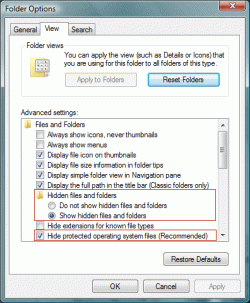
Folder Options > View > enable Hide protected operating system files.
Furthermore, desktop.ini is not written to CD/DVDs when you burn.
 

My Computer My Computer

At a glance

Windows 10 Pro (x64)Intel Core i7-3930K (3.2GHz - 4.5GHz)4x Samsung 4GB PC3-12800 DDR3 (16GB 1600MHz)Nvidia Geforce GTX 690
Computer type
PC/Desktop
Computer Manufacturer/Model Number
Alienware Aurora ALX R4
OS
Windows 10 Pro (x64)
CPU
Intel Core i7-3930K (3.2GHz - 4.5GHz)
Motherboard
Alienware Aurora-R4 x79
Memory
4x Samsung 4GB PC3-12800 DDR3 (16GB 1600MHz)
Graphics Card(s)
Nvidia Geforce GTX 690
Sound Card
SteelSeries Siberia Elite
Monitor(s) Displays
Dell UltraSharp U3011
Screen Resolution
2560x1600
Hard Drives
Samsung 850 Pro 256 GB, Seagate 1TB Desktop Hybrid HDD, 2x Western Digital 4TB Green HDD
PSU
875W Some Dell PSU <.<
Case
Alienware Aurora ALX
Cooling
Custom Liquid Cooling (EK CPU & GPU blocks) dual EK 480RAD
Keyboard
Logitech G710+ Mechanical
Mouse
Logitech G700s
Internet Speed
Verizon Fios (50 mbps average)
Other Info
Server: Intel NUC D54250WYK: i5-4250U, 16GB, 256 GB mSATA, Windows Server 2012 R2
[/QUOTE]

Furthermore, desktop.ini is not written to CD/DVDs when you burn.[/QUOTE]

You are right that it does not write it to the CD/DVD but if you go to write another CD/DVD it shows desktop.ini in que to be written. It just stays in que until you delete it or reboot. Don't understand that.

Jim :geek:
 

My Computer My Computer

At a glance

Windows 8.1 Pro w/Media Center 64bit, Windows...Phenom II X6 1100TCrucial Balistic 8gb DDR3-1866 CL9MSI R6850 Cyclone IGD5 PE
Computer type
PC/Desktop
Computer Manufacturer/Model Number
Home Built
OS
Windows 8.1 Pro w/Media Center 64bit, Windows 7 HP 64bit
CPU
Phenom II X6 1100T
Motherboard
ASUS M5A99X EVO
Memory
Crucial Balistic 8gb DDR3-1866 CL9
Graphics Card(s)
MSI R6850 Cyclone IGD5 PE
Sound Card
On Board
Monitor(s) Displays
ASUS VE258Q 25" LED with DVI-HDMI-DisplayPort
Screen Resolution
1920 x 1080
Hard Drives
Two WD Cavier Black 2TB Sata III, WD My Book Essential 2TB USB 3.0
PSU
Seasonic X650 80 Plus GOLD Modular
Case
Corsair 400R
Cooling
Antec Kuhler H2O 620, Two 120mm and four 140mm
Keyboard
Logitech K120
Mouse
Logitech Marble Mouse USB, Logitech Precision Game Pad
Internet Speed
15MB
Antivirus
Norton IS 2013, Malwarebytes Pro Beta 2
Browser
IE-11, FF-27
Other Info
APC UPS ES 750, Netgear WNR3500L Gigabit & Wireless N Router with SamKnows Test Program, Motorola SB6120 Gigabit Cable Modem. Brother HL-2170W Laser Printer, Epson V300 Scanner
I am new to windows 7, and ever since I started using windows 95 up to the present win7 (with win98 and winxp; yes I skipped vista), I have always viewed hidden files - I am a computer professional, and not an end user type.

Why is ms/windows creating these desktop.ini files on my desktop? What is the purpose anyway?

Deb
 

My Computer My Computer

At a glance

windows 7 64 bitdual core8 gigsati radeon 5800
Computer Manufacturer/Model Number
Sager
OS
windows 7 64 bit
CPU
dual core
Memory
8 gigs
Graphics Card(s)
ati radeon 5800
Hard Drives
ssd 80 gigs
320 gig
I am new to windows 7, and ever since I started using windows 95 up to the present win7 (with win98 and winxp; yes I skipped vista), I have always viewed hidden files - I am a computer professional, and not an end user type.

Why is ms/windows creating these desktop.ini files on my desktop? What is the purpose anyway?

Deb

desktop.ini holds folder configurations/customizations as it always have.
 

My Computer My Computer

At a glance

Windows 10 Pro (x64)Intel Core i7-3930K (3.2GHz - 4.5GHz)4x Samsung 4GB PC3-12800 DDR3 (16GB 1600MHz)Nvidia Geforce GTX 690
Computer type
PC/Desktop
Computer Manufacturer/Model Number
Alienware Aurora ALX R4
OS
Windows 10 Pro (x64)
CPU
Intel Core i7-3930K (3.2GHz - 4.5GHz)
Motherboard
Alienware Aurora-R4 x79
Memory
4x Samsung 4GB PC3-12800 DDR3 (16GB 1600MHz)
Graphics Card(s)
Nvidia Geforce GTX 690
Sound Card
SteelSeries Siberia Elite
Monitor(s) Displays
Dell UltraSharp U3011
Screen Resolution
2560x1600
Hard Drives
Samsung 850 Pro 256 GB, Seagate 1TB Desktop Hybrid HDD, 2x Western Digital 4TB Green HDD
PSU
875W Some Dell PSU <.<
Case
Alienware Aurora ALX
Cooling
Custom Liquid Cooling (EK CPU & GPU blocks) dual EK 480RAD
Keyboard
Logitech G710+ Mechanical
Mouse
Logitech G700s
Internet Speed
Verizon Fios (50 mbps average)
Other Info
Server: Intel NUC D54250WYK: i5-4250U, 16GB, 256 GB mSATA, Windows Server 2012 R2
Professional or amateur, I don't feel there is and real value or purpose in being able to see the system files, except, possibly, if you are troubleshooting. But, fwiw, I have enabled mine and have had no problems deleting .ini files. Some are recreated, but I have not had the desktop ones do that.
 

My Computer My Computer

At a glance

Vista and now 7 in 32 and 64 bit.
Computer Manufacturer/Model Number
Three desktops and one laptop with good specs..
OS
Vista and now 7 in 32 and 64 bit.
Learned something today. It seams that anytime you make a custom change to a folder it writes a desktop.ini file to that folder so it remembers the changes. If you delete the desktop.ini file the folder will return to default settings. To me the name is a little misleading and would not folder.ini be a better name??

Please correct me if I am wrong on this.

Thanks,
Jim :geek:
 

My Computer My Computer

At a glance

Windows 8.1 Pro w/Media Center 64bit, Windows...Phenom II X6 1100TCrucial Balistic 8gb DDR3-1866 CL9MSI R6850 Cyclone IGD5 PE
Computer type
PC/Desktop
Computer Manufacturer/Model Number
Home Built
OS
Windows 8.1 Pro w/Media Center 64bit, Windows 7 HP 64bit
CPU
Phenom II X6 1100T
Motherboard
ASUS M5A99X EVO
Memory
Crucial Balistic 8gb DDR3-1866 CL9
Graphics Card(s)
MSI R6850 Cyclone IGD5 PE
Sound Card
On Board
Monitor(s) Displays
ASUS VE258Q 25" LED with DVI-HDMI-DisplayPort
Screen Resolution
1920 x 1080
Hard Drives
Two WD Cavier Black 2TB Sata III, WD My Book Essential 2TB USB 3.0
PSU
Seasonic X650 80 Plus GOLD Modular
Case
Corsair 400R
Cooling
Antec Kuhler H2O 620, Two 120mm and four 140mm
Keyboard
Logitech K120
Mouse
Logitech Marble Mouse USB, Logitech Precision Game Pad
Internet Speed
15MB
Antivirus
Norton IS 2013, Malwarebytes Pro Beta 2
Browser
IE-11, FF-27
Other Info
APC UPS ES 750, Netgear WNR3500L Gigabit & Wireless N Router with SamKnows Test Program, Motorola SB6120 Gigabit Cable Modem. Brother HL-2170W Laser Printer, Epson V300 Scanner
Folder Options > View > enable Hide protected operating system files.
Furthermore, desktop.ini is not written to CD/DVDs when you burn.
Thou hast not properly understood my question, thus thou shalt not get any e-beer. :)

Edit: Maybe desktop.ini isn't written to a CD/DVD (I wouldn't know, I always delete it manually off the list), but it's always *ready* to be written.

Cheers!
 

My Computer My Computer

At a glance

Windows XP
OS
Windows XP
I've seen before that if you have thumbnail view set for your folders, each folder will have a desktop.ini file. Is this the view you have?
That, I think, was true on Windows XP, but 7 creates desktop.ini file regardless. I deleted the two off my desktop once, only to have them reappear on reboot.

For some reason I'm quite certain that Microsoft could've come up with a more elegant solution to folder customization than having a hidden system file in every folder. I wouldn't even be making such a fuss about it if the files (and yes, I'm saying files, as in more than one of them, both having the same name in the same folder, how insane is that!) weren't showing on my desktop (and no, I'm not likely to un-check viewing of hidden files).
 

My Computer My Computer

At a glance

Windows XP
OS
Windows XP
Thou hast not properly understood my question, thus thou shalt not get any e-beer. :)

It is the only solution there is. Either you hide them or you live with them in view.

That, I think, was true on Windows XP, but 7 creates desktop.ini file regardless. I deleted the two off my desktop once, only to have them reappear on reboot.
Did you just do Windows Updates? That would be why.

(and yes, I'm saying files, as in more than one of them, both having the same name in the same folder, how insane is that!)

One is in Public\Desktop the other in [Username]\Desktop, They are not in the same folder.
 

My Computer My Computer

At a glance

Windows 10 Pro (x64)Intel Core i7-3930K (3.2GHz - 4.5GHz)4x Samsung 4GB PC3-12800 DDR3 (16GB 1600MHz)Nvidia Geforce GTX 690
Computer type
PC/Desktop
Computer Manufacturer/Model Number
Alienware Aurora ALX R4
OS
Windows 10 Pro (x64)
CPU
Intel Core i7-3930K (3.2GHz - 4.5GHz)
Motherboard
Alienware Aurora-R4 x79
Memory
4x Samsung 4GB PC3-12800 DDR3 (16GB 1600MHz)
Graphics Card(s)
Nvidia Geforce GTX 690
Sound Card
SteelSeries Siberia Elite
Monitor(s) Displays
Dell UltraSharp U3011
Screen Resolution
2560x1600
Hard Drives
Samsung 850 Pro 256 GB, Seagate 1TB Desktop Hybrid HDD, 2x Western Digital 4TB Green HDD
PSU
875W Some Dell PSU <.<
Case
Alienware Aurora ALX
Cooling
Custom Liquid Cooling (EK CPU & GPU blocks) dual EK 480RAD
Keyboard
Logitech G710+ Mechanical
Mouse
Logitech G700s
Internet Speed
Verizon Fios (50 mbps average)
Other Info
Server: Intel NUC D54250WYK: i5-4250U, 16GB, 256 GB mSATA, Windows Server 2012 R2
I've found a way to stop desktop.ini files from reappearing on the desktop, at least after one reboot. In Control Panel, click Folder Options, select View tab, and click Reset Folders, and confirm. In Advanced settings, check "Always show icons, never thumbnails", and click Apply. Then delete the desktop.ini files.

I'm still not sure whether that stops Windows from getting desktop.ini file ready to be written to CD/DVDs, or from writing them to other removable media.
 

My Computer My Computer

At a glance

Windows XP
OS
Windows XP
One is in Public\Desktop the other in [Username]\Desktop
I know about this feature of viewing multiple folders as one (though I forgot the actual name), but that doesn't mean I particularly like it. desktop.ini file notwithstanding, someone might have two (or more!) different files saved in multiple folders under the same name, and the aggregate folder would show all of them, leaving the user wondering which is which. I tend to do that with everything ranging from photographs (DSC_0001.JPG is one of the most common file names I have on my system, disregarding the desktop.ini) to video, to text.
Did you just do Windows Updates? That would be why.
Not that I know of. I tend to note when my computer gets updated.
It is the only solution that works. Either you hide them or you live with them in view.
IOW, there is no other solution, i.e. no solution that would make me happy, ergo no e-beer. Sorry. :(
 

My Computer My Computer

At a glance

Windows XP
OS
Windows XP
(and no, I'm not likely to un-check viewing of hidden files)
@Sourcerer
If you have set windows to "Show hidden files" and "Hide system files", then you wont see the desktop.ini files but will still be able to see the hidden files.
Enable_disable_folder_options_windows.gif

That wont actually stop windows from writing the files, but atleast you wont see them ;)
 

My Computer My Computer

At a glance

Windows 7 Ultimate x64 (XP, 98SE, 95, 3.11, D...Intel Core 2 Duo Processor P8600 (2.40 GHz, 3...4GB 800 MHz DDR2 SDRAMATI Mobility FireGL V5700 with 256 MB
Computer type
Laptop
Computer Manufacturer/Model Number
HP EliteBook 8530w Mobile Workstation
OS
Windows 7 Ultimate x64 (XP, 98SE, 95, 3.11, DOS 7.10 on VM) + Ubuntu 10.04 LTS Lucid Lynx
CPU
Intel Core 2 Duo Processor P8600 (2.40 GHz, 3 MB L2 cache)
Motherboard
Mobile Intel PM45 Express Chipset ICH9M-Enhanced
Memory
4GB 800 MHz DDR2 SDRAM
Graphics Card(s)
ATI Mobility FireGL V5700 with 256 MB
Sound Card
SoundMAX Integrated Digital HD Audio
Monitor(s) Displays
15.4-inch WXGA anti-glare (1280 x 800 resolution)
Screen Resolution
1280 x 800
Hard Drives
500GB + 1TB
Mouse
Synaptics PS/2 Port Touchpad, USB Mouse
Internet Speed
4 Mbps
Antivirus
MSE
Browser
Firefox, Chrome, IE
Other Info
Authentec AES2810 Fingerprint Reader
For some reason I'm quite certain that Microsoft could've come up with a more elegant solution to folder customization than having a hidden system file in every folder.
They have a more elegant solution at their fingertips - Alternate Data Streams

ADS's are not an MS idea though, only the name is theirs, ADS's are an implementation of a unix file system fork, which like most ..ix things came from Multics, which borrowed many things from Burroughs MCP. MCP was written in Algol, the precursor of many modern computer languages, Multics was written in PL/1 which bore a strong resemblance to Algol, as of course does C.

So why don't MS use ADS's for desktop.ini, thumbs db etc ?

You cant have ADS's on a FAT/32 device - so you can blame good ol' "backward compatibility".

As a s/w developer I've found if you don't retain 100% backward compatibility then 50% of users will want you hung, drawn & quartered; when you retain 100% backward compatibility then 50% of users will want you shot at dawn and buried alive - and the two groups are not necessarily mutex's.
cool.gif


Basically any adornment you give to a folder will probably create (or add to an existing) desktop ini file.

pjd
 

My Computer My Computer

At a glance

Win 7 Professional 64bitI5 650 @ 3.2GHz6GAMD Radeon R7 200 Series
Computer type
PC/Desktop
Computer Manufacturer/Model Number
generic - made to spec
OS
Win 7 Professional 64bit
CPU
I5 650 @ 3.2GHz
Motherboard
Gigabyte H55M-UD2H
Memory
6G
Graphics Card(s)
AMD Radeon R7 200 Series
Sound Card
whatever is on mobo
Monitor(s) Displays
1 x 24" Samsung
Screen Resolution
1920x1200
Hard Drives
Internal 1x256GB Toshiba SSD
Internal 1x2TB
External 2 slot USB 3.0 dock (various drives)
External 1 500GB USB 2.0 drive
PSU
850W Antech Modular
Case
Shiny Black Aluminium
Cooling
extra fans - sucker in front, blower at back - noisy & cool
Keyboard
Microsoft USB Dual Receiver Wireless Keyboard
Mouse
Microsoft USB Dual Receiver Wireless Mouse
Internet Speed
20/1Mbps down/up
Antivirus
MSE
Browser
Firefox and Chrome
Other Info
Hitachi USB 3.0 adapter
Don't use the built-in burner app and you won't be prompted that they are "ready"? I have never used the built-in burning app, and I have never been prompted that the desktop.ini is ready to burn. I've seen it in screenshots posted before, so I know what you are talking about, but I honestly couldn't replicate the behavior.

As for the level of tech knowledge, hiding system files has nothing to do with whether you are an expert or an end user. Since you have no reason to be mucking with those files, there's no reason to show them. Should you need them...you know how to access them.
 

My Computer My Computer

At a glance

Windows 7 Ultimate x64 SP1Intel Core i7-260012 GB Patriot Extreme DDR3-1333Nvidia GTX 470
OS
Windows 7 Ultimate x64 SP1
CPU
Intel Core i7-2600
Motherboard
Gigabyte GA-P67A-UD3P-B3
Memory
12 GB Patriot Extreme DDR3-1333
Graphics Card(s)
Nvidia GTX 470
Monitor(s) Displays
Dell UltraSharp 2209WA
Hard Drives
OCZ Agility3 240 GB, WD5001AALS, WD7501AALS
PSU
OCZ ModStream 700W
Case
CoolerMaster HAF 912 Advanced
Cooling
CoolerMaster Hyper 212 Plus

My Computer My Computer

At a glance

Windows 7 x64 pro/ Windows 7 x86 Pro/ XP SP3 x86
Computer Manufacturer/Model Number
Too many to describe...
OS
Windows 7 x64 pro/ Windows 7 x86 Pro/ XP SP3 x86
Don't use the built-in burner app and you won't be prompted that they are "ready"? I have never used the built-in burning app, and I have never been prompted that the desktop.ini is ready to burn. I've seen it in screenshots posted before, so I know what you are talking about, but I honestly couldn't replicate the behavior.

As for the level of tech knowledge, hiding system files has nothing to do with whether you are an expert or an end user. Since you have no reason to be mucking with those files, there's no reason to show them. Should you need them...you know how to access them.
I'm with Deacon. Why do you want to the view the hidden files at all times? They're hidden for a reason as they can pose security threats. If you need to view them, is it that hard to click 'Show hidden files'?
 

My Computer My Computer

At a glance

Windows 7 Home Premium x864096MB (2 x 2048) DDR2 667mhz CorsairATI Radeon® X1200 128MB-319MB dynamically all...
Computer Manufacturer/Model Number
Toshiba Satellite A215-S4757
OS
Windows 7 Home Premium x86
Motherboard
AMD Turion™ 64 X2 Dual-Core Mobile Technology TL56 1.8 GHz
Memory
4096MB (2 x 2048) DDR2 667mhz Corsair
Graphics Card(s)
ATI Radeon® X1200 128MB-319MB dynamically allocated shared g
Sound Card
Realtek
Monitor(s) Displays
15.4” diagonal widescreen TruBrite®TFT LCD display at 1280x8
Screen Resolution
1280x800
Hard Drives
Internal HD: 250GB (4200RPM); Serial ATA HDD
External HD: Western Digital 320GB My Passport Elite WDMLZ3200TN USB 2.0 Portable Hard Drive (Bronze)
Case
Targus
Mouse
Logitech G7
Internet Speed
6meg
I'm with Deacon. Why do you want to the view the hidden files at all times? They're hidden for a reason as they can pose security threats. If you need to view them, is it that hard to click 'Show hidden files'?
There are several reasons. Back before I knew about how Windows writes information on thumbnails, I had hidden files really hidden from view. Then came the Thumbs.db file which got updated in a folder whenever I viewed a thumbnail of a photo. Since I had a folder through which many photos have passed, the Thumbs.db had grown to a really huge size of several hundred MBs (which was a whole lot then) and since it was hidden I had no idea where all my disk space had gone. Moreover, when I copied a file called, say DSC_0001.JPG to that folder, and I had previously viewed a file that had the same name, the old thumbnail from Thumbs.db was loaded and displayed in Windows Explorer. Showing hidden files was then sort of a revelation for me, just as preventing Windows from writing a Thumbs.db file at all. This is why I'm always showing hidden files - because I want to know what my disk space is being used for and not just watch how my free space is decreasing inexplicably.

As for showing system files, I had a nasty encounter with a virus once and it got archived in a restore point. I had successfully removed it, but not the copy stored in a restore point. Imagine my surprise when it got back after I had restored my computer about a month later when for some reason (I don't quite remember what it was) I had to revert the system back to a previous state. After removing the virus again, I tried deleting restore points, but the interface that was made for this wouldn't remove it as it was blocked by my antivirus software because of the virus that was in it. Eventually I had to delete restore points manually (and just imagine the pain of having to give myself permissions to manually remove an infected file). On another note, restore points take up a lot of space as well, and are significant when managing a limited disk space - and mind you, with unmanaged Windows any disk space eventually becomes limited.

For these reasons I don't like to be in the dark about anything that goes on on my computer. I know enough to know what I can and what I can't remove or edit. After all, my Windows XP installation was running smoothly (with the exception of the two infections of which one was due to a restore point) for seven years without a single reinstall, which is by far more than what I can say about most installations I've seen.
 

My Computer My Computer

At a glance

Windows XP
OS
Windows XP
If you scroll down the page, reader called Nemo has suggested an alternative solution.
Nemo said:
you can just navigate to “C:\Users\\AppData\Local\Microsoft\Windows\Burn\Burn” and click Properties on that folder. Deny folder access to your current user and the “Desktop.ini” will disappear in your CD-Drive’s Root folder.
Won't that prevent me from using the built-in burner?
 

My Computer My Computer

At a glance

Windows XP
OS
Windows XP
Back
Top