Solved How to stop Windows 10 from installing from tray icon?

Ohmster

New member
Member
Local time
11:11 AM
Messages
46
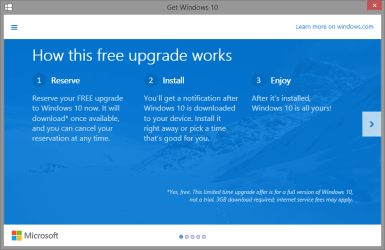
I notice now that there is this white Windows icon in my taskbar and out of curiosity, I clicked it and see that you can opt in to have Windows 10, the full version, for free. I like to checkout new Windows OS versions, but I hate Windows 8 and would not like Windows 10 "forever" if I try it. I went through the process of saying yes and to my horror, at the end I got a notice that when Windows 10 is released at the end of July, it would be installed!

Whoa, whoa, whoa! I wanted an option on this, not have it rammed down my throat one day after rebooting! This little Windows icon now has me believing that in a month or so, I will reboot to Windows 10 and lose my Windows 7 setup. I don't want this, I just want to see what it is like, not be stuck with it. It hasn't happened yet and so who can tell, but has anyone here had experience with with Windows 10 or especially, how to not have it installed automatically? I am now reading some of the bad stuff about it. OMG, am I really doomed? :eek:
 

My Computer My Computer

At a glance

Windows 10 Pro via free update.Intel Core i7 382016,384 MB DDR3-SDRAMNVIDIA GeForce GTX 770
Computer type
PC/Desktop
Computer Manufacturer/Model Number
Built from Maximum PC magazine article
OS
Windows 10 Pro via free update.
CPU
Intel Core i7 3820
Motherboard
Gigabyte X79-UP4
Memory
16,384 MB DDR3-SDRAM
Graphics Card(s)
NVIDIA GeForce GTX 770
Hard Drives
1) - C:/ 500 Gb Samsung SSD 840
2) - 1 Tb SATA drives
1) - 4 Tb SATA Drive
1) - t Tb USB External BU Drive
Antivirus
Avast Free Antivirus 2014.9.0.2006
Browser
Firefox
Found it! OMG, I was really going to be stuck with it and with the right Google search, found the way out of it. Here it is for those that opted in to the free Windows 10 upgrade and now do not want it anymore:

How to stop the Windows 10 Upgrade from downloading on your system | Windows 10 content from SuperSite for Windows

I just uninstalled it as a Windows Update and now have to reboot to get it out for good. Wow, that was a close one. Reading about Windows 10 showed me this is something I want no part of! And better yet, how to get rid of that pesky update forever. Hide it. :)
 

My Computer My Computer

At a glance

Windows 10 Pro via free update.Intel Core i7 382016,384 MB DDR3-SDRAMNVIDIA GeForce GTX 770
Computer type
PC/Desktop
Computer Manufacturer/Model Number
Built from Maximum PC magazine article
OS
Windows 10 Pro via free update.
CPU
Intel Core i7 3820
Motherboard
Gigabyte X79-UP4
Memory
16,384 MB DDR3-SDRAM
Graphics Card(s)
NVIDIA GeForce GTX 770
Hard Drives
1) - C:/ 500 Gb Samsung SSD 840
2) - 1 Tb SATA drives
1) - 4 Tb SATA Drive
1) - t Tb USB External BU Drive
Antivirus
Avast Free Antivirus 2014.9.0.2006
Browser
Firefox

My Computer My Computer

At a glance

Win 10 Pro x64Intel I5-2500K @3.3GHz16GB G.Skill Ripjaws X (4x4GB)EVGA GeForce 750 Ti SC 2GB
Computer type
PC/Desktop
Computer Manufacturer/Model Number
Self Built
OS
Win 10 Pro x64
CPU
Intel I5-2500K @3.3GHz
Motherboard
Asrock P67 Extreme4
Memory
16GB G.Skill Ripjaws X (4x4GB)
Graphics Card(s)
EVGA GeForce 750 Ti SC 2GB
Sound Card
ASUS Xonar DG 5.1 Channels 24-bit 96KHz PCI Interface Sound
Monitor(s) Displays
auria eq2367
Screen Resolution
1920 x 1080
Hard Drives
250GB Samsung 850 EVO SSD
1TB WD Blue
1TB Hitachi
PSU
SeaSonic X 650W 80 Plus Gold
Case
Corsair Obsidian 750D
Cooling
Corsair H60, Three 140mm case fans
Keyboard
Logitech Wireless Keyboard K520
Mouse
Logitech Wireless Mouse M310
Internet Speed
Wave Broadband ~ 100 dn 5 up
Antivirus
Windows Defender, Malwarebytes Premium
Browser
Edge, IE11, Chrome
Other Info
Laptop specs: HP g7-1365dx /
CPU: AMD A6-3420M APU with Radeon(tm) HD Graphics /
RAM: Crucial 8Gb (2x4Gb) /
SSD: Crucial M4-CT128M4SSD2 ATA Device/ FW 000F /
GFX: AMD Radeon HD 6520G /
OS: Windows 10 Pro x64
It is NOT going to install by itself, by you reserving you are allowing it to be downloaded, you can choose when to install.

View attachment 362987

You are not going to wake up to windows 10 installed without any action from you.

These may be what you are looking for,

Get Windows 10 app - Cancel Reservation for Free Upgrade to Windows 10 - Windows 10 Forums

Get Windows 10 Icon - Remove from Taskbar in Windows 7 and 8.1 - Windows 10 Forums

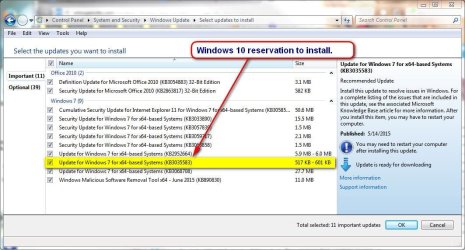
Wow, thank you very much! I found a different way to cancel it and it seems to have worked, as you can see from my link. The free icon is gone but I have not hidden the update yet, have to find it in Windows update and do that. These kb names do not tell you much and I don't want to accidentally do this again. Those links were very informative. Man this is a good place to get Windows answers! That was not a "quick removal", there seems to have been things installed to get ready for this. I got the so many percent update notice when removing this reservation.

I just wanted to "try it" but that entire process seemed awfully "pushy" in a subtle way, but also quite permanent, if I went through with it. There is a lot not to like in Windows 10, too close for comfort. Thanks again! :party:

EDIT:
Wow, now it is buried in my Windows update and there is nothing to tell you exactly what this update really is! Man, Microsoft is pretty persistent about this and it seems from what I am reading, Microsoft will "own this computer as much as I do" if I update to Windows 10. No thanks. Thanks for the heads up!
 

Attachments

  • win10.jpg
    win10.jpg
    100.4 KB · Views: 1
Last edited:

My Computer My Computer

At a glance

Windows 10 Pro via free update.Intel Core i7 382016,384 MB DDR3-SDRAMNVIDIA GeForce GTX 770
Computer type
PC/Desktop
Computer Manufacturer/Model Number
Built from Maximum PC magazine article
OS
Windows 10 Pro via free update.
CPU
Intel Core i7 3820
Motherboard
Gigabyte X79-UP4
Memory
16,384 MB DDR3-SDRAM
Graphics Card(s)
NVIDIA GeForce GTX 770
Hard Drives
1) - C:/ 500 Gb Samsung SSD 840
2) - 1 Tb SATA drives
1) - 4 Tb SATA Drive
1) - t Tb USB External BU Drive
Antivirus
Avast Free Antivirus 2014.9.0.2006
Browser
Firefox
You're welcome.

As long as you got it sorted and know it's not an automatic install.
 

My Computer My Computer

At a glance

Win 10 Pro x64Intel I5-2500K @3.3GHz16GB G.Skill Ripjaws X (4x4GB)EVGA GeForce 750 Ti SC 2GB
Computer type
PC/Desktop
Computer Manufacturer/Model Number
Self Built
OS
Win 10 Pro x64
CPU
Intel I5-2500K @3.3GHz
Motherboard
Asrock P67 Extreme4
Memory
16GB G.Skill Ripjaws X (4x4GB)
Graphics Card(s)
EVGA GeForce 750 Ti SC 2GB
Sound Card
ASUS Xonar DG 5.1 Channels 24-bit 96KHz PCI Interface Sound
Monitor(s) Displays
auria eq2367
Screen Resolution
1920 x 1080
Hard Drives
250GB Samsung 850 EVO SSD
1TB WD Blue
1TB Hitachi
PSU
SeaSonic X 650W 80 Plus Gold
Case
Corsair Obsidian 750D
Cooling
Corsair H60, Three 140mm case fans
Keyboard
Logitech Wireless Keyboard K520
Mouse
Logitech Wireless Mouse M310
Internet Speed
Wave Broadband ~ 100 dn 5 up
Antivirus
Windows Defender, Malwarebytes Premium
Browser
Edge, IE11, Chrome
Other Info
Laptop specs: HP g7-1365dx /
CPU: AMD A6-3420M APU with Radeon(tm) HD Graphics /
RAM: Crucial 8Gb (2x4Gb) /
SSD: Crucial M4-CT128M4SSD2 ATA Device/ FW 000F /
GFX: AMD Radeon HD 6520G /
OS: Windows 10 Pro x64
You're welcome.

As long as you got it sorted and know it's not an automatic install.

Thanks. I know that it is not automatic but I am sure that I will not like it and especially if it is a "one way update". It appears that Windows Update KB3035583 is a "Notification Update" but that is the update I had to remove to make this reservation "go away". So installing it again will probably make the free offer available again. But I don't have to take it, yes? Is KB3035583 an advisable update that will not force anything on the user?
 

My Computer My Computer

At a glance

Windows 10 Pro via free update.Intel Core i7 382016,384 MB DDR3-SDRAMNVIDIA GeForce GTX 770
Computer type
PC/Desktop
Computer Manufacturer/Model Number
Built from Maximum PC magazine article
OS
Windows 10 Pro via free update.
CPU
Intel Core i7 3820
Motherboard
Gigabyte X79-UP4
Memory
16,384 MB DDR3-SDRAM
Graphics Card(s)
NVIDIA GeForce GTX 770
Hard Drives
1) - C:/ 500 Gb Samsung SSD 840
2) - 1 Tb SATA drives
1) - 4 Tb SATA Drive
1) - t Tb USB External BU Drive
Antivirus
Avast Free Antivirus 2014.9.0.2006
Browser
Firefox
You can just right click on it and hide it with no problems if you don't want to upgrade.
 

My Computer My Computer

At a glance

Win 10 Pro x64Intel I5-2500K @3.3GHz16GB G.Skill Ripjaws X (4x4GB)EVGA GeForce 750 Ti SC 2GB
Computer type
PC/Desktop
Computer Manufacturer/Model Number
Self Built
OS
Win 10 Pro x64
CPU
Intel I5-2500K @3.3GHz
Motherboard
Asrock P67 Extreme4
Memory
16GB G.Skill Ripjaws X (4x4GB)
Graphics Card(s)
EVGA GeForce 750 Ti SC 2GB
Sound Card
ASUS Xonar DG 5.1 Channels 24-bit 96KHz PCI Interface Sound
Monitor(s) Displays
auria eq2367
Screen Resolution
1920 x 1080
Hard Drives
250GB Samsung 850 EVO SSD
1TB WD Blue
1TB Hitachi
PSU
SeaSonic X 650W 80 Plus Gold
Case
Corsair Obsidian 750D
Cooling
Corsair H60, Three 140mm case fans
Keyboard
Logitech Wireless Keyboard K520
Mouse
Logitech Wireless Mouse M310
Internet Speed
Wave Broadband ~ 100 dn 5 up
Antivirus
Windows Defender, Malwarebytes Premium
Browser
Edge, IE11, Chrome
Other Info
Laptop specs: HP g7-1365dx /
CPU: AMD A6-3420M APU with Radeon(tm) HD Graphics /
RAM: Crucial 8Gb (2x4Gb) /
SSD: Crucial M4-CT128M4SSD2 ATA Device/ FW 000F /
GFX: AMD Radeon HD 6520G /
OS: Windows 10 Pro x64
I have gone the Scheduled Task route and it has not bothered me since. And I can run the GWX.exe any time I want (if I want).
 

My Computer My Computer

At a glance

Windows 7 Ultimate x64 SP1AMD Phenom 2 1090T2x8GB Kingston HyperX Fury Black 1600Mhz Unga...MSI GTX 970 Gaming 4G
Computer type
PC/Desktop
Computer Manufacturer/Model Number
Custom Build
OS
Windows 7 Ultimate x64 SP1
CPU
AMD Phenom 2 1090T
Motherboard
Gigabyte GA-890FXA-UD5
Memory
2x8GB Kingston HyperX Fury Black 1600Mhz Unganged
Graphics Card(s)
MSI GTX 970 Gaming 4G
Sound Card
Realtek On-Board HD 7.1 Audio / Logitech G35
Monitor(s) Displays
3xAcer GD245HQ
Screen Resolution
1920x1080
Hard Drives
Samsung 850 Pro 512GB SSD - OS /
WD Caviar Black SATA 3 - 1 TBx2 - Dynamic RAID 0 /
WD Caviar Green SATA 2 - 640GBx2 - Dynamic RAID 0 /
WD Caviar Green SATA 2 - 640GB - Internal Backup /
Seagate Barracude SATA 3 - 3TB - External Backup/ Sync
PSU
HighPower 1000W
Case
Cooler Master HAF 932
Cooling
Noctua NH-D14
Keyboard
Logitech G19
Mouse
Logitech G500
Internet Speed
100/4 Mbit Cable (100GB quota)
Antivirus
ZoneAlarm Extreme Security / MBAM Pro / MBAE Free / SAS Free
Browser
IE 11 - Firefox - Chrome
Other Info
Logitech F710/ G27/ G940/ Z5500 // TrackIR 5 // Nvidia 3D Surround Vision
Back
Top