How to stop Windows Update download ?

ffrree

New member
Local time
10:27 PM
Messages
28
I am using temporarily a mobile broadband service which is very expensive, and is charged by downloads. Unfortunately, this will last for the next 4 months.

So I went in and set Windows to "Never search for updates" or some such effect.

To my horror, it does not seem to work. Every time I log on, it would start downloading a whole heap of data, like Tens of MB in just a few minutes. I looked at the Network Activities on Task Manage ( Advanced Resource Monitor), and notice this download comes from IP address 8.254.26.254, I matched its PID and found a number of processes have the same ID, one of them is Windows Update. The image of the process is svchosts.exe(svcnts).

Am I barking up the right tree, that it is Windows Update still doing its job? Or could it be something else that I am not aware of. I set up the options for my Firefox, Adobe etc. to stop updating, and even disabled their service in "msconfig".

So if anyone else knows how do I kill or stop this download?

Thanks
 

My Computer My Computer

OS
Windows 7 64 bit Ultimate
CPU
Core i7 960
Motherboard
ASUS P6X58D-E
Memory
24 G
Graphics Card(s)
HIS 1GB 6790 PCI-E VGA
Sound Card
System
Monitor(s) Displays
ASUS
Hard Drives
2 x 2TB Hitachi SATA-3
PSU
650W
Case
Black
You can go to Control Panel\All Control Panel Items\Windows Update\Change settings and choose the way that you want to download or not download them.
 

My Computer My Computer

Computer Manufacturer/Model Number
Custom Built
OS
Windows 7 Pro with SP1 32bit
Motherboard
Intel D845GVS1 X86-based PC
Memory
2 gigs of RAM
Graphics Card(s)
Intel(R) 82845G/GL/GE/PE/GV Graphics Controller
Sound Card
Realtek AC'97 Audio
Monitor(s) Displays
Samsung SyncMaster 931BF Black 19" LCD Monitor
Screen Resolution
1280X960
Hard Drives
1. SAMSUNG SP0822N ATA Device ~ 80 GigaBytes

2. Seagate FreeAgent Go USB Device ~ 500 GigaBytes
Keyboard
COMPAQ Standard PS/2 Keyboard
Mouse
iBall Laser Precise Speedster
Internet Speed
4 mb/sec
You Should only Stop Automatic download. Choose option let me selectwich updates to install and download. it will help because some updates are necessary and there are driver updates as well.
 

My Computer My Computer

Computer Manufacturer/Model Number
Dell Inspiron n4050
OS
Window 7 64bit
ffrree,

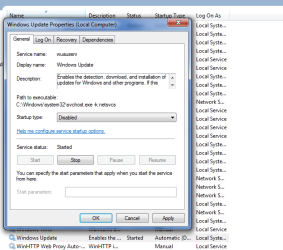
WIN | type SERVICES.MSC | ENTER |
scroll down the list and double-click on WINDOWS UPDATE |
change Startup type to Disabled |
APPLY | OK


WIN=key with wavy microsoft flag on top.

Disable Windows Update Service.PNG
 

My Computer My Computer

Computer Manufacturer/Model Number
Toshiba Satellite S875D-S7239 laptop
OS
MS Windows 7 Ultimate SP1 64-bit
CPU
AMD A10-4600M
Motherboard
AMD Pumori (Socket FT1)
Memory
6.00 GB Dual-Channel DDR3 @ 798MHz (11-11-12-28)
Graphics Card(s)
AMD Radeon HD 7660G
Sound Card
High Definition Audio Device
Monitor(s) Displays
Generic PnP Monitor (1600x900@60Hz)
Screen Resolution
1600x900@60Hz
Hard Drives
SSD 119GB Corsair CSSD-V128GB2 ATA Device
Keyboard
Standard PS/2 Keyboard
Mouse
HP Wireless Optical Mobile Mouse Model FHA-3410
Internet Speed
What the local pub, local coffee shop offers.
Other Info
Optical Drive:MATSHITA BD-CMB UJ160B ATA Device


Also have an Asus ha1002xp netbook with Win 7 Ultimate installed.
FWIW, IP address 8.254.26.254 doesn't appear to correlate to anything Microsoft.
 

My Computer My Computer

OS
Windows 7 Ultimate x64
That IP address goes to CNET. You probably have some other software or utility that is updating. Choose what you download and install from CNET very carefully. Microsoft has never used outside servers that I know of.

Update: It appears to be a proxy server and used by many "questionable" sites. A root kit and malware scan might be a good idea.
 

My Computer My Computer

Computer type
PC/Desktop
Computer Manufacturer/Model Number
Built 2/11/2011
OS
Windows 7 Pro-x64
CPU
i7-2600 3.4GHz - 3.8GHz Turbo
Motherboard
Intel DH67BL-B3
Memory
8Gb - 2x4GB, Muskin 991770 PC3-1333
Graphics Card(s)
Integrated Intel HD 2000
Sound Card
Integrated Intel 10.1 HD, RealTek ALC892
Monitor(s) Displays
Asus LCD VH222H, Haier HL24XSL2a
Screen Resolution
1920x1080, 1920x1080
Hard Drives
Crucial SSD C300-128Gb,
Western Digital WD5002AALX - 500Gb,
Western Digital WD7501AALS - 750Gb
PSU
Seasonic 650W 80+ Gold Modular
Case
Rosewill Defender
Cooling
Stock CPU, Four 120mm case fans, PCH fan added
Keyboard
Logitech EX100 Y-RBH94 Wireless
Mouse
Logitech EX100 M-RCE95 Wireless
Internet Speed
3.0/1.5 Mbs
Antivirus
Microsoft Security Essentials
Browser
Microsoft Internet Explorer 11
Other Info
Antec Veris Premier-Multimedia IR Station,
Cyber Accoustics-3602 Speakers,
AFT XM-5U Card Reader,
Hauppauge TV-HVR-2250,
Sony LX300 USB Turntable
FWIW, I've never heard of this service - svchosts.exe(svcnts) -
You have malware!
 

My Computer My Computer

Computer type
Laptop
Computer Manufacturer/Model Number
Asus K52F or Lenovo B51-80
OS
Win 7 x64 Home Premium (and x86 VirtualBox VM)/Win10
CPU
i3 370M/i7 6500U
Motherboard
Asus/Lenovo
Memory
8GB - finally :)/8GB
Graphics Card(s)
it's an i3, dude!/dual Intel&nVidia
Sound Card
onboard
Monitor(s) Displays
15.6" built-in
Screen Resolution
1366x768/1920x1080
Hard Drives
750GB Seagate internal
Sundry external drives attached to other computers on the local network
1TB SSD on the Lenovo
PSU
n/a
Internet Speed
as much as I can get - usually on a dongle/phone, so <1MB/s
Antivirus
MSE/Defender
Browser
IE11/12/Edge/Chrome/FF(if I must)
Back
Top